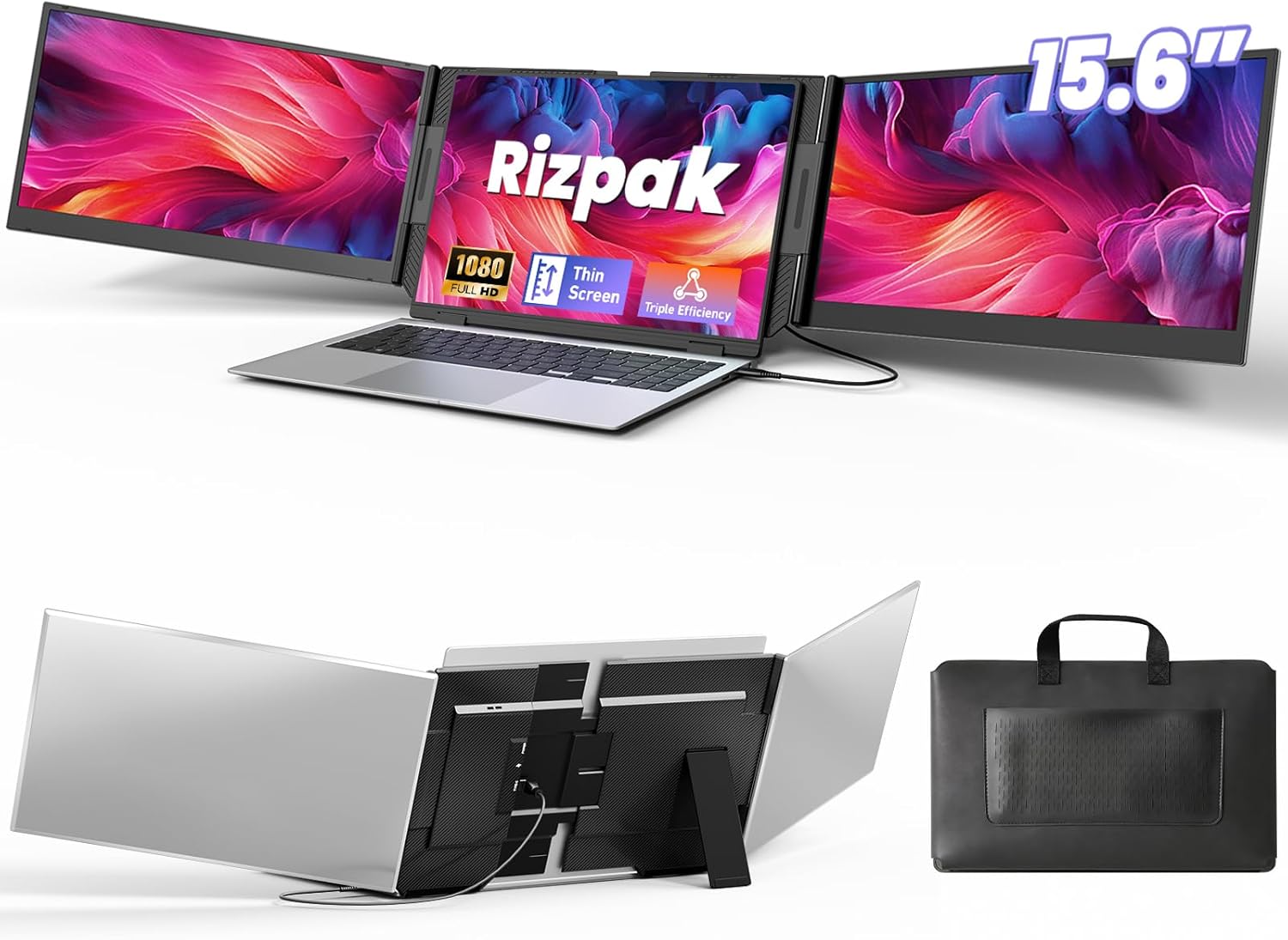
One Cable Laptop Screen Extender, 15.6” Ultra-Slim Triple Portable Monitor, 1080P FHD IPS Display, USB-C/USB-A Connection, Travel Monitor for 13–17.3" Laptops, MacOS/Windows/Android
Want the best price and purchase timing?
Our AI advisor analyzes real-time pricing across all channels to find you the best deal.
AI Verdict
This is a 15.6-inch 1080p IPS triple portable monitor with 300 lm brightness, designed for mobile professionals needing expanded screen real estate.
This triple portable monitor is a strong fit for anyone needing to significantly boost their mobile productivity with two extra 15.6-inch 1080p IPS displays. Its one-cable connectivity and broad OS compatibility make it genuinely convenient for on-the-go use.
If you need higher resolution or a larger screen size, look for portable monitors with 1440p or 4K resolution and 17-inch or larger panels.
Regret Score™
High RiskLower is better — measures purchase-regret risk from real buyer complaints, review credibility, and product maturity
Issues discovered after purchase
Critically weak dimension
Amazon rating vs actual quality
Chance this product isn't for you
Pros
- Expands laptop to a triple-display system using a single USB-C or USB-A cable, minimizing clutter.
- Features two 15.6-inch 1080P FHD IPS screens, providing 24% more screen area than 14-inch displays.
- Reproduces true-to-life colors with 100% sRGB color gamut and offers 178° wide viewing angles.
- Constructed with an aerospace-grade aluminum alloy body and reinforced metal stand, weighing 4 lbs (1.8 kg).
- Compatible with 13–17.3" laptops and supports Windows, macOS, Chrome OS, Android, and Linux systems.
- Includes a carrying bag and all necessary cables for immediate use and portability.
Cons
- Requires driver installation for first-time use, which can be an initial setup hurdle.
- Optimal brightness and stability may require connecting an external power adapter to the PD port.
- The glossy screen surface might cause reflections in brightly lit environments.
- Lacks specific refresh rate or response time specifications, suggesting it's not optimized for fast-paced content or gaming.
- Not designed for professional-grade color calibration work, despite 100% sRGB coverage.
Dimension Scores
The 1080P FHD IPS panels with 100% sRGB color gamut and 178° viewing angles provide clear visuals and accurate colors for general use.
No specific refresh rate or response time is listed, indicating standard performance not optimized for fast-motion content or gaming.
The one-cable USB-C/USB-A connection and broad compatibility with Windows, macOS, Android, and Linux offer excellent versatility.
Features an independent stand, 180° foldable screens for multiple modes, and an adjustable back panel for laptop sizes, but lacks height adjustment or swivel.
Best For
- Remote workers needing to expand their workspace for data analysis or programming.
- Business travelers who require a multi-monitor setup on the go.
- Students or professionals giving presentations or collaborating in meetings.
- Users who frequently multitask across multiple applications and need to reduce window switching.
Not Recommended For
- Competitive gamers requiring high refresh rates and low response times.
- Graphic designers or video editors needing factory-calibrated color accuracy for critical work.
- Users who prefer a completely plug-and-play experience without any driver installation.
Watch Out For
- You'll need to install a driver on your laptop for the first-time setup, which isn't a true 'plug and play' experience.
- For maximum brightness and stable operation, you might need to connect the included power adapter, adding another cable to manage.
- The 4 lbs (1.8 kg) weight, while lighter than some triple extenders, still adds noticeable bulk to your laptop bag.
- The glossy screen surface can be prone to reflections, making it challenging to use in direct sunlight or bright office lighting.
- There are no VESA mounting points, so you can't attach it to a monitor arm for more flexible desk setups.
Full Specifications
| ASIN | B0G7BKXRNV |
| Brand | Rizpak |
| Voltage | 20 Volts |
| Resolution | 1920 x 1080 Pixels |
| Item Weight | 4 pounds |
| Screen Size | 15.6 Inches |
| Aspect Ratio | 16:9 |
| Manufacturer | Rizpak |
| Image brightness | 300 lm |
| Item model number | P7 PRO |
| Product Dimensions | 15 x 9.3 x 0.85 inches |
| Screen Surface Description | Glossy |
| Standing screen display size | 15.6 Inches |
What Buyers Say
What really stands out is how many users are genuinely surprised by the productivity boost from having two extra 15.6-inch screens, especially with the single-cable setup. People are consistently saying it makes their mobile workstation feel complete, even if they have to deal with a driver install first. The aluminum build and included carrying case also get a lot of positive mentions for making it feel durable and easy to transport. The main recurring theme is that for anyone who needs more screen space on the go, this thing delivers on that promise.
“Dude, this thing actually works! I was skeptical about the 'one cable' but it really does clean up my travel setup, and having three screens for my spreadsheets is a game changer, even with the driver install.”
Common Praise
- The single USB-C/USB-A cable connection significantly reduces cable clutter and simplifies setup.
- The two 15.6-inch 1080P IPS displays provide a substantial increase in screen real estate for multitasking.
- The aluminum alloy body and reinforced stand feel sturdy and durable for travel.
- The 100% sRGB color gamut and wide viewing angles make visuals clear and colors accurate for everyday tasks.
- It fits a wide range of laptop sizes from 13 to 17.3 inches, making it adaptable to different machines.
- The included carrying bag is a practical addition for protecting the monitor during transport.
Common Complaints
- Initial setup requires installing a driver, which isn't as seamless as true plug-and-play.
- Some users find they need to use the external power adapter for consistent brightness, adding an extra power brick.
- The glossy screen can be reflective, especially when working near windows or bright lights.
- The 4 lbs (1.8 kg) weight, while portable, is still a noticeable addition to a laptop bag.
- It's not ideal for professional color-critical work, despite the 100% sRGB, as it lacks calibration features.
Ownership Tips
- The independent stand means your laptop's hinges aren't stressed, which is a huge relief if you've had issues with clip-on extenders.
- The 180° foldable screens are surprisingly useful for quick client presentations without having to rearrange your entire setup.
- You'll want to keep the driver installation USB drive handy, just in case you need to reinstall or use it on a new machine.
- The aluminum housing does a decent job of heat dissipation, so the screens don't get uncomfortably warm during long sessions.
- Finding the right angle for the stand and screens takes a bit of fiddling initially to get it perfectly stable on different surfaces.
Frequently Asked Questions
Does this monitor require a power outlet?
While it can draw power from your laptop via USB-C, the manufacturer recommends connecting the included power adapter to the PD port for optimal brightness and stability.
Is driver installation necessary?
Yes, driver installation is required for first-time use on your laptop to enable the triple display functionality.
What operating systems are compatible?
It supports a wide range of operating systems including Windows, macOS, Chrome OS, Android, and Linux.
Can I use this with a laptop smaller than 15.6 inches?
Yes, it's designed to be compatible with laptops ranging from 13 to 17.3 inches.
Does it come with a carrying case?
Yes, the package includes a carrying bag, along with all necessary cables and a power adapter.
Buying Guide
When you're looking at a portable triple monitor, you're basically buying a mobile workstation upgrade. You need to think about how much extra screen space you actually need and how much weight you're willing to carry. The 'one cable' connection is a big deal because it means less hassle with wires, but always check if it's truly one cable for both power and video, or if you might need an extra power brick for full performance. Also, consider your laptop's screen size to ensure a comfortable fit.
Screen Size (15.6 Inches)
This tells you how big your extra screens will be. 15.6 inches is a common laptop size, so these will likely match your main display well, giving you a consistent visual experience without feeling cramped.
Resolution (1920 x 1080 Pixels / 1080P FHD)
This is the sharpness of the image. 1080p is standard Full HD, meaning text and images will look clear enough for productivity tasks, similar to most modern laptop screens. Don't expect super-crisp 4K, but it's perfectly functional.
Panel Type (IPS)
IPS panels are known for their wide viewing angles and accurate color reproduction. This means the image won't look washed out or distorted if you're not looking at it straight on, which is crucial when you have multiple screens at different angles.
Brightness (300 lm)
Measured in 'lumens' (or nits), this tells you how bright the screen gets. 300 lm is a decent brightness level for indoor use, making it visible in most office or home environments, but it might struggle a bit in direct sunlight.
Alternatives
If this doesn't fit, look for portable monitors with higher resolutions like 1440p or 4K for more detailed work, or models with integrated batteries if you want to avoid external power adapters entirely.
You Might Also Like

KTC H27S5C 27" Curved Gaming Monitor, 1440P QHD 144Hz 120Hz Monitor, 1500R HVA Panel, HDR400, Adaptive Sync, 400nits, HDMI 2.0 x2, DP 1.4, VESA 100x100 PC Monitor
$150-$299This is a 27-inch 1440p 144Hz curved HVA panel with 400 nits brightness and HDR400, designed for gamers and creative users needing color accuracy.

ASUS ROG Strix 32” 4K OLED Gaming Monitor (XG32UCWMG) - TrueBlack Glossy, Dual Mode(4K@240Hz, FHD@480Hz), 0.03ms, G-SYNC Compatible, Neo Proximity Sensor, USB-C, HDMI 2.1, 3 yr Warranty
$600+This 32-inch 4K 240Hz WOLED monitor with 0.03ms response and dual-mode FHD 480Hz is for serious gamers and content creators prioritizing visual fidelity and speed.

CRUA 32" White Curved Monitor, 4K UHD(3840*2160P) 1500R VA Screen, 75Hz Computer Monitor Supports AMD Freesync, 120% sRGB, Built-in speakers, Blue Light Filter,Wall Mountable Installs(HDMI 2.0/DP 1.4)
$150-$299This is a 32-inch 4K (3840x2160) 1500R VA curved monitor with a 75Hz refresh rate and 260 cd/m² brightness, best for casual media consumption and productivity.

CRUA 34 Inch Curved Gaming Monitor, 21:9 WQHD 3440x1440 165Hz/144Hz 1500R Ultrawide Computer Monitor Support Freesync, PIP/PBP, 120% sRGB, HDMI 2.0 & DP 1.4, Wall Mountable/Tilt Adjustable-Black
$150-$299A 34-inch 1500R curved 3440x1440 VA panel with 165Hz refresh, 300 cd/m² brightness, and a tilt-only stand.