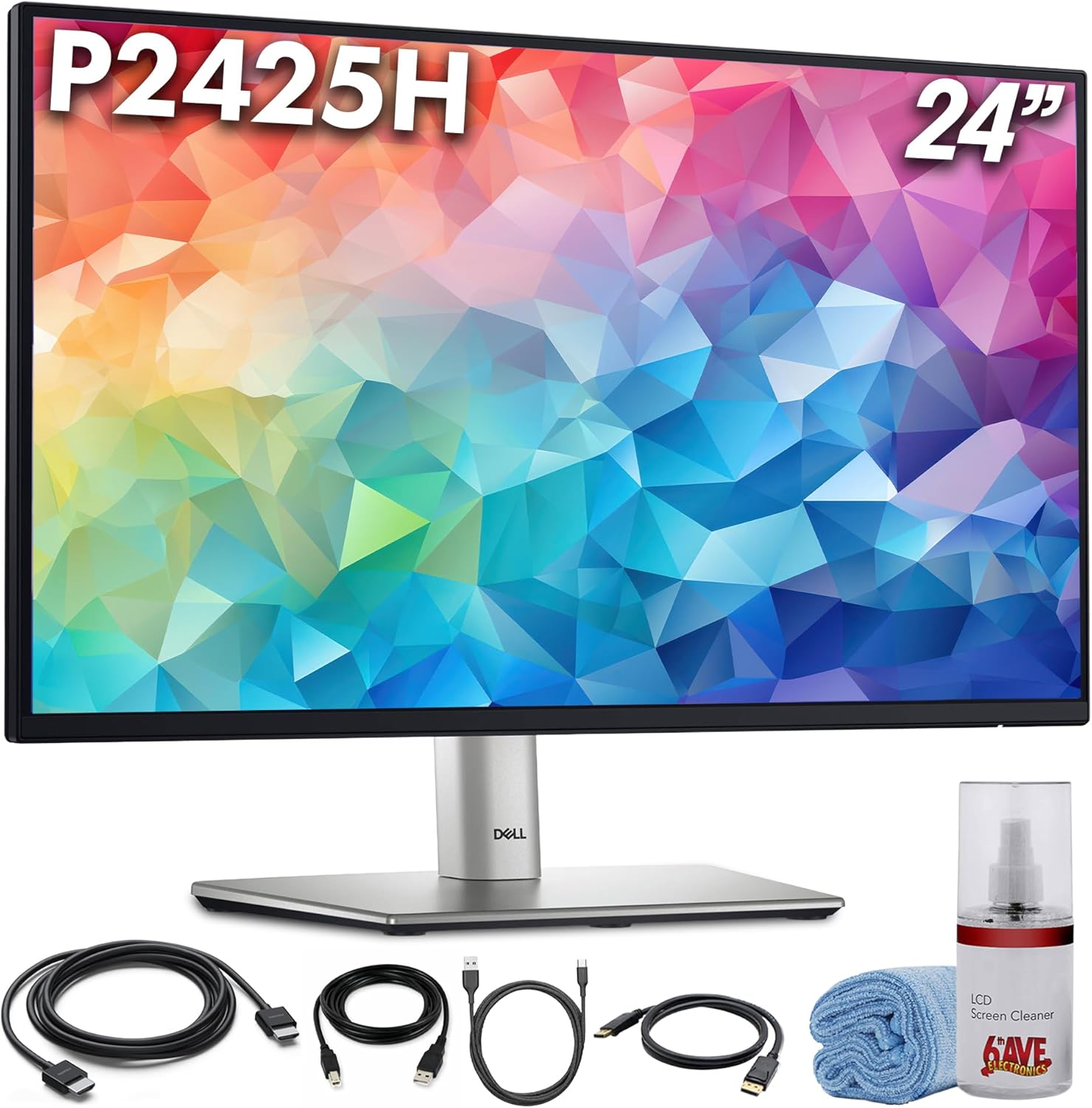
Dell P2425H 24″ 100Hz FHD Monitor (1920×1080) | Comfortview Plus, Anti-Glare LED Panel, Height-Adjustable IPS Display with HDMI & DisplayPort + USB-C Cable + Cleaning Kit
Want the best price and purchase timing?
Our AI advisor analyzes real-time pricing across all channels to find you the best deal.
AI Verdict
This 24-inch 100Hz 1080p IPS monitor with 250 cd/m² brightness and full ergonomic stand is for productivity users valuing smooth motion and adjustability over peak brightness or laptop charging.
This monitor is a situational fit for productivity users who prioritize a smoother 100Hz experience and comprehensive ergonomic adjustments. Its 250 cd/m² brightness and 15W USB-C power delivery mean it's not suitable for bright environments or single-cable laptop setups.
If you need to work in brighter conditions or want to charge your laptop via USB-C, look for monitors with at least 300+ nits brightness and 65W+ USB-C Power Delivery.
Regret Score™
High RiskLower is better — measures purchase-regret risk from real buyer complaints, review credibility, and product maturity
Issues discovered after purchase
Critically weak dimension
Amazon rating vs actual quality
Chance this product isn't for you
Pros
- The 100Hz refresh rate provides noticeably smoother scrolling and general desktop navigation compared to 60Hz monitors.
- The IPS panel offers 99% sRGB color coverage, delivering accurate colors for general office tasks.
- The stand allows for height, tilt, swivel, and pivot adjustments, enabling a comfortable viewing position.
- Includes a USB hub with three USB 3.2 Gen1 Type-A downstream ports and one USB 3.2 Gen1 Type-C downstream port for connecting peripherals.
- ComfortView Plus technology and a built-in blue light filter reduce eye strain during prolonged use.
- The matte anti-glare screen effectively minimizes reflections in most environments.
Cons
- The 250 cd/m² brightness is insufficient for brightly lit rooms or environments with direct sunlight, making the screen appear dim.
- The 1500:1 contrast ratio can result in blacks appearing gray and a somewhat cloudy image in dark scenes.
- The USB-C port provides only 15W of power delivery, which is for data and small peripherals, not for charging most laptops.
- Colors may appear oversaturated out of the box, requiring calibration for optimal accuracy.
- Lacks HDR support, limiting its suitability for HDR content creation or viewing.
Dimension Scores
The IPS panel with 99% sRGB coverage is good for general use, but the 250 cd/m² brightness and 1500:1 contrast ratio are average, and it requires calibration for accuracy.
A 100Hz refresh rate is above average for a productivity monitor, providing smoother visuals than standard 60Hz, with a 5ms GtG response time.
It offers a comprehensive selection including HDMI, DisplayPort, VGA, a USB hub, and USB-C (data only), but the 15W USB-C power delivery is low.
The stand provides full height, tilt, swivel, and pivot adjustments, plus VESA compatibility, offering extensive ergonomic flexibility.
Best For
- Multi-monitor setups, especially with its thin bezels and full adjustability for alignment.
- Office tasks, data entry, and general productivity where smooth scrolling is valued.
- Coding or document review, utilizing the pivot function for portrait orientation.
- Users needing extensive ergonomic adjustments to prevent neck and eye strain.
Not Recommended For
- Graphic design or photo editing requiring precise color accuracy without calibration or deep black levels.
- Bright offices with direct sunlight, where the 250 cd/m² brightness will struggle.
- Users expecting a single USB-C cable solution for laptop display and charging, due to the low 15W power delivery.
- Competitive gaming, given its 5ms GtG response time and lack of HDR.
Watch Out For
- The 250 cd/m² brightness means the screen will look dim if you're in a room with a lot of direct sunlight.
- The USB-C port only delivers 15W of power, which is enough for data and charging a phone, but not for powering most laptops.
- Out-of-the-box colors can be oversaturated, so you'll need to calibrate it if you require accurate color representation.
- The 1500:1 contrast ratio makes blacks appear gray and the screen look somewhat cloudy when displaying dark images.
Full Specifications
| ASIN | B0G3YBPD9F |
| Brand | Dell |
| Resolution | 1920 x 1080 |
| Item Weight | 15 pounds |
| Screen Size | 24 Inches |
| Aspect Ratio | 16:9 |
| Manufacturer | Dell |
| Image brightness | 250 candela_per_square_meter |
| Item model number | P2425H_EDIIT_2V |
| Product Dimensions | 21 x 16 x 7.1 inches |
| Screen Surface Description | Matte |
| Standing screen display size | 24 Inches |
What Buyers Say
Users consistently highlight the 100Hz refresh rate as a noticeable upgrade for daily tasks, making scrolling and general navigation feel much smoother. The fully adjustable stand receives frequent praise for enabling comfortable, personalized viewing angles. However, the 250-nit brightness is a recurring concern, with many finding it too dim in well-lit environments, and the limited 15W USB-C power delivery often disappoints those expecting to charge their laptops.
“I mean, it's fine for my spreadsheets and emails, but I wish it was brighter in my sunny office and the USB-C doesn't even charge my work laptop, so I still need another cable. But hey, 100Hz is kinda nice for scrolling.”
Common Praise
- The 100Hz refresh rate makes everyday computer use, like scrolling documents and web pages, feel significantly smoother.
- The stand's full range of adjustments, including height, tilt, swivel, and pivot, allows for finding a comfortable viewing position.
- The matte anti-glare screen surface effectively reduces reflections and eye strain during long work sessions.
- The 99% sRGB color coverage provides accurate and clear visuals for general office and content viewing.
- The thin bezels are appreciated for creating a more immersive experience and facilitating multi-monitor setups.
Common Complaints
- The 250 cd/m² brightness is often reported as too low for rooms with ample natural light or direct sunlight.
- The 15W USB-C power delivery is insufficient for charging most modern laptops, requiring a separate power adapter.
- The 1500:1 contrast ratio can lead to blacks appearing gray and a lack of depth in darker images.
- Some users note that the colors are oversaturated out of the box and require manual calibration for true accuracy.
Ownership Tips
- The 100Hz refresh rate, while not for gaming, provides a surprising and welcome improvement in the fluidity of daily tasks compared to standard 60Hz monitors.
- The full ergonomic stand proves invaluable over time, allowing users to easily adjust the screen to reduce neck and back strain during long workdays.
- The 15W USB-C port is frequently a point of confusion; many discover it only handles data and minimal power, not full laptop charging, after purchase.
- Despite the anti-glare coating, the monitor's 250 cd/m² brightness can still be a significant limitation in bright rooms, forcing users to adjust lighting or monitor position.
Frequently Asked Questions
Does the Dell P2425H have built-in speakers?
No, the Dell P2425H does not have built-in speakers. An optional soundbar can be purchased separately.
Can I charge my laptop using the USB-C port on this monitor?
No, the USB-C port on the Dell P2425H provides up to 15W of power delivery, which is sufficient for data transfer and charging small peripherals, but not for powering most laptops.
Is this monitor suitable for gaming?
With a 100Hz refresh rate and 5ms GtG response time, it offers a smoother experience than 60Hz monitors for casual gaming, but it is not designed for competitive gaming or HDR content.
Can I mount this monitor on a monitor arm?
Yes, the Dell P2425H features 100mm x 100mm VESA mounting holes, allowing you to easily attach it to a compatible monitor arm or wall mount.
What cables are included with the monitor?
The monitor typically includes a USB-C cable, DisplayPort cable, USB-A 3.2 Gen 1 to USB-B cable, HDMI cable, and a power cord, along with a cleaning kit.
Buying Guide
When looking at a monitor like this, you need to think about how bright your workspace is, what you'll plug into it, and if you care about super smooth motion. Don't just look at the screen size; consider the brightness for your room and the power output of any USB-C ports if you want to simplify your cables.
Refresh Rate (100Hz)
This is how many times per second the screen updates its image. A 100Hz refresh rate means the picture updates 100 times per second, making on-screen motion, like scrolling through documents or moving your mouse, appear much smoother than a typical 60Hz monitor.
Brightness (250 cd/m²)
Measured in candelas per square meter (cd/m² or nits), this tells you how bright the screen can get. 250 nits is okay for a dimly lit room, but in a bright office or near a window, the screen might look washed out and hard to see.
USB-C Power Delivery (15W)
This indicates how much power the USB-C port can supply to a connected device. 15W is enough for data transfer and charging small devices like a phone, but it's not enough to power or charge most laptops, which usually require 65W or more.
Alternatives
If this monitor doesn't fit your needs, look for alternatives with higher brightness (e.g., 300+ nits), more robust USB-C Power Delivery (e.g., 65W or 90W), or a higher contrast ratio for deeper blacks (e.g., a VA panel).
You Might Also Like

KTC H27S5C 27" Curved Gaming Monitor, 1440P QHD 144Hz 120Hz Monitor, 1500R HVA Panel, HDR400, Adaptive Sync, 400nits, HDMI 2.0 x2, DP 1.4, VESA 100x100 PC Monitor
$150-$299This is a 27-inch 1440p 144Hz curved HVA panel with 400 nits brightness and HDR400, designed for gamers and creative users needing color accuracy.

ASUS ROG Strix 32” 4K OLED Gaming Monitor (XG32UCWMG) - TrueBlack Glossy, Dual Mode(4K@240Hz, FHD@480Hz), 0.03ms, G-SYNC Compatible, Neo Proximity Sensor, USB-C, HDMI 2.1, 3 yr Warranty
$600+This 32-inch 4K 240Hz WOLED monitor with 0.03ms response and dual-mode FHD 480Hz is for serious gamers and content creators prioritizing visual fidelity and speed.

CRUA 32" White Curved Monitor, 4K UHD(3840*2160P) 1500R VA Screen, 75Hz Computer Monitor Supports AMD Freesync, 120% sRGB, Built-in speakers, Blue Light Filter,Wall Mountable Installs(HDMI 2.0/DP 1.4)
$150-$299This is a 32-inch 4K (3840x2160) 1500R VA curved monitor with a 75Hz refresh rate and 260 cd/m² brightness, best for casual media consumption and productivity.

CRUA 34 Inch Curved Gaming Monitor, 21:9 WQHD 3440x1440 165Hz/144Hz 1500R Ultrawide Computer Monitor Support Freesync, PIP/PBP, 120% sRGB, HDMI 2.0 & DP 1.4, Wall Mountable/Tilt Adjustable-Black
$150-$299A 34-inch 1500R curved 3440x1440 VA panel with 165Hz refresh, 300 cd/m² brightness, and a tilt-only stand.