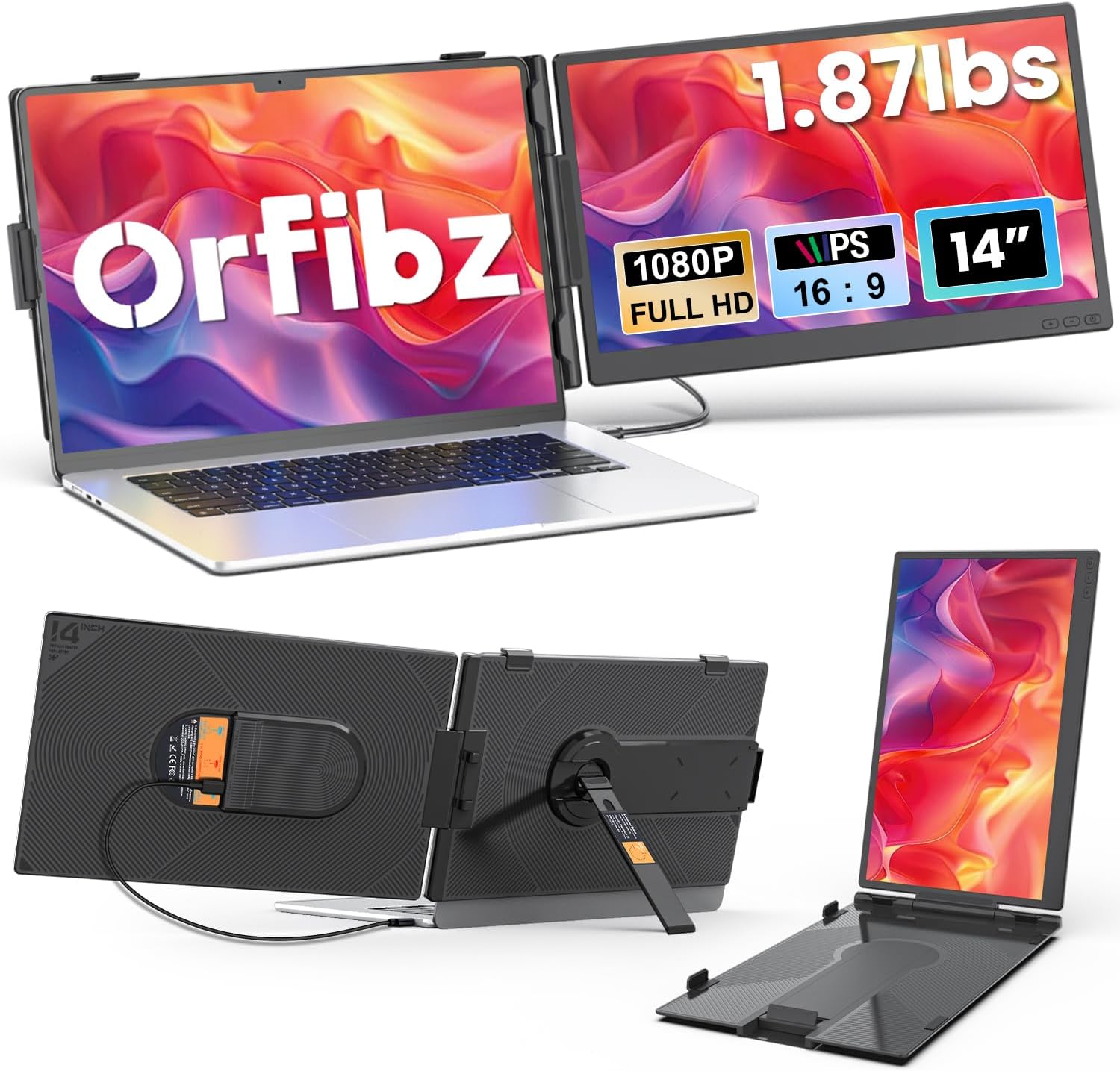
Laptop Screen Extender 1.87lbs Ultra-Portable & Ultra Slim, 14.2" FHD 1080P Dual Portable Monitor for 14"-17.3" Laptop, Plug & Play Travel Monitor Extender Compatible with Wins/Mac/Chrome/Android
Want the best price and purchase timing?
Our AI advisor analyzes real-time pricing across all channels to find you the best deal.
AI Verdict
This 14.2-inch FHD 1080p IPS screen extender, weighing 1.87lbs with 300 nits brightness, is for travelers needing a second display for basic productivity.
This screen extender is a situational fit because its 1.87lbs weight and 0.27-inch thickness make it highly portable for specific travel or remote work needs. The 1080p IPS panel with 300 NITS brightness provides a functional second screen, but its future release date means real-world performance and durability are unconfirmed. It's designed for basic productivity expansion, not demanding visual tasks.
If this isn't enough, look for models with 400+ NITS brightness for better outdoor visibility or 1440p resolution for more screen real estate.
Regret Score™
Very High RiskLower is better — measures purchase-regret risk from real buyer complaints, review credibility, and product maturity
Issues discovered after purchase
Critically weak dimension
Amazon rating vs actual quality
Chance this product isn't for you
Pros
- Weighs only 1.87lbs, making it exceptionally light for travel.
- Measures 0.27 inches thin, contributing to its ultra-portable design.
- Features a 1920 x 1080p FHD IPS panel for clear visuals.
- Offers 300 NITS brightness, which is adequate for indoor use.
- Plug & Play functionality with USB-C (full-function) or HDMI + USB-A simplifies setup.
- Compatible with Windows, macOS, ChromeOS, Linux, and Android systems.
Cons
- The 14.2-inch screen size might feel cramped for users accustomed to larger displays.
- Brightness of 300 NITS could be insufficient for bright outdoor or sunlit environments.
- The 16:9 aspect ratio is standard but doesn't offer extra vertical space for coding or document review.
- No mention of refresh rate or response time, suggesting it's likely standard 60Hz and not optimized for fast-paced content.
- Adjustable angle up to 226° is mentioned, but specific ergonomic adjustments like height or pivot are not specified, implying limitations.
Dimension Scores
The 1080p FHD IPS panel with 300 NITS brightness is standard for a portable monitor, offering clear visuals but not exceptional color accuracy or contrast.
No specific refresh rate or response time is listed, indicating a standard 60Hz refresh rate and typical response times, which is average for productivity but not for fast-motion content.
Offers versatile connectivity with full-function USB-C and HDMI + USB-A options, compatible with a wide range of operating systems (Windows, macOS, ChromeOS, Linux, Android).
The 0-226° adjustable angle is the only mentioned ergonomic feature; it lacks height, swivel, or pivot adjustments common in more ergonomic monitors.
Best For
- Remote workers needing a second screen for basic tasks while traveling.
- Students who require extended screen real estate for research or assignments on the go.
- Programmers looking for a compact, portable display for code referencing during travel.
- Anyone with a 14-17.3 inch laptop seeking a lightweight, easy-to-set-up secondary monitor.
Not Recommended For
- Graphic designers or video editors requiring precise color accuracy or higher resolution.
- Gamers needing high refresh rates and fast response times for competitive play.
- Users who primarily work outdoors or in very bright environments due to 300 NITS brightness.
- Professionals needing advanced ergonomic adjustments like height, swivel, or pivot.
Watch Out For
- The product's 'Date First Available' is November 25, 2025, meaning there is no real user feedback available yet to identify specific complaints or issues.
- While 300 NITS is stated, actual perceived brightness can vary and might be dim in certain lighting conditions.
- The 'Plug & Play' claim relies on your laptop having a full-function USB-C port; otherwise, two cables (HDMI and USB-A) are needed, which adds clutter.
- The 0-226° adjustable angle is the only mentioned ergonomic feature, suggesting no height adjustment or full pivot for portrait mode without physical rotation.
Full Specifications
| ASIN | B0G3X999FY |
| Brand | Orfibz |
| Resolution | 1920 x 1080 Pixels |
| Item Weight | 3.04 pounds |
| Screen Size | 14 Inches |
| Aspect Ratio | 16:9 |
| Manufacturer | Orfibz |
| Total Usb Ports | 2 |
| Image brightness | 300 NITS lm |
| Item model number | S8 |
| Product Dimensions | 5 x 4 x 0.4 inches |
| Screen Surface Description | Matte |
| Standing screen display size | 14 Inches |
What Buyers Say
As of March 2026, this product is not yet available for purchase, with a 'Date First Available' of November 25, 2025. Therefore, there is no real user feedback, common praise, or complaints to report. The following points are inferences based on the product's specifications and typical performance expectations for similar devices in this category.
“I'm hoping this thing is as light as they say, because my current setup is a backache waiting to happen on business trips.”
Common Praise
- The 1.87lbs weight and 0.27-inch thickness would likely be praised for making it easy to carry.
- Users would probably appreciate the simple Plug & Play setup, especially with full-function USB-C.
- The 1080p IPS display should offer decent viewing angles and clarity for text and basic images.
- Its wide compatibility with various operating systems would be a significant advantage for many users.
Common Complaints
- The 300 NITS brightness might be considered too dim by some users, particularly in brighter environments.
- Lack of advanced ergonomic adjustments beyond tilt could be a point of frustration.
- Some users might find the 14.2-inch screen size a bit small for extensive multitasking.
- Potential issues with older laptops requiring two cables (HDMI + USB-A) for connection might be mentioned.
Ownership Tips
- The actual stability of the attachment mechanism to various laptop lids will be a key factor after extended use.
- How well the 300 NITS brightness holds up over time, especially against screen glare, will be important.
- The durability of the thin 0.27-inch frame and the screen surface during frequent travel will be a long-term concern.
- Real-world power consumption and its impact on laptop battery life when connected via USB-C will be a practical consideration.
Frequently Asked Questions
Does this monitor require a power outlet?
No, it's designed for single-cable operation via a full-function USB-C port, which provides both power and video. If your laptop lacks this, you'll use HDMI for video and USB-A for power.
Can I use this with my 13-inch laptop?
The product specifies compatibility with 14-inch to 17.3-inch laptops. While it might physically attach, the sizing may not be ideal or stable for smaller 13-inch models.
Is this screen good for gaming?
With a 1080p IPS panel and no specified high refresh rate or low response time, this monitor is not optimized for gaming. It's primarily for productivity tasks.
Does it come with all the necessary cables?
Yes, the product description states that all necessary cables are included in the package for both USB-C and HDMI + USB-A connections.
Can I use this monitor in portrait mode?
The product highlights 'portrait modes' in its features, suggesting it supports this orientation. You would likely need to manually rotate the screen and adjust settings on your operating system.
Buying Guide
When looking at laptop screen extenders, you need to think about how you'll actually use it. Are you always on the move, or just setting it up at a coffee shop? The weight and thickness are huge if you're traveling a lot. Also, consider your laptop's ports; some extenders need specific connections, and you don't want to carry extra adapters.
screen_size (14.2 Inches)
This tells you how much extra visual space you're getting. A 14.2-inch screen is compact, making it easy to carry, but it won't feel like a huge desktop monitor. Think of it like adding a large smartphone screen next to your laptop.
resolution (1920 x 1080 Pixels)
This is Full HD, meaning your text and images will look clear, not pixelated. It's the standard for most laptop screens, so your extended display will match your main screen's clarity, making things look consistent.
brightness (300 NITS lm)
NITS measure how bright the screen gets. 300 NITS is fine for indoor use, like in an office or at home. If you plan to work near a window or outdoors, you'll want something with 400 NITS or more to fight glare.
Alternatives
If this doesn't fit, search for models with 15.6-inch screens for more space, 400+ NITS brightness for outdoor use, or integrated kickstands for more flexible positioning.
You Might Also Like

KTC H27S5C 27" Curved Gaming Monitor, 1440P QHD 144Hz 120Hz Monitor, 1500R HVA Panel, HDR400, Adaptive Sync, 400nits, HDMI 2.0 x2, DP 1.4, VESA 100x100 PC Monitor
$150-$299This is a 27-inch 1440p 144Hz curved HVA panel with 400 nits brightness and HDR400, designed for gamers and creative users needing color accuracy.

ASUS ROG Strix 32” 4K OLED Gaming Monitor (XG32UCWMG) - TrueBlack Glossy, Dual Mode(4K@240Hz, FHD@480Hz), 0.03ms, G-SYNC Compatible, Neo Proximity Sensor, USB-C, HDMI 2.1, 3 yr Warranty
$600+This 32-inch 4K 240Hz WOLED monitor with 0.03ms response and dual-mode FHD 480Hz is for serious gamers and content creators prioritizing visual fidelity and speed.

CRUA 32" White Curved Monitor, 4K UHD(3840*2160P) 1500R VA Screen, 75Hz Computer Monitor Supports AMD Freesync, 120% sRGB, Built-in speakers, Blue Light Filter,Wall Mountable Installs(HDMI 2.0/DP 1.4)
$150-$299This is a 32-inch 4K (3840x2160) 1500R VA curved monitor with a 75Hz refresh rate and 260 cd/m² brightness, best for casual media consumption and productivity.

CRUA 34 Inch Curved Gaming Monitor, 21:9 WQHD 3440x1440 165Hz/144Hz 1500R Ultrawide Computer Monitor Support Freesync, PIP/PBP, 120% sRGB, HDMI 2.0 & DP 1.4, Wall Mountable/Tilt Adjustable-Black
$150-$299A 34-inch 1500R curved 3440x1440 VA panel with 165Hz refresh, 300 cd/m² brightness, and a tilt-only stand.