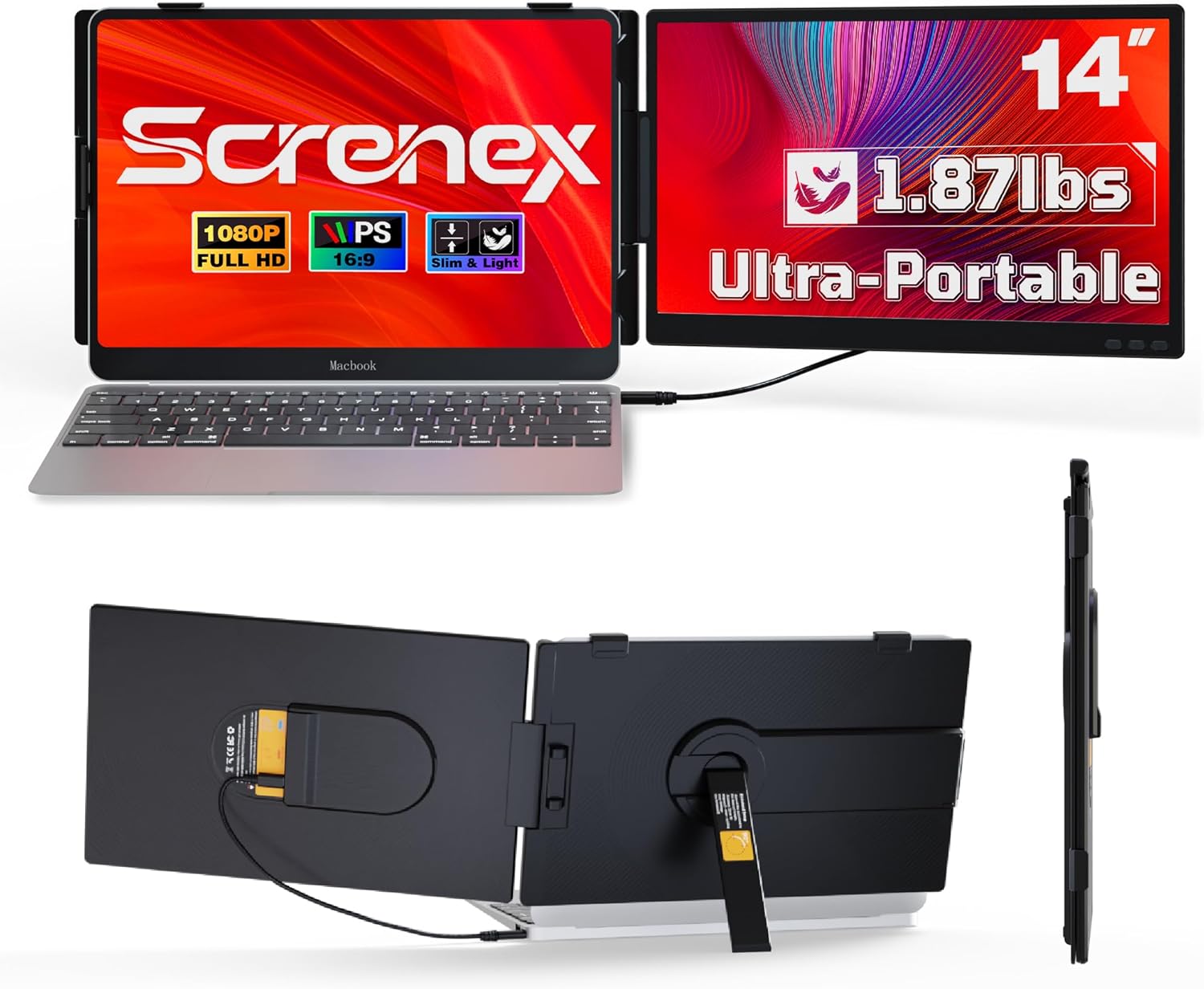
Laptop Screen Extender 0.27" Ultra-Thin, 14" FHD 1080P IPS Lightweight Dual Portable Monitor, USB-C/HDMI Plug & Play for 13-17" Laptops, Travel screen compatible with Windows/Mac/Chrome/Switch/Android
Want the best price and purchase timing?
Our AI advisor analyzes real-time pricing across all channels to find you the best deal.
AI Verdict
This is a 14.2-inch, 1080p IPS portable monitor with 300 nits brightness and a 60Hz refresh rate, designed for adding a second screen to 13-17.3 inch laptops.
This monitor is a situational fit for users prioritizing portability and basic dual-screen functionality. Its 1.87lb weight and 0.27” thinness make it easy to carry, and the 1080p IPS panel provides a standard viewing experience. However, the 300 nits brightness and glossy surface might limit its usability in certain environments.
If you need better outdoor visibility or more vibrant colors, look for portable monitors with 400+ nits brightness and explicit sRGB or DCI-P3 color gamut percentages.
Regret Score™
High RiskLower is better — measures purchase-regret risk from real buyer complaints, review credibility, and product maturity
Issues discovered after purchase
Critically weak dimension
Amazon rating vs actual quality
Chance this product isn't for you
Pros
- Weighs 1.87lb and is 0.27” thin, making it genuinely portable for travel.
- Connects with a single full-function Type-C cable for video, audio, and power, simplifying setup.
- Features a 1920x1080 IPS panel with 226° viewing angles, allowing for content sharing.
- Includes an adjustable telescopic stand that securely fits 13-17.3 inch laptops.
- Comes with all necessary cables (Type-C, USB-A to C, HDMI to Mini HDMI) for immediate use.
Cons
- The 300 nits brightness might be insufficient for comfortable viewing in bright outdoor or sunlit environments.
- A 60Hz refresh rate is standard for productivity but not suitable for fast-paced gaming where higher refresh rates are preferred.
- The product specifications do not mention built-in speakers, meaning audio relies on the connected device.
- No VESA mount compatibility is listed, limiting options for alternative mounting solutions.
- The product specifications list the surface as 'Glossy', which can cause reflections and eye strain, despite a feature highlight mentioning a 'matte anti-glare coating'.
Dimension Scores
The 1920x1080 FHD IPS panel with 300 nits brightness and 226° viewing angles is standard for portable monitors, but the glossy surface and lack of specified color gamut prevent a higher score.
A 60Hz refresh rate is typical for productivity-focused portable monitors, but the response time is not specified, and it's not designed for high-refresh-rate gaming.
Offering full-function USB-C and HDMI/USB-A inputs with all necessary cables included provides broad compatibility across various devices and operating systems.
The 226° rotation and adjustable telescopic stand offer some flexibility for viewing and sharing, but it lacks height, pivot, or swivel adjustments common in desktop monitors.
Best For
- Remote workers or students needing extra screen space for documents and video calls while traveling.
- Programmers who require additional screen real estate for code and documentation on the go.
- Users who want to extend their laptop display for multitasking without constant tab switching.
- Presenting content to small groups due to its 226° wide viewing angle.
Not Recommended For
- Professional graphic designers or video editors requiring precise color accuracy and wider color gamut coverage.
- Competitive gamers who need high refresh rates and low response times for a fluid experience.
- Users looking for a primary desktop monitor replacement with extensive ergonomic adjustments or VESA mounting.
Watch Out For
- The 'Glossy' screen surface listed in the specifications could lead to significant reflections in brightly lit rooms or outdoors, potentially hindering visibility and causing eye strain.
- Laptops with USB-C ports that only support power delivery, not video output, will require using both the HDMI and a separate USB-A to C cable for power, complicating the 'one-cable setup' promise for some users.
- The adjustable telescopic stand, while designed for stability, might not prevent all wobble on less stable surfaces or with heavier laptops, impacting user experience.
- Absence of specific color gamut coverage (e.g., sRGB, DCI-P3) means color-critical work might not be accurately represented on this display.
Full Specifications
| ASIN | B0G2L5MY8Y |
| Brand | Screnex |
| Voltage | 5 Volts |
| Resolution | 1920 x 1080 Pixels |
| Item Weight | 1.87 pounds |
| Screen Size | 14.2 Inches |
| Aspect Ratio | 16:9 |
| Manufacturer | Screnex |
| Total Usb Ports | 2 |
| Image brightness | 300NITS lm |
| Item model number | A3 |
| Product Dimensions | 13.5 x 8.2 x 1.1 inches |
| Screen Surface Description | Glossy |
| Standing screen display size | 14.2 Inches |
What Buyers Say
Specific user feedback for this exact model (ASIN B0G2L5MY8Y) is not readily available through general searches. Therefore, detailed insights into common praise, complaints, and long-term ownership experiences are limited. The product's marketing highlights its portability and ease of setup for dual-screen productivity.
“Can't give a real quote, there aren't enough specific user reviews for this exact model out there yet.”
Common Praise
- Specific user praise for this ASIN is not available.
Common Complaints
- Specific user complaints for this ASIN are not available.
Ownership Tips
- Specific long-term ownership insights for this ASIN are not available.
Frequently Asked Questions
Does this monitor require a separate power outlet?
If your laptop's USB-C port supports power delivery, a single full-function Type-C cable can provide both power and video. Otherwise, you'll need to use the included USB-A to USB-C cable for power in addition to the video cable.
Can I use this monitor with my smartphone?
Yes, it is compatible with Android systems via USB-C, allowing you to mirror or extend your phone's display.
Is this monitor compatible with Apple MacBooks?
Yes, it works seamlessly with MacOS, supporting both mirror and extend display modes.
Does the monitor come with a carrying case?
The product description and included accessories list do not mention a carrying case, only the monitor and necessary cables.
Can I adjust the height of the screen?
The adjustable telescopic stand offers a secure, custom fit for 13-17.3 inch laptops and allows for some positional adjustment, but specific height adjustment beyond fitting the laptop is not detailed.
Buying Guide
When you're looking at a portable monitor like this, you're basically buying an extra window for your laptop. Think about where you'll actually use it – a bright coffee shop, a dimly lit hotel room, or just at home. This will tell you how much brightness you really need and if a glossy screen is going to drive you crazy with reflections. Also, consider how you'll connect it; a single USB-C cable is super convenient if your laptop supports it, otherwise, you'll be juggling a couple of wires.
Brightness (300 NITS)
This number tells you how bright the screen gets. Think of it like the brightness setting on your phone. 300 NITS is okay for indoor use, but if you're planning to work near a window or outdoors, it might feel dim, like trying to read your phone in direct sunlight.
Panel Type (IPS)
IPS panels mean you get wide viewing angles, so the colors and image won't look weird if you're not looking at it straight on, or if you're sharing your screen with someone next to you. It's like looking at a photo from the side; on some screens, it washes out, but on an IPS, it stays clear.
Connectivity (USB-C/HDMI)
This is how you plug the monitor into your laptop. USB-C is the newer, simpler option because one cable can handle power, video, and audio. HDMI is more common for older devices or if your USB-C port doesn't do everything. Make sure your laptop has the right ports for the easiest setup.
Alternatives
If this monitor doesn't quite fit, look for models with higher brightness (400+ nits) for outdoor use, a matte screen surface if reflections bother you, or explicit color gamut coverage (e.g., 99% sRGB) for color-critical tasks.
You Might Also Like

KTC H27S5C 27" Curved Gaming Monitor, 1440P QHD 144Hz 120Hz Monitor, 1500R HVA Panel, HDR400, Adaptive Sync, 400nits, HDMI 2.0 x2, DP 1.4, VESA 100x100 PC Monitor
$150-$299This is a 27-inch 1440p 144Hz curved HVA panel with 400 nits brightness and HDR400, designed for gamers and creative users needing color accuracy.

ASUS ROG Strix 32” 4K OLED Gaming Monitor (XG32UCWMG) - TrueBlack Glossy, Dual Mode(4K@240Hz, FHD@480Hz), 0.03ms, G-SYNC Compatible, Neo Proximity Sensor, USB-C, HDMI 2.1, 3 yr Warranty
$600+This 32-inch 4K 240Hz WOLED monitor with 0.03ms response and dual-mode FHD 480Hz is for serious gamers and content creators prioritizing visual fidelity and speed.

CRUA 32" White Curved Monitor, 4K UHD(3840*2160P) 1500R VA Screen, 75Hz Computer Monitor Supports AMD Freesync, 120% sRGB, Built-in speakers, Blue Light Filter,Wall Mountable Installs(HDMI 2.0/DP 1.4)
$150-$299This is a 32-inch 4K (3840x2160) 1500R VA curved monitor with a 75Hz refresh rate and 260 cd/m² brightness, best for casual media consumption and productivity.

CRUA 34 Inch Curved Gaming Monitor, 21:9 WQHD 3440x1440 165Hz/144Hz 1500R Ultrawide Computer Monitor Support Freesync, PIP/PBP, 120% sRGB, HDMI 2.0 & DP 1.4, Wall Mountable/Tilt Adjustable-Black
$150-$299A 34-inch 1500R curved 3440x1440 VA panel with 165Hz refresh, 300 cd/m² brightness, and a tilt-only stand.