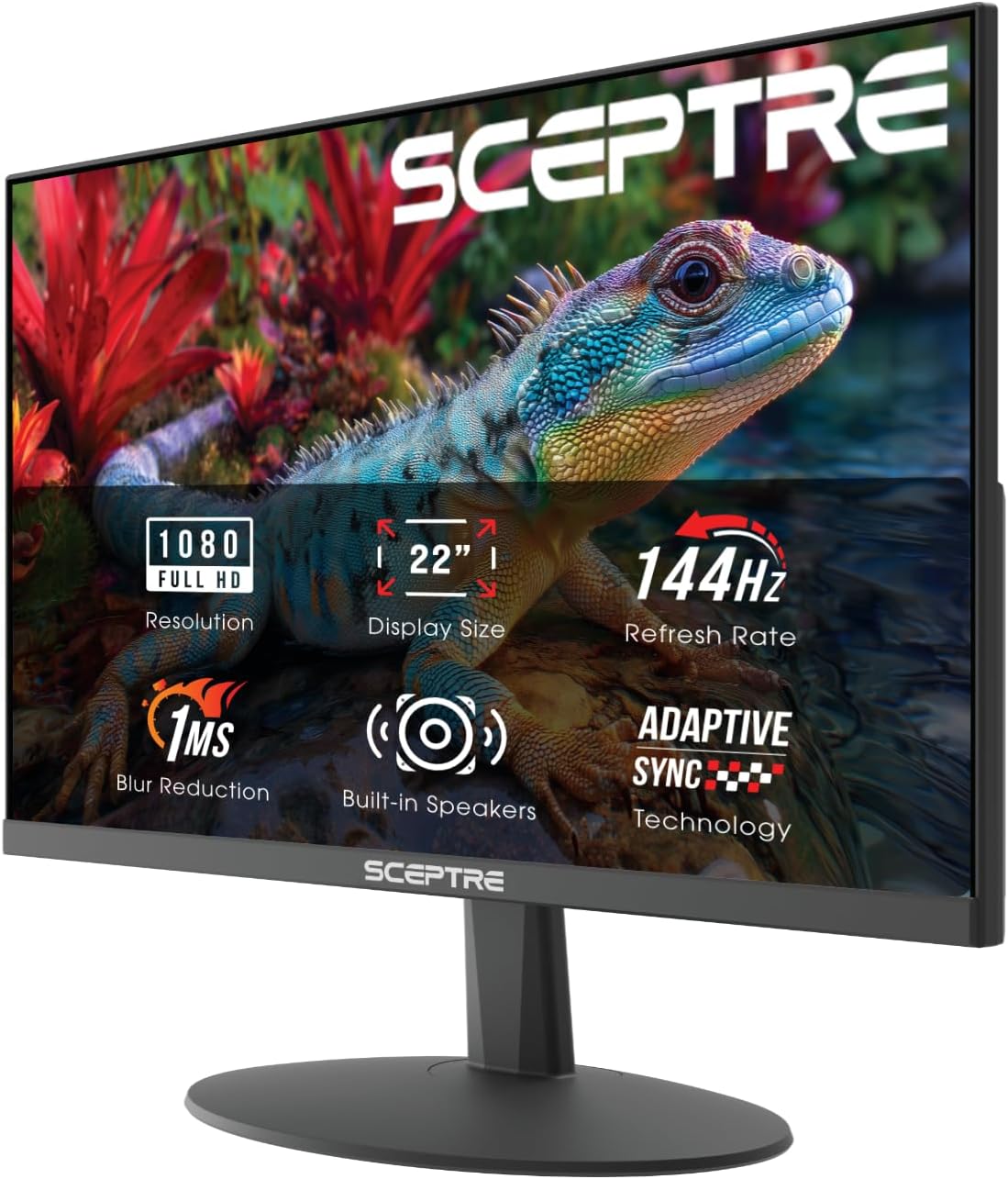
Sceptre New 22-Inch Gaming Monitor, FHD 1080p, Up to 144Hz, HDMI, DisplayPort, Built-in Speakers, Machine Black (E225W-FW144 Series, 2026)
Want the best price and purchase timing?
Our AI advisor analyzes real-time pricing across all channels to find you the best deal.
AI Verdict
A 22-inch 1080p VA panel with a 144Hz refresh rate and 1ms response time, suitable for budget-focused casual gaming setups.
This monitor is a strong contender if you're strictly limited by budget and desk space, prioritizing a 144Hz refresh rate and 1ms response time for 1080p gaming. Its 22-inch size and minimal bezels work well for compact setups or as a secondary display. However, the limited ergonomics and basic integrated speakers mean you'll need to manage expectations.
If ergonomics are a priority, look for monitors with VESA mounting and a separate monitor arm, or a stand offering height, swivel, and pivot adjustments.
Regret Score™
High RiskLower is better — measures purchase-regret risk from real buyer complaints, review credibility, and product maturity
Issues discovered after purchase
Critically weak dimension
Amazon rating vs actual quality
Chance this product isn't for you
Pros
- 144Hz refresh rate delivers smoother motion compared to 60Hz displays, reducing motion blur in games.
- 1ms BR response time helps minimize ghosting during fast-paced action.
- 105% sRGB color gamut provides a broader range of colors than standard sRGB displays.
- Blue-Light Shift technology reduces harmful blue light emissions to alleviate eye strain during extended use.
- Minimal bezel design allows for a nearly seamless dual-monitor setup.
- VESA mount compatibility offers flexibility for alternative mounting solutions.
Cons
- Stand only offers tilt adjustment, lacking height, swivel, or pivot capabilities.
- Built-in speakers are adequate for casual audio but do not replace dedicated sound systems.
- Only one HDMI port is specified, which may limit connectivity for multiple devices.
- Sceptre's customer service and quality control have been reported as inconsistent by some users.
Dimension Scores
The VA panel with 105% sRGB color gamut and 2000:1 contrast ratio offers decent color reproduction and contrast for its price point.
A 144Hz refresh rate and 1ms BR response time are above average for an entry-level monitor, providing a fluid gaming experience.
Includes both HDMI and DisplayPort for modern connectivity, but only one HDMI port is specified, which is average for a budget monitor.
The stand only offers tilt adjustment, lacking height, swivel, or pivot, which is below average for ergonomic flexibility.
Best For
- Budget-conscious gamers needing a compact 1080p display for competitive titles.
- Secondary monitor for multitasking alongside a primary display.
- Users seeking a 144Hz refresh rate on a limited desk space.
- Students or home office users who need a basic display with integrated audio.
Not Recommended For
- Professional graphic designers or video editors requiring precise color accuracy and wider color spaces.
- Users who need extensive ergonomic adjustments from their monitor stand.
- Console gamers expecting refresh rates higher than 60Hz, as current-gen consoles output 1080p at 60Hz on this monitor.
- Anyone prioritizing premium audio quality without external speakers.
Watch Out For
- Sceptre's customer service has been described as 'dog poo poo' by some users, with reports of unhelpful responses to issues.
- Quality control issues, such as dead pixels or backlight problems, have been reported with Sceptre monitors in the past.
- The stand only tilts, meaning you can't adjust the height, swivel the screen, or pivot it for portrait mode.
- While it has built-in speakers, their audio quality is generally considered basic and not comparable to external speakers.
Full Specifications
| ASIN | B0FT21HKZ6 |
| Brand | Sceptre |
| Color | Machine Black |
| Series | E225W-FW144G |
| Resolution | FHD 1080p |
| Item Weight | 7 pounds |
| Screen Size | 22 Inches |
| Aspect Ratio | 16:9 |
| Manufacturer | e-Sceptre |
| Item model number | E225W-FW144G |
| Screen Resolution | 1920x1080 |
| Product Dimensions | 7 x 19.9 x 15.5 inches |
| Max Screen Resolution | 1920 x 1080 Pixels |
| Item Dimensions LxWxH | 7 x 19.9 x 15.5 inches |
| Screen Surface Description | Matte |
| Standing screen display size | 22 Inches |
What Buyers Say
Many users highlight the monitor's 144Hz refresh rate and 1ms response time as key benefits for smooth gaming, especially considering its price. The compact 22-inch size and minimal bezels are frequently mentioned as ideal for smaller desks or multi-monitor setups. However, some feedback points to potential inconsistencies in Sceptre's quality control and less-than-stellar customer service experiences. The built-in speakers are generally seen as a convenient addition for basic audio, though not a replacement for dedicated sound.
“Look, for under a hundred bucks, this 144Hz monitor is actually pretty sick for gaming, but don't expect a fancy stand or amazing sound from those built-in speakers, they're just 'there'.”
Common Praise
- 144Hz refresh rate makes games feel significantly smoother than 60Hz monitors.
- 1ms response time effectively reduces motion blur during fast gameplay.
- Compact 22-inch screen fits well on smaller desks.
- Minimal bezels create a clean look and work for dual monitor arrangements.
- Colors are surprisingly vibrant for a budget monitor, with 105% sRGB coverage.
- Setup is straightforward with HDMI and DisplayPort inputs.
Common Complaints
- Stand only tilts and lacks height, swivel, or pivot adjustments.
- Built-in speakers are basic and not suitable for immersive audio.
- Reports of poor customer service experiences from Sceptre.
- Some users have encountered quality control issues like dead pixels or backlight problems.
Ownership Tips
- The 144Hz refresh rate is noticeable even in everyday desktop use, making scrolling and mouse movements feel more fluid.
- The minimal bezels really do make a difference if you're planning a two-monitor setup, reducing the gap between screens.
- You'll probably want to invest in separate speakers or a headset because the built-in audio is just okay for notifications or background noise.
- The lack of height adjustment on the stand means you might need to prop it up with books or a monitor riser for comfortable viewing.
Frequently Asked Questions
Does this monitor have built-in speakers?
Yes, the Sceptre E225W-FW144 Series monitor includes built-in speakers for integrated audio.
What is the refresh rate of this monitor?
The monitor features a refresh rate of up to 144Hz, providing smoother visuals for gaming and fast-motion content.
Is this monitor VESA mount compatible?
Yes, the Sceptre E225W-FW144 Series is VESA wall-mount compatible, allowing for alternative mounting options.
What kind of panel does this monitor use?
This monitor uses a VA (Vertical Alignment) panel, known for its contrast and viewing angles.
Can I connect my PlayStation 5 or Xbox Series X to this monitor?
Yes, you can connect current-generation consoles via HDMI, but they will typically output at 1080p 60Hz on this display.
Does this monitor have eye-care features?
Yes, it includes Blue-Light Shift technology designed to reduce blue light emissions and alleviate eye strain during long viewing sessions.
Buying Guide
When you're looking at a monitor like this, you need to think about what you actually *do* with your computer. If you're mostly gaming, especially fast-paced stuff, that 144Hz refresh rate is a big deal for how smooth things look. But if you're just browsing or doing schoolwork, you might not even notice it. Also, consider your desk space; 22 inches is small for some, but perfect for others.
Refresh Rate (144Hz)
This is how many times per second the screen updates its image. A 144Hz monitor updates 144 times per second, making motion appear much smoother than a standard 60Hz monitor, especially in games. Think of it like watching a high-frame-rate movie versus a standard one – everything just flows better.
Response Time (1ms)
This measures how quickly pixels can change color. A 1ms response time means pixels change almost instantly, which helps prevent 'ghosting' or 'smearing' behind moving objects in fast-action scenes. It's crucial for competitive gaming where every millisecond counts.
Panel Type (VA)
Different panel types have different strengths. VA panels like this one typically offer better contrast ratios and deeper blacks compared to IPS or TN panels, making movies and dark game scenes look richer. However, viewing angles might not be as wide as IPS, and response times can sometimes be slower than TN (though 1ms is fast for a VA).
Alternatives
If you need better color accuracy or wider viewing angles for creative work, look for monitors with an IPS panel. For more comfortable viewing over long periods, prioritize models with full ergonomic stands that allow height, swivel, and pivot adjustments.
You Might Also Like

KTC H27S5C 27" Curved Gaming Monitor, 1440P QHD 144Hz 120Hz Monitor, 1500R HVA Panel, HDR400, Adaptive Sync, 400nits, HDMI 2.0 x2, DP 1.4, VESA 100x100 PC Monitor
$150-$299This is a 27-inch 1440p 144Hz curved HVA panel with 400 nits brightness and HDR400, designed for gamers and creative users needing color accuracy.

ASUS ROG Strix 32” 4K OLED Gaming Monitor (XG32UCWMG) - TrueBlack Glossy, Dual Mode(4K@240Hz, FHD@480Hz), 0.03ms, G-SYNC Compatible, Neo Proximity Sensor, USB-C, HDMI 2.1, 3 yr Warranty
$600+This 32-inch 4K 240Hz WOLED monitor with 0.03ms response and dual-mode FHD 480Hz is for serious gamers and content creators prioritizing visual fidelity and speed.

CRUA 32" White Curved Monitor, 4K UHD(3840*2160P) 1500R VA Screen, 75Hz Computer Monitor Supports AMD Freesync, 120% sRGB, Built-in speakers, Blue Light Filter,Wall Mountable Installs(HDMI 2.0/DP 1.4)
$150-$299This is a 32-inch 4K (3840x2160) 1500R VA curved monitor with a 75Hz refresh rate and 260 cd/m² brightness, best for casual media consumption and productivity.

CRUA 34 Inch Curved Gaming Monitor, 21:9 WQHD 3440x1440 165Hz/144Hz 1500R Ultrawide Computer Monitor Support Freesync, PIP/PBP, 120% sRGB, HDMI 2.0 & DP 1.4, Wall Mountable/Tilt Adjustable-Black
$150-$299A 34-inch 1500R curved 3440x1440 VA panel with 165Hz refresh, 300 cd/m² brightness, and a tilt-only stand.