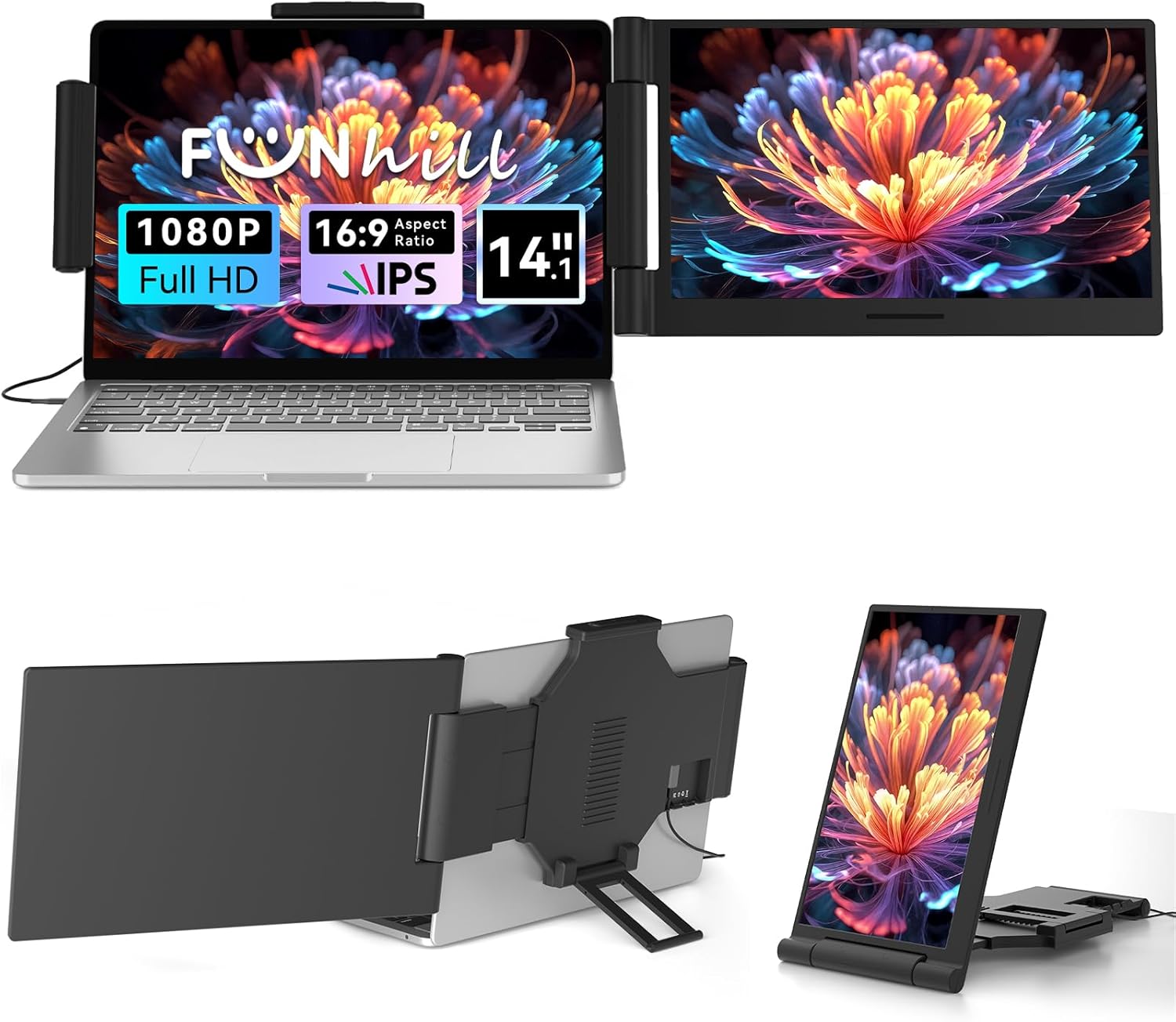
Laptop Screen Extender 14 inch Laptop Monitor Extender 1080P IPS, 280° Rotation Portable Monitor for Laptops 13-17.3" with USB-C DP/HDMI Port, Plug-Play Dual Screen for Windows/Mac/Chrome/Android
Want the best price and purchase timing?
Our AI advisor analyzes real-time pricing across all channels to find you the best deal.
AI Verdict
This is a 14-inch 1080P IPS portable monitor extender with 280° rotation, designed for adding a second screen to laptops from 13-17.3 inches.
This extender is a situational fit for users prioritizing screen real estate and portability over high-end display performance. Its 1080P IPS panel and 280° rotation are functional for productivity, but the reliance on external power for HDMI and potential review discrepancies mean it's not a universal recommendation.
If you need higher fidelity or gaming performance, look for portable monitors with higher refresh rates (e.g., 120Hz+), faster response times (e.g., 1ms), and confirmed color gamut coverage (e.g., 99% sRGB).
Regret Score™
High RiskLower is better — measures purchase-regret risk from real buyer complaints, review credibility, and product maturity
Issues discovered after purchase
Critically weak dimension
Amazon rating vs actual quality
Chance this product isn't for you
Pros
- Expands laptop display to dual screens, supporting extended, duplicate, and portrait modes for increased screen real estate.
- Features a 14-inch 1920x1080 IPS panel with a 16:9 aspect ratio and 60Hz refresh rate.
- Offers 0-280° rotation for flexible viewing angles.
- Connects via USB-C/A DP and HDMI, with all necessary cables included (Dual USB-C, USB-A to USB-C, HDMI to Mini-HDMI, DC Charger).
- Plug-and-play functionality without requiring driver downloads.
- Compatible with a wide range of devices and operating systems, including Windows, Mac, Chrome, Android, PS4, and Switch.
Cons
- Requires an additional USB-A/C cable for power when using the HDMI connection.
- Phones need to support video output to function with the extender.
- The product does not include a carrying bag for storage, despite being designed to fold compactly.
- The 60Hz refresh rate is standard for productivity but not suitable for high-refresh-rate gaming.
- Brightness adjustment is only via side buttons, lacking more advanced OSD controls.
Dimension Scores
The 14-inch 1080P IPS panel provides wide viewing angles and clear images, which is average for portable monitors in this price band.
A 60Hz refresh rate is standard for productivity and general use, but not optimized for fast-paced gaming or demanding visual tasks.
It offers USB-C DP/HDMI ports and includes all necessary cables, providing broad compatibility with various devices and operating systems.
The 0-280° rotation allows for significant adjustment of viewing angles, which is a key ergonomic feature for a screen extender.
Best For
- Professionals needing a second screen for spreadsheets or design tools while traveling.
- Students managing multiple applications for coursework on the go.
- Anyone wanting to reduce tab-switching fatigue by having simultaneous views.
- Users with laptops between 13 and 17.3 inches seeking a portable dual-screen setup.
Not Recommended For
- Gamers requiring refresh rates above 60Hz or response times faster than typical IPS panels.
- Users who need a monitor with integrated speakers, as this model does not list them in its specifications.
- Individuals seeking a primary desktop monitor replacement due to its portable design and limited stand functionality.
Watch Out For
- The 4.3/5 rating and 337 reviews for ASIN B0FNDB4TN6 may be misleading due to potential ASIN hijacking, where reviews for different products are aggregated.
- Power delivery can be tricky; using HDMI requires a separate USB-A/C cable for power, which means managing more cables.
- Some users of similar extenders report that the included cables might not always be of the highest quality or sufficient length for all setups.
- The physical attachment mechanism might not fit every laptop perfectly, especially those with unusual lid designs or very thin bezels.
- Brightness and color calibration might not match the laptop's primary display, potentially leading to visual inconsistencies.
Full Specifications
| ASIN | B0FNDB4TN6 |
| Brand | Funhill |
| Resolution | 1920 x 1080 Pixels |
| Item Weight | 3.34 pounds |
| Screen Size | 14 Inches |
| Aspect Ratio | 16:9 |
| Manufacturer | Funhill |
| Item model number | 0768834431093 |
| Package Dimensions | 16.26 x 13.07 x 3.31 inches |
| Screen Surface Description | Matte |
| Standing screen display size | 14 Inches |
What Buyers Say
User feedback for 14-inch laptop screen extenders generally highlights the convenience of added screen space and portability, making multitasking easier. Many appreciate the plug-and-play setup, often requiring no drivers. The 1080P IPS display is frequently noted for its clarity. However, the specific ASIN B0FNDB4TN6 has raised concerns about potential review hijacking, meaning some aggregated reviews might not be for this exact Funhill product. Common issues for this product type include managing multiple cables for power, especially when using HDMI, and ensuring laptop compatibility.
“Look, I needed more screen space for work on the road, and this thing does the job, but seriously, check if those reviews are even for THIS exact monitor before you buy, because it feels a bit off.”
Common Praise
- Expands screen real estate, making it easier to work with multiple applications simultaneously.
- Simple plug-and-play setup without needing to install drivers.
- The 1080P IPS display provides clear images and wide viewing angles.
- Portable and lightweight design, making it easy to carry for travel.
- Supports various display modes like extended, duplicate, and portrait.
Common Complaints
- Requires an additional power cable when connecting via HDMI, leading to more cable clutter.
- The product's listed reviews may not be entirely for this specific model due to suspected ASIN hijacking.
- Some users of similar products report the included cables could be better quality or longer.
- The attachment mechanism might not securely fit all laptop models, particularly those with very thin bezels or specific hinge designs.
- Brightness adjustment is limited to physical buttons on the side, without a comprehensive on-screen display menu.
Ownership Tips
- You'll quickly realize how many cables you need to manage if your laptop doesn't have full-function USB-C ports on both sides.
- The 280° rotation is actually useful for showing colleagues things without them craning their necks.
- Brightness levels might need frequent adjustment depending on your environment, and those side buttons are a bit fiddly.
- While it folds compactly, you'll want to invest in a separate sleeve or bag to protect it, as one isn't included.
- The matte finish helps with glare, which is a lifesaver when working in different lighting conditions.
Frequently Asked Questions
Does this screen extender require drivers to work?
No, it's designed for plug-and-play operation, meaning you connect it via USB-C/A DP or HDMI without needing to download additional drivers.
Can I use this with my MacBook?
Yes, it supports a wide range of operating systems including Mac, Windows, Chrome, and Android, and is compatible with 13-17.3 inch laptops.
How do I power the screen extender?
It powers directly via USB-C. If you're using an HDMI connection, you'll need to connect an additional USB-A/C cable to the screen extender for power.
Does it have built-in speakers?
The product specifications do not list built-in speakers, so you should not expect audio output from the extender itself.
What kind of cables are included?
It comes with a Dual USB-C cable, a USB-A to USB-C cable, an HDMI to Mini-HDMI cable, and a DC Charger.
Buying Guide
When looking at laptop screen extenders, you're essentially buying productivity on the go. You need to consider how it connects to your laptop, as some require specific USB-C ports that support video output and power delivery, while others might use HDMI but then need a separate power source. Think about your laptop's ports and how many cables you're willing to manage. Also, check the screen size and how it physically attaches to ensure it fits your laptop without blocking vents or ports.
Resolution (1080P)
This determines how sharp and detailed the image will look. 1080P (1920x1080 pixels) is standard for clear text and images, like watching a Full HD movie. Higher resolutions mean more pixels, which can make things look even sharper, but also make text and icons smaller unless you scale them up.
Panel Type (IPS)
IPS (In-Plane Switching) panels are known for wide viewing angles and accurate color reproduction. This means the picture won't look washed out or distorted if you're not looking at it straight on, which is crucial for a portable screen that might be viewed from various angles.
Connectivity (USB-C DP/HDMI)
This is how the extender talks to your laptop. USB-C with DisplayPort (DP) Alt Mode is often the easiest, as one cable can handle video, audio, and power. HDMI is common but usually requires a separate USB cable for power, adding to cable clutter. Make sure your laptop has the right ports.
Rotation (280°)
This tells you how much you can physically adjust the screen's angle. A wider rotation range, like 280°, gives you flexibility to position the screen for different tasks or to easily share your screen with someone sitting next to you, without having to move your entire laptop.
Alternatives
If this extender doesn't fit your needs, look for portable monitors with higher refresh rates for gaming, brighter displays for outdoor use, or models with integrated batteries for true single-cable operation.
You Might Also Like

KTC H27S5C 27" Curved Gaming Monitor, 1440P QHD 144Hz 120Hz Monitor, 1500R HVA Panel, HDR400, Adaptive Sync, 400nits, HDMI 2.0 x2, DP 1.4, VESA 100x100 PC Monitor
$150-$299This is a 27-inch 1440p 144Hz curved HVA panel with 400 nits brightness and HDR400, designed for gamers and creative users needing color accuracy.

ASUS ROG Strix 32” 4K OLED Gaming Monitor (XG32UCWMG) - TrueBlack Glossy, Dual Mode(4K@240Hz, FHD@480Hz), 0.03ms, G-SYNC Compatible, Neo Proximity Sensor, USB-C, HDMI 2.1, 3 yr Warranty
$600+This 32-inch 4K 240Hz WOLED monitor with 0.03ms response and dual-mode FHD 480Hz is for serious gamers and content creators prioritizing visual fidelity and speed.

CRUA 32" White Curved Monitor, 4K UHD(3840*2160P) 1500R VA Screen, 75Hz Computer Monitor Supports AMD Freesync, 120% sRGB, Built-in speakers, Blue Light Filter,Wall Mountable Installs(HDMI 2.0/DP 1.4)
$150-$299This is a 32-inch 4K (3840x2160) 1500R VA curved monitor with a 75Hz refresh rate and 260 cd/m² brightness, best for casual media consumption and productivity.

CRUA 34 Inch Curved Gaming Monitor, 21:9 WQHD 3440x1440 165Hz/144Hz 1500R Ultrawide Computer Monitor Support Freesync, PIP/PBP, 120% sRGB, HDMI 2.0 & DP 1.4, Wall Mountable/Tilt Adjustable-Black
$150-$299A 34-inch 1500R curved 3440x1440 VA panel with 165Hz refresh, 300 cd/m² brightness, and a tilt-only stand.