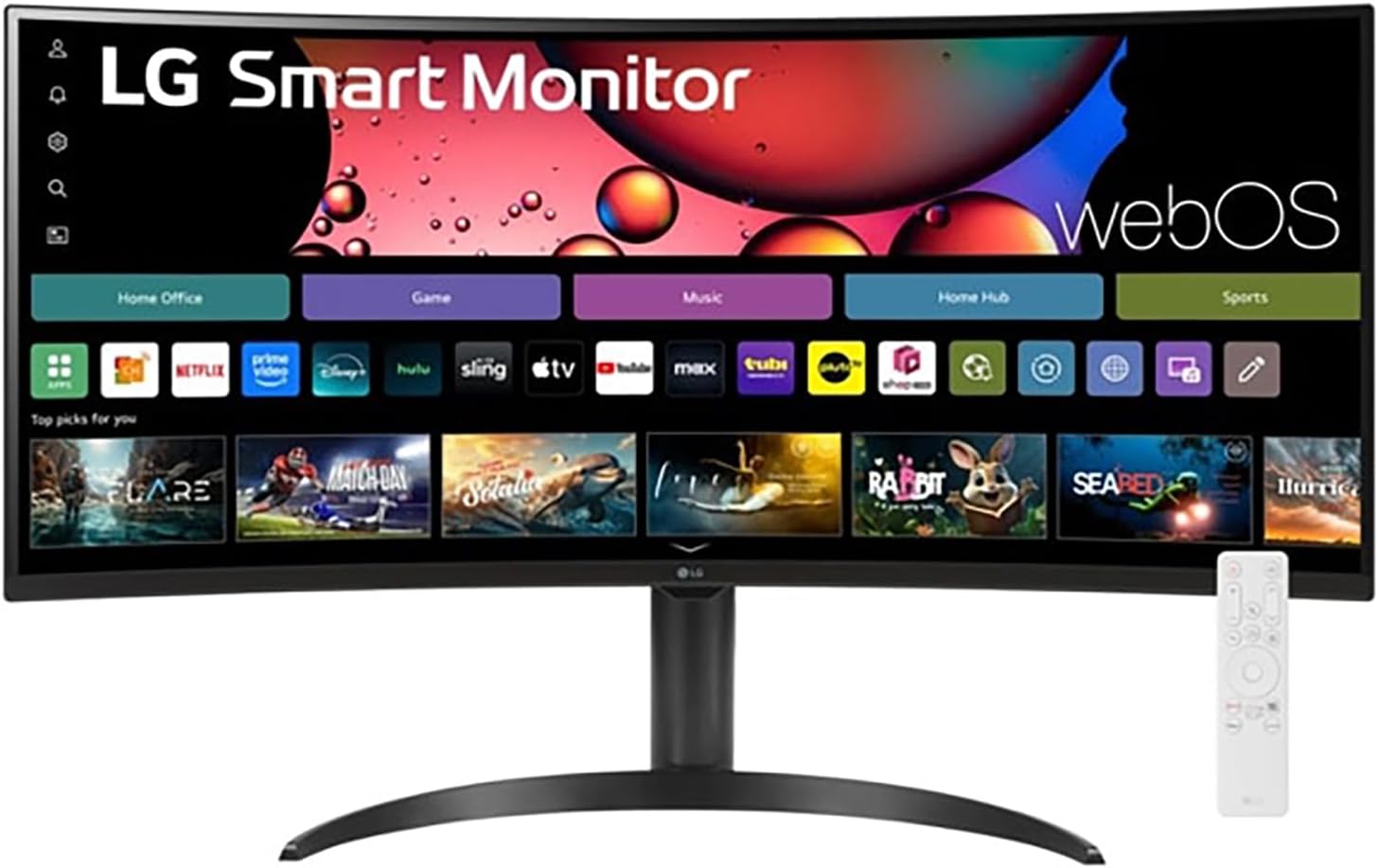
LG 34" Curved UltraWide WQHD(3440x1440) Smart Monitor with HDR10 99% sRGB, 100Hz, Magic Remote, AirPlay 2 & Adjustable Stand, webOS
Want the best price and purchase timing?
Our AI advisor analyzes real-time pricing across all channels to find you the best deal.
AI Verdict
This 34-inch 3440x1440 100Hz curved VA panel with webOS and USB-C is for multitaskers wanting a smart TV and monitor in one.
This monitor is a strong fit for users seeking a large, curved ultrawide display that doubles as a smart entertainment hub. Its 3440x1440 resolution, 100Hz refresh rate, and webOS integration cater well to productivity, casual gaming, and streaming. The 99% sRGB coverage also makes it suitable for color-sensitive work.
If you need higher refresh rates for competitive gaming or brighter HDR performance, look for monitors with 144Hz+ refresh rates and 400+ nits brightness (DisplayHDR 400 or higher).
Regret Score™
Low RiskLower is better — measures purchase-regret risk from real buyer complaints, review credibility, and product maturity
Issues discovered after purchase
Critically weak dimension
Amazon rating vs actual quality
Chance this product isn't for you
Pros
- The 34-inch 21:9 WQHD (3440x1440) display offers 34% more horizontal screen space than a 16:9 monitor, making multitasking easier.
- Built-in webOS 23 provides direct access to streaming apps like Netflix, Prime Video, and Apple TV, plus 300+ free LG Channels without needing a connected PC.
- HDR10 support and 99% sRGB color gamut deliver accurate and vibrant colors for content consumption and creative tasks.
- The 100Hz refresh rate provides smoother motion than 60Hz displays for daily use and casual gaming.
- USB-C connectivity with 65W power delivery simplifies laptop connections for video, data, and charging with a single cable.
- The adjustable stand allows for tilt and height adjustments, promoting comfortable viewing angles.
Cons
- The VA panel can exhibit smearing or ghosting, especially during fast scrolling or with quick-moving objects, which some users find distracting.
- A 100Hz refresh rate is not sufficient for competitive gamers who require higher frame rates and faster response times.
- The 300 nits brightness is adequate for most indoor environments but won't deliver the punch of brighter displays, especially with HDR content.
- There are no built-in speakers, requiring external audio solutions for sound.
- Console gaming is not optimized for the 21:9 ultrawide aspect ratio, leading to black bars or stretched images.
Dimension Scores
The 3440x1440 WQHD resolution, HDR10, and 99% sRGB coverage provide a detailed and color-accurate image, though the 300 nits brightness is average.
A 100Hz refresh rate is above the standard 60Hz, offering smoother motion for general use, but the VA panel's 5ms response time and potential smearing are not ideal for fast-paced competitive gaming.
Connectivity is strong with HDMI, DisplayPort, and a USB-C port that includes 65W power delivery and DisplayPort Alt Mode, plus two USB-A 3.0 ports.
The adjustable stand provides tilt and height adjustments, which is better than basic tilt-only stands.
Best For
- home office setups needing expansive screen real estate for multiple applications simultaneously
- casual gamers who prioritize immersion and smooth motion over competitive performance
- users who want a combined smart TV and productivity monitor for streaming and work without a separate device
- creative professionals needing 99% sRGB color accuracy for photo or video editing
Not Recommended For
- competitive esports gamers requiring refresh rates above 100Hz and minimal ghosting
- users who need a monitor with integrated speakers for a minimalist setup
- console gamers who will experience compatibility issues with the 21:9 aspect ratio
Watch Out For
- The VA panel technology can cause noticeable smearing or black smearing when scrolling text or viewing fast-moving content.
- Despite the 1800R curvature, some users report slight color shifting when viewing the screen from extreme off-center angles.
- The 300-nit peak brightness means HDR content won't have the same impact as on monitors with higher brightness capabilities.
- Picture-by-picture mode is present, but some users find it less effective than simply using two separate monitors for dual input sources.
Full Specifications
| ASIN | B0FL88XH8V |
| Brand | LG |
| Resolution | 3440 x 1440 Pixels |
| Item Weight | 15.4 pounds |
| Screen Size | 34 Inches |
| Aspect Ratio | 21:9 |
| Manufacturer | LG |
| Total Usb Ports | 2 |
| Image brightness | 300 Candela per Square Meter |
| Item model number | 34SR65QC-B |
| Product Dimensions | 14.5 x 31.9 x 22.4 inches |
| Screen Surface Description | Anti-Glare |
| Standing screen display size | 34 Inches |
What Buyers Say
Users are really digging the massive screen real estate for work, saying it makes multitasking way easier than juggling multiple windows. The smart TV features with webOS and the Magic Remote are a big hit, essentially turning the monitor into an entertainment hub when you're not working. However, some folks are definitely noticing the VA panel's smearing, especially when scrolling through documents, which can be a real buzzkill. The lack of built-in speakers also catches some off guard, meaning you'll need to factor in external audio.
“Honestly, this monitor is a game-changer for my work setup, I can finally have all my spreadsheets open without squinting, but man, that smearing when I scroll is kinda annoying, and I wish it had speakers built-in.”
Common Praise
- The ultrawide 21:9 aspect ratio makes managing multiple open applications effortless.
- webOS provides a seamless smart TV experience with direct access to streaming apps and free LG Channels.
- The Magic Remote makes navigating the smart features and monitor settings intuitive and easy.
- The 100Hz refresh rate makes everyday tasks and casual gaming feel noticeably smoother.
- USB-C with 65W power delivery is super convenient for connecting and charging a laptop with one cable.
- Colors appear vibrant and accurate thanks to HDR10 and 99% sRGB coverage.
Common Complaints
- The VA panel can cause noticeable black smearing or ghosting, particularly with dark text on light backgrounds or fast-moving content.
- There are no integrated speakers, requiring users to purchase or connect external audio devices.
- The 100Hz refresh rate, while an upgrade from 60Hz, isn't enough for serious competitive gaming.
- Some users report slight color shifts when viewing the curved screen from wider angles.
- Console games often don't support the 21:9 aspect ratio, resulting in black bars or a stretched image.
Ownership Tips
- The webOS interface can sometimes feel a bit sluggish, especially right after turning the monitor on.
- The Magic Remote is super handy, but it's another remote to keep track of on your desk.
- You'll definitely want to invest in some external speakers or a soundbar, as there's no audio out of the box.
- Adjusting the picture settings for different content (like gaming vs. streaming) can take a bit of tweaking to get right.
- The anti-glare coating works well, but in very bright rooms, the 300 nits brightness can feel a little dim.
Frequently Asked Questions
Does this monitor have built-in speakers?
No, this monitor does not include built-in speakers, so you will need external speakers or headphones for audio.
Can I connect my laptop and charge it with a single cable?
Yes, it features a USB-C port that supports DisplayPort Alt Mode and provides up to 65W of power delivery, allowing for single-cable connectivity for compatible laptops.
Is this monitor suitable for gaming?
It's suitable for casual gaming with its 100Hz refresh rate and ultrawide immersion, but competitive gamers may find the refresh rate and potential VA panel smearing insufficient.
What smart features does webOS offer?
webOS 23 provides direct access to popular streaming services like Netflix, Prime Video, and Disney+, along with cloud PC services like Microsoft 365, all without needing a connected computer.
Does the stand offer ergonomic adjustments?
Yes, the adjustable stand allows for both tilt and height adjustments, helping you find a comfortable viewing position.
Buying Guide
When you're looking at an ultrawide like this, you're buying screen real estate first and foremost. Think about how many windows you usually have open and if a 21:9 aspect ratio will actually make your workflow smoother. Also, consider the 'smart' features – if you already have a smart TV or streaming stick, you might not need webOS built-in. The panel type (VA here) is also crucial; VA panels usually have better contrast but can have issues with ghosting, which is something you'll notice if you're sensitive to it.
3440x1440 Resolution
This isn't just 'HD' – it's WQHD, meaning you get a ton of pixels. Imagine having two nearly full-sized 1080p monitors side-by-side, but without the bezel in the middle. More pixels mean sharper images and more room for your apps.
100Hz Refresh Rate
Think of this like frames per second for your monitor. A 100Hz screen updates 100 times a second, making everything from scrolling web pages to moving your mouse feel noticeably smoother than a standard 60Hz display. It's not for competitive gaming, but it's a step up for everyday fluidity.
99% sRGB
This number tells you how many colors the monitor can accurately display within a standard color space. 99% sRGB means colors will look true-to-life, which is important if you're doing any kind of photo editing, graphic design, or just want your movies and games to look their best.
webOS
This is like having a smart TV built into your monitor. You can launch Netflix, Disney+, or other streaming apps directly from the monitor itself, using the included Magic Remote, without even needing to turn on your computer. It turns your workspace into an entertainment center.
Alternatives
If this monitor doesn't quite fit, look for models with higher refresh rates (144Hz+) and lower response times (1ms) for competitive gaming, or IPS panels if you prioritize wider viewing angles and minimal ghosting over deep blacks.
You Might Also Like

KTC H27S5C 27" Curved Gaming Monitor, 1440P QHD 144Hz 120Hz Monitor, 1500R HVA Panel, HDR400, Adaptive Sync, 400nits, HDMI 2.0 x2, DP 1.4, VESA 100x100 PC Monitor
$150-$299This is a 27-inch 1440p 144Hz curved HVA panel with 400 nits brightness and HDR400, designed for gamers and creative users needing color accuracy.

ASUS ROG Strix 32” 4K OLED Gaming Monitor (XG32UCWMG) - TrueBlack Glossy, Dual Mode(4K@240Hz, FHD@480Hz), 0.03ms, G-SYNC Compatible, Neo Proximity Sensor, USB-C, HDMI 2.1, 3 yr Warranty
$600+This 32-inch 4K 240Hz WOLED monitor with 0.03ms response and dual-mode FHD 480Hz is for serious gamers and content creators prioritizing visual fidelity and speed.

CRUA 32" White Curved Monitor, 4K UHD(3840*2160P) 1500R VA Screen, 75Hz Computer Monitor Supports AMD Freesync, 120% sRGB, Built-in speakers, Blue Light Filter,Wall Mountable Installs(HDMI 2.0/DP 1.4)
$150-$299This is a 32-inch 4K (3840x2160) 1500R VA curved monitor with a 75Hz refresh rate and 260 cd/m² brightness, best for casual media consumption and productivity.

CRUA 34 Inch Curved Gaming Monitor, 21:9 WQHD 3440x1440 165Hz/144Hz 1500R Ultrawide Computer Monitor Support Freesync, PIP/PBP, 120% sRGB, HDMI 2.0 & DP 1.4, Wall Mountable/Tilt Adjustable-Black
$150-$299A 34-inch 1500R curved 3440x1440 VA panel with 165Hz refresh, 300 cd/m² brightness, and a tilt-only stand.