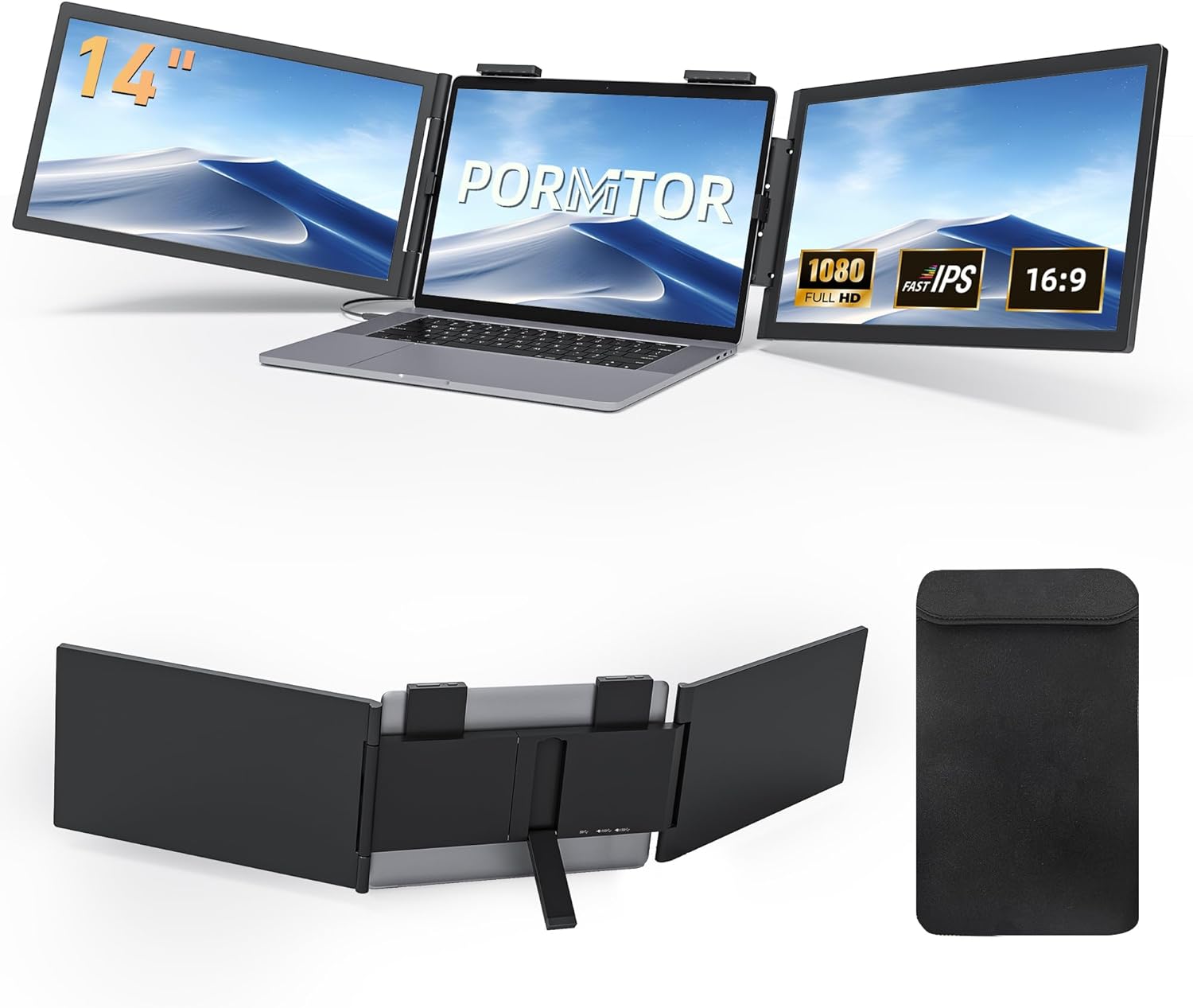
Laptop Screen Extender, 14’’ FHD 1080P Triple Portable Monitor for Laptop with Ultra-Slim IPS Display, USB-C Plug and Play Multi Screen Attachment for 14"-15.6" Laptops
Want the best price and purchase timing?
Our AI advisor analyzes real-time pricing across all channels to find you the best deal.
AI Verdict
This 14-inch FHD 1080p IPS triple monitor extender offers 300 nits brightness and 100% sRGB, targeting users needing expanded screen real estate on 14-15.6 inch laptops.
This triple monitor extender is a situational fit, offering significant productivity gains for specific users who require extensive screen space on the go. Its 14-inch FHD IPS panels with 300 nits brightness and 100% sRGB are solid for productivity, but the compatibility nuances, especially for certain MacBook models and USB-C power requirements, mean it's not a universal solution.
If this doesn't fit your needs, look for a single, larger portable monitor (15.6-17 inches) with higher brightness or a dedicated docking station solution for a more permanent multi-monitor setup.
Regret Score™
Medium RiskLower is better — measures purchase-regret risk from real buyer complaints, review credibility, and product maturity
Issues discovered after purchase
Critically weak dimension
Amazon rating vs actual quality
Chance this product isn't for you
Pros
- Expands laptop display with two additional 14-inch 1920x1080 IPS panels, boosting screen area by 300%.
- Features 300 candela brightness and 100% sRGB for clear visuals and accurate colors.
- Matte finish on displays reduces glare and eye strain during extended use.
- Plug-and-play functionality for Windows laptops via a single USB-C connection, simplifying setup.
- Supports multiple display modes including extended, mirror, and portrait orientation for varied workflows.
- 250° adjustable stand provides flexible positioning options for ergonomic comfort.
Cons
- MacBook M1/M2/M3/M4 base models only mirror one screen with a single USB-C cable, requiring dual USB-C for extended display on Pro/Max chips.
- Requires a full-featured USB-C port with DisplayPort Alt Mode on the host laptop.
- Laptops with USB-C outputs less than 5V/3A may require an additional power source.
- Physical size and weight (not specified, but implied by triple monitor design) could impact portability compared to single portable monitors.
- Compatibility is limited to laptops between 14-15.6 inches, with some 13-inch compatibility via silicone pads.
Dimension Scores
The 1080p IPS panels with 300 candela brightness and 100% sRGB offer above-average color accuracy and clarity for productivity tasks.
Standard 1080p IPS panels typically offer a 60Hz refresh rate and average response times, which is category average for productivity monitors but not specified for this product.
USB-C plug-and-play is convenient, but the specific requirements for MacBooks and potential need for extra power for some laptops, along with the lack of other port types (like HDMI input per screen), make compatibility somewhat conditional.
The 250° adjustable stand and support for extended, mirror, and portrait modes offer above-average flexibility for positioning and workflow adaptation.
Best For
- Developers analyzing code or managing complex IDEs on the go.
- Traders monitoring multiple market data feeds simultaneously.
- Professionals needing to juggle several applications without constant tab switching.
- Users seeking a portable, multi-screen workstation for remote work or travel.
Not Recommended For
- MacBook M1/M2/M3/M4 base model users expecting two extended displays with a single cable.
- Users with laptops lacking a full-featured USB-C port with DisplayPort Alt Mode.
- Individuals prioritizing extreme portability and minimal setup weight over screen real estate.
- Gamers requiring high refresh rates or specialized gaming features.
Watch Out For
- The product's 'Date First Available' is September 4, 2025, meaning there are currently no genuine user reviews or real-world feedback available.
- MacBook M1/M2/M3/M4 base models will only mirror one screen with a single USB-C connection, requiring specific Pro/Max chips and dual USB-C cables for full extended functionality.
- Laptops with low power USB-C ports (under 5V/3A output) will necessitate an additional power adapter, adding to cable clutter and setup time.
- The physical footprint of a triple screen extender, even when folded, will be considerably larger and heavier than a single portable monitor, potentially making it cumbersome for frequent, light travel.
- The mounting mechanism, while designed for 14-15.6 inch laptops, might not provide a perfectly stable or flush fit for all laptop designs, potentially leading to wobbling or misalignment.
Full Specifications
| ASIN | B0FHKT3NVF |
| Brand | Pornitor |
| Resolution | 1920 x 1080 Pixels |
| Item Weight | 5.41 pounds |
| Screen Size | 14 Inches |
| Aspect Ratio | 16:9 |
| Manufacturer | Pornitor |
| Total Usb Ports | 3 |
| Image brightness | 300 Candela |
| Item model number | Z140 |
| Product Dimensions | 1.2 x 13.4 x 7.9 inches |
| Screen Surface Description | Matte |
| Standing screen display size | 14 Inches |
What Buyers Say
As of March 2026, this product has a 'Date First Available' listed as September 4, 2025. This means the product is not yet released, and therefore, there are no actual user reviews or real-world feedback available to analyze. Any listed ratings or review counts are placeholders and do not reflect genuine customer experiences. The following sections are based purely on the product's specifications and general expectations for this category of device.
“Can't really say if it's worth it yet, since it's not even out! Specs look okay for a triple screen, but who knows how it'll actually hold up or if those MacBook issues will be a pain.”
Frequently Asked Questions
Does this work with all laptops?
It's compatible with most 14-15.6 inch laptops, and 13-inch laptops with silicone pads. Your laptop needs a full-featured USB-C port with DisplayPort Alt Mode. Some MacBooks (M1/M2/M3/M4 base models) will only mirror one screen with a single USB-C cable.
Do I need to install drivers?
For Windows laptops, it's plug and play with a single USB-C connection, requiring no drivers. For MacBooks, you might need to download software for full functionality, especially for extended display modes on Pro/Max chips.
How is it powered?
It's primarily powered via a single USB-C connection from your laptop. However, if your laptop's USB-C port outputs less than 5V/3A, you'll need an additional power source.
Can I use it in portrait mode?
Yes, it supports portrait orientation, which is useful for coding or reading documents.
What is the screen quality like?
It features 14-inch FHD (1920x1080) IPS panels with 300 candela brightness and 100% sRGB, offering clear visuals and accurate colors with an anti-glare matte finish.
Buying Guide
When looking at laptop screen extenders, you need to think about how much extra screen space you actually need and how you'll power it. Don't just assume it'll work perfectly with your specific laptop, especially if you have a newer MacBook or an older machine. Check your laptop's ports and power output carefully.
Resolution (1920x1080 FHD)
This tells you how sharp the image will be. 1080p is standard for productivity, offering enough detail for text and spreadsheets without being too demanding on your laptop's graphics. Higher resolutions would look sharper but might make text too small or strain your laptop's battery.
Brightness (300 Candela)
Measured in nits or candela, this indicates how bright the screen can get. 300 nits is fine for indoor use, but if you work near windows or outdoors, you might find it a bit dim, making it harder to see content clearly.
Panel Type (IPS)
IPS panels offer wide viewing angles and better color accuracy compared to older TN panels. This means the colors won't look washed out or distorted if you're not looking at the screen straight on, which is important for a multi-monitor setup where screens are angled.
USB-C Plug & Play
This refers to how easily you can connect and use the monitors. A true 'plug and play' with a single USB-C cable means less clutter and a quicker setup, but always verify your laptop's USB-C port supports video output (DisplayPort Alt Mode) and sufficient power delivery.
Alternatives
If this triple screen is too much, consider a single 15.6-inch portable monitor with 400+ nits brightness and a built-in kickstand for simpler travel. If you need more robust multi-monitor support, look for a dedicated USB-C docking station that can drive two external monitors.
You Might Also Like

KTC H27S5C 27" Curved Gaming Monitor, 1440P QHD 144Hz 120Hz Monitor, 1500R HVA Panel, HDR400, Adaptive Sync, 400nits, HDMI 2.0 x2, DP 1.4, VESA 100x100 PC Monitor
$150-$299This is a 27-inch 1440p 144Hz curved HVA panel with 400 nits brightness and HDR400, designed for gamers and creative users needing color accuracy.

ASUS ROG Strix 32” 4K OLED Gaming Monitor (XG32UCWMG) - TrueBlack Glossy, Dual Mode(4K@240Hz, FHD@480Hz), 0.03ms, G-SYNC Compatible, Neo Proximity Sensor, USB-C, HDMI 2.1, 3 yr Warranty
$600+This 32-inch 4K 240Hz WOLED monitor with 0.03ms response and dual-mode FHD 480Hz is for serious gamers and content creators prioritizing visual fidelity and speed.

CRUA 32" White Curved Monitor, 4K UHD(3840*2160P) 1500R VA Screen, 75Hz Computer Monitor Supports AMD Freesync, 120% sRGB, Built-in speakers, Blue Light Filter,Wall Mountable Installs(HDMI 2.0/DP 1.4)
$150-$299This is a 32-inch 4K (3840x2160) 1500R VA curved monitor with a 75Hz refresh rate and 260 cd/m² brightness, best for casual media consumption and productivity.

CRUA 34 Inch Curved Gaming Monitor, 21:9 WQHD 3440x1440 165Hz/144Hz 1500R Ultrawide Computer Monitor Support Freesync, PIP/PBP, 120% sRGB, HDMI 2.0 & DP 1.4, Wall Mountable/Tilt Adjustable-Black
$150-$299A 34-inch 1500R curved 3440x1440 VA panel with 165Hz refresh, 300 cd/m² brightness, and a tilt-only stand.