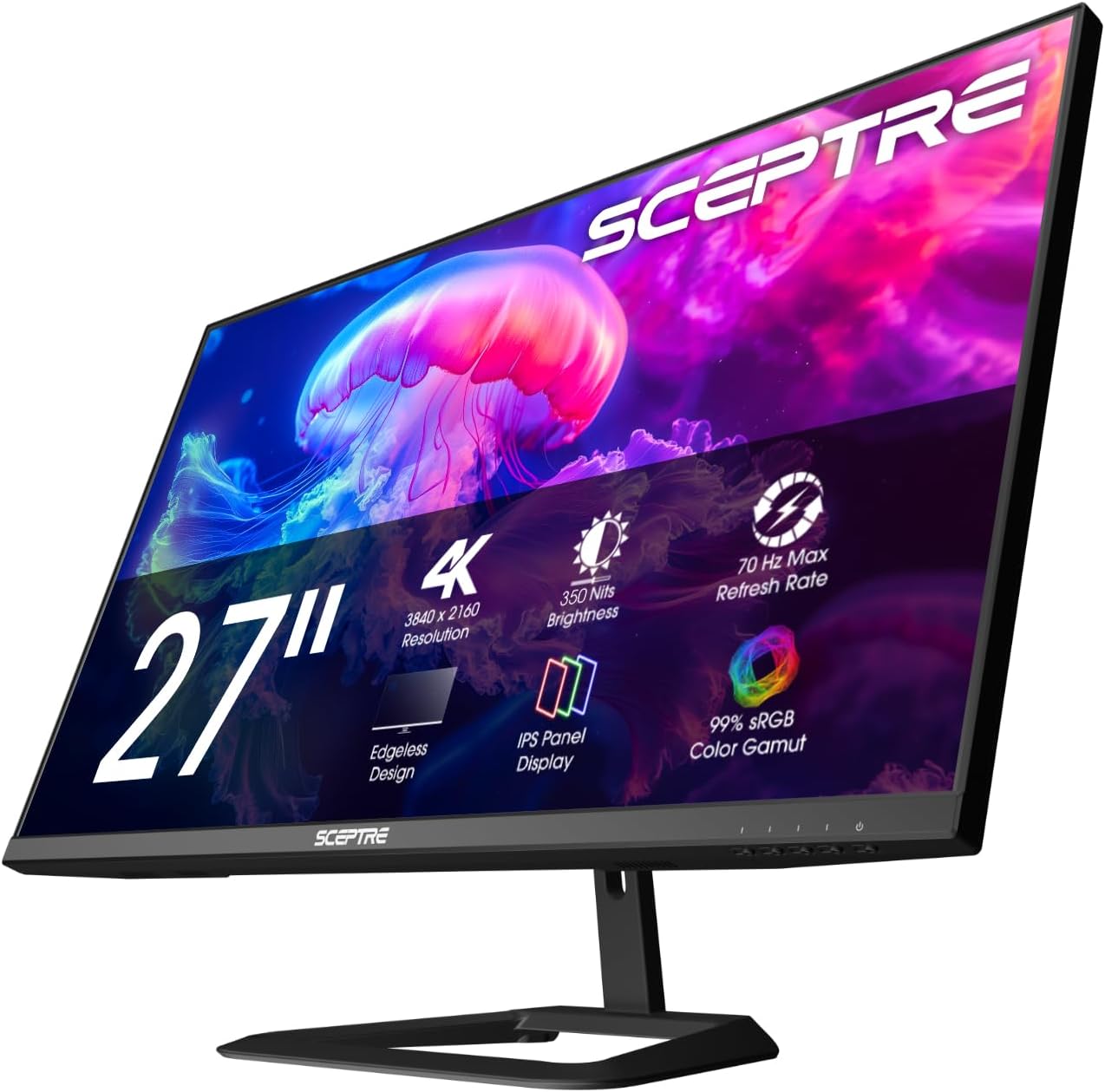
New! Sceptre 4K IPS 27" 3840 x 2160 UHD Monitor up to 70+Hz DisplayPort HDMI 100% sRGB Build-in Speakers, Machine Black 2026 (U275W-UPT Series)
Want the best price and purchase timing?
Our AI advisor analyzes real-time pricing across all channels to find you the best deal.
AI Verdict
A 27-inch 4K IPS panel with 70Hz refresh and 99% sRGB, ideal for productivity and casual media consumption.
This Sceptre monitor is a strong contender if you prioritize 4K resolution and color accuracy for productivity or casual media viewing, especially if you plan to use a VESA mount. The 70Hz refresh rate is a small but noticeable upgrade over 60Hz for general use.
If competitive gaming is a priority, look for monitors with a 144Hz+ refresh rate and 1ms response time.
Regret Score™
High RiskLower is better — measures purchase-regret risk from real buyer complaints, review credibility, and product maturity
Issues discovered after purchase
Critically weak dimension
Amazon rating vs actual quality
Chance this product isn't for you
Pros
- 3840 x 2160 resolution provides 163 pixels per inch for exceptionally sharp text and images.
- IPS panel delivers consistent colors and 178° wide viewing angles without color shift.
- Covers 99% of the sRGB color space, suitable for general work and media.
- 70Hz refresh rate offers a smoother visual experience than standard 60Hz monitors.
- Includes DisplayPort 1.2, HDMI 2.0, and two HDMI 1.4 ports for varied connectivity.
- VESA 100x100mm mounting compatibility allows for alternative stands or arms.
Cons
- Stand only offers tilt adjustment (-5°/15°), lacking height, swivel, or pivot.
- HDMI 1.4 ports are limited to 4K at 30Hz, restricting high-resolution refresh rates.
- Built-in 2W speakers are functional for basic audio but lack depth.
- 5ms response time and 70Hz refresh rate are not optimal for competitive gaming, potentially causing tearing or ghosting.
- Buttons for OSD control are on the front, which some users find less intuitive than a joystick.
Dimension Scores
The IPS panel delivers 4K resolution with 163 PPI and 99% sRGB coverage, providing sharp images and consistent colors.
The 70Hz refresh rate is a slight improvement over 60Hz, and the 5ms response time is adequate for general use, but not for competitive gaming.
It includes DisplayPort 1.2, HDMI 2.0, and two HDMI 1.4 ports, along with a 3.5mm audio jack, offering varied connectivity options.
The stand only provides tilt adjustment (-5°/15°), lacking height, swivel, or pivot, though it is VESA mount compatible.
Best For
- Home office setups requiring sharp text for coding or document work.
- Casual media consumption like watching movies or streaming video.
- Basic photo editing and graphic design due to 99% sRGB coverage and IPS panel.
- Users needing a VESA-mountable 4K display for multi-monitor setups.
Not Recommended For
- Competitive esports gaming due to 70Hz refresh rate and 5ms response time.
- Professional color-critical video editing without additional calibration.
- Users requiring extensive ergonomic adjustments from the included stand.
Watch Out For
- You need to use the DisplayPort connection to achieve the monitor's full 70Hz refresh rate.
- The two HDMI 1.4 ports only support 4K resolution at a maximum of 30Hz.
- The included stand only allows for tilting, with no height, swivel, or pivot adjustments.
- While advertised at 350 nits, some tests show it can reach up to 400 nits, but it lacks HDR capabilities.
Full Specifications
| ASIN | B0FDDVRS59 |
| Brand | Sceptre |
| Color | Machine Black |
| Series | U275W-UPT Series |
| Resolution | 4K UHD 2160p |
| Item Weight | 16.17 pounds |
| Screen Size | 27 Inches |
| Aspect Ratio | 16:9 |
| Manufacturer | e-Sceptre |
| Item model number | U275W-UPT.A1 |
| Screen Resolution | 3840x2160 |
| Product Dimensions | 8 x 24 x 17.7 inches |
| Max Screen Resolution | 3840 x 2160 Pixels |
| Item Dimensions LxWxH | 8 x 24 x 17.7 inches |
| Screen Surface Description | Matte |
| Standing screen display size | 27 Inches |
What Buyers Say
Users frequently highlight the monitor's clear 4K picture and accurate colors as its main strengths, especially for its price point. Many appreciate the slight bump to 70Hz over standard 60Hz panels for a smoother desktop experience. However, the limited ergonomics of the included stand are a common point of contention, often leading users to recommend VESA mounting. The built-in speakers are generally considered sufficient for casual listening but not for quality audio.
“Honestly, for the money, this 4K picture is insane, but seriously, get a monitor arm because that stand is a joke.”
Common Praise
- Text and images are incredibly crisp due to the 163 PPI at 4K resolution.
- Colors are consistent and accurate across wide viewing angles from the IPS panel.
- The 70Hz refresh rate provides a noticeable fluidity compared to 60Hz monitors.
- The monitor has a sturdy build quality and a minimalist design.
- VESA 100x100mm compatibility makes it easy to use with aftermarket mounts.
Common Complaints
- The stand only allows for tilting, with no height, swivel, or pivot adjustments.
- Built-in speakers are basic and lack audio quality for anything beyond casual use.
- Only the DisplayPort and one HDMI 2.0 port support higher refresh rates at 4K; other HDMI ports are 30Hz.
- Not suitable for competitive gaming due to the 5ms response time and 70Hz refresh rate.
Ownership Tips
- You'll definitely want to use the DisplayPort cable included in the box to get the full 70Hz.
- The screen has a matte anti-glare coating that works well without adding graininess.
- Scaling in your OS is essential for comfortable text viewing at 27 inches with 4K resolution.
- The monitor's chassis feels surprisingly sturdy, not cheap or flimsy.
Frequently Asked Questions
Does this monitor support HDR?
No, the Sceptre U275W-UPT does not advertise HDR capabilities, which is typical for monitors in its price range.
What refresh rate can I get with HDMI?
You can achieve 4K at 60Hz using the HDMI 2.0 port, but the two HDMI 1.4 ports are limited to 4K at 30Hz.
Are the built-in speakers any good?
The 2W built-in speakers are functional for basic audio like watching movies or shows occasionally, but they are not designed for high-fidelity sound.
Can I mount this monitor on a monitor arm?
Yes, the monitor is VESA mount compatible with a 100x100mm pattern, allowing you to use a monitor arm or wall mount.
Is this monitor suitable for gaming?
It's suitable for story-driven or adventure games, but the 70Hz refresh rate and 5ms response time are not ideal for competitive gaming where tearing or ghosting might occur.
Buying Guide
When looking at a monitor like this, you need to think about what you'll actually do with it. A 4K resolution on a 27-inch screen means everything is super sharp, but you'll likely need to use scaling in your operating system so text isn't microscopic. The IPS panel is key for consistent colors and wide viewing angles, which is great if you share your screen or do any visual work. The 70Hz refresh rate is a small bonus over 60Hz, making everyday scrolling feel a bit smoother, but don't expect a gaming powerhouse.
4K UHD 2160p Resolution
This means the screen packs 3840 x 2160 pixels, four times as many as a Full HD screen. Think of it like a super high-resolution photo; everything looks incredibly detailed and crisp, especially text and fine lines.
IPS Panel
IPS (In-Plane Switching) panels are known for their color accuracy and wide viewing angles. This means colors won't look washed out or distorted if you're not sitting directly in front of the screen, or if you're sharing your screen with someone else.
70Hz Refresh Rate
The refresh rate is how many times the screen updates per second. 70Hz means it updates 70 times per second, which is slightly faster than the standard 60Hz. It makes motion on screen, like scrolling web pages or moving your mouse, appear a little smoother.
99% sRGB
sRGB is a standard color space, and 99% coverage means the monitor can display almost all the colors within that standard. This is important for tasks where color accuracy matters, like viewing photos or creating digital content, ensuring colors appear as intended.
Alternatives
If you need more fluid motion for competitive gaming, look for monitors with a 144Hz or higher refresh rate and a 1ms response time. For professional color grading, seek monitors with wider color gamut coverage like Adobe RGB or DCI-P3 and factory calibration reports.
You Might Also Like

KTC H27S5C 27" Curved Gaming Monitor, 1440P QHD 144Hz 120Hz Monitor, 1500R HVA Panel, HDR400, Adaptive Sync, 400nits, HDMI 2.0 x2, DP 1.4, VESA 100x100 PC Monitor
$150-$299This is a 27-inch 1440p 144Hz curved HVA panel with 400 nits brightness and HDR400, designed for gamers and creative users needing color accuracy.

ASUS ROG Strix 32” 4K OLED Gaming Monitor (XG32UCWMG) - TrueBlack Glossy, Dual Mode(4K@240Hz, FHD@480Hz), 0.03ms, G-SYNC Compatible, Neo Proximity Sensor, USB-C, HDMI 2.1, 3 yr Warranty
$600+This 32-inch 4K 240Hz WOLED monitor with 0.03ms response and dual-mode FHD 480Hz is for serious gamers and content creators prioritizing visual fidelity and speed.

CRUA 32" White Curved Monitor, 4K UHD(3840*2160P) 1500R VA Screen, 75Hz Computer Monitor Supports AMD Freesync, 120% sRGB, Built-in speakers, Blue Light Filter,Wall Mountable Installs(HDMI 2.0/DP 1.4)
$150-$299This is a 32-inch 4K (3840x2160) 1500R VA curved monitor with a 75Hz refresh rate and 260 cd/m² brightness, best for casual media consumption and productivity.

CRUA 34 Inch Curved Gaming Monitor, 21:9 WQHD 3440x1440 165Hz/144Hz 1500R Ultrawide Computer Monitor Support Freesync, PIP/PBP, 120% sRGB, HDMI 2.0 & DP 1.4, Wall Mountable/Tilt Adjustable-Black
$150-$299A 34-inch 1500R curved 3440x1440 VA panel with 165Hz refresh, 300 cd/m² brightness, and a tilt-only stand.