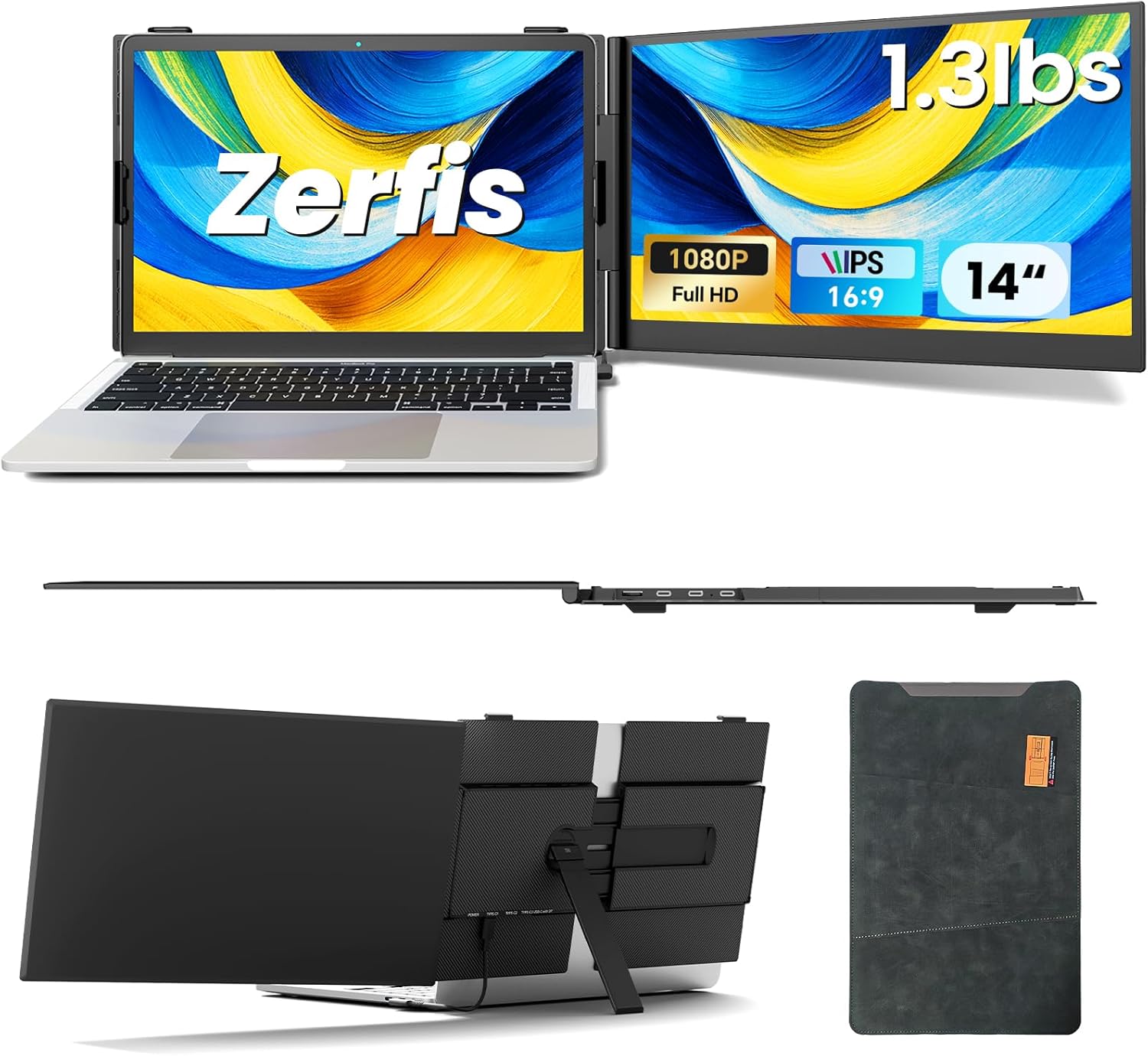
Laptop Screen Extender, Ultra-Thin 14" FHD 1080P Portable Monitor for Laptop, 1.3lbs Lightweight Dual Monitor Extender Plug & Play for 13"-17" Laptops, Compatible with Wins/Mac/Android/Chrome
Want the best price and purchase timing?
Our AI advisor analyzes real-time pricing across all channels to find you the best deal.
AI Verdict
This is a 14-inch, 1.3lb, 300-nit FHD IPS portable monitor for anyone needing a second screen for a 13-17 inch laptop on the go.
This monitor is a strong fit for users prioritizing extreme portability and simple display extension for their 13-17 inch laptop. Its 1.3lb weight and 6.5mm thickness make it genuinely travel-friendly, and the 1080P IPS panel with 100% sRGB provides a clear, color-accurate secondary display for general productivity.
If you need higher pixel density for detailed work, look for a portable monitor with 2K or 4K resolution, though expect a higher price and potentially more weight.
Regret Score™
Medium RiskLower is better — measures purchase-regret risk from real buyer complaints, review credibility, and product maturity
Issues discovered after purchase
Critically weak dimension
Amazon rating vs actual quality
Chance this product isn't for you
Pros
- Weighs only 1.3 lbs and is 6.5mm thick, making it lighter and thinner than many smartphones for easy portability.
- Features a 1920x1080P IPS panel with 100% sRGB and 300 nits brightness, delivering clear visuals and accurate colors.
- Connects with a single USB-C cable for video and power if your laptop supports it, or via HDMI and USB-A for broader compatibility.
- Built with an anodized aluminum alloy shell for durability and improved heat dissipation.
- Supports extended, mirrored, and portrait display modes, adapting to various workflows.
- Includes built-in speakers, removing the need for external audio devices.
Cons
- Not all laptops are compatible, specifically those without full-function Type-C ports, requiring a two-cable setup.
- The 1080P resolution on a 14-inch screen might not be sufficient for detailed graphic design or heavy content editing tasks.
- The glossy screen surface can be prone to reflections in brightly lit environments.
- The adjustable rear stand and top hook design, while functional, may not offer the same stability as a dedicated VESA mount or a heavier, integrated stand.
Dimension Scores
The 14-inch FHD 1920x1080P IPS panel with 100% sRGB and 300 nits brightness provides above-average clarity and color accuracy for a portable monitor.
While not explicitly stated, portable monitors in this category typically offer a standard 60Hz refresh rate, which is average for general productivity but not for high-refresh gaming.
Offers versatile connectivity with full-function USB-C (single cable solution) and HDMI + USB-A options, ensuring broad compatibility across Windows, Mac, Android, and other systems.
Includes a built-in top hook and adjustable rear stand for flexible viewing angles and portrait mode, which is above average for basic portable monitors, but lacks height adjustment.
Best For
- Digital nomads needing a lightweight second screen for productivity while traveling.
- Remote workers expanding their laptop workspace in temporary setups.
- Students or presenters requiring an additional display for research or sharing content.
- Users with 13-17 inch laptops seeking a simple, plug-and-play display extension.
Not Recommended For
- Professional graphic designers or video editors requiring high-resolution, color-critical displays.
- Users who primarily work in bright, uncontrolled lighting conditions due to the glossy screen.
- Anyone needing a monitor with advanced ergonomic adjustments beyond basic tilt.
Watch Out For
- Compatibility issues: Some laptops lack full-function Type-C ports, forcing users to connect with both HDMI and USB-A cables, which can be less convenient.
- Display limitations for specific tasks: The 1920x1080P resolution, while FHD, may feel restrictive for detailed work like professional photo editing where higher pixel density is preferred.
- Potential for reflections: The glossy screen can make visibility challenging in direct sunlight or rooms with strong overhead lighting.
- Stand stability: While it has a top hook and adjustable rear stand, some clip-on designs in this category can feel less secure than monitors with traditional, weighted bases, especially if the laptop is moved frequently.
Full Specifications
| ASIN | B0F9PDZKGK |
| Brand | Zerfis |
| Voltage | 20 Volts |
| Resolution | 1920 x 1080 Pixels |
| Item Weight | 1.32 pounds |
| Screen Size | 14 Inches |
| Aspect Ratio | 16:9 |
| Manufacturer | Zerfis |
| Image brightness | 300 NITS lm |
| Item model number | S8 |
| Product Dimensions | 13 x 8.14 x 0.61 inches |
| Screen Surface Description | Glossy |
| Standing screen display size | 14 Inches |
What Buyers Say
What really stands out is how genuinely light and thin this thing is; users keep mentioning it's barely noticeable in a bag. The picture quality for a portable screen is consistently praised, with colors looking accurate and text staying sharp. Setup is usually a breeze, often just one cable, but some folks ran into snags if their laptop's USB-C port wasn't fully featured. It's definitely seen as a productivity booster, making multitasking much easier on the go.
“Dude, this thing is so light I forget it's even in my backpack, and the screen is actually really clear for emails and stuff, totally worth it for travel.”
Common Praise
- The 1.3 lbs weight and 6.5mm thickness make it incredibly easy to carry around.
- Colors on the 1080P IPS display look crisp and vibrant, with wide viewing angles.
- Plug-and-play setup is quick and simple, especially with a single USB-C cable.
- The aluminum alloy casing feels durable and helps with heat dissipation.
- It significantly boosts productivity by providing a second screen for multitasking.
Common Complaints
- Some users found that their laptop's USB-C port didn't support video output, requiring both HDMI and USB-A cables.
- The glossy screen can be reflective, making it harder to use in bright environments.
- While the stand works, some wished for more robust or versatile mounting options.
- The 1080P resolution, while clear, isn't ideal for highly detailed professional design work.
Ownership Tips
- The single USB-C cable connection is a game-changer for reducing cable clutter, but confirm your laptop's port capabilities first.
- The built-in speakers are basic, but they're there if you need them in a pinch for video calls.
- The aluminum build feels much more premium than plastic portable monitors and seems to handle being tossed in a bag well.
- Adjusting the rear stand takes a little getting used to to find the perfect angle and ensure stability.
- Even with the top hook, it's best to be gentle when moving your laptop setup to avoid dislodging the monitor.
Frequently Asked Questions
Does this monitor require a separate power source?
No, if your laptop has a full-function USB-C port (Thunderbolt 3.0/4.0 with DP Alt Mode), a single USB-C to USB-C cable can provide both power and video. Otherwise, it draws power via a USB-A connection while receiving video through HDMI.
Is this monitor compatible with my MacBook?
Yes, it's compatible with Mac laptops, as well as Windows, Android, Chrome, and Linux systems. You'll need a full-function USB-C port or an HDMI port on your MacBook for connection.
Can I use this monitor in portrait mode?
Yes, the monitor supports multiple display modes, including portrait mode, which can be useful for coding or reading documents.
How thin and light is this monitor?
It's designed to be ultra-thin at just 6.5mm and ultra-light, weighing approximately 1.3 lbs, making it highly portable.
Does it come with all the necessary cables?
Yes, the portable monitor comes with all the required cables for a seamless setup, including USB-C to USB-C, USB-A, and HDMI cables.
Buying Guide
When you're looking at portable monitors like this, you're essentially buying a second screen for your laptop that you can take anywhere. Think about how you'll connect it: a single USB-C cable is ideal for power and video, but many laptops still need separate HDMI for video and USB-A for power. The screen size and resolution determine how much workspace you get and how sharp things look. Since you're carrying it, weight and thickness are huge factors.
Screen Size (14 Inches)
This tells you how much extra screen real estate you're getting. A 14-inch screen is a good balance between portability and usable workspace, roughly matching many common laptop sizes.
Resolution (1920 x 1080 Pixels / FHD)
This is the clarity of the image. Full HD (1080P) means text and images will look sharp enough for most tasks, like browsing, documents, and videos, but it's not as pixel-dense as 2K or 4K displays.
Brightness (300 NITS lm)
Nits measure how bright the screen can get. 300 nits is bright enough for indoor use and most office environments, but it might struggle against direct sunlight or very bright windows, especially with a glossy screen.
Weight (1.3 lbs)
This is crucial for a 'portable' monitor. At 1.3 lbs, this monitor is genuinely lightweight, making it easy to carry in a laptop bag without adding significant bulk, like carrying an extra water bottle.
Alternatives
If this monitor doesn't fit, consider models with higher resolutions (2K or 4K) for more detailed work, or a matte screen finish if you frequently work in bright conditions to reduce glare.
You Might Also Like

KTC H27S5C 27" Curved Gaming Monitor, 1440P QHD 144Hz 120Hz Monitor, 1500R HVA Panel, HDR400, Adaptive Sync, 400nits, HDMI 2.0 x2, DP 1.4, VESA 100x100 PC Monitor
$150-$299This is a 27-inch 1440p 144Hz curved HVA panel with 400 nits brightness and HDR400, designed for gamers and creative users needing color accuracy.

ASUS ROG Strix 32” 4K OLED Gaming Monitor (XG32UCWMG) - TrueBlack Glossy, Dual Mode(4K@240Hz, FHD@480Hz), 0.03ms, G-SYNC Compatible, Neo Proximity Sensor, USB-C, HDMI 2.1, 3 yr Warranty
$600+This 32-inch 4K 240Hz WOLED monitor with 0.03ms response and dual-mode FHD 480Hz is for serious gamers and content creators prioritizing visual fidelity and speed.

CRUA 32" White Curved Monitor, 4K UHD(3840*2160P) 1500R VA Screen, 75Hz Computer Monitor Supports AMD Freesync, 120% sRGB, Built-in speakers, Blue Light Filter,Wall Mountable Installs(HDMI 2.0/DP 1.4)
$150-$299This is a 32-inch 4K (3840x2160) 1500R VA curved monitor with a 75Hz refresh rate and 260 cd/m² brightness, best for casual media consumption and productivity.

CRUA 34 Inch Curved Gaming Monitor, 21:9 WQHD 3440x1440 165Hz/144Hz 1500R Ultrawide Computer Monitor Support Freesync, PIP/PBP, 120% sRGB, HDMI 2.0 & DP 1.4, Wall Mountable/Tilt Adjustable-Black
$150-$299A 34-inch 1500R curved 3440x1440 VA panel with 165Hz refresh, 300 cd/m² brightness, and a tilt-only stand.