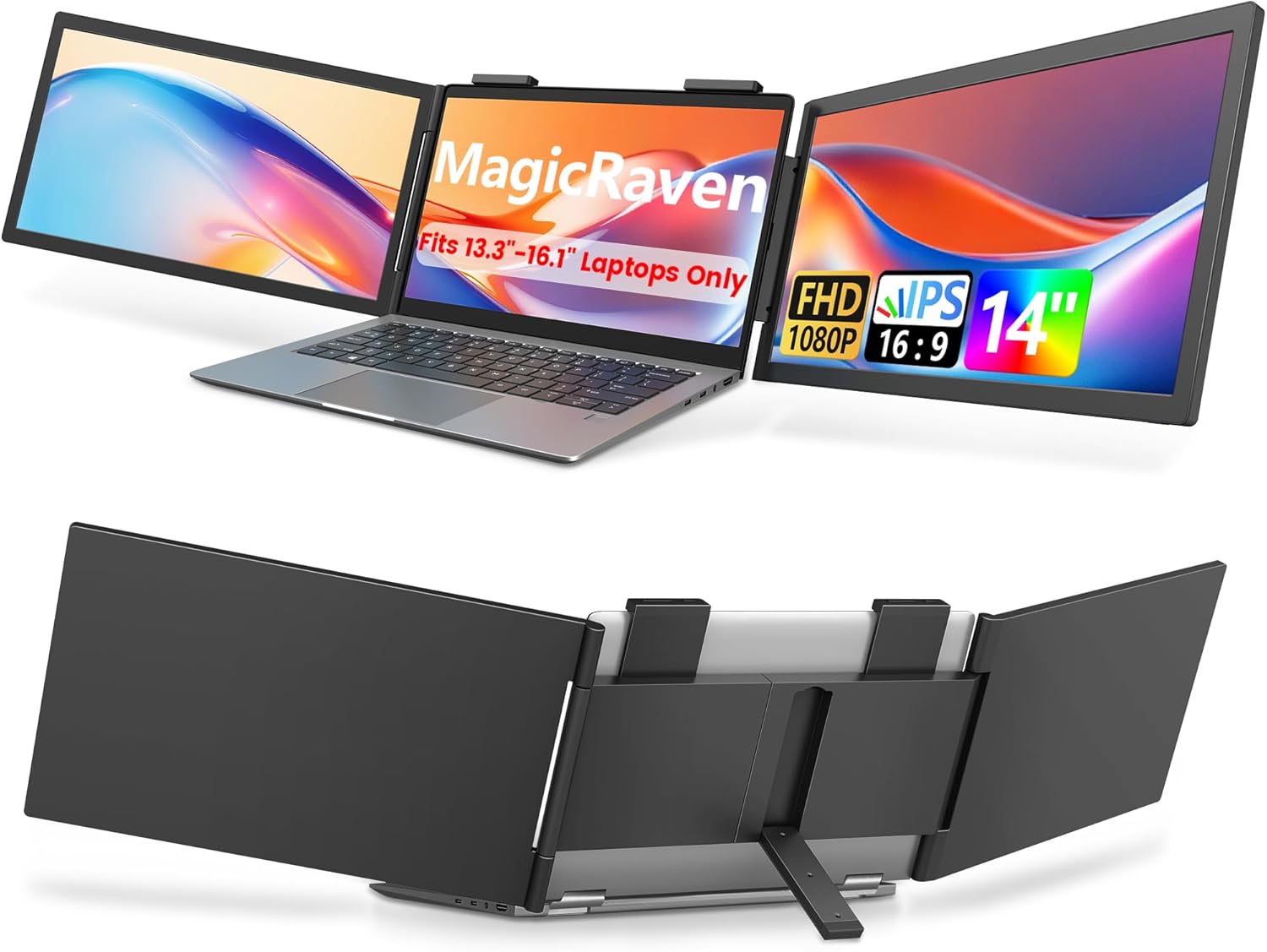
Dual Laptop Screen Extender, 14" 1080P IPS Portable Triple Monitor for 13.3-16.1" Laptops with USB-C Port, Plug and Play, Attachment Screen for Windows/Mac/Android/Switch/PS5/Xbox
Want the best price and purchase timing?
Our AI advisor analyzes real-time pricing across all channels to find you the best deal.
AI Verdict
A 14-inch 1080P IPS portable triple monitor with 300 nits brightness and 100% sRGB, designed for multi-screen productivity on the go.
This screen extender is a strong fit for Windows users needing a portable triple-screen setup with its 14-inch 1080P IPS displays and single USB-C connectivity. However, the limitation of only one extended display for macOS M-chip devices and the 3.4 lbs weight make it a situational choice for others.
If you need full triple-screen functionality with macOS M-chips, look for models explicitly stating support for multiple external displays via a single connection or a dedicated adapter.
Regret Score™
Medium RiskLower is better — measures purchase-regret risk from real buyer complaints, review credibility, and product maturity
Issues discovered after purchase
Critically weak dimension
Amazon rating vs actual quality
Chance this product isn't for you
Pros
- Expands laptop display with two 14-inch 1920x1080 IPS screens, boosting screen real estate for multitasking.
- Each screen offers 300 nits brightness and 100% sRGB for clear, vivid visuals.
- Connects to Windows laptops with a single USB-C cable for video and power, simplifying setup.
- Features a 250° rotation for flexible viewing angles and screen sharing.
- Weighs 3.4 lbs, making it portable for travel and remote work setups.
- Plug-and-play functionality across Windows, Android, Switch, PS5, and Xbox without needing drivers.
Cons
- macOS devices with M1, M2, M3, M4 chips will only extend one display, limiting triple-screen functionality.
- Requires two cables for macOS laptops, adding to cable management.
- At 3.4 lbs, it adds significant weight to a laptop, potentially stressing hinges or making the setup top-heavy.
- The product specifications do not mention built-in speakers, requiring external audio solutions.
- No explicit mention of HDMI input in the product's key specifications, limiting direct connectivity options for some devices.
Dimension Scores
The 14-inch 1920x1080 IPS panels with 300 nits brightness and 100% sRGB offer clear and accurate visuals for a portable monitor.
The refresh rate and response time are not specified, implying standard 60Hz and typical portable monitor performance, which is adequate for productivity but not optimized for competitive gaming.
Offers USB-C connectivity for Windows, Android, Switch, PS5, and Xbox, with plug-and-play ease, but the macOS M-chip limitation to one extended display and lack of explicit HDMI input are drawbacks.
The screens can rotate 250° for flexible viewing, but there's no independent height adjustment or dedicated stand, relying solely on laptop attachment.
Best For
- IT professionals, stock traders, and programmers needing multiple screens for complex workflows while traveling.
- Users of Windows laptops who want a quick, single-cable triple-screen setup for productivity.
- Gamers wanting to extend their Nintendo Switch, PS5, or Xbox display on a portable screen.
- Remote workers or students who frequently change their workspace and need more screen area.
Not Recommended For
- macOS users with M1/M2/M3/M4 chips expecting a full triple-screen extension.
- Users prioritizing minimal laptop weight, as the 3.4 lbs addition might be too heavy.
- Individuals needing a monitor with integrated speakers for audio output.
Watch Out For
- macOS M1/M2/M3/M4 chip users will only get one extended display, not two, despite being a 'triple monitor' product.
- The 3.4 lbs weight can make a laptop setup top-heavy or unstable, especially with smaller or lighter laptops.
- Cable management can become cumbersome, especially for macOS users requiring two cables per screen.
- The attachment mechanism, while designed for 13.3-16.1" laptops, might not feel secure on all laptop lid thicknesses or finishes.
Full Specifications
| ASIN | B0DRP3RJLV |
| Brand | MAGICRAVEN |
| Resolution | 1920 x 1080 Pixels |
| Item Weight | 5.17 pounds |
| Screen Size | 14 Inches |
| Aspect Ratio | 16:9 |
| Manufacturer | THREAD TECHNOLOGY CO.,LIMITED |
| Image brightness | 300 Candela |
| Item model number | Z140A01D |
| Product Dimensions | 11.8 x 7.6 x 0.4 inches |
| Screen Surface Description | Matte |
| Standing screen display size | 14 Inches |
What Buyers Say
Many users find this triple screen extender genuinely boosts their productivity by providing ample screen space for multitasking. The ease of setup, particularly for Windows laptops with a single USB-C cable, is frequently highlighted as a major benefit. However, the weight of the unit and the specific limitations for newer macOS devices are recurring points of concern. Some users also mention the need for careful cable management to keep their workspace tidy.
“Dude, this thing actually works! My spreadsheets are finally not a nightmare, but seriously, my MacBook only gets one extra screen, which is kinda annoying for the price. Still, way better than just my laptop screen.”
Common Praise
- Significantly increases screen real estate, allowing multiple applications to be open simultaneously.
- Simple plug-and-play setup, especially with a single USB-C cable for Windows laptops.
- Screens provide clear 1080P resolution and vibrant colors for work tasks.
- The ability to rotate screens 250° is useful for presentations or sharing content.
- Compatible with gaming consoles like Switch and PS5, expanding entertainment options.
Common Complaints
- macOS M1/M2/M3/M4 chip compatibility only allows for one extended display, not two.
- The 3.4 lbs weight adds noticeable bulk and can make a laptop feel top-heavy.
- Managing multiple cables, particularly for macOS setups, can lead to clutter.
- Some users express concern about the long-term stress on laptop hinges from the added weight.
Ownership Tips
- The attachment mechanism needs to be securely fastened to prevent wobbling, especially when adjusting screen angles.
- Power draw from the laptop's USB-C port can be significant, potentially draining laptop battery faster.
- The included cables are essential, but their length and flexibility might require additional cable ties for a neat setup.
- The matte finish helps reduce glare in various lighting conditions, which is a plus for travel.
Frequently Asked Questions
Does this work with all MacBook models?
It works with macOS, but M1, M2, M3, and M4 chip MacBooks will only extend one display, not two. Older Intel-based MacBooks should support both screens.
How do I power the screens?
For Windows laptops, a single USB-C cable typically handles both power and video. For macOS, two cables are needed, implying separate power and video connections.
Is it truly plug and play, or do I need to install drivers?
It's designed for true plug-and-play functionality, meaning no drivers or additional apps are needed for Windows, Android, Switch, PS5, or Xbox.
Can I use this with my gaming console?
Yes, it's compatible with Nintendo Switch, PS5, and Xbox, allowing you to extend your gaming experience on the go.
What is the weight of the screen extender?
The dual screen extender weighs 3.4 lbs.
Buying Guide
When looking at portable screen extenders, you're essentially buying more workspace for your laptop. Think about how many screens you genuinely need and how you'll connect them. Portability is key, so consider the total weight added to your setup. Also, check specific compatibility with your laptop's operating system and processor, especially if you use a MacBook with Apple Silicon.
Screen Size (14 Inches)
Resolution (1920 x 1080 Pixels)
Brightness (300 Candela)
Panel Type (IPS)
Alternatives
If you need full triple-screen support for macOS M-chips, search for 'portable triple monitor macOS M-chip compatible'. If weight is a primary concern, look for 'lightweight portable monitor under 2 lbs'.
You Might Also Like

KTC H27S5C 27" Curved Gaming Monitor, 1440P QHD 144Hz 120Hz Monitor, 1500R HVA Panel, HDR400, Adaptive Sync, 400nits, HDMI 2.0 x2, DP 1.4, VESA 100x100 PC Monitor
$150-$299This is a 27-inch 1440p 144Hz curved HVA panel with 400 nits brightness and HDR400, designed for gamers and creative users needing color accuracy.

ASUS ROG Strix 32” 4K OLED Gaming Monitor (XG32UCWMG) - TrueBlack Glossy, Dual Mode(4K@240Hz, FHD@480Hz), 0.03ms, G-SYNC Compatible, Neo Proximity Sensor, USB-C, HDMI 2.1, 3 yr Warranty
$600+This 32-inch 4K 240Hz WOLED monitor with 0.03ms response and dual-mode FHD 480Hz is for serious gamers and content creators prioritizing visual fidelity and speed.

CRUA 32" White Curved Monitor, 4K UHD(3840*2160P) 1500R VA Screen, 75Hz Computer Monitor Supports AMD Freesync, 120% sRGB, Built-in speakers, Blue Light Filter,Wall Mountable Installs(HDMI 2.0/DP 1.4)
$150-$299This is a 32-inch 4K (3840x2160) 1500R VA curved monitor with a 75Hz refresh rate and 260 cd/m² brightness, best for casual media consumption and productivity.

CRUA 34 Inch Curved Gaming Monitor, 21:9 WQHD 3440x1440 165Hz/144Hz 1500R Ultrawide Computer Monitor Support Freesync, PIP/PBP, 120% sRGB, HDMI 2.0 & DP 1.4, Wall Mountable/Tilt Adjustable-Black
$150-$299A 34-inch 1500R curved 3440x1440 VA panel with 165Hz refresh, 300 cd/m² brightness, and a tilt-only stand.