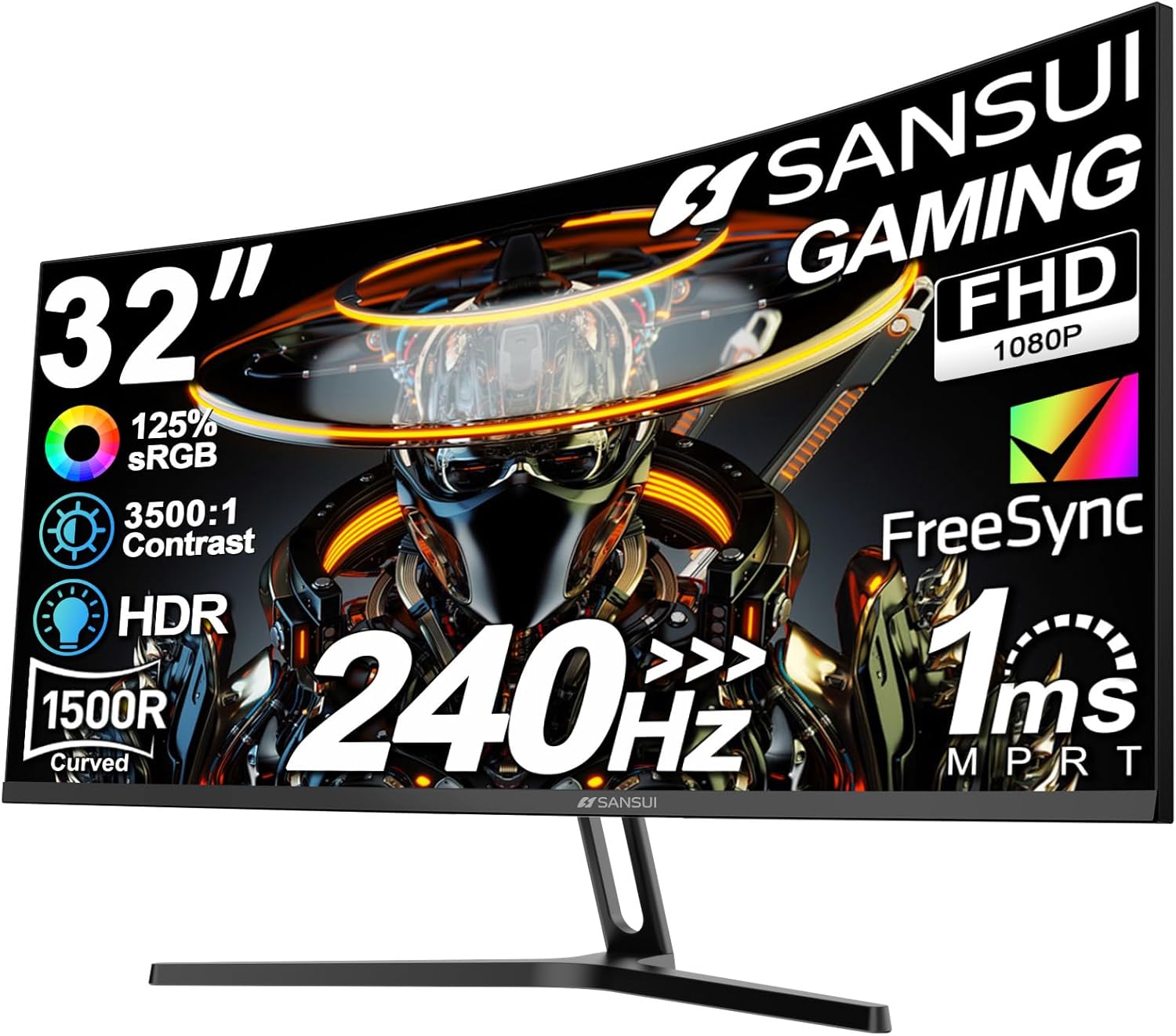
SANSUI 32 Inch Curved 240Hz Gaming Monitor High Refresh Rate, FHD 1080P Gaming PC Monitor HDMI DP1.4, Curved 1500R, 1Ms MPRT, HDR,Metal Stand,VESA Compatible(DP Cable Incl.)
Want the best price and purchase timing?
Our AI advisor analyzes real-time pricing across all channels to find you the best deal.
AI Verdict
This 32-inch 1080p 240Hz 1ms MPRT 1500R curved monitor is for budget gamers who prioritize high refresh rates and immersive gameplay over pixel density.
This monitor is a situational fit because its 240Hz refresh rate and 1ms MPRT are excellent for competitive gaming at its price point, but the 1080p resolution on a 32-inch screen is a significant compromise for pixel density. The limited ergonomic adjustments also mean it won't suit all setups without additional investment.
If pixel density is a concern, look for a 1440p resolution monitor or a 27-inch screen with 1080p resolution for a sharper image.
Regret Score™
Medium RiskLower is better — measures purchase-regret risk from real buyer complaints, review credibility, and product maturity
Issues discovered after purchase
Critically weak dimension
Amazon rating vs actual quality
Chance this product isn't for you
Pros
- The 240Hz refresh rate delivers exceptionally fluid motion for fast-paced games.
- A 1ms MPRT response time minimizes motion blur and ghosting during gameplay.
- The 1500R curvature provides an immersive viewing experience, wrapping visuals around your field of vision.
- It covers 125% sRGB color gamut, offering a wide range of display colors.
- Built-in FreeSync technology helps eliminate screen tearing and stuttering.
- VESA compatibility (75 x 75mm) allows for alternative mounting options.
Cons
- The 1920x1080 resolution on a 32-inch screen results in a lower pixel density, making individual pixels more noticeable.
- Brightness is limited to 300 nits, which is insufficient for a truly impactful HDR experience.
- The included stand only offers tilt adjustments (-5°~15°), lacking height, swivel, or pivot functionality.
- There are no built-in speakers, requiring external audio solutions.
- The VA panel technology, despite 1ms MPRT, can sometimes exhibit minor ghosting in specific scenarios.
Dimension Scores
The 1080p resolution on a 32-inch screen leads to noticeable pixelation, and 300 nits brightness limits HDR impact, despite 125% sRGB color gamut and 3500:1 contrast.
A 240Hz refresh rate and 1ms MPRT response time, combined with FreeSync, provide top-tier performance for fast-paced gaming.
It includes essential HDMI and DP 1.4 ports, plus an earphone jack, but lacks a USB hub or USB-C connectivity.
The stand only offers tilt adjustment (-5°~15°), severely limiting ergonomic flexibility, though VESA compatibility is present.
Best For
- Competitive FPS and RTS gamers on a tight budget who need high refresh rates.
- Users seeking an immersive curved experience for single-player games.
- Anyone planning to use a VESA-compatible monitor arm for ergonomic adjustments.
Not Recommended For
- Users requiring sharp text and high pixel density for productivity or detailed work.
- Professional content creators needing accurate colors and high brightness for HDR editing.
- Anyone who needs a monitor with integrated speakers or extensive stand adjustments out of the box.
Watch Out For
- The 1080p resolution on a 32-inch panel means you'll likely see individual pixels, especially if you sit close to the screen.
- While it supports HDR, the 300 nits brightness won't deliver the vibrant contrast and highlights associated with true HDR content.
- The stand only tilts between -5° and 15°, so you can't adjust the height, swivel, or pivot the screen without a separate monitor arm.
- You'll need to purchase external speakers or use headphones, as the monitor does not have any built-in.
Full Specifications
| ASIN | B0DD7GPXFH |
| Brand | SANSUI |
| Resolution | 1920 x 1080 Pixels |
| Item Weight | 11.88 pounds |
| Screen Size | 32 Inches |
| Aspect Ratio | 16:9 |
| Manufacturer | EXPRESS LUCK INDUSTRIAL(ZHONGSHAN)LIMITED |
| Image brightness | 300 Candela |
| Item model number | ES-G32C1F |
| Product Dimensions | 24.19 x 8.06 x 17.75 inches |
| Screen Surface Description | Matte |
| Standing screen display size | 32 Inches |
What Buyers Say
Many users are drawn to this monitor for its high 240Hz refresh rate and 1ms response time, which delivers smooth gameplay, especially for competitive titles. The 1500R curve also gets a lot of mentions for making games feel more immersive. However, a recurring point is the 1080p resolution on a 32-inch screen, with some finding the pixel density too low for their liking. The lack of built-in speakers and the basic tilt-only stand are also frequently noted.
“Dude, the 240Hz is absolutely insane for my FPS games, but man, I really wish this 32-inch screen was 1440p, the pixels are kinda chunky up close.”
Common Praise
- Gameplay feels incredibly smooth and fluid due to the 240Hz refresh rate.
- The 1ms MPRT response time effectively eliminates motion blur in fast-moving scenes.
- The 1500R curved screen creates a more engaging and immersive gaming environment.
- Colors appear vibrant and rich, covering 125% of the sRGB gamut.
- It offers significant value for its high refresh rate and large screen size.
Common Complaints
- The 1080p resolution on a 32-inch screen makes pixels visible, impacting image sharpness.
- The stand only tilts, lacking height, swivel, or pivot adjustments, making it hard to find a comfortable viewing position.
- HDR performance is not very noticeable due to the 300 nits peak brightness.
- Absence of built-in speakers means needing separate audio equipment.
Ownership Tips
- You'll definitely want to invest in a monitor arm if you need any kind of height or swivel adjustment, as the included stand is super basic.
- Sitting a bit further back from the screen helps reduce the visibility of individual pixels from the 1080p resolution on such a large display.
- Don't expect mind-blowing HDR; it's more of a checkbox feature with only 300 nits brightness.
- Plan on using a headset or external speakers from day one, because there's no sound coming out of this thing.
Frequently Asked Questions
Is 1080p resolution sufficient for a 32-inch monitor?
No, 1080p on a 32-inch screen results in a lower pixel density, which means images and text may appear less sharp and individual pixels more visible compared to smaller monitors or higher resolutions.
Does this monitor have built-in speakers?
No, this monitor does not include built-in speakers. You'll need to use external speakers or headphones via the earphone jack.
What kind of stand adjustments does it offer?
The included stand only allows for tilt adjustments, ranging from -5° to 15°. It does not offer height, swivel, or pivot adjustments.
Is the monitor VESA compatible?
Yes, it is VESA compatible with a 75 x 75mm mounting pattern, allowing you to use a monitor arm or wall mount.
How effective is the HDR feature with 300 nits brightness?
While the monitor supports HDR technology, its 300 nits brightness is relatively low for a truly impactful HDR experience, meaning the dynamic range and contrast won't be as pronounced as on brighter HDR displays.
Buying Guide
When you're looking at gaming monitors, you need to decide what's most important for your games. If you play competitive shooters, a high refresh rate and low response time are key for smooth, responsive gameplay. If you're into visually rich single-player games or do a lot of productivity, then resolution and pixel density will matter more for a sharp, detailed image. Curved screens can pull you into the game, but they aren't for everyone.
Refresh Rate (Hz)
Think of this like frames per second for your monitor. A 240Hz refresh rate means the screen updates 240 times every second, making motion incredibly smooth, especially in fast-paced games where every millisecond counts.
Resolution (Pixels)
This is the number of tiny dots (pixels) that make up the image on your screen. More pixels (like 1440p or 4K) mean a sharper, more detailed picture, but they also require a more powerful graphics card to run games smoothly.
Curvature (R)
The 'R' stands for radius, and a lower number (like 1500R) means a more aggressive curve. This wraps the image around your peripheral vision, aiming to make the experience more immersive, especially on larger screens.
Response Time (ms)
This measures how quickly a pixel can change from one color to another. A low response time, like 1ms, reduces 'ghosting' or 'smearing' behind fast-moving objects, keeping the image clear during intense action.
Alternatives
If you need a sharper image for a 32-inch screen, look for monitors with 1440p resolution. For better ergonomics, prioritize models with height, swivel, and pivot adjustments in their stands.
You Might Also Like

KTC H27S5C 27" Curved Gaming Monitor, 1440P QHD 144Hz 120Hz Monitor, 1500R HVA Panel, HDR400, Adaptive Sync, 400nits, HDMI 2.0 x2, DP 1.4, VESA 100x100 PC Monitor
$150-$299This is a 27-inch 1440p 144Hz curved HVA panel with 400 nits brightness and HDR400, designed for gamers and creative users needing color accuracy.

ASUS ROG Strix 32” 4K OLED Gaming Monitor (XG32UCWMG) - TrueBlack Glossy, Dual Mode(4K@240Hz, FHD@480Hz), 0.03ms, G-SYNC Compatible, Neo Proximity Sensor, USB-C, HDMI 2.1, 3 yr Warranty
$600+This 32-inch 4K 240Hz WOLED monitor with 0.03ms response and dual-mode FHD 480Hz is for serious gamers and content creators prioritizing visual fidelity and speed.

CRUA 32" White Curved Monitor, 4K UHD(3840*2160P) 1500R VA Screen, 75Hz Computer Monitor Supports AMD Freesync, 120% sRGB, Built-in speakers, Blue Light Filter,Wall Mountable Installs(HDMI 2.0/DP 1.4)
$150-$299This is a 32-inch 4K (3840x2160) 1500R VA curved monitor with a 75Hz refresh rate and 260 cd/m² brightness, best for casual media consumption and productivity.

CRUA 34 Inch Curved Gaming Monitor, 21:9 WQHD 3440x1440 165Hz/144Hz 1500R Ultrawide Computer Monitor Support Freesync, PIP/PBP, 120% sRGB, HDMI 2.0 & DP 1.4, Wall Mountable/Tilt Adjustable-Black
$150-$299A 34-inch 1500R curved 3440x1440 VA panel with 165Hz refresh, 300 cd/m² brightness, and a tilt-only stand.