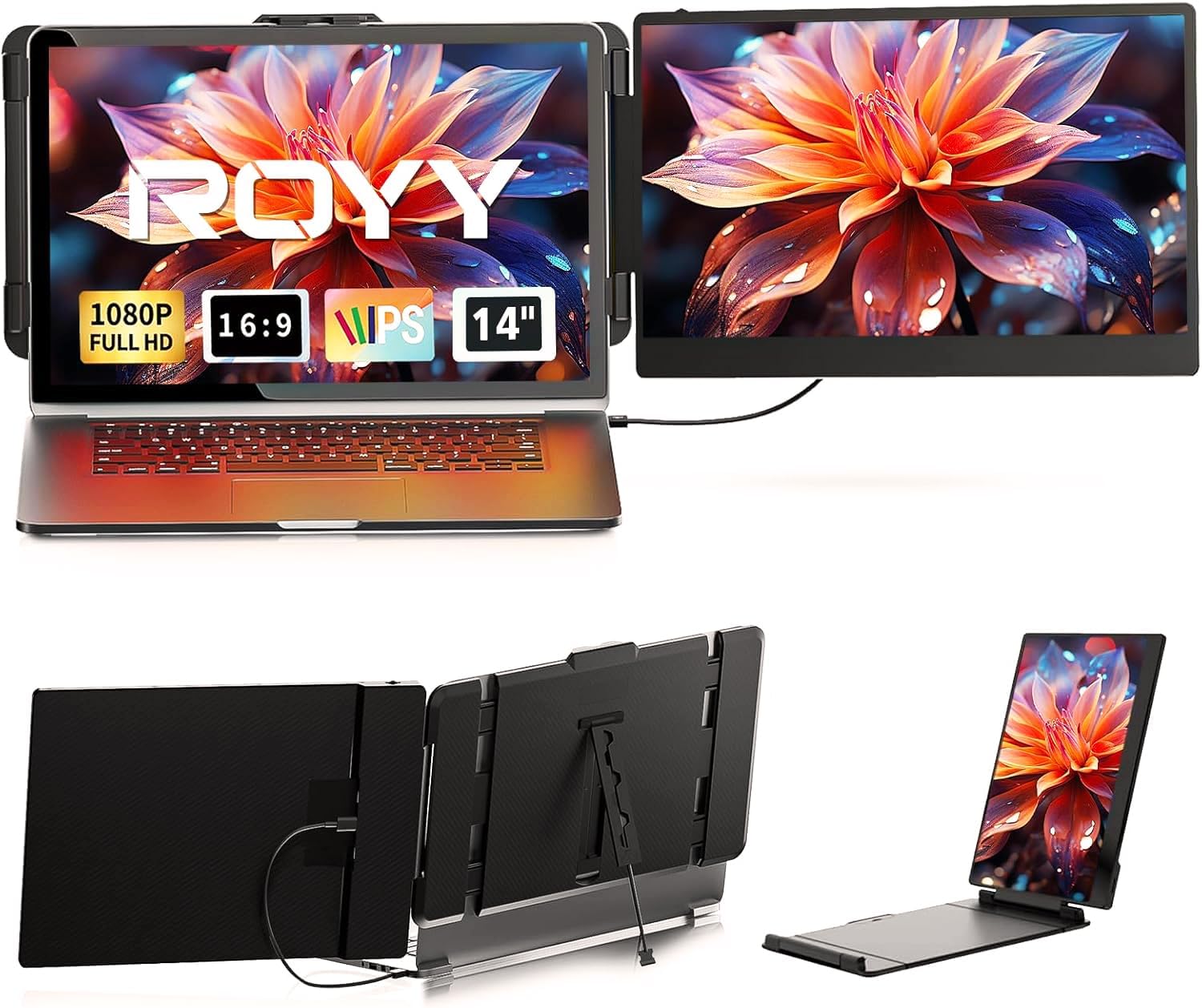
Laptop Screen Extender - 14" FHD 1080P IPS Portable Computer Monitor for Laptops, Dual Screen Travel Monitor for Laptops 13-17" with USB-C/HDMI Port, Plug & Play for Windows/Mac/Android/Switch/PS
Want the best price and purchase timing?
Our AI advisor analyzes real-time pricing across all channels to find you the best deal.
AI Verdict
A 14-inch 1080p IPS 300-nit portable monitor for 13-17 inch laptops, ideal for on-the-go dual-screen productivity.
This ROYY 14-inch 1080p IPS portable monitor is a strong fit for anyone needing a straightforward, travel-friendly screen extension. Its 2.34 lbs weight and plug-and-play USB-C connectivity make it genuinely portable and easy to deploy for productivity or entertainment on the move.
If 300 nits brightness isn't enough for bright environments, look for portable monitors with 400+ nits and higher sRGB or DCI-P3 color coverage.
Regret Score™
Medium RiskLower is better — measures purchase-regret risk from real buyer complaints, review credibility, and product maturity
Issues discovered after purchase
Critically weak dimension
Amazon rating vs actual quality
Chance this product isn't for you
Pros
- The 14-inch FHD 1920x1080 IPS panel delivers 300 nits brightness and 1000:1 contrast for clear visuals.
- Setup is driver-free and plug-and-play using a single USB-C cable for power and video, or HDMI plus USB-A.
- It weighs 2.34 lbs, making it easy to carry for frequent travel.
- Supports 0-280° rotation and multiple display modes (extended, mirror, portrait) for flexible viewing angles.
- Compatible with Windows, Mac, Android, Linux, PS4, Xbox, and Switch via USB-C or HDMI.
Cons
- The monitor requires external power via DC charger when connected solely through HDMI.
- Some users report the included cables could be better quality.
- Built-in speakers are present, but user feedback indicates they do not get very loud.
- The attachment mechanism may not fit every laptop perfectly, especially older or specific models.
- It draws a noticeable amount of power from the host laptop's battery.
Dimension Scores
The 14-inch FHD 1080p IPS panel with 300 nits brightness and 72% NTSC color coverage offers clear visuals, but 72% NTSC is average for color accuracy.
A 60Hz refresh rate and 5ms response time are standard for productivity monitors but not ideal for competitive gaming.
It offers broad compatibility with USB-C and HDMI inputs, supporting various operating systems and devices including consoles.
The monitor features 0-280° rotation and multiple display modes, providing good flexibility for viewing angles.
Best For
- Professionals needing a second screen for presentations or multitasking during business travel.
- Students or remote workers requiring expanded screen real estate in cafes or shared spaces.
- Gamers wanting a portable display for consoles like Switch or PS4/PS5 on the go.
- Anyone with a 13-17 inch laptop who needs to extend their workspace without a complex setup.
Not Recommended For
- Users seeking a primary desktop monitor with advanced ergonomic adjustments and high refresh rates.
- Individuals who primarily work in a stationary office with access to full-sized monitors.
- Laptops without a full-featured USB-C port or an HDMI port, as compatibility issues may arise.
Watch Out For
- Some users found initial setup tricky, requiring careful attention to cable connections and port types.
- The monitor needs a separate power source (DC charger) when using an HDMI connection, as HDMI only transmits video.
- The included cables might be of lower quality, potentially leading to connection issues or early wear.
- It can significantly drain a laptop's battery due to its power consumption.
- The physical fit might not be perfect for all laptop models, especially those outside the 13-17 inch range or with unusual designs.
Full Specifications
| ASIN | B0CZSB1DMW |
| Brand | ROYY |
| Resolution | 1920 x 1080 Pixels |
| Item Weight | 3.45 pounds |
| Screen Size | 14 Inches |
| Aspect Ratio | 16:9 |
| Manufacturer | ROYY |
| Total Usb Ports | 2 |
| Image brightness | 300 nits |
| Item model number | S1 |
| Product Dimensions | 1.6 x 7.42 x 8.15 inches |
| Screen Surface Description | Matte |
| Standing screen display size | 14 Inches |
What Buyers Say
Users frequently highlight how easy it is to carry this monitor due to its 2.34 lbs weight, making it a true travel companion. Many appreciate the clear and bright 1080p IPS screen, noting that colors pop and text is sharp, even from wider angles. The plug-and-play setup is a recurring positive, allowing quick connection via USB-C or HDMI/USB-A without needing drivers. However, some owners mention that the included cables could be sturdier, and the monitor can draw a significant amount of power from the laptop.
“This thing is a lifesaver for travel, but man, it sucks my laptop battery dry fast, and I wish the speakers actually got loud enough to hear anything over hotel AC.”
Common Praise
- The monitor is super easy to carry around because it's light at 2.34 lbs.
- The 1080p IPS screen is clear and bright, making videos and work look good.
- It connects quickly and easily to most laptops without needing drivers.
- The screen offers wide viewing angles, so colors don't wash out when viewed from the side.
- It feels sturdy and well-made, not flimsy.
Common Complaints
- The monitor needs a good amount of battery power from the host laptop.
- Some users found it tricky to get the monitor working correctly the first time.
- The quality of the included cables could be improved.
- The built-in speakers are not very loud.
- It doesn't fit every single laptop perfectly, with some compatibility issues reported for specific models.
Ownership Tips
- Expect to carry a power bank or stay near an outlet if you plan on extended use away from your laptop's charger.
- The included cables might fail sooner than expected; consider having backup USB-C and HDMI cables.
- While plug-and-play, some laptops might require manual display settings adjustments initially.
- The brightness and color quality hold up well over time, even with daily use.
- The kickstand design is functional for quick setups, but don't expect full ergonomic adjustability.
Frequently Asked Questions
Does this monitor require drivers to work?
No, the ROYY monitor is designed for driver-free plug-and-play operation. You just connect it via USB-C or HDMI/USB-A, and it should work.
Will this work with my MacBook?
Yes, it is compatible with most MacBooks, as well as Windows, Android, and other operating systems, provided your MacBook has a full-featured USB-C or HDMI port.
How do I power the monitor if my laptop only has an HDMI port?
If you connect via HDMI, you'll also need to use a USB-A to USB-C cable for power, or the included DC charger, as HDMI only transmits video signals.
Can I use this for gaming consoles like a Nintendo Switch?
Yes, the monitor supports gaming consoles including the Nintendo Switch, PS4, and Xbox, allowing for a larger portable gaming experience.
What is the weight of this portable monitor?
The ROYY laptop screen extender weighs 2.34 lbs, making it relatively lightweight for travel and portability.
Buying Guide
When buying a portable monitor like this, you need to think about how you'll connect it and power it. Most modern laptops use USB-C for both video and power, which is the easiest. If your laptop only has HDMI, you'll likely need a separate USB cable for power, or even a wall adapter. Also, consider the screen size relative to your laptop; a 14-inch screen works well with 13-17 inch laptops for a balanced setup.
Resolution (1920x1080 Pixels)
This is how many pixels are on the screen. 1920x1080 (FHD or 1080p) means sharp enough text and images for a 14-inch screen, like watching a Blu-ray movie. Higher numbers mean more detail, but also cost more and use more power.
Brightness (300 nits)
Nits measure how bright the screen gets. 300 nits is fine for indoor use, similar to a standard laptop screen. If you plan to work near bright windows or outdoors, you'll want something closer to 400-500 nits to avoid glare.
Panel Type (IPS)
IPS panels offer wide viewing angles and accurate colors, so the picture looks consistent even if you're not looking at it straight on. This is important for sharing your screen or if you move around a lot while working.
Connectivity (USB-C/HDMI)
This tells you how the monitor connects to your laptop. USB-C is often a single cable solution for both video and power. HDMI is common for video, but usually requires a separate USB cable for power, adding to cable clutter. Make sure your laptop has the right ports.
Alternatives
If you need more screen space, look for 15.6-inch or larger portable monitors. For better color accuracy, search for models with 99% sRGB or higher DCI-P3 coverage. If you need a brighter screen for outdoor use, target 400+ nits.
You Might Also Like

KTC H27S5C 27" Curved Gaming Monitor, 1440P QHD 144Hz 120Hz Monitor, 1500R HVA Panel, HDR400, Adaptive Sync, 400nits, HDMI 2.0 x2, DP 1.4, VESA 100x100 PC Monitor
$150-$299This is a 27-inch 1440p 144Hz curved HVA panel with 400 nits brightness and HDR400, designed for gamers and creative users needing color accuracy.

ASUS ROG Strix 32” 4K OLED Gaming Monitor (XG32UCWMG) - TrueBlack Glossy, Dual Mode(4K@240Hz, FHD@480Hz), 0.03ms, G-SYNC Compatible, Neo Proximity Sensor, USB-C, HDMI 2.1, 3 yr Warranty
$600+This 32-inch 4K 240Hz WOLED monitor with 0.03ms response and dual-mode FHD 480Hz is for serious gamers and content creators prioritizing visual fidelity and speed.

CRUA 32" White Curved Monitor, 4K UHD(3840*2160P) 1500R VA Screen, 75Hz Computer Monitor Supports AMD Freesync, 120% sRGB, Built-in speakers, Blue Light Filter,Wall Mountable Installs(HDMI 2.0/DP 1.4)
$150-$299This is a 32-inch 4K (3840x2160) 1500R VA curved monitor with a 75Hz refresh rate and 260 cd/m² brightness, best for casual media consumption and productivity.

CRUA 34 Inch Curved Gaming Monitor, 21:9 WQHD 3440x1440 165Hz/144Hz 1500R Ultrawide Computer Monitor Support Freesync, PIP/PBP, 120% sRGB, HDMI 2.0 & DP 1.4, Wall Mountable/Tilt Adjustable-Black
$150-$299A 34-inch 1500R curved 3440x1440 VA panel with 165Hz refresh, 300 cd/m² brightness, and a tilt-only stand.