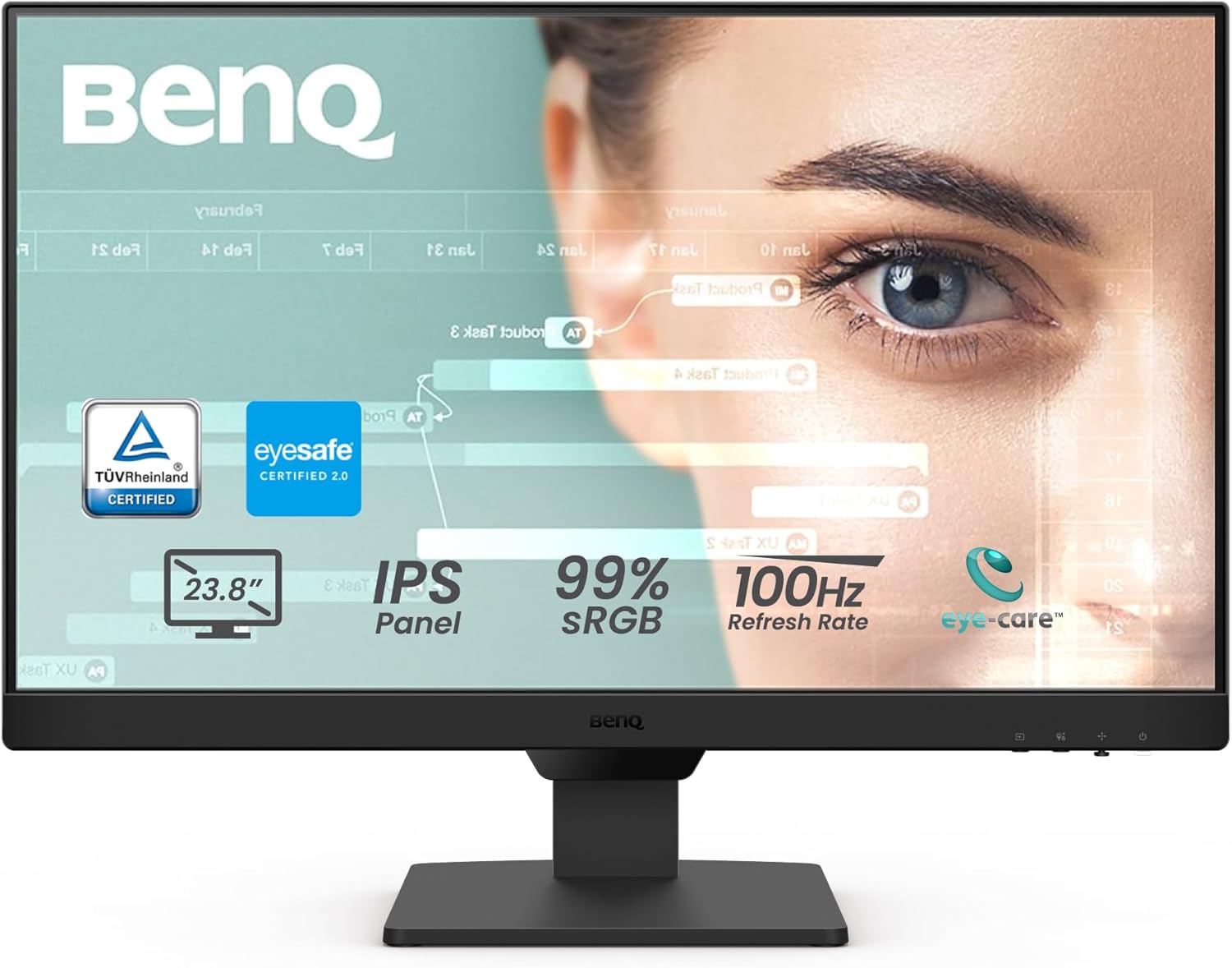
BenQ GW2490 24" Computer Monitor 100Hz FHD 1920x1080p IPS Eye-Care Tech VESA Mount Thin Bezel Low Blue Light Adaptive Brightness Wall Mount Built-in Speakers DisplayPort HDMI Port2
Want the best price and purchase timing?
Our AI advisor analyzes real-time pricing across all channels to find you the best deal.
AI Verdict
This 23.8-inch 1080p IPS monitor with a 100Hz refresh rate and extensive eye-care features is for budget-conscious users prioritizing comfortable, everyday productivity and light media consumption.
This BenQ GW2490 is a strong fit for its entry-level price band, offering a 100Hz IPS panel and a comprehensive suite of eye-care technologies. It directly addresses the needs of users seeking comfortable viewing for extended periods and smoother motion than standard 60Hz monitors, without breaking the bank. The 99% sRGB coverage also means colors are accurate enough for most everyday tasks.
If you need more screen real estate or sharper text, look for a 27-inch monitor with 1440p resolution, or a 24-inch with 1440p if pixel density is a top priority.
Regret Score™
Medium RiskLower is better — measures purchase-regret risk from real buyer complaints, review credibility, and product maturity
Issues discovered after purchase
Critically weak dimension
Amazon rating vs actual quality
Chance this product isn't for you
Pros
- 100Hz refresh rate provides smoother visuals for web browsing, video streaming, and casual gaming compared to 60Hz monitors.
- IPS panel delivers wide viewing angles and accurate colors with 99% sRGB coverage.
- BenQ Eye-Care Tech, including Low Blue Light Plus, Flicker-Free, and Adaptive Brightness, reduces eye strain during extended use.
- Features two HDMI ports and one DisplayPort for flexible connectivity to various devices.
- M-Book mode specifically matches colors for MacBooks, benefiting Mac users.
- Thin bezels maximize screen real estate and contribute to a clean aesthetic.
Cons
- The stand only offers tilt adjustment, lacking height, swivel, or pivot capabilities.
- Built-in speakers are 2W and suitable only for casual listening, not for immersive audio.
- HDR support is basic and not considered 'good' by users, typical for monitors in this price band.
- Some users report the backlight can be dimmer on the left side, with brightness dropping up to 12% away from the center.
- A 1080p resolution on a 23.8-inch screen may result in noticeable pixel density for users accustomed to higher resolutions.
Dimension Scores
The IPS panel with 99% sRGB coverage and 1300:1 contrast ratio delivers accurate colors and wide viewing angles for its price point.
The 100Hz refresh rate is an upgrade over standard 60Hz monitors, providing smoother motion, while the 5ms response time is average for an IPS panel in this category.
With two HDMI ports, one DisplayPort, and VESA mount compatibility, it offers flexible connectivity for multiple devices.
The stand only provides tilt adjustment, severely limiting ergonomic flexibility compared to monitors with height, swivel, and pivot.
Best For
- Home office setups for document work, web browsing, and video calls.
- Students needing a secondary display for research and online learning.
- Users who spend long hours in front of a screen and prioritize eye comfort.
- Casual gamers looking for a smoother experience than 60Hz without a significant investment.
Not Recommended For
- Professional graphic designers or video editors requiring precise color grading and high brightness uniformity.
- Competitive gamers needing high refresh rates (144Hz+) and low response times (1ms).
- Users who require extensive ergonomic adjustments from their monitor stand.
- Anyone expecting a true HDR viewing experience.
Watch Out For
- The included stand only tilts, meaning you'll need to buy a VESA-compatible monitor arm if you want height, swivel, or pivot adjustments.
- Don't expect much from the built-in 2W speakers; they're fine for system sounds but not for music or movies.
- While it supports HDR, the panel's capabilities mean it won't deliver a true HDR experience with deep blacks or high peak brightness.
- Some units might show up to a 12% brightness drop on the left side of the screen, which could be distracting for some content.
Full Specifications
| ASIN | B0CP9THGP2 |
| Brand | BenQ |
| Color | VIOLET, BLACK |
| Series | GW2490 |
| Voltage | 220 Volts |
| Department | Computer Monitor |
| Resolution | FHD 1080p |
| Item Weight | 8.4 pounds |
| Screen Size | 23.8 Inches |
| Aspect Ratio | 16:9 |
| Manufacturer | BenQ |
| Item model number | GW2490 |
| Screen Resolution | 1920x1080 |
| Product Dimensions | 6.9 x 16.03 x 21.26 inches |
| Max Screen Resolution | 1920 x 1080 Pixels |
| Item Dimensions LxWxH | 6.9 x 16.03 x 21.26 inches |
| Screen Surface Description | Matte |
| Standing screen display size | 23.8 Inches |
What Buyers Say
Users frequently highlight the BenQ GW2490's eye-care features as a major selling point, making long work sessions much more comfortable. The 100Hz refresh rate is consistently praised for providing a noticeably smoother experience than 60Hz monitors, even for everyday tasks like web browsing. While the 99% sRGB color accuracy is appreciated for general use and light creative work, the stand's lack of adjustments and the basic quality of the built-in speakers are common points of contention. Some users also note that while HDR is present, it doesn't offer a truly impactful visual upgrade.
“Honestly, this monitor saved my eyes during my 8-hour workdays, but I had to buy a VESA arm because the stand was driving me nuts with just tilt.”
Common Praise
- The Low Blue Light Plus and Flicker-Free technologies significantly reduce eye fatigue during extended use.
- 100Hz refresh rate makes scrolling, video playback, and casual gaming feel much smoother.
- Colors are accurate and vibrant with 99% sRGB coverage, making it suitable for light photo/video editing.
- The thin bezels create an immersive viewing experience and a modern look.
- M-Book mode is a specific and useful feature for MacBook users to match color profiles.
- Text appears crisp and clear, which is beneficial for productivity tasks.
Common Complaints
- The stand only tilts, making it difficult to find an optimal viewing position without a separate monitor arm.
- Built-in speakers are weak (2W) and lack bass, requiring external speakers for decent audio.
- HDR functionality is not very effective and doesn't provide a noticeable improvement in image quality.
- Some users experienced slight brightness inconsistencies, particularly a dimmer left side.
- The 1080p resolution on a 23.8-inch screen can appear less sharp if you're used to higher pixel densities.
Ownership Tips
- The eye-care modes, especially the adaptive brightness, really do make a difference for long-term comfort, not just marketing fluff.
- Switching between devices using the Input Hotkey is genuinely convenient if you use multiple computers.
- You'll probably want to invest in external speakers or headphones if audio quality matters to you at all.
- The 100Hz refresh rate is a subtle but welcome upgrade for everyday use, making everything feel a bit snappier.
- The M-Book mode is a pleasant surprise for Mac users, helping to maintain consistent color appearance.
Frequently Asked Questions
Does this monitor have built-in speakers?
Yes, the BenQ GW2490 includes built-in speakers. However, they are 2W speakers and are best suited for casual audio like system sounds or video calls, not for high-fidelity music or immersive movie watching.
Can I adjust the height of the monitor?
No, the included stand for the BenQ GW2490 only allows for tilt adjustments. It does not offer height, swivel, or pivot adjustments.
Is this monitor good for gaming?
With a 100Hz refresh rate and 5ms response time, it offers a smoother experience than standard 60Hz monitors, making it suitable for casual gaming and less demanding titles. However, it's not designed for competitive gaming where higher refresh rates (144Hz+) and faster response times (1ms) are preferred.
What kind of eye-care features does it have?
The BenQ GW2490 features extensive Eye-Care Tech, including Low Blue Light Plus to filter harmful blue-violet light, Flicker-Free technology to eliminate screen flicker, and Adaptive Brightness (Visual Optimizer) which adjusts brightness and color temperature based on ambient light. It also has ePaper and Coding modes for reading comfort.
Does it work well with MacBooks?
Yes, it includes an M-Book mode that matches the colors to your MacBook, which is a specific benefit for Mac users seeking color accuracy.
Buying Guide
When you're looking at monitors, especially in this price range, think about what you'll actually be doing. A 100Hz refresh rate means the screen updates 100 times per second, making motion look smoother than a typical 60Hz display, which is noticeable even when just scrolling. IPS panels give you wider viewing angles and better color accuracy than cheaper TN panels, so colors won't look washed out if you're not sitting perfectly straight in front of it. Eye-care features are a big deal if you stare at a screen for hours; they actively work to reduce strain.
100Hz Refresh Rate
This is how many times per second the image on your screen refreshes. A 100Hz monitor updates more frequently than a standard 60Hz one, making everything from scrolling web pages to moving your mouse feel noticeably smoother, like watching a higher frame rate video.
IPS Panel
This refers to the type of display technology. IPS (In-Plane Switching) panels are known for their wide viewing angles and accurate color reproduction. This means colors stay consistent and true, even if you're looking at the screen from the side, unlike older panel types where colors can shift.
Eye-Care Tech (Low Blue Light Plus, Flicker-Free, Adaptive Brightness)
These are features designed to protect your eyes. Low Blue Light Plus filters out harmful blue light without distorting colors, Flicker-Free eliminates invisible screen flickering that causes strain, and Adaptive Brightness automatically adjusts the screen's brightness to your room's lighting, similar to how your phone adjusts its screen.
Alternatives
If this monitor doesn't quite fit, consider searching for a 27-inch 1440p IPS monitor for more screen space and sharper images, or a 144Hz+ monitor if competitive gaming is your main focus.
You Might Also Like

KTC H27S5C 27" Curved Gaming Monitor, 1440P QHD 144Hz 120Hz Monitor, 1500R HVA Panel, HDR400, Adaptive Sync, 400nits, HDMI 2.0 x2, DP 1.4, VESA 100x100 PC Monitor
$150-$299This is a 27-inch 1440p 144Hz curved HVA panel with 400 nits brightness and HDR400, designed for gamers and creative users needing color accuracy.

ASUS ROG Strix 32” 4K OLED Gaming Monitor (XG32UCWMG) - TrueBlack Glossy, Dual Mode(4K@240Hz, FHD@480Hz), 0.03ms, G-SYNC Compatible, Neo Proximity Sensor, USB-C, HDMI 2.1, 3 yr Warranty
$600+This 32-inch 4K 240Hz WOLED monitor with 0.03ms response and dual-mode FHD 480Hz is for serious gamers and content creators prioritizing visual fidelity and speed.

CRUA 32" White Curved Monitor, 4K UHD(3840*2160P) 1500R VA Screen, 75Hz Computer Monitor Supports AMD Freesync, 120% sRGB, Built-in speakers, Blue Light Filter,Wall Mountable Installs(HDMI 2.0/DP 1.4)
$150-$299This is a 32-inch 4K (3840x2160) 1500R VA curved monitor with a 75Hz refresh rate and 260 cd/m² brightness, best for casual media consumption and productivity.

CRUA 34 Inch Curved Gaming Monitor, 21:9 WQHD 3440x1440 165Hz/144Hz 1500R Ultrawide Computer Monitor Support Freesync, PIP/PBP, 120% sRGB, HDMI 2.0 & DP 1.4, Wall Mountable/Tilt Adjustable-Black
$150-$299A 34-inch 1500R curved 3440x1440 VA panel with 165Hz refresh, 300 cd/m² brightness, and a tilt-only stand.