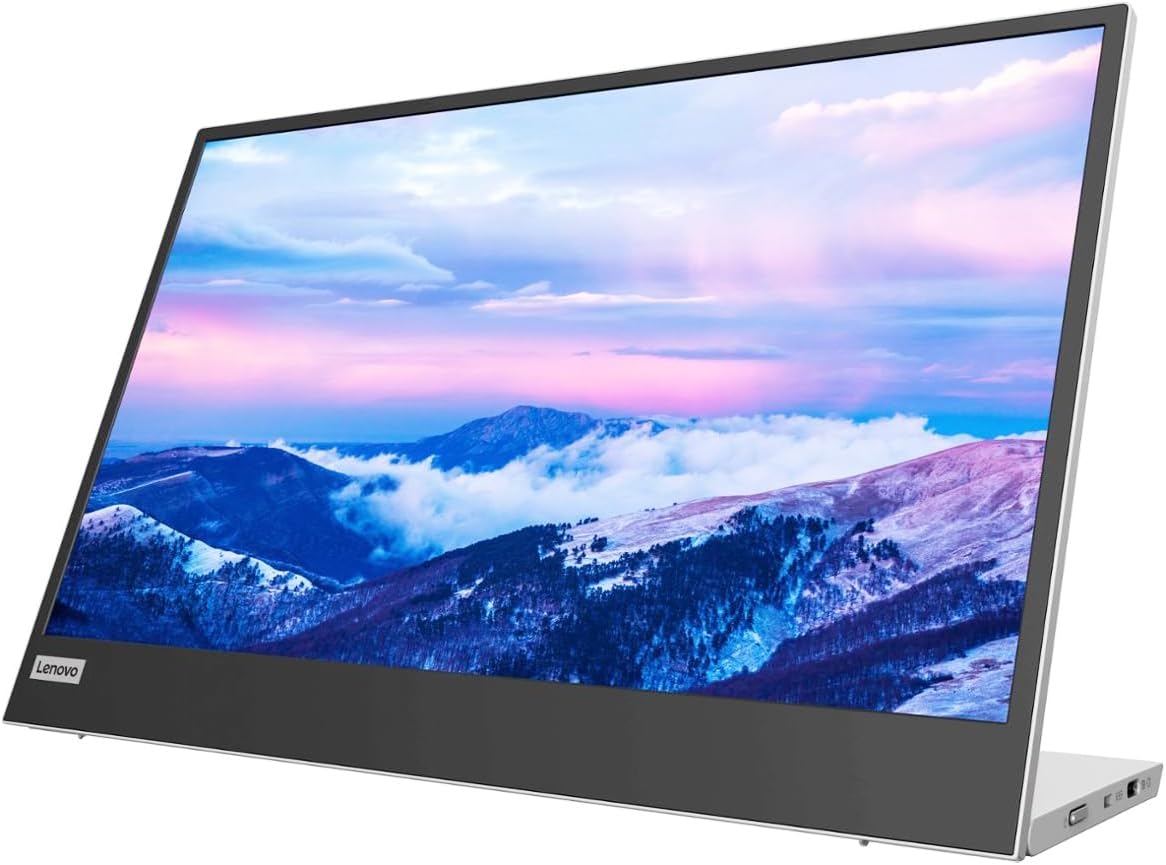
Lenovo L15 Portable Monitor, 15.6” Display, Full HD Resolution, IPS Panel, 250 nits Brightness, 60Hz Refresh Rate, USB-C Ports, Height-Adjustable Stand, Flicker-Free Technology, Grey
Want the best price and purchase timing?
Our AI advisor analyzes real-time pricing across all channels to find you the best deal.
AI Verdict
This 15.6-inch, 1080p IPS display with 250 nits brightness and dual USB-C ports is for anyone needing a lightweight, single-cable second screen for productivity on the go.
This monitor is a solid pick if your primary need is a lightweight, easy-to-use second screen for basic productivity tasks via a single USB-C cable. Its 250-nit IPS panel and 1080p resolution are adequate for text and general use, but won't impress for color-critical work or in bright rooms. The unique, stable stand is a definite plus over many competitors' flimsy covers.
If you need better color accuracy or higher brightness, look for portable monitors with 300+ nits and specified sRGB or DCI-P3 coverage.
Regret Score™
Medium RiskLower is better — measures purchase-regret risk from real buyer complaints, review credibility, and product maturity
Issues discovered after purchase
Critically weak dimension
Amazon rating vs actual quality
Chance this product isn't for you
Pros
- Connects and powers via a single USB-C cable, simplifying setup.
- Weighs 1.9 pounds, making it genuinely portable for travel.
- Integrated stand with a sturdy hinge allows for height adjustment and stable positioning without a flimsy cover.
- Features two USB-C ports, one for input/power and the other for power pass-through to charge your laptop or phone.
- IPS panel provides consistent colors and wide viewing angles.
- Includes a soft carrying sleeve for basic screen protection during transport.
Cons
- 250 nits brightness is often insufficient for bright environments or outdoor use, appearing dim compared to many laptop screens.
- Lacks an HDMI port, limiting compatibility to devices with USB-C DisplayPort Alt Mode.
- No built-in speakers, requiring external audio solutions.
- Limited on-screen display (OSD) options, with only dedicated brightness and blue light buttons.
- Using the monitor significantly drains laptop battery life.
Dimension Scores
The 1080p IPS panel with 250 nits brightness is average for a portable monitor, suitable for text but not for color-critical tasks or bright environments.
A 60Hz refresh rate is standard for productivity monitors and portable displays, offering fluid visuals for general use but not for high-refresh-rate gaming.
Two USB-C ports with power pass-through are convenient, but the complete absence of HDMI significantly limits compatibility with many devices.
The integrated, height-adjustable stand with a stable hinge is a significant ergonomic advantage over many portable monitors that rely on flimsy folding covers.
Best For
- Expanding screen real estate for a laptop in coffee shops or temporary workspaces.
- Presenting content to a small group from a USB-C enabled device.
- Adding a second screen for spreadsheet work or email management while traveling.
- Students needing an extra display for research or coding on a budget.
Not Recommended For
- Graphic designers or photographers requiring high color accuracy or brightness.
- Users needing a monitor with integrated speakers for multimedia consumption.
- Anyone connecting to older devices without USB-C DisplayPort Alt Mode.
Watch Out For
- The low blue light setting defaults to max brightness and is non-adjustable, which defeats its purpose for some users.
- Some users report occasional connectivity challenges, especially if the host device doesn't provide enough power over USB-C.
- The top bezel can feel a bit loose, suggesting a less rigid build quality in that area.
- Portrait orientation is awkward due to button placement and the absence of auto-rotation.
- The included sleeve is soft, offering minimal impact protection, so you need to be careful when tossing it into a backpack.
Full Specifications
| ASIN | B0B5GRGCX5 |
| Brand | Lenovo |
| Color | Black/Grey |
| Series | L15 |
| Resolution | FHD 1080p |
| Item Weight | 4.7 pounds |
| Screen Size | 15.6 Inches |
| Aspect Ratio | 16:9 |
| Manufacturer | Lenovo |
| Item model number | 66E4UCC1UZ |
| Screen Resolution | 1920x1080 |
| Product Dimensions | 9.66 x 42.67 x 14.17 inches |
| Max Screen Resolution | 1920 x 1080 |
| Item Dimensions LxWxH | 9.66 x 42.67 x 14.17 inches |
| Screen Surface Description | Glossy |
| Standing screen display size | 15.6 Inches |
What Buyers Say
What really stands out is how many people love the built-in stand; it's way better than those floppy cover stands other portable monitors use. People are stoked about how easy it is to set up with just one USB-C cable, and how light it feels in a backpack. The 1080p screen is totally fine for work stuff, but don't expect it to blow your mind with brightness or color accuracy, especially if you're near a window. The biggest bummer for some is the lack of an HDMI port, which means you're out of luck if your device doesn't do video over USB-C.
“Okay, so I needed a second screen for my work laptop when I'm bouncing between coffee shops, and this thing is PERFECT for that. Just one cable, boom, extra screen. Yeah, it's not super bright and no speakers, but for spreadsheets and emails, who cares? My only gripe is I wish it had an HDMI for my old mini PC, but whatever, it's still a lifesaver.”
Common Praise
- The integrated stand is stable and allows for height adjustment, unlike many portable monitor covers.
- Single USB-C cable for both power and video makes setup incredibly simple.
- Extremely lightweight at 1.9 pounds, making it easy to carry in a bag.
- Pass-through power feature lets you charge your laptop or phone through the monitor.
- IPS panel offers wide viewing angles for consistent image quality.
- Comes with a soft sleeve for scratch protection during travel.
Common Complaints
- Brightness of 250 nits is often perceived as dim, especially in well-lit rooms or outdoors.
- No HDMI port means limited compatibility with devices lacking USB-C video output.
- Absence of built-in speakers requires users to rely on external audio.
- The low blue light setting's non-adjustable brightness is counterintuitive.
- The top bezel can feel less secure than the rest of the display.
- Significantly reduces laptop battery life when in use.
Ownership Tips
- The USB-C cable included is usually long enough for most setups, but having a spare shorter one for tighter spaces is handy.
- The stand's hinge is stiff enough to hold its position, which is a relief after dealing with monitors that slowly sag.
- You'll quickly learn to manage your laptop's battery life, as this monitor definitely sips power from it.
- The lack of an OSD means you're stuck with basic brightness and blue light controls; don't expect to tweak color profiles.
- While it comes with a sleeve, investing in a slightly more padded case might be a good idea if you're rough with your gear.
Frequently Asked Questions
Does the Lenovo L15 require a separate power adapter?
No, it typically powers directly from your laptop via the USB-C cable. It can also pass through power from a USB-C charger to your laptop or phone, so you only need one power source for both devices.
Can I connect this monitor to a device that only has HDMI?
No, the Lenovo L15 only has USB-C ports for video input. It does not have an HDMI port, so devices without USB-C DisplayPort Alt Mode will not be compatible without a specific adapter that converts HDMI to DisplayPort over USB-C, which may not always work.
Does the L15 have built-in speakers?
No, the Lenovo L15 Portable Monitor does not include built-in speakers.
Is the stand adjustable?
Yes, it features an ergonomically designed, height-adjustable stand with a sturdy hinge and a flip-down foot for additional elevation.
Does it come with a carrying case?
Yes, it includes a soft, felt-like sleeve for protection against scratches when transporting it.
Buying Guide
When you're looking at portable monitors like this, you're basically buying an extension of your laptop screen. The key is how easily it integrates into your mobile setup. You want something that powers and displays with minimal fuss, ideally a single cable. Don't expect desktop monitor performance; these are for convenience and expanding screen real estate on the go, not for high-fidelity graphics or gaming. Think about where you'll actually use it and what devices you'll connect.
250 nits Brightness
This number tells you how bright the screen gets. Think of it like a flashlight's power: 250 nits is okay for indoor use, like a dimly lit room, but it'll struggle in bright offices or direct sunlight, making the screen look washed out.
IPS Panel
This refers to the screen technology. IPS panels are like having a wide viewing angle on your TV; you can look at the screen from almost any side and the colors and image won't distort. This is crucial for a portable monitor where your viewing position might not always be head-on.
USB-C Ports
These are your connection points. For portable monitors, USB-C is like a magic cable because it can carry video, audio, and power all at once. If your laptop has a 'full-featured' USB-C port (check for DisplayPort Alt Mode), you only need one cable. If not, you might need adapters or separate power, which defeats the 'portable' convenience.
Alternatives
If this monitor doesn't quite fit, look for models with higher brightness (300+ nits), additional input ports like HDMI or DisplayPort, or integrated speakers if multimedia is a priority.
You Might Also Like

KTC H27S5C 27" Curved Gaming Monitor, 1440P QHD 144Hz 120Hz Monitor, 1500R HVA Panel, HDR400, Adaptive Sync, 400nits, HDMI 2.0 x2, DP 1.4, VESA 100x100 PC Monitor
$150-$299This is a 27-inch 1440p 144Hz curved HVA panel with 400 nits brightness and HDR400, designed for gamers and creative users needing color accuracy.

ASUS ROG Strix 32” 4K OLED Gaming Monitor (XG32UCWMG) - TrueBlack Glossy, Dual Mode(4K@240Hz, FHD@480Hz), 0.03ms, G-SYNC Compatible, Neo Proximity Sensor, USB-C, HDMI 2.1, 3 yr Warranty
$600+This 32-inch 4K 240Hz WOLED monitor with 0.03ms response and dual-mode FHD 480Hz is for serious gamers and content creators prioritizing visual fidelity and speed.

CRUA 32" White Curved Monitor, 4K UHD(3840*2160P) 1500R VA Screen, 75Hz Computer Monitor Supports AMD Freesync, 120% sRGB, Built-in speakers, Blue Light Filter,Wall Mountable Installs(HDMI 2.0/DP 1.4)
$150-$299This is a 32-inch 4K (3840x2160) 1500R VA curved monitor with a 75Hz refresh rate and 260 cd/m² brightness, best for casual media consumption and productivity.

CRUA 34 Inch Curved Gaming Monitor, 21:9 WQHD 3440x1440 165Hz/144Hz 1500R Ultrawide Computer Monitor Support Freesync, PIP/PBP, 120% sRGB, HDMI 2.0 & DP 1.4, Wall Mountable/Tilt Adjustable-Black
$150-$299A 34-inch 1500R curved 3440x1440 VA panel with 165Hz refresh, 300 cd/m² brightness, and a tilt-only stand.