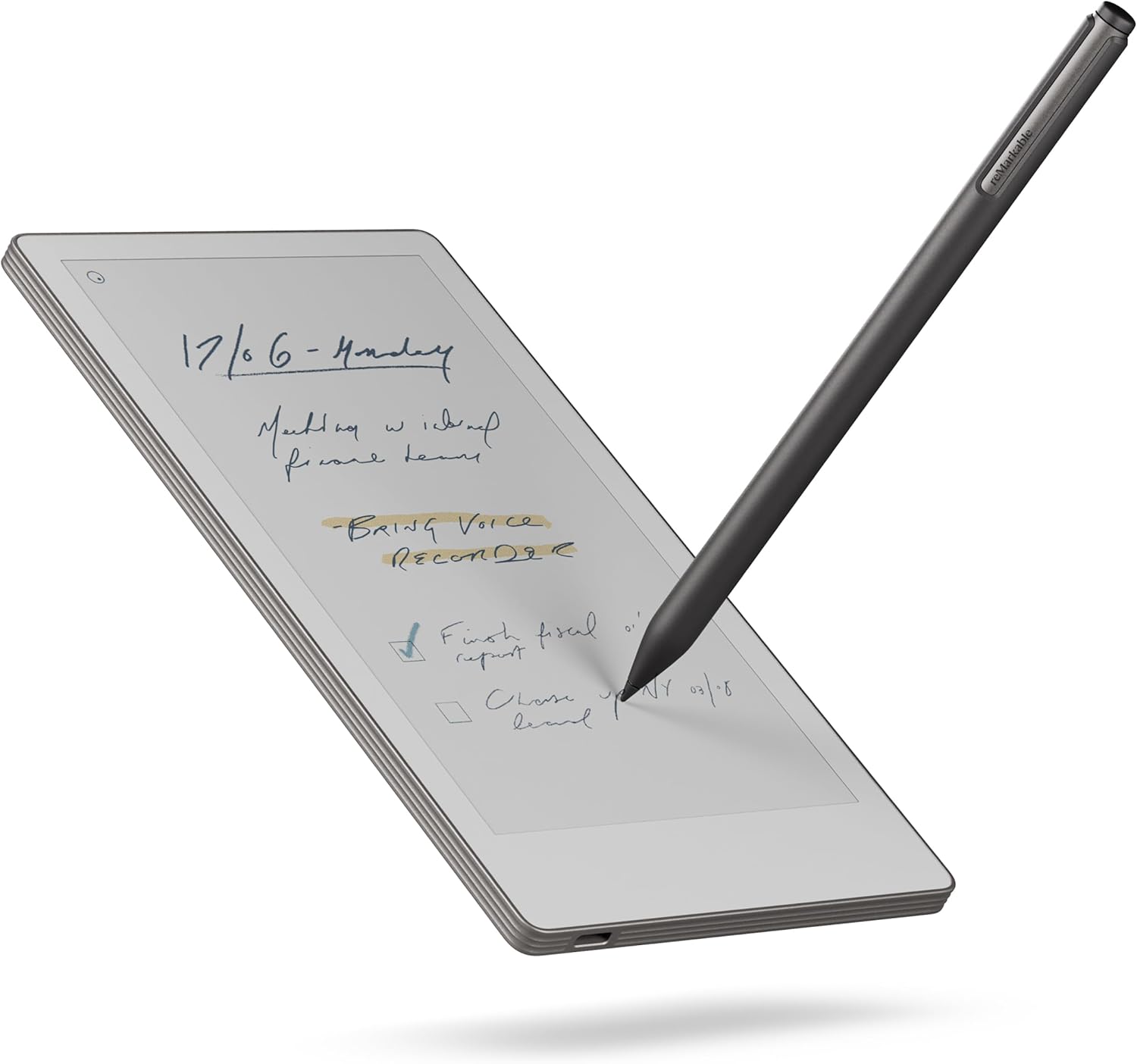
reMarkable Paper Pro Move | Ultraportable Color 7.3" Paper Tablet with Marker Plus | The Digital Pocket Notebook for Productivity on The Go
Want the best price and purchase timing?
Our AI advisor analyzes real-time pricing across all channels to find you the best deal.
AI Verdict
This 7.3-inch color e-ink tablet with 64 GB storage is for focused, distraction-free handwriting and note-taking on the go.
This device is a strong fit for individuals prioritizing a focused, paper-like writing experience in a portable form factor. Its 7.3-inch color e-ink display and 64 GB storage are specifically designed for extensive note-taking and document annotation without digital distractions.
If you need a larger workspace for complex documents or a broader app ecosystem, look for e-ink tablets with 10-inch+ screens or an Android OS.
Regret Score™
High RiskLower is better — measures purchase-regret risk from real buyer complaints, review credibility, and product maturity
Issues discovered after purchase
Critically weak dimension
Amazon rating vs actual quality
Chance this product isn't for you
Pros
- The writing experience feels natural, similar to pen on paper.
- Its 7.3-inch form factor is compact and portable, fitting into a jacket pocket.
- The color display helps with visual distinction and organizing notes and planning layouts.
- The reMarkable OS is designed to be distraction-free, without notifications.
- 64 GB of storage allows for carrying many notebooks and documents.
- Handwritten notes can be converted to typed text and synced to the cloud with a Connect subscription.
Cons
- Battery life is significantly shorter than the advertised 15 days, lasting 1-2 days with active writing and backlight.
- A Connect subscription is required for cloud sync, handwriting conversion, and search features.
- The color display can appear muted or washed out compared to other screen technologies.
- The screen exhibits noticeable flickering during refreshes, which some users find distracting.
- There is no fingerprint scanner for quick, secure access.
- The tall aspect ratio of the 7.3-inch screen is not ideal for all document types, making some PDFs and EPUBs appear too small in portrait mode.
Dimension Scores
The 7.3-inch color e-ink display offers visual distinction, but some users report muted colors and noticeable flickering during refreshes.
Running reMarkable OS, it's generally responsive for note-taking, but some users experience occasional marker glitches and sluggishness with color features.
Despite a 15-day claim, active use with the backlight reduces battery life to 1-2 days, requiring frequent charging.
The reMarkable OS provides a focused experience with cloud sync via Connect, but lacks broader app integration or external device support beyond basic WiFi.
Best For
- Taking quick, focused notes in meetings without digital interruptions.
- Journaling and daily planning, especially when portability is key.
- Annotating documents and PDFs in a distraction-free environment.
- Users who prefer the tactile feel of writing on paper but need digital organization.
Not Recommended For
- Reading DRM-protected ebooks or accessing a wide range of e-reader features like bookstores or dictionaries.
- Users expecting a full-featured tablet experience with app ecosystems and multimedia playback.
- Those who need vibrant, saturated colors for graphic design or detailed color work.
Watch Out For
- The Marker Plus can occasionally stop working, requiring a device restart to resolve.
- Battery drains quickly with active use and the backlight, often needing charging every 1-2 days instead of the advertised 15 days.
- The screen refresh causes a noticeable flicker that can be distracting during continuous use.
- The Connect subscription, which costs extra, is necessary for core features like cloud synchronization, handwriting search, and text conversion.
- Some PDFs and EPUB files are too small in portrait mode on the 7.3-inch screen, necessitating frequent scrolling or zooming.
Full Specifications
| RAM | 2 GB |
| ASIN | B0FMS91Z9M |
| Brand | reMarkable |
| Color | Silver |
| Series | reMarkable Paper Pro Move |
| Batteries | 1 Lithium Ion batteries required. (included) |
| Processor | 1.7 GHz |
| Model Name | reMarkable Paper Pro Move |
| Item Weight | 8.8 ounces |
| Screen Size | 7.3 Inches |
| Wireless Type | 802.11g |
| Processor Brand | ARM |
| Operating System | reMarkable OS |
| Flash Memory Size | 64 GB |
| Hardware Platform | PC |
| Item model number | RM03A |
| Screen Resolution | 954x1696 pixels |
| Product Dimensions | 8.9 x 5.43 x 1.3 inches |
| Max Screen Resolution | 954x1696 Pixels |
| Item Dimensions LxWxH | 8.9 x 5.43 x 1.3 inches |
| Memory Storage Capacity | 64 GB |
| Display Resolution Maximum | 954x1696 Pixels |
| Standing screen display size | 7.3 Inches |
| Average Battery Life (in hours) | 15 days |
What Buyers Say
The reMarkable Paper Pro Move is a polarizing device; many users are thrilled with its compact size and the natural feel of writing on its 7.3-inch color e-ink screen, making it a constant companion for notes and planning. However, the battery life often falls short of expectations, especially with active use and the backlight, leading to more frequent charging than anticipated. The requirement of a Connect subscription for essential features like cloud sync and handwriting search is a recurring point of contention for some users. While the color display is appreciated for organization, its muted appearance and screen flickering during refreshes are noted drawbacks.
“I shelled out for this thing expecting two weeks of battery, but if I actually *use* it for notes, I'm charging it every other day, which is just annoying for the price.”
Common Praise
- The writing experience feels incredibly natural, like using a real pen on paper.
- The compact 7.3-inch size makes it easy to carry everywhere, fitting into pockets.
- The device offers a truly distraction-free environment for focused work.
- The addition of color helps significantly with organizing notes and planning layouts.
- The ability to convert handwriting to typed text is a useful productivity feature.
- The build quality feels premium and sturdy.
Common Complaints
- Battery life is much shorter than the advertised 15 days, often lasting only 1-2 days with active use.
- The Connect subscription is a mandatory extra cost for cloud sync, search, and text conversion.
- The screen flickers noticeably during refreshes, which can be distracting.
- Colors on the display can appear dull, washed out, or muted, not vibrant like an LCD.
- The Marker Plus occasionally stops responding, requiring a device restart.
- The tall aspect ratio makes some PDFs and EPUBs difficult to read in portrait mode.
Ownership Tips
- You'll need to charge this device much more frequently than the advertised 15 days if you're actively writing and using the backlight.
- The tall aspect ratio of the 7.3-inch screen takes some getting used to, especially for documents not optimized for it.
- While it has color, don't expect the vibrancy of an LCD; it's more subtle and watercolor-like, which is different.
- The Marker Plus, with its built-in eraser, feels almost essential for a seamless writing experience, making the basic marker less appealing.
- The device is truly pocketable for jackets, but might be a tight squeeze for jeans pockets.
Frequently Asked Questions
Does the reMarkable Paper Pro Move have a backlight?
Yes, it features a front light, making it usable in various lighting conditions.
Can I use the reMarkable Paper Pro Move for reading books?
It supports ePub and PDF formats, but it lacks features like a built-in bookstore, dictionaries, or DRM support found in dedicated e-readers.
Is the Connect subscription required for all features?
The Connect subscription is necessary for cloud synchronization, converting handwriting to typed text, and searching through your handwritten notes.
What is the actual battery life of the device?
While advertised at 15 days, users report 1-2 days with active writing and backlight, or a few days with regular use, requiring charging every other day.
Are reMarkable 2 markers compatible with this device?
No, reMarkable 2 markers are not compatible, but reMarkable Paper Pro markers are fully compatible.
Buying Guide
When looking at e-ink tablets like this, you're buying into a specific experience: distraction-free digital paper. It's not a tablet for browsing the web or watching videos. You're paying for the feel of writing on paper, the ability to organize endless notes, and the portability. Understand that features like cloud sync often come with a separate subscription.
screen_size: 7.3 Inches
This measurement tells you how much writing space you get. A 7.3-inch screen is very portable, like a small paperback, but it means less room for viewing large documents or complex layouts without zooming or scrolling.
resolution: 954x1696 pixels
This determines how sharp and clear text and lines appear. A higher resolution means smoother lines and crisper text, making your handwriting look more natural and documents easier to read.
storage: 64 GB
This is how much space you have for your digital notebooks and documents. 64 GB is enough to store thousands of notes and books, essentially replacing countless physical notebooks.
connectivity: 802.11g
This is the type of Wi-Fi it uses to connect to the internet for syncing your notes. 802.11g is an older standard, meaning slower transfer speeds compared to newer Wi-Fi versions, but it's sufficient for syncing text-based notes.
Alternatives
If you need more screen real estate for reading or annotating larger documents, look for e-ink tablets with 10-inch or larger displays. If you want a device with a broader range of apps and more vibrant color, consider e-ink tablets running an Android operating system.
You Might Also Like

Android Tablet with Keyboard, Android 15 Tablet 10 inch, 26GB+256GB+2TB Expand, 2-in-1 Tablets with 8-Core, 5G WiFi, 8000mAh, BT5.0, GMS, GPS, Gemini AI, Tablets PC with Mouse, Case, Stylus(Black)
$100-$149This 10.1-inch Android 15 tablet offers a 1280x800 IPS display, 6GB physical RAM (plus 20GB virtual), 256GB storage, and an 8000mAh battery, bundled with a keyboard, mouse, and stylus for budget-focus

Apple iPad (9th Generation): with A13 Bionic chip, 10.2-inch Retina Display, 64GB, Wi-Fi, 12MP front/8MP Back Camera, Touch ID, All-Day Battery Life – Space Gray
This 10.2-inch Retina Display iPad with an A13 Bionic chip and 64GB storage is for casual users needing a reliable Apple tablet for media and light tasks.

Amazon Fire HD 10 tablet (newest model) built for relaxation, 10.1" vibrant Full HD screen, octa-core processor, 3 GB RAM, 32 GB, Lilac
A 10.1" 1080p tablet with an octa-core processor and 3GB RAM, designed for Amazon content consumption and light use.

Wacom Intuos Small Graphics Drawing Tablet, Includes Training & Software; 4 Customizable ExpressKeys Compatible with Chromebook Mac Android & Windows, Black
A compact Wacom Intuos with a battery-free pen and 6.0 x 3.7-inch active area, suitable for digital art beginners on Windows, Mac, or Android.