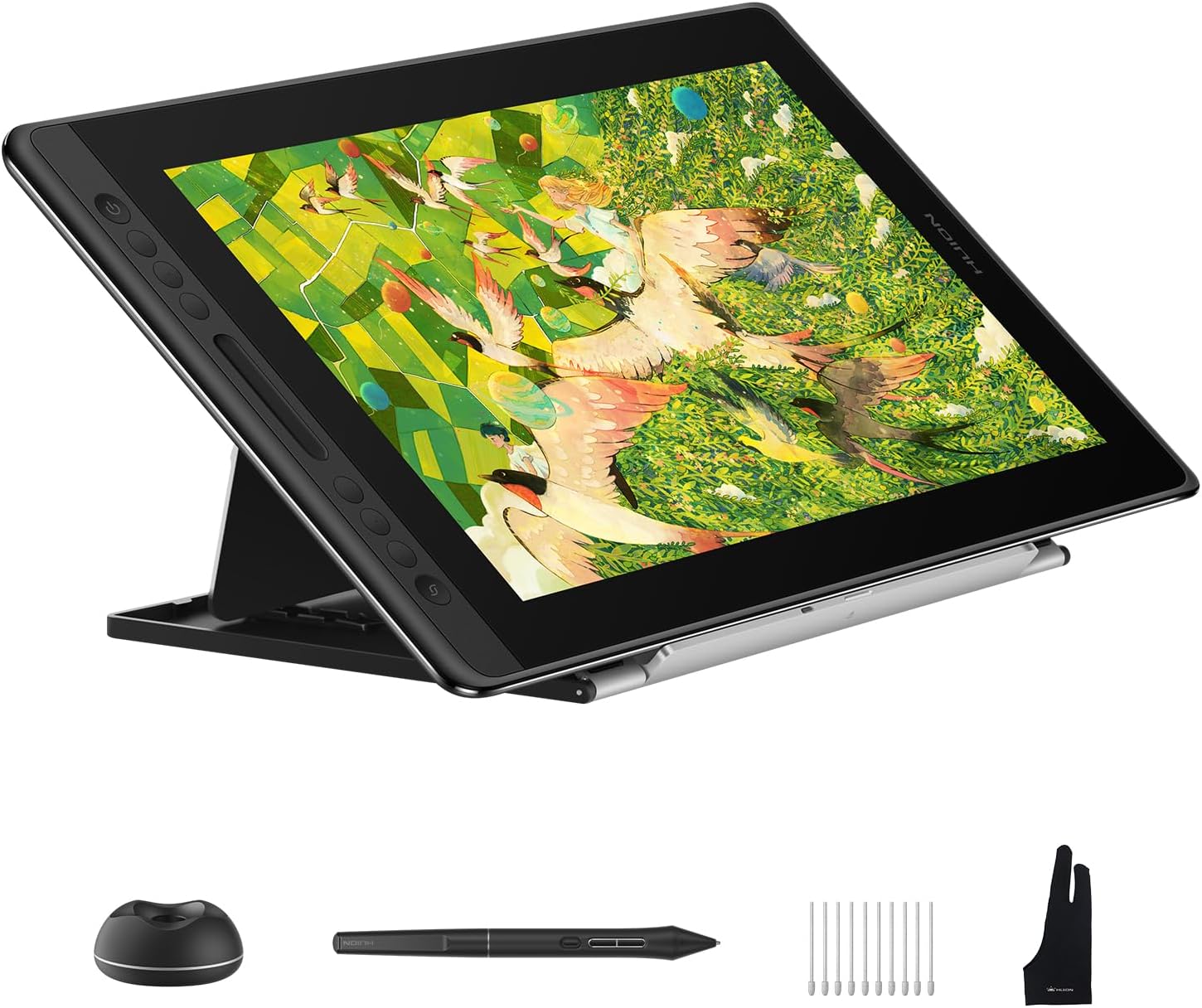
HUION Kamvas Pro 16 V2 Drawing Tablet with Screen 16K Levels PenTech 4.0 Battery-Free Pen, 15.6" Full-Laminated, Smart Touch Bar & 6 Keys Art Tablet Work with Windows, Mac and Linux
Want the best price and purchase timing?
Our AI advisor analyzes real-time pricing across all channels to find you the best deal.
AI Verdict
This 15.6-inch, 1080p pen display with 16,384 pressure levels and PenTech 4.0 is for digital artists needing precise pen input and a paper-like drawing surface without breaking the bank.
This pen display is a strong fit for digital artists who value pen accuracy and a natural drawing feel over high pixel density. Its 16,384 pressure levels and PenTech 4.0 pen deliver exceptional control, and the full-laminated anti-glare screen provides a satisfying paper-like texture. The 1080p resolution is its main limitation, but for many drawing tasks, the pen performance and tactile experience are more critical.
If 1080p isn't enough for your detailed work, look for pen displays with 2.5K or 4K resolution and similar PenTech 4.0 features.
Regret Score™
Very High RiskLower is better — measures purchase-regret risk from real buyer complaints, review credibility, and product maturity
Issues discovered after purchase
Critically weak dimension
Amazon rating vs actual quality
Chance this product isn't for you
Pros
- PenTech 4.0 with 16,384 pressure levels and 2g initial activation force offers exceptional precision and responsiveness for nuanced strokes.
- The 15.6-inch full-laminated anti-glare Canvas Glass provides a paper-like texture and minimizes parallax for a natural drawing feel.
- Six customizable Express Keys and a Smart Touch Bar streamline workflow by putting essential controls at your fingertips.
- The included ST200 aluminum stand offers six adjustable angles (14.5°-45°) for ergonomic drawing positions. [Product Data]
- The tablet is 0.453 inches thick and weighs 2.65lb, making it relatively portable for a pen display. [Product Data]
- Color coverage of 100% sRGB (measured) and 16.7 million colors provides accuracy for color-sensitive work.
Cons
- The 1920x1080 resolution on a 15.6-inch screen can result in visible pixelation, especially in UI elements.
- The measured maximum brightness of 141 nits is lower than typical for displays, which might be insufficient in brightly lit environments.
- Connectivity relies on a 3-in-1 cable, and it does not support single USB-C video connections, potentially requiring adapters for modern laptops.
- Some users report inconsistent performance from the Smart Touch Bar.
- Color calibration might be necessary as colors can appear different compared to other monitors, requiring adjustment.
Dimension Scores
The 1080p resolution on a 15.6-inch screen is average, but 100% sRGB coverage and full lamination are above average for color accuracy and reduced parallax.
PenTech 4.0 with 16,384 pressure levels and 2g initial activation force provides best-in-class pen precision and responsiveness.
This is a pen display, not a standalone tablet, and requires continuous power, so it has no internal battery. [Product Data]
It offers broad compatibility with Windows, macOS, and Linux, but the reliance on a 3-in-1 cable rather than single USB-C video limits modern integration.
Best For
- Digital artists and illustrators prioritizing pen precision and a tactile drawing experience.
- Students or hobbyists needing a dedicated drawing display for Windows, Mac, or Linux environments.
- Users seeking a portable pen display for creative work on the go, given its 2.65lb weight and 0.453-inch thickness.
Not Recommended For
- Professionals requiring 2K or 4K resolution for highly detailed visual work or large canvases.
- Users who need a standalone tablet experience, as this is a pen display requiring a computer connection.
- Individuals sensitive to lower brightness levels or who frequently work in very bright conditions.
Watch Out For
- The 1080p resolution on a 15.6-inch screen means you'll see individual pixels more clearly than on higher-resolution displays, which can affect the perceived sharpness of your artwork and UI.
- Measured brightness can be as low as 141 nits, which is significantly below the advertised 220 nits and might make working in well-lit rooms challenging.
- The anti-glare etched glass, while providing a paper-like texture, has been a point of contention in previous Huion models for causing a 'sparkle' effect, and some users are concerned the V2 uses similar glass.
- The 3-in-1 cable setup means you'll have more cables to manage than with single USB-C video solutions, and you might need a USB-A to USB-C adapter for newer laptops.
- Some users report that the touch strip can be inconsistent, potentially leading to frustration during rapid adjustments.
Full Specifications
| ASIN | B0FHN8GB51 |
| Brand | HUION |
| Model Name | Kamvas Pro 16 V2 |
| Item Weight | 7.08 pounds |
| Manufacturer | Shenzhen Huion Animation Technology LTD. |
| Operating System | Linux (Ubuntu 20.04 LTS), Windows 7 and above, macOS 10.12 and above |
| Item model number | GT-156-V2-US |
| Batteries required | No |
| Product Dimensions | 17.24 x 9.89 x 0.1 inches |
| Included Components | 3-in-1 Cable & Charger & Power Adapter, Cleaning Cloth, Digital Pen, Glove, Pen Holder & Pen Nib & Pen Nib Clip, Stand |
| Warranty Description | 1 Year |
| Connectivity Technology | USB |
| Specific instructions for use | 3D Modelling, Animation & Drawing, Designing & Painting |
What Buyers Say
Users are really digging the PenTech 4.0, saying the precision is way better than older versions, making drawing feel super natural. The screen's paper-like texture and minimal parallax also get a lot of love for making the drawing experience feel more authentic. However, the 1080p resolution on a 15.6-inch display is a recurring point of concern, with some wishing for a sharper image. The brightness can also be a bit of a letdown, especially if you're working in a bright room.
“Okay, so the pen on this thing is INSANE, like, I can actually draw tiny hairs without it looking like a blob, but man, I wish the screen was sharper, everything looks a little fuzzy sometimes.”
Common Praise
- PenTech 4.0 offers significantly improved precision and less wobble compared to PenTech 3.0.
- The Canvas Glass provides a satisfying, subtle paper-like texture for drawing.
- The 16,384 pressure levels allow for incredibly fine control over line weight and opacity.
- The included accessories, like the adjustable stand and extra nibs, are a welcome bonus.
- The build quality, especially the metal back, feels sturdy and durable.
- The anti-glare film effectively reduces reflections without overly distorting the image.
Common Complaints
- The 1920x1080 resolution on a 15.6-inch screen shows noticeable pixelation, especially for text and UI elements.
- Measured screen brightness can be as low as 141 nits, which is dim for some environments.
- The 3-in-1 cable is less convenient than a single USB-C connection for video and power.
- The Smart Touch Bar can be inconsistent in its responsiveness.
- Achieving consistent color matching between the tablet and a primary monitor can be challenging.
Ownership Tips
- You'll probably spend some time tweaking driver settings to get the pen feel just right for your preferred software.
- The anti-glare surface is great for drawing, but it can make the screen appear slightly less crisp than a glossy display.
- Keep your workspace lighting in mind; the screen isn't super bright, so direct sunlight might be an issue.
- The 3-in-1 cable can be a bit of a hassle for cable management, especially if your setup isn't permanent.
- While the stand is included, you might eventually want a more robust or flexible monitor arm for ultimate ergonomic comfort.
Frequently Asked Questions
Is the Kamvas Pro 16 V2 a standalone tablet?
No, the Kamvas Pro 16 V2 is a pen display, not a standalone tablet. It requires connection to a computer or laptop (Windows, macOS, or Linux) to function. [Product Data]
What kind of pen does it use?
It uses the battery-free PW600A pen with Huion's PenTech 4.0 technology, offering 16,384 pressure levels and ±60° tilt support. [Product Data, 6]
Does it have a touchscreen?
No, the Kamvas Pro 16 V2 is not a touchscreen device. It relies solely on the included pen for input. [Product Data]
What is the screen resolution?
The screen has a 1920x1080 (Full HD) resolution on its 15.6-inch display.
Is the stand included?
Yes, an ST200 aluminum stand is included in the box, offering six adjustable angles for ergonomic use. [Product Data]
Can I connect it with a single USB-C cable?
No, the Kamvas Pro 16 V2 requires the included 3-in-1 cable for connectivity, which uses HDMI for video and USB-A for data. It does not support single USB-C video connections.
Buying Guide
When you're looking at a pen display like this, you're basically getting a second monitor that you can draw directly on. It's not a computer itself, so you'll need to hook it up to your desktop or laptop. The big deal here is the pen's accuracy and how the screen feels when you draw on it. Think about how much detail you need and where you'll be using it.
16,384 Pressure Levels
This number tells you how many different levels of pressure the pen can detect. A higher number, like 16,384, means the pen can register even the lightest touch, giving you incredibly fine control over your lines, from super thin to really thick, just like a real pencil or brush.
Full-Laminated Anti-Glare Screen
Full lamination means there's almost no gap between the glass and the display panel, which makes your pen strokes appear directly under the nib, reducing parallax. The anti-glare part cuts down on reflections, and the etched surface gives it a slight texture, making it feel more like drawing on paper than on slippery glass.
100% sRGB Color Coverage
sRGB is a standard color space, and 100% coverage means the display can accurately show all the colors within that standard. This is crucial for artists because it ensures the colors you see on your screen are the same colors that will appear when your work is printed or viewed on other sRGB-calibrated displays.
Alternatives
If this display's 1080p resolution isn't sharp enough for your needs, look for pen displays with 2560x1440 (2.5K) or 3840x2160 (4K) resolution. If you need a standalone device, consider tablets with integrated operating systems and pen support.
You Might Also Like

Android Tablet with Keyboard, Android 15 Tablet 10 inch, 26GB+256GB+2TB Expand, 2-in-1 Tablets with 8-Core, 5G WiFi, 8000mAh, BT5.0, GMS, GPS, Gemini AI, Tablets PC with Mouse, Case, Stylus(Black)
$100-$149This 10.1-inch Android 15 tablet offers a 1280x800 IPS display, 6GB physical RAM (plus 20GB virtual), 256GB storage, and an 8000mAh battery, bundled with a keyboard, mouse, and stylus for budget-focus

Apple iPad (9th Generation): with A13 Bionic chip, 10.2-inch Retina Display, 64GB, Wi-Fi, 12MP front/8MP Back Camera, Touch ID, All-Day Battery Life – Space Gray
This 10.2-inch Retina Display iPad with an A13 Bionic chip and 64GB storage is for casual users needing a reliable Apple tablet for media and light tasks.

Amazon Fire HD 10 tablet (newest model) built for relaxation, 10.1" vibrant Full HD screen, octa-core processor, 3 GB RAM, 32 GB, Lilac
A 10.1" 1080p tablet with an octa-core processor and 3GB RAM, designed for Amazon content consumption and light use.

Wacom Intuos Small Graphics Drawing Tablet, Includes Training & Software; 4 Customizable ExpressKeys Compatible with Chromebook Mac Android & Windows, Black
A compact Wacom Intuos with a battery-free pen and 6.0 x 3.7-inch active area, suitable for digital art beginners on Windows, Mac, or Android.