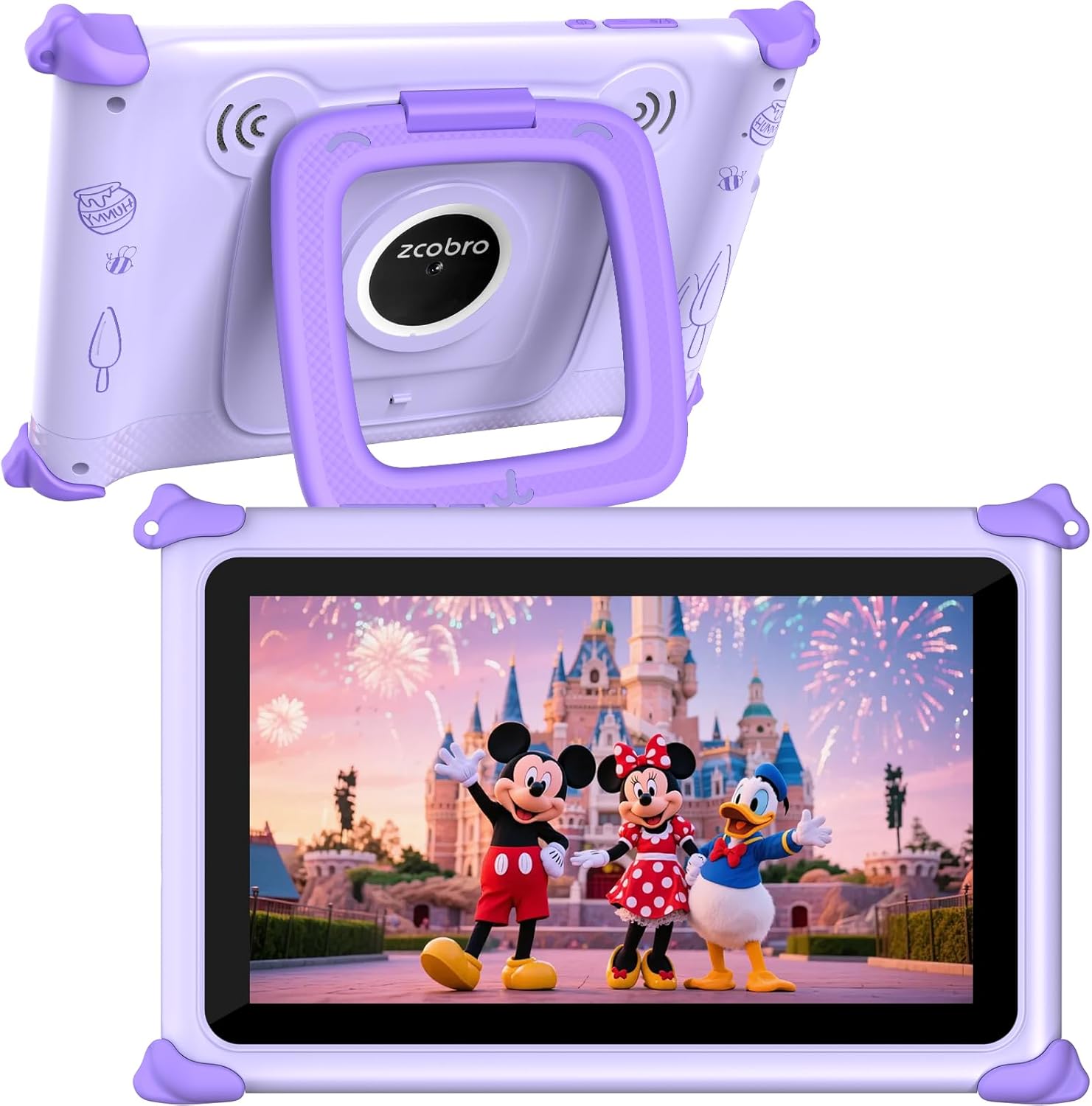
Kids Tablet 7 inch Tablet for Kids 3-12 32GB Toddler Children's Tablets with WiFi, YouTube, Baby Tablets with Shockproof Case, IPS Screen Parental Control GMS Education Games for Girls Boys (Purple)
Want the best price and purchase timing?
Our AI advisor analyzes real-time pricing across all channels to find you the best deal.
AI Verdict
This is a 7-inch Android tablet with a 1024x600 IPS display and 2GB RAM, designed for kids aged 3-12 who need basic app access and parental controls on a budget.
This tablet is a situational fit for its target audience due to its 2GB RAM and 1024x600 IPS display, which are entry-level specifications. While the included shockproof case and parental controls are beneficial for kids, the performance might be limiting for anything beyond basic tasks and light educational games.
If you need smoother performance and sharper visuals, look for a kids' tablet with at least 3GB or 4GB RAM and a 1280x800 or higher resolution display.
Regret Score™
High RiskLower is better — measures purchase-regret risk from real buyer complaints, review credibility, and product maturity
Issues discovered after purchase
Critically weak dimension
Amazon rating vs actual quality
Chance this product isn't for you
Pros
- Includes a shockproof case with an adjustable stand, protecting the tablet from drops and allowing hands-free viewing.
- Features GMS certification, enabling access to the Google Play Store for a wide range of educational and entertainment apps.
- Offers up to 10 hours of battery life, suitable for extended use during travel or daily learning.
- Equipped with parental controls for content filtering, time limits, and app management, supporting a secure environment for children.
- Comes with 32GB of internal storage, expandable up to 512GB with a microSD card, providing space for photos, music, and videos.
- Features a 1024x600 IPS HD display with automatic brightness adjustment and low blue light technology for eye protection.
Cons
- The 2GB RAM and generic quad-core processor may result in slower performance and app loading times compared to tablets with more RAM or faster processors.
- The 1024x600 pixel resolution provides a basic visual experience, lacking the sharpness and detail of higher-resolution screens.
- Relies on 2.4 GHz WiFi, which can be slower and less reliable than dual-band (2.4 GHz and 5 GHz) WiFi connections found in some other kids' tablets.
- The 'latest Android operating system' claim is vague; specific Android version is not provided, which could impact app compatibility and security updates over time.
Dimension Scores
The 1024x600 IPS display offers wide viewing angles but a low pixel density for a 7-inch screen, resulting in less sharp visuals compared to many modern tablets.
With 2GB RAM and a generic quad-core processor, the tablet will handle basic apps and light games but will struggle with multitasking or more demanding applications.
The stated 'up to 10 hours' of battery life is above average for a budget 7-inch kids' tablet, making it suitable for extended use.
GMS certification provides access to the full Google Play ecosystem, which is a significant advantage for app variety, but the preloaded Yubabe app is a niche offering.
Best For
- Parents seeking a tablet for children aged 3-12 for basic educational apps and video streaming.
- Families needing a portable device for road trips or flights, with up to 10 hours of battery life.
- Kids who require a durable tablet with a protective case and parental control features.
- First-time tablet users who will primarily engage with preloaded content and GMS-certified educational games.
Not Recommended For
- Children who need to run demanding games or multiple apps simultaneously due to 2GB RAM.
- Users expecting a high-resolution display for crisp graphics or detailed media consumption.
- Anyone needing fast and consistent internet speeds, as it only supports 2.4 GHz WiFi.
Watch Out For
- The 2GB RAM can lead to noticeable lag and slow app switching, especially when multiple applications are open, a common complaint for budget tablets.
- The 1024x600 display resolution, while IPS, will show pixelation on text and images, which some users find distracting for reading or detailed viewing.
- Battery life, while stated as 'up to 10 hours', can vary significantly based on usage (e.g., continuous video streaming vs. light app use), with some similar budget tablets reporting closer to 4-6 hours in heavy use.
- The 'powerful quad-core processor' is not specified by clock speed or model, meaning actual performance might be lower than expected for a '40% faster' claim.
Full Specifications
| ASIN | B0FB92P2B4 |
| Brand | zcobro |
| Color | Purple |
| Series | KIDS710 |
| Batteries | 1 A batteries required. (included) |
| Model Name | KIDS710 |
| Item Weight | 1.21 pounds |
| Screen Size | 7 Inches |
| Processor Brand | Allwinner |
| Card Description | Integrated |
| Operating System | Android |
| Flash Memory Size | 32 GB |
| Product Dimensions | 7.8 x 5.2 x 0.6 inches |
| Max Screen Resolution | 1024x600 Pixels |
| Item Dimensions LxWxH | 7.8 x 5.2 x 0.6 inches |
| Memory Storage Capacity | 32 GB |
| Display Resolution Maximum | 1024x600 Pixels |
| Standing screen display size | 7 Inches |
| Average Battery Life (in hours) | 3 years |
What Buyers Say
While specific reviews for this zcobro tablet are not available, budget 7-inch kids' tablets generally receive mixed feedback. Parents often appreciate the included protective cases and the ability to access educational content through Google Play. However, common frustrations revolve around the limited performance from 2GB RAM, which can lead to slow app loading and occasional freezing, and the basic screen resolution that isn't ideal for detailed viewing. Battery life claims often vary significantly in real-world use compared to advertised figures.
“Honestly, it's okay for my 5-year-old to just watch some cartoons and play a few simple games, but anything more than that and it just chugs. The case is good though, he's dropped it like five times already.”
Common Praise
- The included shockproof case with a kickstand is a lifesaver for protecting against drops.
- Parental controls are easy to set up and effectively limit screen time and content access.
- Access to Google Play Store means a huge library of learning and entertainment apps.
- The tablet is lightweight and easy for small hands to grip and carry around.
Common Complaints
- Apps take a long time to load and sometimes freeze, especially with only 2GB RAM.
- The screen resolution makes pictures and videos look pixelated, not sharp at all.
- Battery life doesn't always hit the advertised 10 hours, more like 4-6 hours with constant video.
- Only having 2.4 GHz WiFi means slower downloads and occasional buffering for streaming.
Ownership Tips
- The tablet can become sluggish after installing several apps, requiring frequent restarts to maintain responsiveness.
- The preloaded Yubabe app content might not be updated frequently, leading to repetitive educational activities over time.
- The automatic brightness adjustment can sometimes be too aggressive, making the screen appear dim in certain lighting conditions.
- The dual high-quality stereo speakers are adequate for a child's use but lack depth for a rich audio experience.
Frequently Asked Questions
Can my child watch YouTube and Netflix on this tablet?
Yes, since the tablet is GMS certified, you can download YouTube and Netflix from the Google Play Store. Parental controls allow you to manage access to these apps.
How much storage does this tablet have, and can it be expanded?
The tablet comes with 32GB of internal storage. You can expand this storage up to 512GB using a microSD card.
Is the case removable, and does it come with a screen protector?
The tablet includes a soft silicone shockproof case that is designed to be protective. While the case is removable, a screen protector is not explicitly mentioned in the specifications.
What kind of parental controls are included?
The tablet features advanced parental controls that let you filter content by age, set time limits, approve app purchases, and block or grant access to specific applications.
What operating system does this tablet run?
The tablet runs on the 'latest Android operating system'. While the specific version isn't stated, it supports GMS, allowing access to Google Play apps.
Buying Guide
When buying a kids' tablet, you're balancing durability, content control, and performance. You need a device that can withstand drops, offers robust parental controls to manage screen time and content, and is fast enough to keep your child engaged without frustration. Don't expect top-tier performance at this price point; focus on the features that matter most for a child's use.
RAM (Random Access Memory)
Think of RAM as the tablet's short-term memory for running apps. With only 2GB, this tablet can only handle a few simple apps at once, like trying to juggle two balls. More RAM (3GB or 4GB) means it can juggle more apps smoothly, preventing slowdowns and crashes.
Resolution (e.g., 1024x600 Pixels)
This is how many tiny dots (pixels) make up the picture on the screen. A 1024x600 resolution on a 7-inch screen means you'll see individual pixels, like looking at a photo that's been zoomed in too much. Higher numbers (like 1280x800 or 1920x1200) mean a sharper, clearer picture, like a high-definition TV.
GMS Certification
This means the tablet is officially approved by Google and can access the Google Play Store. Without it, you'd be stuck with a limited app store, like only being able to shop at one small store instead of a huge mall. It ensures you can download popular apps like YouTube Kids, educational games, and more.
Alternatives
If this tablet's performance or screen resolution isn't enough, look for models with at least 3GB or 4GB of RAM and a display resolution of 1280x800 pixels or higher for a smoother and clearer experience.
You Might Also Like

Android Tablet with Keyboard, Android 15 Tablet 10 inch, 26GB+256GB+2TB Expand, 2-in-1 Tablets with 8-Core, 5G WiFi, 8000mAh, BT5.0, GMS, GPS, Gemini AI, Tablets PC with Mouse, Case, Stylus(Black)
$100-$149This 10.1-inch Android 15 tablet offers a 1280x800 IPS display, 6GB physical RAM (plus 20GB virtual), 256GB storage, and an 8000mAh battery, bundled with a keyboard, mouse, and stylus for budget-focus

Apple iPad (9th Generation): with A13 Bionic chip, 10.2-inch Retina Display, 64GB, Wi-Fi, 12MP front/8MP Back Camera, Touch ID, All-Day Battery Life – Space Gray
This 10.2-inch Retina Display iPad with an A13 Bionic chip and 64GB storage is for casual users needing a reliable Apple tablet for media and light tasks.

Amazon Fire HD 10 tablet (newest model) built for relaxation, 10.1" vibrant Full HD screen, octa-core processor, 3 GB RAM, 32 GB, Lilac
A 10.1" 1080p tablet with an octa-core processor and 3GB RAM, designed for Amazon content consumption and light use.

Wacom Intuos Small Graphics Drawing Tablet, Includes Training & Software; 4 Customizable ExpressKeys Compatible with Chromebook Mac Android & Windows, Black
A compact Wacom Intuos with a battery-free pen and 6.0 x 3.7-inch active area, suitable for digital art beginners on Windows, Mac, or Android.