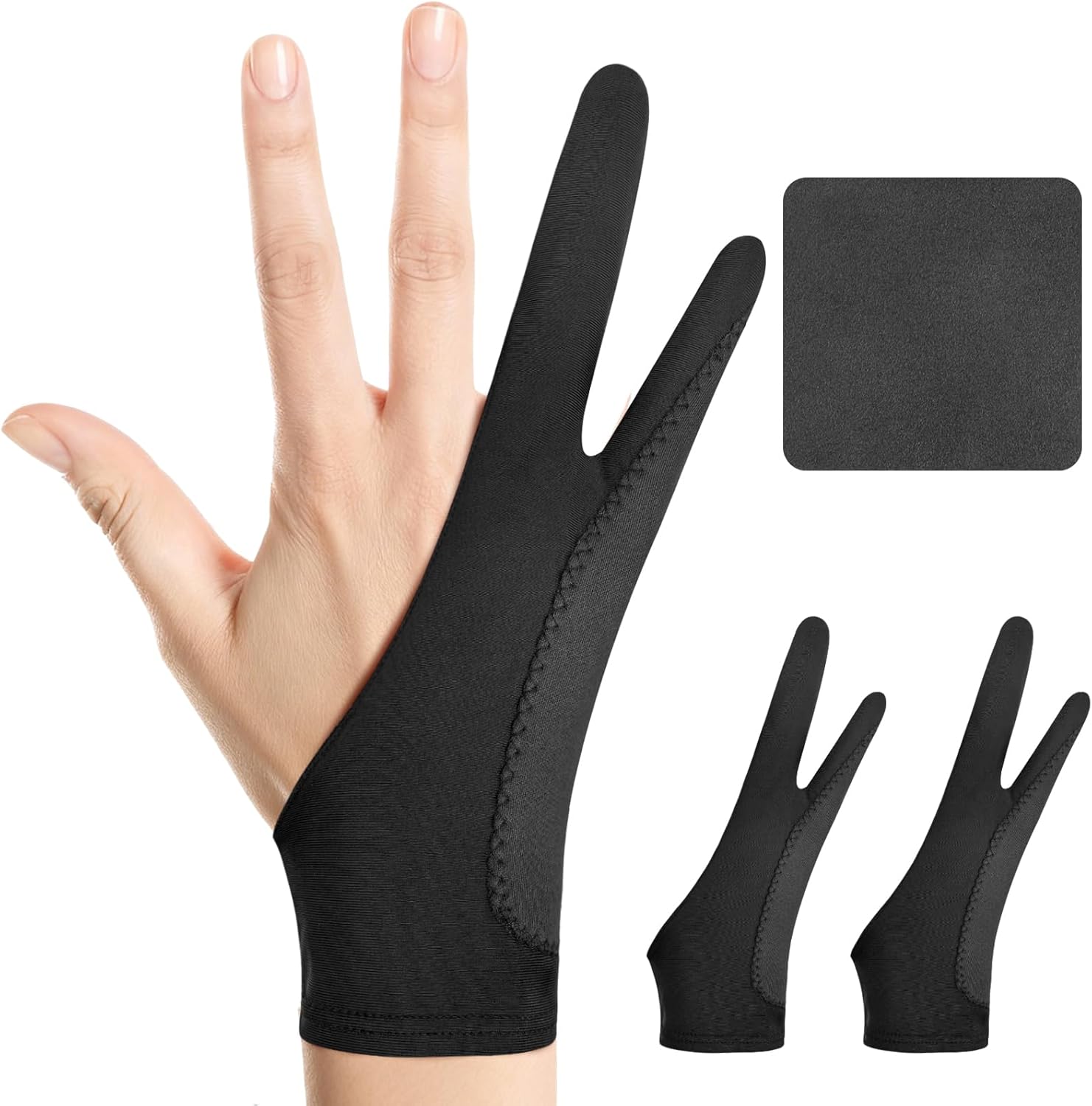
Digital Drawing Glove: 3-Layer Palm Rejection, Two-Finger Artist Glove for Drawing Tablet, iPad, Paper Sketching, Fits Left and Right Hand, Includes Cleaning Cloth(2 Pack,Black,Small)
Want the best price and purchase timing?
Our AI advisor analyzes real-time pricing across all channels to find you the best deal.
AI Verdict
A two-finger, ambidextrous drawing glove with a three-layer anti-slip design, ideal for digital artists needing friction reduction and accidental touch prevention on tablets.
This glove is a strong fit for its intended purpose of reducing friction and preventing accidental touches with its three-layer anti-slip design and ambidextrous two-finger cut. The inclusion of three distinct sizes (S, M, L) increases the likelihood of a comfortable and effective fit for a wider range of users. It directly addresses common pain points for digital artists.
If you need active palm rejection, ensure your stylus and tablet software support it, as the glove only provides a physical barrier.
Regret Score™
Very High RiskLower is better — measures purchase-regret risk from real buyer complaints, review credibility, and product maturity
Issues discovered after purchase
Critically weak dimension
Amazon rating vs actual quality
Chance this product isn't for you
Pros
- Ambidextrous design fits both left and right hands, eliminating the need for specific hand orientation.
- Three-layer anti-slip design provides a physical barrier to prevent accidental screen touches.
- Reduces friction, allowing for smoother stylus movement across tablet surfaces.
- Crafted from soft, stretchy, breathable fabric designed to keep hands cool and dry during extended use.
- Includes two gloves and a cleaning cloth, offering a spare and maintenance tool.
- Available in three sizes (Small: 2.95’’x7.48’’, Medium: 3.34’’x8.07’’, Large: 3.54’’x8.46’’) for a more tailored fit.
Cons
- The glove itself does not provide active palm rejection; this function relies on the stylus or tablet software.
- Despite breathable fabric claims, some users report hand sweating during long sessions.
- No specific durability metrics beyond 'stain-resistant fabric' are provided, leaving long-term wear unknown.
Dimension Scores
This product is a glove and does not have a display, so this dimension is not applicable.
The three-layer anti-slip design and friction reduction capabilities directly address key performance aspects for a drawing glove, enhancing stylus glide and preventing accidental touches.
This product is a glove and does not require a battery, so this dimension is not applicable.
The glove is optimized for stylus use and works seamlessly with iPads and other Graphics tablets, indicating broad compatibility across digital art ecosystems.
Best For
- Digital artists using iPads or graphics tablets for extended periods.
- Individuals experiencing hand friction or smudges on their drawing surfaces.
- Artists working in humid environments where hands tend to stick to screens.
- Users who need a physical barrier to minimize accidental touches while drawing.
Not Recommended For
- Users expecting the glove to electronically disable palm input on their device.
- Individuals with hand sizes significantly outside the provided Small, Medium, or Large dimensions.
- Artists who prefer a bare-hand feel and do not experience friction or accidental touches.
Watch Out For
- The '3-Layer Palm Rejection' in the title can be misleading; the glove provides a physical barrier, but true palm rejection is a feature of the stylus or tablet software, not the glove itself.
- Some users report that even with breathable fabrics, hands can still get sweaty during prolonged use.
- If the glove is not snug, it may not effectively prevent accidental touches or provide consistent glide.
Full Specifications
| ASIN | B0DKNSYS1J |
| Brand | Kortimu |
| Department | Unisex |
| Model Name | Kortimu TwoFinger PalmReject |
| Item Weight | 0.634 ounces |
| Manufacturer | shenzhenshixinyaokejiyouxiangongsi |
| Special Feature | Palm Rejection, Digital Art Glove, Anti-touch, Two-finger design, Antifouling, Anti-Friction |
| Item model number | TwoFinger PalmReject |
| Product Dimensions | 7.48 x 2.95 x 0.1 inches |
| Included Components | 1 Cleaning Cloth, 2 Drawing Glove |
| Specific Uses For Product | Drawing, Painting, Writing |
What Buyers Say
Users generally find drawing gloves essential for smoother digital art experiences, primarily due to reduced friction on tablet screens. The main benefit is preventing the hand from sticking, especially in humid conditions, which allows for more fluid strokes. However, a common point of confusion is the expectation that the glove itself provides electronic palm rejection; this is typically handled by the stylus or tablet software. Some artists also report that even with breathable materials, hands can still get warm and sweaty during long creative sessions.
“Okay, so I got this glove 'cause my hand was always dragging and leaving smudges on my iPad, and honestly, it totally fixed that. My hand just glides now, it's way smoother. Just remember, the glove doesn't magically turn off palm rejection, that's your Apple Pencil doing the work, but it definitely stops my hand from messing things up.”
Common Praise
- Hand glides much more easily across the screen, preventing sticking.
- Helps prevent smudges and accidental marks from the side of the hand.
- Essential for comfortable drawing in humid environments.
- Allows for more precise and consistent strokes by reducing friction.
- The ambidextrous design means it works for both left and right-handed artists.
Common Complaints
- The glove doesn't actively block capacitive touch; palm rejection is a stylus/software function.
- Hands can still get sweaty during long drawing sessions, despite breathable fabric claims.
- A glove that is too loose won't effectively prevent accidental touches or provide consistent glide.
- Some users find the two-finger design can interfere with multi-finger gestures if not accustomed to it.
Ownership Tips
- After a few weeks, the fabric maintains its stretch and snug fit, crucial for consistent performance.
- The included cleaning cloth actually gets used a lot more than I thought, keeping the screen spotless.
- You really notice the difference in glide when you switch back to drawing without it; the friction is a real drag.
- The 'three-layer' part feels like it actually makes a difference in preventing accidental touches compared to thinner gloves I've tried.
- Even though it's breathable, my hand still gets a little warm after a couple of hours, but it's not a deal-breaker.
Frequently Asked Questions
Does this glove provide palm rejection?
The glove creates a physical barrier with its three-layer anti-slip design to prevent accidental touches and smudges. However, true 'palm rejection' is typically a feature of your stylus and tablet software, which detects and ignores your palm while you're drawing with the pen.
Can I use this glove on either my left or right hand?
Yes, the two-finger design is ambidextrous, meaning it's designed to fit comfortably on both left and right hands.
Will this glove make my hand sweat during long drawing sessions?
The glove is crafted from soft, stretchy, breathable, and moisture-wicking fabric to keep your hand cool and dry. However, some users of similar gloves have reported experiencing hand sweat during extended use.
How do I choose the correct size?
The product is available in Small (2.95’’x7.48’’), Medium (3.34’’x8.07’’), and Large (3.54’’x8.46’’). You should measure your hand to select the size that will provide a snug fit for optimal performance.
Is a cleaning cloth included?
Yes, the set includes two gloves and a bonus cleaning cloth for maintaining your screen's cleanliness.
Buying Guide
When you're looking at drawing gloves, you're mainly trying to solve two problems: friction and accidental touches. Your hand dragging on the screen can make your lines wobbly and uncomfortable, especially during long sessions. The glove's job is to create a smooth, low-friction surface for your hand to glide on. It also acts as a physical barrier to stop your palm from registering as an input on the screen, which is super annoying when you're trying to draw precise lines.
Two-Finger Design
3-Layer Anti-Slip Palm Rejection
Breathable Fabric
Sizes (Small, Medium, Large)
Alternatives
If this glove doesn't fit, look for alternatives with more specific sizing options like XS or XL, or those with reinforced padding on the pinky side for enhanced palm insulation. Consider gloves made from different fabric blends if breathability is a primary concern.
You Might Also Like

Android Tablet with Keyboard, Android 15 Tablet 10 inch, 26GB+256GB+2TB Expand, 2-in-1 Tablets with 8-Core, 5G WiFi, 8000mAh, BT5.0, GMS, GPS, Gemini AI, Tablets PC with Mouse, Case, Stylus(Black)
$100-$149This 10.1-inch Android 15 tablet offers a 1280x800 IPS display, 6GB physical RAM (plus 20GB virtual), 256GB storage, and an 8000mAh battery, bundled with a keyboard, mouse, and stylus for budget-focus

Apple iPad (9th Generation): with A13 Bionic chip, 10.2-inch Retina Display, 64GB, Wi-Fi, 12MP front/8MP Back Camera, Touch ID, All-Day Battery Life – Space Gray
This 10.2-inch Retina Display iPad with an A13 Bionic chip and 64GB storage is for casual users needing a reliable Apple tablet for media and light tasks.

Amazon Fire HD 10 tablet (newest model) built for relaxation, 10.1" vibrant Full HD screen, octa-core processor, 3 GB RAM, 32 GB, Lilac
A 10.1" 1080p tablet with an octa-core processor and 3GB RAM, designed for Amazon content consumption and light use.

Wacom Intuos Small Graphics Drawing Tablet, Includes Training & Software; 4 Customizable ExpressKeys Compatible with Chromebook Mac Android & Windows, Black
A compact Wacom Intuos with a battery-free pen and 6.0 x 3.7-inch active area, suitable for digital art beginners on Windows, Mac, or Android.