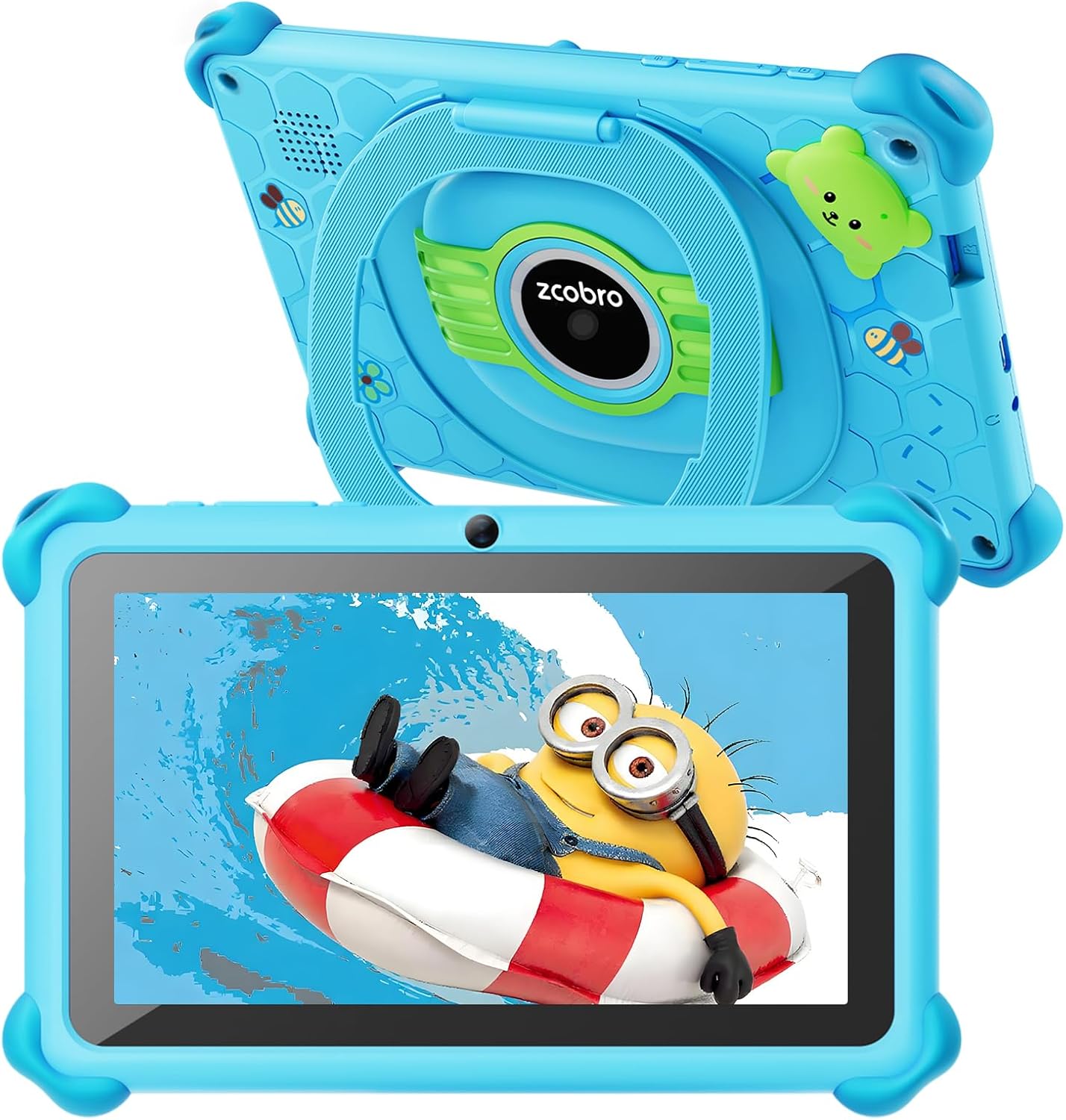
Kids Tablet Toddler 7 inch Kids Learning Tablet 32GB WiFi Tablets with Shockproof Case, YouTube, GMS, Parental Control, Dual Camera for Boys Girls Preinstalled Educational Games, Blue
Want the best price and purchase timing?
Our AI advisor analyzes real-time pricing across all channels to find you the best deal.
AI Verdict
This is a 7-inch Android tablet with a 1024x600 screen, 2GB RAM, 32GB storage, and robust parental controls, designed for young children's basic learning and entertainment.
This tablet is a situational fit for budget-conscious parents of young children due to its 7-inch 1024x600 screen, 2GB RAM, and robust parental controls. It handles basic educational apps and video playback, but its limited performance and display resolution won't satisfy older kids or demanding users.
If you need better performance and a sharper display, look for tablets with at least 4GB RAM and a 1920x1200 resolution screen.
Regret Score™
High RiskLower is better — measures purchase-regret risk from real buyer complaints, review credibility, and product maturity
Issues discovered after purchase
Critically weak dimension
Amazon rating vs actual quality
Chance this product isn't for you
Pros
- Includes a durable silicone shockproof case with an adjustable stand, protecting the device from drops and allowing hands-free viewing.
- Features GMS certification, allowing access to the Google Play Store for a wide range of apps.
- Offers 32GB of internal storage, expandable up to 512GB via microSD card for additional content.
- Comes with pre-installed Yubabe kid's software, providing educational content for learning and play.
- Equipped with comprehensive parental controls for content management, app filtering, and screen time limits.
- The 1024x600 IPS FHD touchscreen includes automatic brightness adjustment and low blue light technology for eye protection.
Cons
- The 1024x600 pixel resolution is lower compared to many other tablets, impacting visual clarity.
- 2GB of RAM can limit multitasking capabilities and lead to slower performance with multiple apps open.
- Connectivity uses the older 802.11n Wi-Fi standard, which may result in slower internet speeds compared to newer standards.
- The dual cameras are basic, with the rear camera specified at 2.0 MP, suitable only for casual use, not high-quality photography.
- Real-world battery life may be closer to 5 hours, despite claims of 6-10 hours, requiring more frequent charging for extended use.
Dimension Scores
The 1024x600 pixel resolution on a 7-inch screen is below average for clarity and detail compared to many modern tablets.
With a quad-core processor and 2GB RAM, the tablet struggles with multitasking and demanding applications, leading to slower operation.
The 3500mAh battery offers an estimated 6-10 hours, but user experiences for similar devices often report closer to 5 hours of actual use.
GMS certification provides full access to the Google Play Store and its vast app ecosystem, along with robust parental control features.
Best For
- Parents seeking an affordable tablet for young children (ages 3-8) for basic educational games and video streaming.
- Keeping kids entertained during car rides or flights with pre-downloaded content.
- Families who prioritize strong parental controls and a safe digital environment.
- Children needing a durable device that can withstand accidental drops and bumps.
Not Recommended For
- Older children or users who require high-performance for demanding games or complex applications.
- Anyone expecting a high-resolution display for crisp visuals and detailed graphics.
- Users needing fast Wi-Fi speeds for large downloads or seamless online gaming.
- Individuals looking for a tablet with advanced camera capabilities for photography.
Watch Out For
- The 1024x600 screen resolution means visuals aren't as sharp as tablets with higher pixel counts.
- With only 2GB of RAM, switching between apps or running several at once can cause noticeable slowdowns.
- The 802.11n Wi-Fi standard is older, so you might experience slower download and streaming speeds compared to devices with Wi-Fi 5 or 6.
- Despite claims of 6-10 hours, similar budget tablets often deliver closer to 5 hours of battery life, potentially requiring more frequent charging.
- The cameras are basic 2.0 MP, so don't expect clear, detailed photos or video calls.
Full Specifications
| ASIN | B0CZDK5862 |
| Brand | zcobro |
| Color | Blue |
| Series | KIDS710 |
| Batteries | 1 Lithium Ion batteries required. (included) |
| Model Name | KIDS710 |
| Item Weight | 1.17 pounds |
| Screen Size | 7 Inches |
| Chipset Brand | Allwinner |
| Wireless Type | 802.11n |
| Processor Brand | Allwinner |
| Card Description | Integrated |
| Operating System | Android |
| Flash Memory Size | 32 GB |
| Item model number | Z10 |
| Screen Resolution | 1024x600 Pixels |
| Product Dimensions | 7.8 x 5.2 x 0.6 inches |
| Max Screen Resolution | 1024x600 Pixels |
| Item Dimensions LxWxH | 7.8 x 5.2 x 0.6 inches |
| Memory Storage Capacity | 32 GB |
| Display Resolution Maximum | 1024x600 Pixels |
| Standing screen display size | 7 Inches |
| Average Battery Life (in hours) | 3 years |
What Buyers Say
Many parents find this tablet hits the mark for keeping younger kids occupied without breaking the bank. The included shockproof case is a recurring highlight, saving the tablet from countless tumbles. However, the screen resolution and overall speed are frequently mentioned as areas where the tablet shows its budget price. It's definitely not a powerhouse, but for basic games and streaming, it gets the job done. The parental controls are a big win for peace of mind, letting parents manage what their kids access and for how long.
“Look, it's cheap, the case is a lifesaver, and my 5-year-old loves the games, but man, that screen isn't exactly Retina, and it can be slow sometimes.”
Common Praise
- The silicone shockproof case with an adjustable stand is durable and practical for kids.
- Parental control features are comprehensive and effective for managing child usage.
- Access to the Google Play Store allows for a wide selection of educational and entertainment apps.
- Pre-installed educational software like Yubabe provides immediate learning content.
- The ability to expand storage up to 512GB is useful for downloading many games and videos.
Common Complaints
- The 1024x600 screen resolution is noticeably low, making some content appear less sharp.
- Performance can be sluggish, especially when multiple apps are running due to 2GB RAM.
- Battery life often falls short of the advertised 6-10 hours, requiring more frequent charging.
- The cameras are basic and produce low-quality images, not suitable for anything beyond casual snaps.
- The older 802.11n Wi-Fi standard can result in slower internet speeds.
Ownership Tips
- The pre-installed Yubabe software is a solid starting point, but you'll quickly be downloading more apps from the Play Store.
- You'll want to invest in a large microSD card almost immediately to avoid storage issues with downloaded games and videos.
- The adjustable stand on the case is surprisingly useful for hands-free viewing during meals or long car rides.
- The parental controls are effective, but remember to change the default password ('0000') right away.
- Charging can feel a bit slow, so plan ahead for longer trips.
Frequently Asked Questions
Can I download apps from the Google Play Store?
Yes, the tablet is GMS certified and runs on Android, so you can download age-appropriate apps directly from the Google Play Store.
How much storage does it have, and can I add more?
It comes with 32GB of internal storage, and you can expand this up to 512GB using a microSD card.
Does it have parental controls?
Yes, it features comprehensive parental controls for managing content, setting screen time limits, and filtering apps. You can exit kids mode with a password.
Is the screen protected?
The tablet includes a soft, durable silicone shockproof case that protects it from scratches and accidental drops.
What is the battery life like?
The manufacturer claims 6-10 hours of use, but user reports for similar tablets suggest real-world usage might be closer to 5 hours.
Buying Guide
When buying a kids' tablet, you're balancing durability, content, and parental control with performance and display quality. You need something that can take a beating, offers engaging educational apps, and lets you manage screen time without constant supervision. Don't expect a powerhouse, but ensure it's responsive enough not to frustrate your child.
Screen Resolution (e.g., 1024x600 Pixels)
This number tells you how sharp and detailed the image on the screen will be. A lower number like 1024x600 means images might look a bit pixelated, like an older TV, while higher resolutions offer clearer, more vibrant visuals.
RAM (e.g., 2GB RAM)
RAM is like the tablet's short-term memory; it affects how many apps you can have open at once and how smoothly they run. 2GB is okay for one or two simple apps, but more RAM (like 4GB or 6GB) means less lag when switching between games or videos.
Storage (e.g., 32GB ROM)
This is where all the apps, games, photos, and videos are saved. 32GB fills up fast with kids' content, so the ability to expand it with a microSD card is crucial, like having a bigger bookshelf for more books.
Parental Control
This feature lets you set rules for how your child uses the tablet, like limiting screen time, blocking inappropriate websites, or approving which apps they can use. It's like having a digital babysitter that keeps your child safe online.
Alternatives
If this tablet doesn't quite fit, look for alternatives with at least 4GB of RAM for smoother performance and a screen resolution of 1920x1200 or higher for a clearer picture.
You Might Also Like

Android Tablet with Keyboard, Android 15 Tablet 10 inch, 26GB+256GB+2TB Expand, 2-in-1 Tablets with 8-Core, 5G WiFi, 8000mAh, BT5.0, GMS, GPS, Gemini AI, Tablets PC with Mouse, Case, Stylus(Black)
$100-$149This 10.1-inch Android 15 tablet offers a 1280x800 IPS display, 6GB physical RAM (plus 20GB virtual), 256GB storage, and an 8000mAh battery, bundled with a keyboard, mouse, and stylus for budget-focus

Apple iPad (9th Generation): with A13 Bionic chip, 10.2-inch Retina Display, 64GB, Wi-Fi, 12MP front/8MP Back Camera, Touch ID, All-Day Battery Life – Space Gray
This 10.2-inch Retina Display iPad with an A13 Bionic chip and 64GB storage is for casual users needing a reliable Apple tablet for media and light tasks.

Amazon Fire HD 10 tablet (newest model) built for relaxation, 10.1" vibrant Full HD screen, octa-core processor, 3 GB RAM, 32 GB, Lilac
A 10.1" 1080p tablet with an octa-core processor and 3GB RAM, designed for Amazon content consumption and light use.

Wacom Intuos Small Graphics Drawing Tablet, Includes Training & Software; 4 Customizable ExpressKeys Compatible with Chromebook Mac Android & Windows, Black
A compact Wacom Intuos with a battery-free pen and 6.0 x 3.7-inch active area, suitable for digital art beginners on Windows, Mac, or Android.