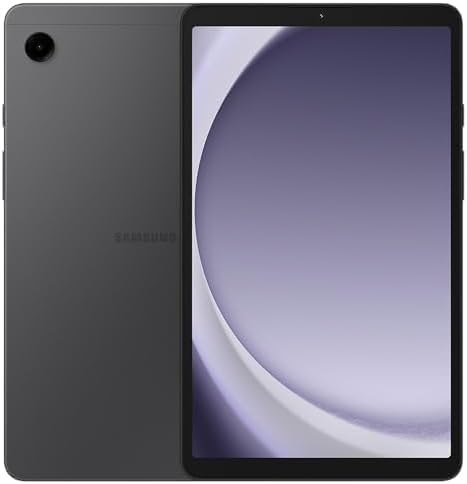
Samsung Galaxy Tab A9 (SM-X110), 64GB 4GB RAM, WiFi Only, International Version (15W Wall Charger Bundle) (Gray)
Want the best price and purchase timing?
Our AI advisor analyzes real-time pricing across all channels to find you the best deal.
AI Verdict
This is an 8.7-inch 800x1340 TFT LCD tablet with 64GB storage and 4GB RAM, best for basic media consumption and web browsing.
The 8.7-inch 800x1340 pixel TFT LCD and 4GB RAM are adequate for basic media consumption and web browsing, making it a budget-friendly option for casual use. However, the 179 ppi density and limited RAM hinder performance for more demanding tasks or users seeking crisp visuals. It's a compromise for its price point.
If you need a smoother experience and sharper visuals, look for a tablet with at least 6GB RAM and a 1920x1200 IPS display.
Regret Score™
High RiskLower is better — measures purchase-regret risk from real buyer complaints, review credibility, and product maturity
Issues discovered after purchase
Critically weak dimension
Amazon rating vs actual quality
Chance this product isn't for you
Pros
- Helio G99 processor provides capable performance for its price point.
- Features a metal back, contributing to a premium feel for a budget tablet.
- Storage is expandable via a microSD card slot.
- Includes dual speakers with Dolby Atmos support for audio.
- Comes with a 15W USB-C wall adapter in the bundle [cite: Product Data].
Cons
- The 8.7-inch 800x1340 pixel TFT LCD (179 ppi) results in pixelated text and blurry visuals.
- 4GB RAM can lead to noticeable slowdowns and jerky animations, especially with Android 14/One UI 6.1.
- 15W charging speed is slow, requiring 3-4 hours for a full battery charge.
- Cameras (8MP rear, 2MP front) are of poor quality, suitable only for basic tasks like QR code scanning or video calls.
- Lacks a fingerprint sensor, relying solely on face recognition for unlocking.
Dimension Scores
The 8.7-inch TFT LCD with 800x1340 pixels and 179 ppi density is below category average, with users reporting pixelation and blurriness.
The Helio G99 processor is capable for basic tasks, but the 4GB RAM can cause slowdowns, especially with Android 14/One UI 6.1, and struggles with demanding games.
The 5100 mAh battery provides around 6-7 hours of screen-on time, which is average for its category but not exceptional.
Running Android 13 with promised updates to Android 15 and Samsung's One UI offers decent integration for file sharing within the Samsung ecosystem.
Best For
- Watching streaming video content on platforms like YouTube and Netflix.
- Reading e-books, comics, and PDFs.
- Casual web browsing and social media use.
- Light gaming that is not graphically intensive.
- Basic productivity tasks such as managing spreadsheets, WhatsApp, and making calls.
Not Recommended For
- High-end gaming or graphically demanding applications, which cause slowdowns and frame rate drops.
- Heavy multitasking with multiple applications open simultaneously due to 4GB RAM limitations.
- Professional photography or videography due to the low-quality cameras.
- Users who require a high-resolution display for sharp text and detailed images.
Watch Out For
- The 800x1340 pixel TFT display with 179 ppi density can make text appear pixelated and blurry.
- The 4GB RAM version can experience significant sluggishness and slow animations (3-4 seconds delay) after updating to Android 14/One UI 6.1.
- Charging the 5100 mAh battery at 15W takes approximately 3 to 4 hours for a full charge.
- Gaming performance struggles with graphically intensive titles, showing noticeable slowdowns and frame rate drops.
- Face recognition is the only biometric unlock option, which is less secure than a fingerprint reader.
Full Specifications
| RAM | 4 GB |
| ASIN | B0CSF51KCW |
| Brand | Samsung |
| Color | Graphite |
| Series | Galaxy Tab A9 |
| Batteries | 1 D batteries required. |
| Processor | 2.2 GHz |
| Hard Drive | 64 GB |
| Model Name | Galaxy Tab A9 |
| Item Weight | 1.12 pounds |
| Screen Size | 8.7 Inches |
| Chipset Brand | ARM |
| Wireless Type | 802.11ac |
| Processor Brand | Samsung |
| Card Description | Integrated |
| Operating System | Android 13 |
| Flash Memory Size | 64 GB |
| Item model number | SM-X110 |
| Screen Resolution | 800 x 1340 pixels |
| Product Dimensions | 4.91 x 8.31 x 0.31 inches |
| Computer Memory Type | DDR3 SDRAM |
| Number of Processors | 8 |
| Max Screen Resolution | 800x1340 |
| Item Dimensions LxWxH | 4.91 x 8.31 x 0.31 inches |
| Rear Webcam Resolution | 8 MP |
| Memory Storage Capacity | 64 GB |
| Display Resolution Maximum | 800x1340 |
| Standing screen display size | 8.7 Inches |
What Buyers Say
Many users find the 4GB RAM version sluggish, especially after Android 14/One UI 6.1 updates, with animations taking 3-4 seconds to respond. The 800x1340 pixel TFT display (179 ppi) is a common point of contention, with text appearing pixelated, though some users mitigate this with custom launchers. Despite these issues, the Helio G99 processor is frequently praised for its capability at this price point, handling basic tasks and even some less demanding games without issue. The build quality, featuring a metal back, is also often highlighted as feeling more premium than expected for a budget tablet.
“Honestly, the screen is kinda blurry and it feels slow sometimes with all the apps open, but for $100, I can watch YouTube and read my books without my phone dying, so whatever.”
Common Praise
- Helio G99 processor provides capable performance for its price.
- Premium feel due to metal back, making it feel more substantial than other budget tablets.
- Smooth navigation for basic tasks like sheets, WhatsApp, and calls.
- Dual speakers with Dolby Atmos support enhance the audio experience.
- Compact 8.7-inch size is light (330g) and comfortable for one-handed use.
Common Complaints
- The 800x1340 pixel TFT display (179 ppi) results in pixelated text and blurry visuals.
- 4GB RAM causes noticeable slowdowns and jerky animations, particularly with Android 14/One UI 6.1.
- 15W charging is slow, taking 3-4 hours for a full charge.
- Cameras (8MP rear, 2MP front) are poor quality, only suitable for QR codes or basic video calls.
- No fingerprint sensor, only less secure face recognition.
Ownership Tips
- Installing a custom launcher like Nova Launcher can significantly improve the visual experience and icon resizing due to the low resolution.
- The 4GB RAM version can feel significantly slower after OS updates to Android 14/One UI 6.1, impacting menu navigation.
- The tablet is light (330g) and comfortable for one-handed use for extended periods, making it suitable for reading.
- The 60Hz refresh rate is noticeable when quickly scrolling compared to devices with higher refresh rates.
Frequently Asked Questions
Does the Samsung Galaxy Tab A9 have a fingerprint sensor?
No, the tablet does not include a fingerprint sensor. It uses face recognition for unlocking the device.
Can I expand the storage on the Galaxy Tab A9?
Yes, the tablet has a microSD card slot, allowing you to expand the internal 64GB storage with additional memory.
Is the screen resolution high on this tablet?
The tablet features an 8.7-inch display with an 800 x 1340 pixel resolution, which translates to approximately 179 ppi density. This is considered a low resolution for its size, and some users report pixelated text.
What is the typical battery life of the Galaxy Tab A9?
Users report around 6 to 7 hours of screen-on time for mixed usage, such as watching videos and browsing the web.
Is the Galaxy Tab A9 suitable for gaming?
It handles light games well, but struggles with graphically intensive titles, often showing slowdowns and frame rate drops.
Does this bundle include a wall charger?
Yes, this specific bundle includes a 15W USB-C wall adapter, which is beneficial as chargers are often sold separately [cite: Product Data].
Buying Guide
When looking at tablets, you need to think about how sharp the screen is, how many apps you can run at once, and how quickly it responds. Don't just look at the screen size; the pixel density (ppi) tells you how clear text and images will be. RAM dictates how smoothly you can switch between apps, and the processor is the engine that drives everything.
screen_size: 8.7 Inches
This size is compact, making the tablet easy to hold in one hand and highly portable, like a larger smartphone. However, it offers less screen real estate for multitasking or immersive video compared to larger tablets.
resolution: 800 x 1340 pixels (~179 ppi density)
This resolution means the screen isn't super sharp. Text might look a bit pixelated, and images won't have as much detail as on higher-resolution displays, similar to watching a standard definition video on a large TV.
storage: 64 GB
This is how much space you have for apps, photos, and videos. 64GB fills up quickly if you download many games or movies, so you'll likely need to use the microSD card slot for extra space, like having an external hard drive for your computer.
RAM: 4 GB
RAM is like your tablet's short-term memory. 4GB is enough for one or two apps at a time, but if you try to juggle many apps or run demanding ones, the tablet will slow down, similar to how a computer with too little RAM feels sluggish.
Alternatives
If this tablet doesn't fit your needs, search for models with at least a 1920x1200 pixel display for sharper visuals, 6GB or more RAM for smoother multitasking, and potentially a 90Hz refresh rate for a more fluid scrolling experience.
You Might Also Like

Android Tablet with Keyboard, Android 15 Tablet 10 inch, 26GB+256GB+2TB Expand, 2-in-1 Tablets with 8-Core, 5G WiFi, 8000mAh, BT5.0, GMS, GPS, Gemini AI, Tablets PC with Mouse, Case, Stylus(Black)
$100-$149This 10.1-inch Android 15 tablet offers a 1280x800 IPS display, 6GB physical RAM (plus 20GB virtual), 256GB storage, and an 8000mAh battery, bundled with a keyboard, mouse, and stylus for budget-focus

Apple iPad (9th Generation): with A13 Bionic chip, 10.2-inch Retina Display, 64GB, Wi-Fi, 12MP front/8MP Back Camera, Touch ID, All-Day Battery Life – Space Gray
This 10.2-inch Retina Display iPad with an A13 Bionic chip and 64GB storage is for casual users needing a reliable Apple tablet for media and light tasks.

Amazon Fire HD 10 tablet (newest model) built for relaxation, 10.1" vibrant Full HD screen, octa-core processor, 3 GB RAM, 32 GB, Lilac
A 10.1" 1080p tablet with an octa-core processor and 3GB RAM, designed for Amazon content consumption and light use.

Wacom Intuos Small Graphics Drawing Tablet, Includes Training & Software; 4 Customizable ExpressKeys Compatible with Chromebook Mac Android & Windows, Black
A compact Wacom Intuos with a battery-free pen and 6.0 x 3.7-inch active area, suitable for digital art beginners on Windows, Mac, or Android.