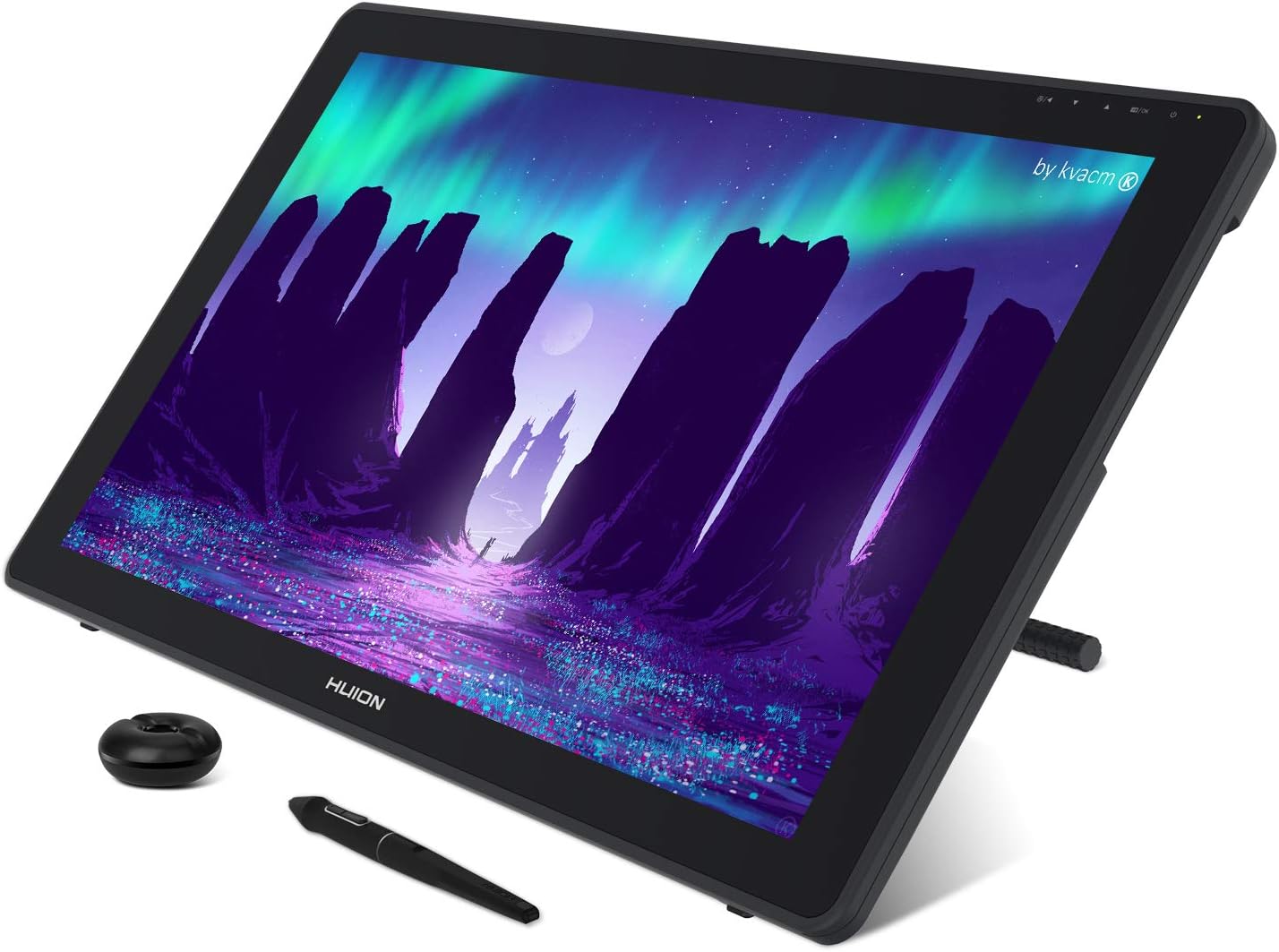
HUION KAMVAS 22 Drawing Tablet with Screen 120% sRGB PW517 Battery-Free Stylus Adjustable Stand, 21.5inch Pen Display for Windows PC, Mac, Android
Want the best price and purchase timing?
Our AI advisor analyzes real-time pricing across all channels to find you the best deal.
AI Verdict
This 21.5-inch 1080p pen display with 120% sRGB and a battery-free PW517 stylus is for digital artists needing a large, color-accurate screen without built-in express keys.
This pen display is a situational fit for digital artists prioritizing a large drawing area and color accuracy (120% sRGB) at a 1080p resolution. Its battery-free stylus with 8192 pressure levels offers precise input, but the lack of integrated express keys and the optional USB-C to USB-C cable might require workflow adjustments.
If 1080p on 21.5 inches isn't enough pixel density, look for a 2K or 4K resolution display in a similar screen size for sharper visuals.
Regret Score™
High RiskLower is better — measures purchase-regret risk from real buyer complaints, review credibility, and product maturity
Issues discovered after purchase
Critically weak dimension
Amazon rating vs actual quality
Chance this product isn't for you
Pros
- The 21.5-inch screen displays 16.7 million colors with 120% sRGB color gamut.
- The PW517 stylus is battery-free, offers 8192 pressure levels, and includes tilt response.
- An anti-glare matte film is applied, mimicking the feel of drawing on paper.
- The adjustable stand allows for working angles from 20° to 80°.
- Connectivity includes two USB-C ports and one USB-A port for flexible device connections.
- Compatible with Windows 7 or later, Mac OS 10.12 or later, and Android devices supporting USB3.1 GEN1 and DP1.2.
Cons
- The 1920x1080 resolution on a 21.5-inch screen results in 102 PPI.
- There are no built-in express keys on the tablet itself.
- The USB-C to USB-C cable for single-cable connection to compatible devices is an optional purchase.
- Brightness is limited to 220cd/m2 (Max).
- It is not a standalone device and requires connection to a computer or compatible Android device to function.
Dimension Scores
The 1080p resolution on a 21.5-inch screen is average, but the 120% sRGB color gamut and 1000:1 contrast ratio are above average for color reproduction.
PenTech 3.0, 8192 pressure levels, tilt response, and lag-free tracking from the PW517 stylus offer precise and natural pen performance.
This is not a standalone device and does not have a battery; the stylus is battery-free.
Broad compatibility with Windows, Mac, and Android, along with flexible USB-C and USB-A connectivity, offers good integration options.
Best For
- Digital illustrators and concept artists who prioritize a large drawing surface and color accuracy.
- Artists using Windows, Mac, or compatible Android devices who need broad operating system support.
- Users who prefer a drawing surface with a paper-like texture due to the anti-glare matte film.
- Those seeking an ergonomic setup with an included adjustable stand for varied drawing angles.
Not Recommended For
- Professionals requiring higher pixel density for UI design or high-resolution photo retouching due to the 1080p resolution on a 21.5-inch screen.
- Artists who rely heavily on integrated physical shortcut buttons directly on their pen display.
- Users needing a standalone drawing device that doesn't require a host computer or Android device.
Watch Out For
- The 1920x1080 resolution on a 21.5-inch display means you'll see pixels more clearly than on smaller, higher-resolution screens.
- You'll need to purchase a separate USB-C to USB-C cable if you want a single-cable connection to your computer or Android device, as it's not included with the Kamvas 22.
- There are no physical express keys on the tablet, so you'll be relying entirely on keyboard shortcuts or external keypads for workflow efficiency.
- The maximum brightness of 220cd/m2 might feel dim in brightly lit environments.
- This isn't a standalone tablet; it absolutely needs to be connected to a Windows, Mac, or specific Android device to function.
Full Specifications
| ASIN | B08BZ729QJ |
| Brand | HUION |
| Item Weight | 8.6 pounds |
| Manufacturer | Shenzhen Huion Animation Technology LTD. |
| Special Feature | 60° Tilt Support, PenTech 3.0, Stylus Dock |
| Operating System | Windows 7 or later, Mac OS 10.12 or later, Android devices that support USB3.1 GEN1 and DP1.2 |
| Item model number | GS2201 |
| Product Dimensions | 21.5 x 12.72 x 0.75 inches |
| Pressure Sensitivity | 8192 Levels |
| Connectivity Technology | HDMI, USB |
What Buyers Say
While the product descriptions heavily emphasize the 120% sRGB color gamut and the responsive, battery-free PW517 stylus, the 1080p resolution on a 21.5-inch screen is a recurring point of consideration for potential buyers. The inclusion of an adjustable stand and broad OS compatibility are highlighted as key benefits. However, the absence of built-in express keys means users will need to adapt their workflow or invest in external shortcut devices. The optional nature of the USB-C to USB-C cable for single-cable setups is also a detail to note.
“Ugh, I wish it had some buttons on the side, but the drawing experience is so smooth and the colors actually pop, even if I can see the pixels a bit on this big screen. Still, for the price, I'm making it work!”
Common Praise
- The 21.5-inch screen provides a large canvas for digital art.
- Colors appear vivid and natural due to the 120% sRGB color gamut.
- The PW517 stylus feels accurate with 8192 pressure levels and tilt response.
- The anti-glare matte film makes drawing feel like paper.
- The adjustable stand helps find a comfortable drawing position between 20° and 80°.
- It connects easily to Windows, Mac, and compatible Android devices.
Common Complaints
- The 1920x1080 resolution on a 21.5-inch display can make individual pixels noticeable.
- There are no integrated shortcut buttons on the tablet itself.
- A USB-C to USB-C cable for simplified connectivity is not included and must be bought separately.
- The maximum brightness of 220cd/m2 is not particularly high for bright environments.
- It requires a computer or specific Android device to operate, it's not a standalone unit.
Ownership Tips
- You'll quickly realize how much you miss physical shortcut buttons if you're used to them; get a separate keypad.
- The anti-glare film does feel pretty good, but it can make the screen slightly less sharp than a glossy one.
- Connecting to Android is cool, but make sure your phone actually supports the right USB-C features, not all do.
- The included stand is surprisingly sturdy and useful for finding a comfortable angle.
- Calibration out of the box is usually decent, but a quick manual adjustment can make the colors even better.
Frequently Asked Questions
Does the Huion Kamvas 22 work with Android phones?
Yes, it works with Android devices that support USB3.1 GEN1 and DP1.2, but you might need an optional USB-C to USB-C cable for a full-featured connection.
Is the stylus battery-free?
Yes, the included PW517 stylus uses PenTech 3.0 and is battery-free, so you don't need to charge it.
What operating systems are compatible with this tablet?
It's compatible with Windows 7 or later, Mac OS 10.12 or later, and specific Android devices.
Does the screen have an anti-glare finish?
Yes, it features an anti-glare matte film that also provides a paper-like drawing texture.
Can I adjust the angle of the screen?
Yes, it comes with an adjustable stand that allows you to set the screen angle from 20° to 80°.
Does it have built-in shortcut buttons?
No, the Kamvas 22 does not have built-in express keys on the tablet itself.
Buying Guide
When you're looking at a pen display like this, you're basically getting a second monitor that you can draw directly on. Think about how big you want your digital canvas to be and what resolution you need for your work. A larger screen at 1080p means bigger pixels, which is fine for sketching but might not be ideal for super detailed work where you're zooming in a lot. Also, consider how you'll connect it to your computer or phone and if you need built-in shortcut keys.
Screen Size (21.5-inch)
This is your digital canvas. A 21.5-inch screen gives you a lot of room to move your arm and draw large strokes, similar to a traditional easel. Smaller screens feel more like drawing in a sketchbook.
Resolution (1920x1080)
This dictates how sharp images and lines appear. On a 21.5-inch screen, 1080p means you'll see individual pixels if you look closely, like seeing the dots in a newspaper photo. Higher resolutions (like 2K or 4K) would make everything look smoother and more detailed.
Color Gamut (120% sRGB)
This tells you how many colors the screen can accurately display. 120% sRGB means it can show a wide range of vibrant and true-to-life colors, which is crucial for artists to ensure their digital work looks consistent across different displays.
Pressure Levels (8192)
This measures how many different levels of pressure the stylus can detect. More pressure levels mean finer control over line thickness and opacity, making your digital strokes feel more like real pen or brush strokes on paper.
Alternatives
If you need higher pixel density, look for pen displays with 2K or 4K resolution. If integrated shortcut buttons are essential for your workflow, search for models that include them directly on the tablet's bezel.
You Might Also Like

Android Tablet with Keyboard, Android 15 Tablet 10 inch, 26GB+256GB+2TB Expand, 2-in-1 Tablets with 8-Core, 5G WiFi, 8000mAh, BT5.0, GMS, GPS, Gemini AI, Tablets PC with Mouse, Case, Stylus(Black)
$100-$149This 10.1-inch Android 15 tablet offers a 1280x800 IPS display, 6GB physical RAM (plus 20GB virtual), 256GB storage, and an 8000mAh battery, bundled with a keyboard, mouse, and stylus for budget-focus

Apple iPad (9th Generation): with A13 Bionic chip, 10.2-inch Retina Display, 64GB, Wi-Fi, 12MP front/8MP Back Camera, Touch ID, All-Day Battery Life – Space Gray
This 10.2-inch Retina Display iPad with an A13 Bionic chip and 64GB storage is for casual users needing a reliable Apple tablet for media and light tasks.

Amazon Fire HD 10 tablet (newest model) built for relaxation, 10.1" vibrant Full HD screen, octa-core processor, 3 GB RAM, 32 GB, Lilac
A 10.1" 1080p tablet with an octa-core processor and 3GB RAM, designed for Amazon content consumption and light use.

Wacom Intuos Small Graphics Drawing Tablet, Includes Training & Software; 4 Customizable ExpressKeys Compatible with Chromebook Mac Android & Windows, Black
A compact Wacom Intuos with a battery-free pen and 6.0 x 3.7-inch active area, suitable for digital art beginners on Windows, Mac, or Android.