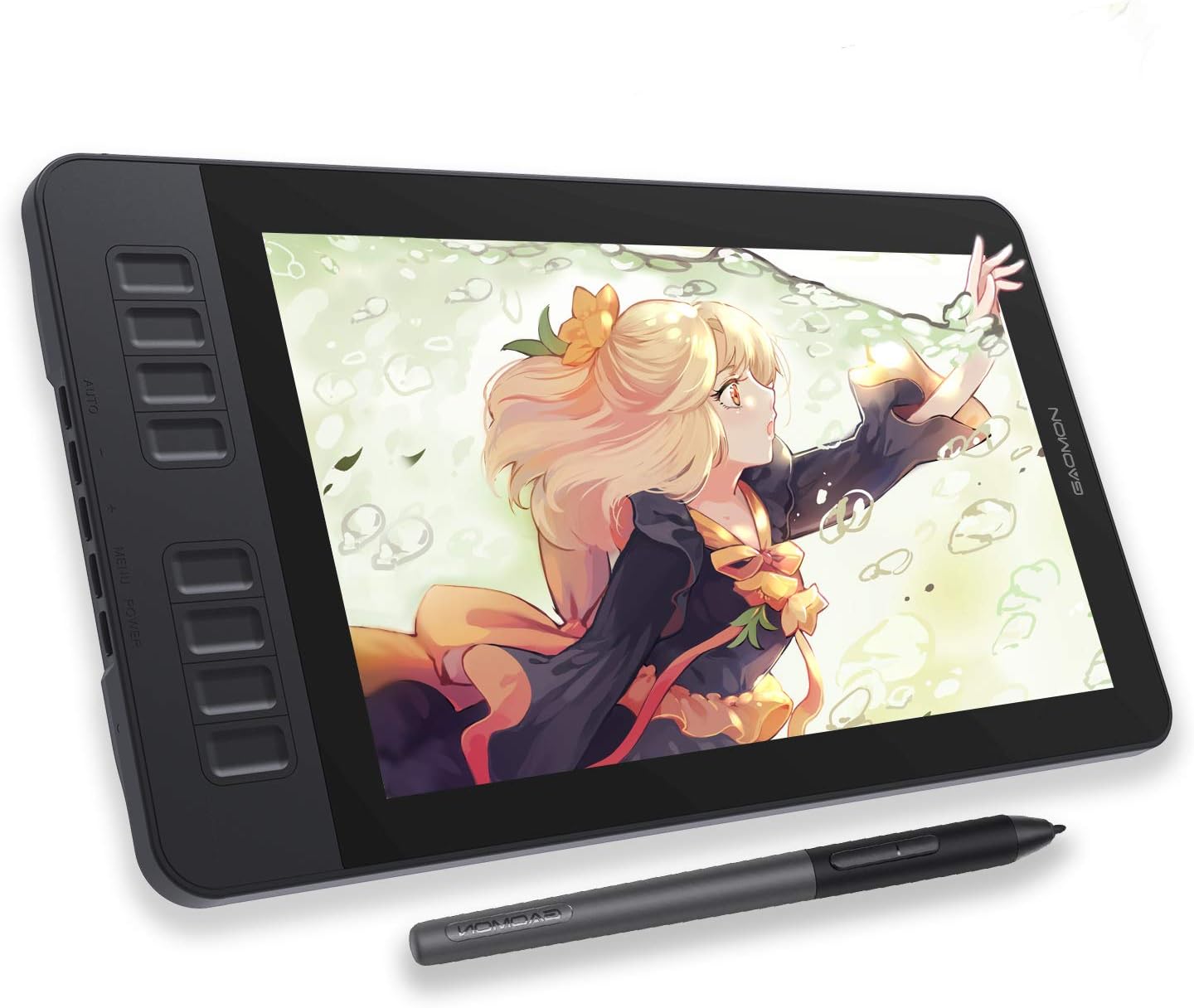
GAOMON PD1161 Drawing Tablet with Screen, Digital Art Tablet with Battery-Free Stylus, Tilt, 8 Shortcut Keys for Paint, Design, Illustration, Editing, 11.6-inch Graphics Tablet for Mac, Windows PC
Want the best price and purchase timing?
Our AI advisor analyzes real-time pricing across all channels to find you the best deal.
AI Verdict
This is an 11.6-inch, 1920x1080 IPS screen tablet with a battery-free stylus and 8192 pressure levels, ideal for digital art beginners needing a display that connects to a computer.
This tablet is a solid pick if you're just starting out in digital art or need a secondary, portable screen for your existing computer setup. The 11.6-inch 1080p IPS display with 100% sRGB color and a battery-free pen with 8192 pressure levels offers a capable drawing experience for its entry-plus price band. However, its reliance on a host computer and the lack of an integrated stand mean it's not for everyone.
If you need a larger drawing area or a standalone device, look for tablets with screen sizes above 13 inches or those explicitly advertised as standalone with their own operating system.
Regret Score™
High RiskLower is better — measures purchase-regret risk from real buyer complaints, review credibility, and product maturity
Issues discovered after purchase
Critically weak dimension
Amazon rating vs actual quality
Chance this product isn't for you
Pros
- The 11.6-inch IPS screen displays 1920x1080 resolution with 72% NTSC (100% sRGB) color gamut, offering clear visuals and accurate color reproduction.
- The battery-free AP50 stylus provides 8192 levels of pressure sensitivity and ±60-degree tilt functionality for natural drawing and shading.
- Eight programmable press keys and two pen buttons allow for workflow customization and quick access to shortcuts.
- A pre-installed matte film on the display reduces glare and provides a paper-like drawing surface.
- The tablet is lightweight at 866g, making it portable for use with a laptop.
- It offers broad compatibility with Windows 7 or later and macOS 10.12 or later, supporting most art software.
Cons
- The tablet is not a standalone device and requires connection to a laptop or desktop computer to function.
- It does not include a built-in stand, which users may find inconvenient for ergonomic setup.
- Connecting the tablet involves multiple cables (HDMI, USB, power), which some users describe as a 'maze of wires'.
- The product comes with a limited one-year warranty.
- No carrying case is included, despite its portable size.
Dimension Scores
The 11.6-inch 1920x1080 IPS screen with 100% sRGB color coverage is adequate for an entry-plus display tablet, but larger and higher resolution screens are common in the category.
The battery-free stylus with 8192 pressure levels, ±60-degree tilt, and a 266PPS report rate provides a responsive and natural drawing experience.
The tablet has no internal battery and must be continuously connected to a power source and a computer to operate.
It connects via standard HDMI and USB to Windows and macOS systems, supporting common art software, but lacks any proprietary ecosystem features or wireless connectivity.
Best For
- Beginner digital artists learning to draw or paint directly on screen.
- Students needing a portable drawing display for design or illustration work with a laptop.
- Hobbyists looking for a budget-friendly pen display for photo editing or sketching.
- Users with limited desk space who need a compact drawing monitor.
Not Recommended For
- Artists requiring a standalone drawing device without a computer connection.
- Professionals needing a larger screen size or advanced ergonomic stand adjustments.
- Users who prioritize a clutter-free setup, due to the multiple required cables.
Watch Out For
- You'll need to supply your own stand; the tablet doesn't come with one, so you're stuck laying it flat or buying an accessory.
- The connection setup involves a power cable, a USB cable, and an HDMI cable, which can create a 'maze of wires' on your desk.
- The 11.6-inch screen, while portable, might feel cramped for detailed artwork or complex interfaces, especially with a 1920x1080 resolution.
- The warranty period is only one year, which is shorter than some competitors offer for similar devices.
Full Specifications
| ASIN | B07YFG742J |
| Brand | GAOMON |
| Item Weight | 1.9 pounds |
| Manufacturer | GAOMON TECHNOLOGY CORPORATION |
| Special Feature | 60° Tilt Support, Anti-glare protective film, Programmable Press Key |
| Operating System | Windows 7 or later, macOS 10.12 or later |
| Item model number | GAOMON PD1161 |
| Product Dimensions | 14.2 x 7.9 x 0.1 inches |
| Pressure Sensitivity | 8192 Levels |
| Connectivity Technology | HDMI, USB |
What Buyers Say
Many users are surprised by the drawing experience, noting the battery-free pen feels natural with its pressure sensitivity and tilt. The compact size is a recurring positive, making it easy to move around, though the lack of a built-in stand is a consistent complaint. The multiple cables needed for connection can be a hassle, creating a cluttered setup. While the screen quality is generally appreciated for its price, some wish for a larger display for more detailed work.
“Okay, so it's not standalone, which is a bummer, but for the price, drawing on this thing with the pen feels surprisingly good, like, actually drawing. Just wish it had a stand built in, my desk is a cable nightmare now.”
Common Praise
- The battery-free pen with 8192 pressure levels makes drawing feel natural and responsive.
- The 1920x1080 IPS screen provides crisp visuals and accurate colors for digital art.
- The compact 11.6-inch size and 866g weight make it easy to transport.
- The pre-installed matte film gives a paper-like texture and reduces screen glare.
- The 8 customizable shortcut keys improve workflow efficiency.
Common Complaints
- The tablet requires multiple cables (HDMI, USB, power) for connection, leading to cable clutter.
- There is no built-in stand, forcing users to buy an external one or lay the tablet flat.
- The tablet is not a standalone device and always needs to be connected to a computer.
- The 11.6-inch screen can feel small for artists working on intricate details or complex software interfaces.
- The one-year warranty is considered short by some users.
Ownership Tips
- You'll quickly realize you need to buy a separate stand for comfortable use, as laying it flat isn't ergonomic for long sessions.
- Managing the three separate cables (power, USB, HDMI) becomes a daily routine, and they can tangle easily.
- The pre-installed matte screen protector is a lifesaver for reducing reflections, but you might want to keep screen wipes handy.
- The customizable shortcut keys are essential; you'll spend time setting them up for your specific software to avoid reaching for the keyboard constantly.
Frequently Asked Questions
Does the GAOMON PD1161 work as a standalone tablet?
No, the GAOMON PD1161 is not a standalone tablet. It must be connected to a computer running Windows 7 or later, or macOS 10.12 or later, to function.
What kind of pen does it use?
It uses a battery-free stylus, model AP50, which means you never need to charge it. It supports 8192 levels of pressure sensitivity and ±60 degrees of tilt.
Does it come with a stand?
No, a stand is not included with the GAOMON PD1161. You'll need to purchase one separately if you want to use it at an angle.
How many shortcut keys does it have?
The tablet features 8 customizable press keys on the side and 2 programmable buttons on the pen, allowing you to set up your preferred shortcuts.
What is the screen resolution and color accuracy?
The 11.6-inch IPS screen has a 1920x1080 resolution and covers 72% NTSC (100% sRGB) color gamut, displaying 16.7 million colors.
Is it compatible with left-handed users?
Yes, the GAOMON PD1161 supports a left-hand mode, allowing you to configure it for left-handed use.
Buying Guide
When looking at drawing tablets with screens, you need to understand that many, like this one, aren't standalone. They act like a second monitor for your computer, but you can draw directly on them. This means you'll still need a laptop or desktop to power the software and process your art. Pay attention to the screen size and resolution, as this directly impacts your working area and how much detail you can see. Also, the pen's pressure sensitivity and tilt support are crucial for how naturally your strokes translate to the digital canvas.
Screen Size (11.6 inches)
This is your digital canvas. An 11.6-inch screen is compact and portable, like a small notebook, but it means less space for your artwork and software menus compared to larger displays. Think about how much room you need to comfortably draw and navigate your art program.
Pressure Sensitivity (8192 levels)
This determines how much your lines change based on how hard you press the pen. 8192 levels is a lot, meaning you get very fine control over line thickness and opacity, similar to how a real pencil responds to pressure.
Tilt Function (±60 degrees)
This allows you to shade by tilting your pen, much like you would with a real pencil or charcoal. If you do a lot of sketching or rendering, this feature makes the experience feel more natural and intuitive.
Color Gamut (100% sRGB)
This indicates how many colors the screen can accurately display. 100% sRGB means the colors you see on the tablet will be very close to what you'd see on most standard monitors and web content, which is important for consistent color work.
Alternatives
If this tablet feels too small or you need a truly portable device, search for 'standalone drawing tablets' or 'pen displays 13 inch and above' to find options with larger screens or integrated operating systems.
You Might Also Like

Android Tablet with Keyboard, Android 15 Tablet 10 inch, 26GB+256GB+2TB Expand, 2-in-1 Tablets with 8-Core, 5G WiFi, 8000mAh, BT5.0, GMS, GPS, Gemini AI, Tablets PC with Mouse, Case, Stylus(Black)
$100-$149This 10.1-inch Android 15 tablet offers a 1280x800 IPS display, 6GB physical RAM (plus 20GB virtual), 256GB storage, and an 8000mAh battery, bundled with a keyboard, mouse, and stylus for budget-focus

Apple iPad (9th Generation): with A13 Bionic chip, 10.2-inch Retina Display, 64GB, Wi-Fi, 12MP front/8MP Back Camera, Touch ID, All-Day Battery Life – Space Gray
This 10.2-inch Retina Display iPad with an A13 Bionic chip and 64GB storage is for casual users needing a reliable Apple tablet for media and light tasks.

Amazon Fire HD 10 tablet (newest model) built for relaxation, 10.1" vibrant Full HD screen, octa-core processor, 3 GB RAM, 32 GB, Lilac
A 10.1" 1080p tablet with an octa-core processor and 3GB RAM, designed for Amazon content consumption and light use.

Wacom Intuos Small Graphics Drawing Tablet, Includes Training & Software; 4 Customizable ExpressKeys Compatible with Chromebook Mac Android & Windows, Black
A compact Wacom Intuos with a battery-free pen and 6.0 x 3.7-inch active area, suitable for digital art beginners on Windows, Mac, or Android.