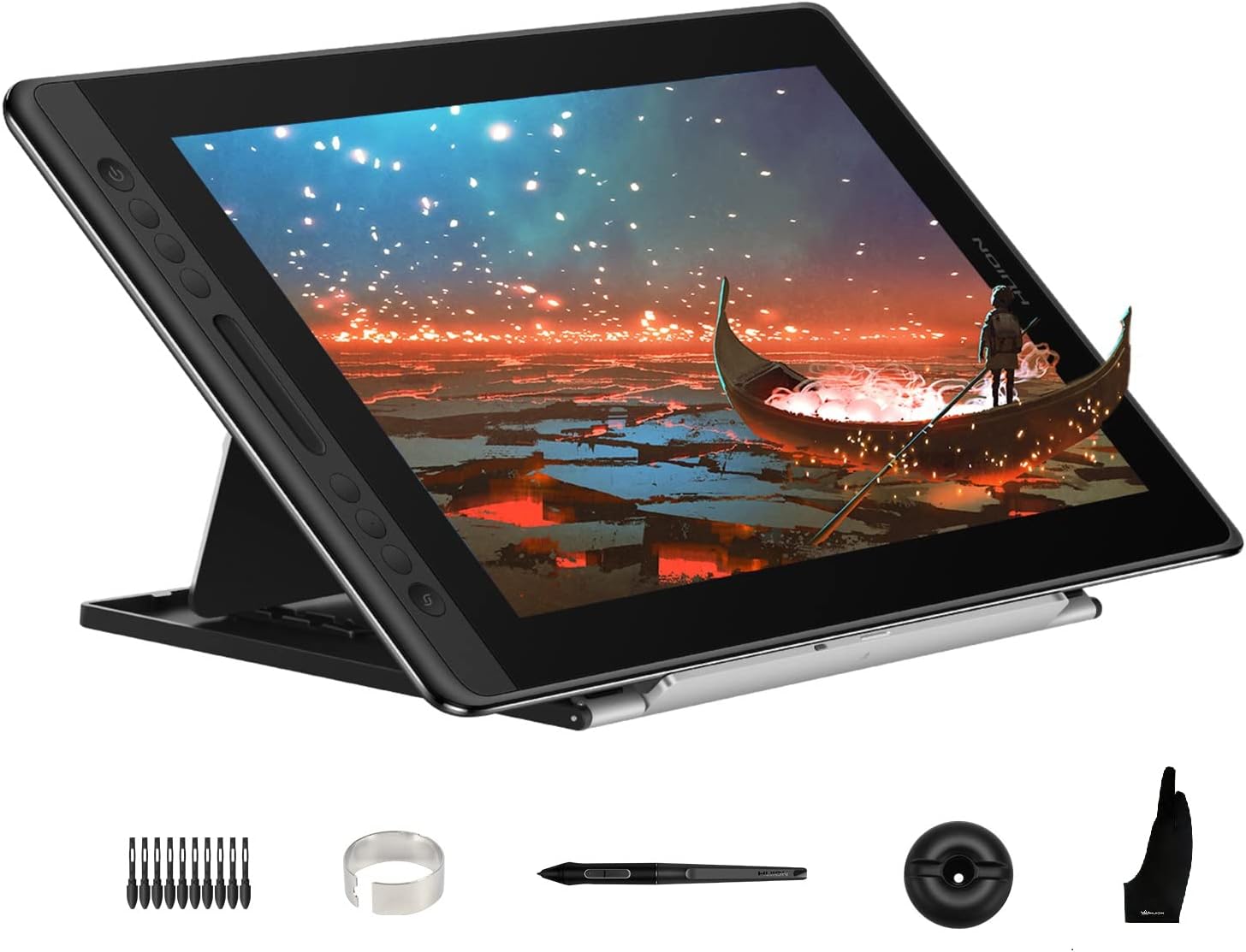
HUION KAMVAS Pro 16 Drawing Tablet with Screen, 15.6 inch Pen Display Anti-Glare Glass 6 Shortcut Keys Adjustable Stand, Graphics Tablet for Drawing, Writing, Design, Work with Windows, Mac and Linux
Want the best price and purchase timing?
Our AI advisor analyzes real-time pricing across all channels to find you the best deal.
AI Verdict
This 15.6-inch pen display with 120% sRGB and 8192 pressure levels is for digital artists needing a connected drawing screen.
This tablet is a strong fit for digital artists who need a connected pen display with a 15.6-inch screen, 120% sRGB color, and 8192 pressure levels. Its full lamination and anti-glare glass enhance the drawing experience, making it suitable for detailed 2D work.
If you need higher pixel density, look for a pen display with 2.5K or 4K resolution.
Regret Score™
Medium RiskLower is better — measures purchase-regret risk from real buyer complaints, review credibility, and product maturity
Issues discovered after purchase
Critically weak dimension
Amazon rating vs actual quality
Chance this product isn't for you
Pros
- The 15.6-inch full-laminated screen minimizes parallax, making the cursor follow the pen nib closely.
- It displays 120% sRGB (92% AdobeRGB) color gamut volume with 16.7 million 8-bit colors, offering accurate color reproduction.
- The battery-free pen provides 8192 levels of pressure sensitivity and 60° tilt recognition for precise input.
- Six customizable express keys and a touch bar optimize workflow by allowing quick access to shortcuts like zooming or brush size adjustments.
- The anti-glare glass provides a smooth, slightly textured drawing surface, mimicking a pen-on-paper feel.
- The adjustable stand allows angles between 20 and 60 degrees, helping reduce strain during long drawing sessions.
Cons
- Some users report drawing accuracy issues, with the cursor appearing slightly offset from the pen tip at certain angles.
- The driver software can be less integrated with Windows environments compared to competitors, occasionally causing issues.
- There is no option to create per-application profiles for the shortcut keys, requiring manual changes for different software.
- The anti-glare coating can create a 'sparkle' or 'white haze' effect on the display depending on lighting conditions.
- The 3-in-1 USB-C cable, while reducing clutter, requires an HDMI port on the host computer, potentially needing an adapter.
Dimension Scores
The 15.6-inch full-laminated screen with 120% sRGB (92% AdobeRGB) and 1000:1 contrast offers accurate color and reduced parallax.
The battery-free pen with 8192 pressure levels, 60° tilt recognition, and >220PPS report rate provides responsive and precise drawing.
This is a pen display that requires a host computer for power and operation, so it does not have its own battery life.
It supports Windows, Mac, and Linux, and works with mainstream creative software, but driver integration can be inconsistent.
Best For
- Digital artists and illustrators working in 2D applications like Photoshop or Clip Studio Paint.
- Students or hobbyists transitioning from screen-less tablets to a pen display.
- Users needing a portable 15.6-inch pen display that connects to Windows, Mac, or Linux systems.
- Artists prioritizing color accuracy with 120% sRGB coverage for their work.
Not Recommended For
- Users seeking a standalone drawing tablet that doesn't require a computer connection.
- 3D artists who primarily use mouse and keyboard for modeling, as pen displays are more suited for sculpting.
- Professionals who require per-application custom profiles for shortcut keys to switch workflows quickly.
Watch Out For
- Initial setup can be challenging, with users reporting trial and error to get it working correctly.
- The pen pressure can feel unnatural or exhibit wobble, even after calibration, compared to higher-end tablets.
- The anti-glare surface, while providing a paper-like feel, can introduce a noticeable 'sparkle' effect on the screen.
- Driver instability or occasional crashes have been reported, sometimes requiring a restart to resolve.
- The 3-in-1 cable requires specific ports (HDMI) on the host computer, which might necessitate purchasing an adapter.
Full Specifications
| ASIN | B07RXZC12J |
| Brand | HUION |
| Item Weight | 2.98 pounds |
| Manufacturer | Shenzhen Huion Animation Technology LTD. |
| Special Feature | 60° Tilt Support, Anti-Glare Glass, Full Lamination, Programmable Press Key |
| Operating System | Linux(Ubuntu), Mac OS 10.12 and above, Windows 7 and above |
| Item model number | Kamvas Pro 16 |
| Product Dimensions | 17.24 x 9.88 x 0.47 inches |
| Pressure Sensitivity | 8192 Levels |
| Connectivity Technology | USB |
What Buyers Say
Many users find the display quality, with its 120% sRGB and full lamination, to be a significant selling point, offering vibrant colors and minimal parallax. However, recurring complaints point to driver issues, with some users experiencing instability or difficulty with setup, especially on Mac OS. The pen's pressure sensitivity and tilt function are generally praised for accuracy, though some artists report pen wobble or an unnatural feel compared to other brands. The anti-glare screen is appreciated for its paper-like texture, but the 'sparkle' it creates can be distracting for some.
“Look, the screen colors are awesome and it feels pretty good to draw on, but man, the drivers can be a headache to get right, and I wish I didn't have to keep changing my shortcuts for every program!”
Common Praise
- The 120% sRGB color gamut provides rich and accurate colors on the 15.6-inch screen.
- The full-laminated screen significantly reduces the gap between the pen tip and the cursor, improving drawing precision.
- The battery-free pen with 8192 pressure levels and 60° tilt feels natural and responsive for detailed artwork.
- The anti-glare etched glass surface offers a pleasant, textured 'pen-on-paper' drawing experience.
- The 6 customizable express keys and touch bar are helpful for speeding up workflow.
Common Complaints
- Driver software can be buggy or less refined than competitors, leading to occasional crashes or setup difficulties.
- Some users experience a noticeable 'anti-glare sparkle' or haze on the screen, which can be distracting.
- The pen can exhibit wobble or feel unnatural for some users, even after calibration.
- Lack of per-application profiles for shortcut keys means settings apply globally, requiring manual changes for different software.
- Drawing accuracy can be inconsistent, with slight cursor offset reported at various angles.
Ownership Tips
- You'll probably need to spend some time tweaking driver settings and pen calibration to get the feel just right for your drawing style.
- The 3-in-1 cable, while neat, can be a bit stiff, and you might need an HDMI adapter if your computer lacks the port.
- The adjustable stand is really helpful for ergonomics, so if it's not included, consider buying one to avoid neck strain.
- The anti-glare surface is a double-edged sword; it feels great but can show a 'sparkle' under certain lighting, so mind your studio setup.
- While it works with Linux, Mac, and Windows, driver stability and feature parity might vary, with Windows generally having a smoother experience.
Frequently Asked Questions
Does the Huion Kamvas Pro 16 work as a standalone tablet?
No, the Kamvas Pro 16 is a pen display that requires connection to a computer (Windows, Mac, or Linux) to function.
Is the adjustable stand included with the tablet?
The adjustable stand (ST200) is often an optional purchase, so check the specific bundle you are buying.
What operating systems are compatible with this tablet?
It is compatible with Windows 7 and above, Mac OS 10.12 and above, and Linux (Ubuntu).
Does the pen require batteries or charging?
No, the included PW507 pen uses battery-free technology and does not require charging.
How does the screen feel when drawing?
The screen features anti-glare etched glass with a slight texture, designed to provide a pen-on-paper drawing sensation.
Can I customize the shortcut keys for different applications?
While the 6 express keys and touch bar are customizable, the tablet's driver does not support creating per-application profiles, meaning changes are global.
Buying Guide
When you're looking at a pen display like this, you're essentially getting a second monitor that you can draw directly on. It's not a standalone tablet like an iPad; it needs to be connected to your computer to work. Think of it as an interactive screen that extends your desktop, letting you use your favorite desktop art software with a pen.
sRGB / AdobeRGB color gamut
This tells you how many colors the screen can accurately display. Higher percentages, like 120% sRGB, mean your digital artwork will look more true-to-life on the screen, which is super important if you're doing color-sensitive work for print or web.
Pressure Sensitivity (8192 levels)
This is how many different levels of pressure the pen can detect. More levels mean your lines can vary more subtly from thin to thick, or light to dark, just like a real pencil or brush. 8192 levels is a lot, giving you fine control over your strokes.
Full Lamination / Anti-Glare Glass
Full lamination means there's no air gap between the screen and the glass, which makes the pen feel like it's directly on your drawing, reducing parallax (the slight offset between your pen tip and the cursor). Anti-glare glass reduces reflections and often adds a slight texture for a more natural 'pen-on-paper' feel.
Alternatives
If this tablet doesn't quite fit, consider looking for pen displays with 2.5K or 4K resolution for sharper images, or models that offer per-application driver profiles for more customized shortcut key management.
You Might Also Like

Android Tablet with Keyboard, Android 15 Tablet 10 inch, 26GB+256GB+2TB Expand, 2-in-1 Tablets with 8-Core, 5G WiFi, 8000mAh, BT5.0, GMS, GPS, Gemini AI, Tablets PC with Mouse, Case, Stylus(Black)
$100-$149This 10.1-inch Android 15 tablet offers a 1280x800 IPS display, 6GB physical RAM (plus 20GB virtual), 256GB storage, and an 8000mAh battery, bundled with a keyboard, mouse, and stylus for budget-focus

Apple iPad (9th Generation): with A13 Bionic chip, 10.2-inch Retina Display, 64GB, Wi-Fi, 12MP front/8MP Back Camera, Touch ID, All-Day Battery Life – Space Gray
This 10.2-inch Retina Display iPad with an A13 Bionic chip and 64GB storage is for casual users needing a reliable Apple tablet for media and light tasks.

Amazon Fire HD 10 tablet (newest model) built for relaxation, 10.1" vibrant Full HD screen, octa-core processor, 3 GB RAM, 32 GB, Lilac
A 10.1" 1080p tablet with an octa-core processor and 3GB RAM, designed for Amazon content consumption and light use.

Wacom Intuos Small Graphics Drawing Tablet, Includes Training & Software; 4 Customizable ExpressKeys Compatible with Chromebook Mac Android & Windows, Black
A compact Wacom Intuos with a battery-free pen and 6.0 x 3.7-inch active area, suitable for digital art beginners on Windows, Mac, or Android.