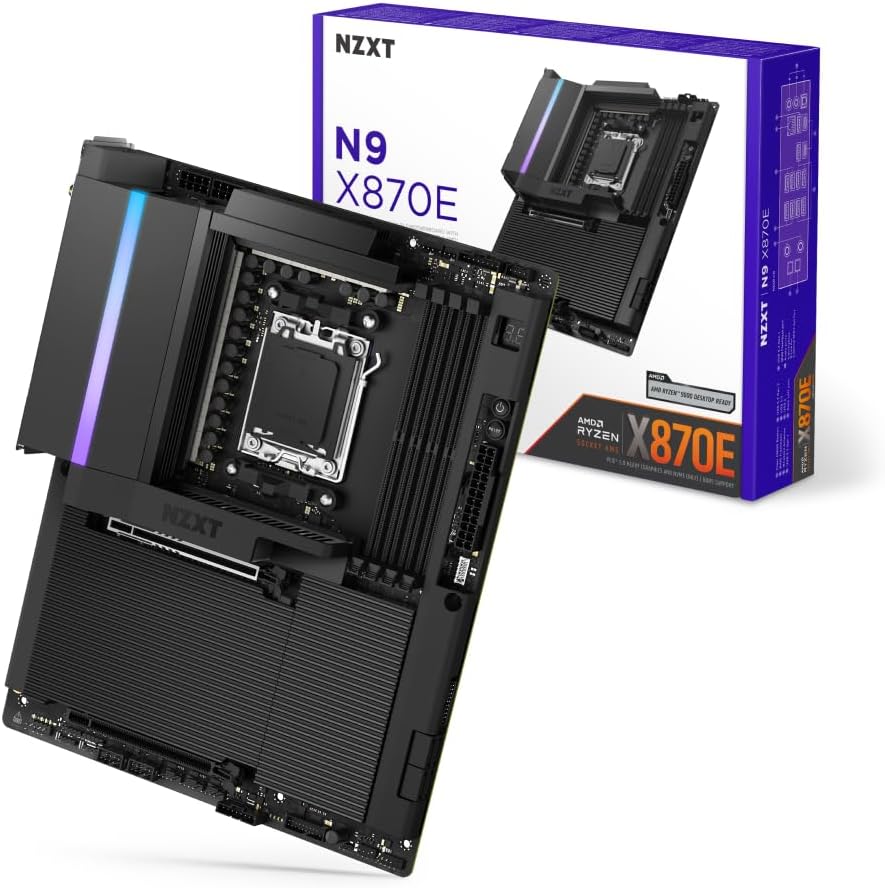
NZXT N9 X870E - AMD X870E AM5 ATX Gaming Motherboard for Ryzen 9000/8000/7000-20+2+1, DDR5, 4X M.2, PCIe 5.0, Wi-Fi 7, 5GbE, USB 4 – Full-Metal Cover, M.2 Quick-Release Latches – Black
Want the best price and purchase timing?
Our AI advisor analyzes real-time pricing across all channels to find you the best deal.
AI Verdict
This NZXT N9 X870E motherboard offers a 20+2+1 power phase and PCIe 5.0 for high-end Ryzen 9000 builds, but requires immediate BIOS updates for stability.
This motherboard is a strong fit for high-end AMD Ryzen 9000/8000/7000 builds, offering a 20+2+1 power phase design and PCIe 5.0 support for top-tier components. Its advanced connectivity with Wi-Fi 7 and 5GbE, alongside four M.2 slots with quick-release latches, caters to users demanding speed and convenience.
If you prioritize a fully white PCB and ports for a truly all-white build, look for motherboards that offer this specific aesthetic detail.
Regret Score™
Medium RiskLower is better — measures purchase-regret risk from real buyer complaints, review credibility, and product maturity
Issues discovered after purchase
Critically weak dimension
Amazon rating vs actual quality
Chance this product isn't for you
Pros
- 20+2+1 power phase design with 110A Smart Power Stages ensures stable, overclocking-ready power delivery.
- Four M.2 slots (one PCIe 5.0, three PCIe 4.0) with toolless quick-release latches for ultra-fast storage.
- Includes Wi-Fi 7, 5GbE LAN, and USB4 ports for advanced connectivity.
- One PCIe 5.0 x16 slot for next-gen GPUs and one PCIe 3.0 x16 slot for additional expansion.
- DDR5 memory support up to 8000+ MT/s across four dual-channel DIMM slots.
- Full-metal cover conceals the PCB, contributing to a clean, modern aesthetic.
Cons
- VRM fans can be noisy and require tuning via NZXT CAM software or EFI to reduce sound levels.
- EFI lacks modern fan control options, forcing users to rely on NZXT CAM software for fan curve adjustments.
- No GPU quick-release latch, making GPU installation or removal less convenient than M.2 drives.
- Some users reported GPU clearance issues with larger cards, requiring alternative mounting solutions like riser cables.
- User manual has been described as lacking clarity, potentially complicating initial setup for some builders.
Dimension Scores
The 20+2+1 power phase design with 110A Smart Power Stages and an 8-layer, 2-ounce copper PCB provides robust and stable power for overclocking.
It includes Wi-Fi 7, 5GbE, USB4, a full-metal cover, M.2 quick-release latches, and advanced cooling with dual PWM fans.
Offers one PCIe 5.0 x16 slot, one PCIe 3.0 x16 slot, and four M.2 slots (one PCIe 5.0, three PCIe 4.0) for extensive storage and GPU configurations.
While NZXT CAM software works well for fan and RGB control, the EFI is dated, lacks modern fan control options, and critical BIOS updates are necessary for CPU stability.
Best For
- Building a high-performance AMD Ryzen 9000/8000/7000 gaming PC with a focus on aesthetics.
- Enthusiasts who plan to utilize multiple PCIe 5.0 and PCIe 4.0 NVMe drives.
- Users requiring advanced networking with Wi-Fi 7 and 5GbE.
- Overclockers needing a robust power delivery system for Ryzen 7000/8000/9000 CPUs.
Not Recommended For
- Budget-conscious PC builders, due to its upper-mid price band.
- Users who prefer extensive BIOS-level fan control over software solutions.
- Builders with very large GPUs who are unwilling to use vertical mounts or riser cables.
Watch Out For
- BIOS version 3.20 or later is required for AMD Ryzen 7 9800X3D support to prevent memory-related issues; failure to update immediately can lead to CPU damage.
- The integrated VRM fans can produce noticeable noise, requiring manual adjustment through NZXT CAM software to achieve quieter operation.
- Some large GPUs, like the XFX 9070 XT Mercury, may not fully seat in the PCIe slot due to interference with the motherboard's metal cover, preventing the retention arm from locking.
- The user manual has been criticized for a lack of clarity, which could make initial setup and troubleshooting more difficult for less experienced builders.
- The EFI's limited fan control options mean you're pushed towards using NZXT CAM software for modern fan curve profiles.
Full Specifications
| RAM | DDR5 |
| ASIN | B0DZF1VQ3K |
| Brand | NZXT |
| Color | Black |
| Series | N9 X870E |
| Platform | Windows |
| CPU Model | AMD Ryzen 7 |
| Processor | amd_ryzen_7 |
| CPU Socket | Socket AM5 |
| Department | Gaming |
| Model Name | N9 X870E |
| Item Weight | 5.62 pounds |
| Chipset Type | AMD 870 |
| Manufacturer | NZXT |
| Memory Speed | 8200 MHz |
| Item model number | N9-X87XT-B1 |
| Compatible Devices | Personal Computer |
| Memory Clock Speed | 8200 MHz |
| Package Dimensions | 13.78 x 11.1 x 3.07 inches |
| Compatible Processors | AMD Ryzen™ 9000/ 8000 / 7000 |
| RAM Memory Technology | DDR5 |
What Buyers Say
This NZXT N9 X870E motherboard gets a lot of praise for its clean, minimalist aesthetic and robust feature set, especially the 20+2+1 power delivery and toolless M.2 latches. However, the VRM fans can be quite loud out of the box, pushing users to fine-tune them with NZXT CAM software. A significant concern is the critical BIOS update required for certain Ryzen 7000/9000 series CPUs, with reports of CPU damage if not updated promptly. Some users also ran into GPU clearance issues with larger cards, which is a pain during assembly.
“Look, this board looks sick and has all the ports, but seriously, update that BIOS ASAP or you're gonna fry your expensive CPU, and those VRM fans are loud enough to wake the dead until you tweak 'em.”
Common Praise
- Clean, minimalist design with a full-metal cover that looks sharp in builds.
- Robust 20+2+1 power phase design handles high-end Ryzen CPUs and overclocking effectively.
- Four M.2 slots with toolless quick-release latches make storage installation super easy.
- Excellent connectivity with USB4, Wi-Fi 7, and 5GbE for fast data transfers and networking.
- VRM and M.2 temperatures remain low even under heavy load.
Common Complaints
- VRM fans are noisy and require manual adjustment through NZXT CAM or EFI.
- BIOS updates are critical for CPU stability, with reports of CPU damage if not updated for specific Ryzen 7000/9000 series chips.
- The EFI is dated and lacks modern fan control options, pushing users to software solutions.
- Some large graphics cards may have clearance issues with the motherboard's metal shroud, preventing proper seating.
- No quick-release latch for the main PCIe x16 slot, unlike the convenient M.2 latches.
Ownership Tips
- Immediately update the BIOS to version 3.20 or later before installing a Ryzen 7 9800X3D or similar CPU to prevent potential memory-related issues and CPU damage.
- Be prepared to adjust the VRM fan curves using NZXT CAM software to reduce noise, as they can be audible at default settings.
- If you're using a particularly thick or long GPU, double-check clearance with the motherboard's metal cover; a vertical mount or riser cable might be necessary.
- The user manual isn't the clearest, so expect to rely on online resources or prior building experience for some steps.
Frequently Asked Questions
What CPUs are compatible with the NZXT N9 X870E?
It supports AMD Ryzen 9000, 8000, and 7000 series desktop processors with an AM5 socket.
What type of RAM does this motherboard use?
The motherboard has four dual-channel DIMM slots that support DDR5 RAM speeds of 8000+ MT/s.
How many M.2 slots does it have?
It features four M.2 slots: one PCIe 5.0 and three PCIe 4.0, all equipped with quick-release latches.
Does the motherboard include Wi-Fi and Ethernet?
Yes, it comes with Wi-Fi 7 and a 5GbE LAN port for high-speed wireless and wired networking.
Is a BIOS update necessary for new CPUs?
Yes, BIOS version 3.20 or later is required for full support of the AMD Ryzen 7 9800X3D to prevent memory-related issues.
Buying Guide
When you're looking at a motherboard like this, you're essentially picking the backbone of your PC. It dictates what CPU you can use, how much and what kind of RAM you can install, and how many fast storage drives you can cram in there. Don't just look at the flashy features; consider the long-term stability and ease of use, especially with BIOS updates and software integration.
AMD AM5 Socket
20+2+1 Power Phase Design
PCIe 5.0
Wi-Fi 7 and 5GbE
Alternatives
If this board doesn't fit, consider motherboards with a B650E chipset for a lower price point if you don't need the full X870E feature set, or look for models with a more traditional BIOS interface if you prefer less reliance on companion software for fan control.
You Might Also Like

JetKVM KVM Over IP ATX Extension Board, ATX Power Control Board- Only for Jet KVM Accessories Boot from Shutdown, Crash Recovery
$0-$49This is an ATX form factor power control board designed for JetKVM accessories, enabling remote PC power state management and simultaneous front panel button use.

Asus ROG Strix B550-F Gaming WiFi II AMD AM4 (3rd Gen Ryzen) ATX Motherboard & TUF Gaming B650-PLUS WiFi Socket AM5 (LGA 1718) Ryzen 7000 ATX Gaming Motherboard
$150-$299This bundle offers two ATX motherboards: the ROG Strix B550-F Gaming WiFi II for AM4 Ryzen 3000/5000 CPUs with DDR4 RAM, and the TUF Gaming B650-PLUS WiFi for AM5 Ryzen 7000 CPUs with DDR5 RAM.

Game Motherboard Fit for ASROCK B650E PG-ITX WiFi B650 AM5 Motherboard Support Ryzen 7800X3D 7600/X 7950X 7700/X CPU 2xDDR5 128GB Hyper M.2 Mini-ITX
Price range unavailableThis KUETFBVC motherboard listing presents highly contradictory specifications, including a BGA 1023 socket and AMD 480 chipset, making it unsuitable for any modern Ryzen AM5 CPU.

Asus ROG Strix B550-F Gaming WiFi II AMD AM4 (3rd Gen Ryzen) ATX Gaming Motherboard (PCIe 4.0,WiFi 6E, 2.5Gb LAN, BIOS Flashback, HDMI 2.1, Addressable Gen 2 RGB Header and Aura Sync)
This is a premium-feeling AM4 board with beefy VRMs and WiFi 6E, perfect for squeezing the last drop of performance out of a Ryzen 5000 series CPU.