
MSI MAG Z890 Tomahawk WiFi Gaming Motherboard (Supports Core Ultra Series 2 Intel Processors, LGA 1851, DDR5, PCIe 5.0, M.2, SATA, 5Gbps LAN, USB Type-C, Wi-Fi 7, Bluetooth 5.4, Thunderbolt 4, ATX)
Want the best price and purchase timing?
Our AI advisor analyzes real-time pricing across all channels to find you the best deal.
AI Verdict
This Z890 board with LGA 1851 and DDR5-7800MHz is for builders prioritizing PCIe 5.0, Wi-Fi 7, and Thunderbolt 4 connectivity.
This motherboard is a strong contender for builders targeting the new Intel Core Ultra Series 2 processors, offering top-tier connectivity like Wi-Fi 7 and Thunderbolt 4. However, recurring BIOS reset issues and potential USB instability mean it's not a 'set it and forget it' board for everyone.
If you need absolute stability and don't want to troubleshoot BIOS or USB quirks, look for boards with more mature firmware or a longer track record of user satisfaction.
Regret Score™
Medium RiskLower is better — measures purchase-regret risk from real buyer complaints, review credibility, and product maturity
Issues discovered after purchase
Critically weak dimension
Amazon rating vs actual quality
Chance this product isn't for you
Pros
- Features a 16+1+1+1 Duet Rail Power System with 90A Smart Power Stage for stable CPU performance under heavy loads.
- Includes Wi-Fi 7 with a 320MHz channel, capable of 5.8Gbps transmission speeds.
- Offers two Thunderbolt 4 ports, providing 40Gbps data transfer and display output up to 8K/60Hz or 4K/120Hz.
- Equipped with one PCIe 5.0 x16 slot and one Gen5 x4 M.2 slot for high-speed graphics cards and storage.
- Features four M.2 connectors in total, including three Gen4 x4 slots, for extensive storage options.
- MSI's EZ M.2 Clip II and EZ M.2 Shield Frozr II simplify M.2 SSD installation without tools.
Cons
- Users have reported the BIOS settings resetting to default after the PC loses power, even after firmware updates.
- Some users experienced USB peripherals freezing or disconnecting randomly, requiring replugging.
- A user noted that Gen4 SSDs did not consistently achieve full advertised speeds.
- DDR5 memory can be unstable when all four DIMM slots are populated, especially at higher speeds.
- One user could not access the BIOS display after a cold start when using a dedicated Nvidia graphics card.
Dimension Scores
The 16+1+1+1 Duet Rail Power System with 90A Smart Power Stage and extended heatsinks is designed to handle heavy CPU loads.
It includes cutting-edge features like Wi-Fi 7, 5Gbps LAN, two Thunderbolt 4 ports, and a PCIe 5.0 M.2 slot.
With one PCIe 5.0 x16 slot, two PCIe 4.0 x16 slots, and four M.2 connectors (one Gen5, three Gen4), it offers substantial expansion.
While the BIOS is user-friendly, recurring issues with settings resetting and potential USB instability indicate a need for further refinement.
Best For
- Building a high-performance system with Intel Core Ultra Series 2 processors and a single PCIe 5.0 graphics card.
- Users needing extensive high-speed storage with one PCIe 5.0 M.2 drive and three PCIe 4.0 M.2 drives.
- Workstations or gaming rigs requiring Wi-Fi 7 and 5Gbps wired network connectivity.
- Enthusiasts who will leverage Thunderbolt 4 for high-bandwidth peripherals or external displays.
Not Recommended For
- Users who frequently unplug their PC from power and rely on persistent BIOS settings.
- Budget-conscious builders who don't need cutting-edge connectivity like Wi-Fi 7 or Thunderbolt 4.
- Multi-GPU setups requiring more than one PCIe 5.0 x16 slot, as the second and third PCIe x16 slots are Gen4 x4.
Watch Out For
- BIOS settings can reset to default if the system loses AC power, a recurring issue for some users even after firmware updates.
- USB devices like keyboards and mice may freeze or disconnect, requiring physical replugging to restore functionality.
- Accessing the BIOS display can be problematic with certain dedicated graphics cards during a cold boot.
- Wi-Fi drivers might not be pre-installed or automatically detected, necessitating manual installation to enable wireless connectivity.
- Populating all four DDR5 DIMM slots can lead to system instability, especially when pushing memory speeds beyond JEDEC specifications.
Full Specifications
| RAM | DDR5 |
| ASIN | B0DH6SF5LB |
| Brand | msi |
| Series | Z890TOMAHAWKWIFI |
| Platform | Windows 11 |
| CPU Socket | LGA 1851 |
| Model Name | Z890TOMAHAWKWIFI |
| Item Weight | 4.56 pounds |
| Chipset Type | Intel Z890 |
| Manufacturer | MSI |
| Memory Speed | 7800 MHz |
| Item model number | MAG Z890 TOMAHAWK WIFI |
| Compatible Devices | Personal Computer |
| Memory Clock Speed | 7800 MHz |
| Product Dimensions | 13.46 x 10.55 x 2.76 inches |
| Compatible Processors | Supports Intel Core Ultra Processors (Series 2) |
| RAM Memory Technology | DDR5 |
| Item Dimensions LxWxH | 13.46 x 10.55 x 2.76 inches |
| Memory Storage Capacity | 256 GB |
What Buyers Say
The most surprising finding is the persistent BIOS settings reset issue when the PC loses power, which has plagued some users despite firmware updates. Beyond that, some users have encountered frustrating USB peripheral disconnections and difficulties accessing the BIOS display with a dedicated GPU. However, many appreciate the robust power delivery and the array of modern connectivity options like Wi-Fi 7 and Thunderbolt 4. The tool-free M.2 installation is a definite plus for builders. Overall, it seems like a feature-rich board that might require some initial troubleshooting and BIOS updates to achieve full stability.
“Dude, this board has all the new stuff like Wi-Fi 7 and Thunderbolt, but seriously, my BIOS keeps forgetting my settings if I unplug it, and my mouse just randomly stops working sometimes, it's a pain!”
Common Praise
- The 16+1+1+1 Duet Rail Power System handles demanding CPU workloads without issue.
- Wi-Fi 7 and 5Gbps LAN provide fast and reliable network connections.
- The two Thunderbolt 4 ports are a significant value addition for high-speed peripherals.
- M.2 installation is simplified with tool-free clips and heatsinks.
- The fixed I/O shield makes installation easier and less prone to misalignment.
- The BIOS is user-friendly, offering both easy and advanced modes for configuration.
Common Complaints
- BIOS settings reset to default after the system loses AC power, which is super annoying.
- USB devices randomly disconnect or freeze, forcing you to replug them.
- Difficulty accessing the BIOS display when a dedicated graphics card is installed, especially on cold boots.
- Some users experienced slower than expected speeds from Gen4 SSDs.
- System instability can occur when all four DDR5 memory slots are populated.
- Wi-Fi drivers sometimes need to be manually installed after initial setup.
Ownership Tips
- You'll probably need to update the BIOS right out of the box for better stability and to address known issues.
- Be prepared to troubleshoot USB connectivity if you experience random peripheral disconnections.
- If you plan on using all four DDR5 DIMM slots, be aware of potential stability issues, especially with high-speed RAM.
- Keep an eye on MSI's support page for new firmware updates, as they seem to be actively addressing issues.
- Make sure to install Wi-Fi drivers manually if your system doesn't detect networks immediately after OS installation.
Frequently Asked Questions
Does this motherboard support Intel Core Ultra Series 2 processors?
Yes, it supports Intel Core Ultra Processors (Series 2) with the LGA 1851 socket.
What is the maximum RAM speed supported?
It supports Dual Channel DDR5 memory up to 256GB, with overclocked speeds reaching 9200+ MT/s.
How many M.2 slots does it have?
The board features four M.2 connectors: one Gen5 x4 slot and three Gen4 x4 slots for high-speed storage.
Does it have Wi-Fi 7 and Thunderbolt 4?
Yes, it comes with Wi-Fi 7, offering speeds up to 5.8Gbps, and two Thunderbolt 4 ports.
Are there known issues with BIOS settings resetting?
Yes, some users have reported that BIOS settings reset to default if the PC loses power, though firmware updates have attempted to address this.
Is it easy to install M.2 SSDs?
Yes, MSI includes EZ M.2 Clip II and EZ M.2 Shield Frozr II, making M.2 installation tool-free and straightforward.
Buying Guide
When buying a motherboard, you're essentially picking the central nervous system for your PC. It dictates what CPU, RAM, and storage you can use, and how fast everything talks to each other. For a Z890 board like this, you're looking at the latest Intel processors and high-end features, so compatibility with your other components is key. Don't just look at the flashy numbers; consider how many USB ports you actually need, if you'll use all those M.2 slots, and if the network speeds match your internet plan.
LGA 1851 Socket
This is the physical connector for your CPU. LGA 1851 means this board is designed for Intel's Core Ultra Series 2 processors, so you can't use older Intel CPUs or AMD processors with it.
DDR5 Memory
This refers to the type of RAM (Random Access Memory) the board supports. DDR5 is the newest and fastest generation of RAM, offering higher speeds and capacities than previous generations, which is crucial for demanding tasks and gaming.
PCIe 5.0
This is the latest and fastest version of the PCIe (Peripheral Component Interconnect Express) interface. It's like a super-fast highway for your graphics card and high-speed M.2 SSDs, allowing them to transfer data much quicker than PCIe 4.0 or older versions.
Wi-Fi 7 & 5Gbps LAN
These are your internet connection options. Wi-Fi 7 is the newest wireless standard, offering incredibly fast speeds and lower latency if you have a compatible router. The 5Gbps LAN port provides a wired connection that's five times faster than standard Gigabit Ethernet, great for large file transfers or competitive online gaming.
Alternatives
If this board's BIOS or USB issues are a deal-breaker, look for Z890 motherboards from other brands with a proven track record of stable firmware, or consider models with fewer cutting-edge features if you don't need them, which might offer greater stability.
You Might Also Like

JetKVM KVM Over IP ATX Extension Board, ATX Power Control Board- Only for Jet KVM Accessories Boot from Shutdown, Crash Recovery
$0-$49This is an ATX form factor power control board designed for JetKVM accessories, enabling remote PC power state management and simultaneous front panel button use.
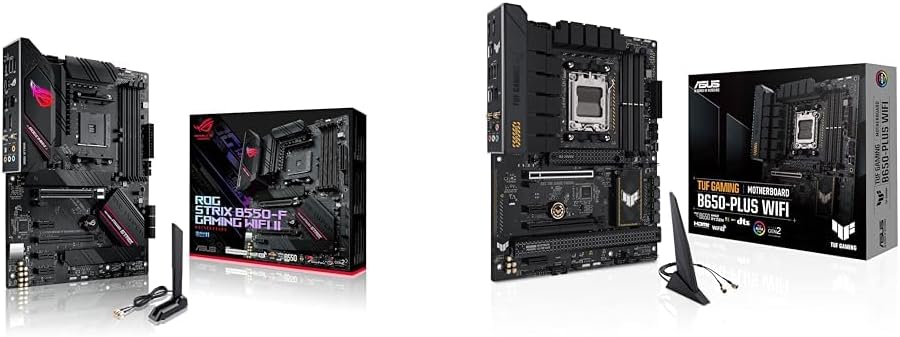
Asus ROG Strix B550-F Gaming WiFi II AMD AM4 (3rd Gen Ryzen) ATX Motherboard & TUF Gaming B650-PLUS WiFi Socket AM5 (LGA 1718) Ryzen 7000 ATX Gaming Motherboard
$150-$299This bundle offers two ATX motherboards: the ROG Strix B550-F Gaming WiFi II for AM4 Ryzen 3000/5000 CPUs with DDR4 RAM, and the TUF Gaming B650-PLUS WiFi for AM5 Ryzen 7000 CPUs with DDR5 RAM.

Game Motherboard Fit for ASROCK B650E PG-ITX WiFi B650 AM5 Motherboard Support Ryzen 7800X3D 7600/X 7950X 7700/X CPU 2xDDR5 128GB Hyper M.2 Mini-ITX
Price range unavailableThis KUETFBVC motherboard listing presents highly contradictory specifications, including a BGA 1023 socket and AMD 480 chipset, making it unsuitable for any modern Ryzen AM5 CPU.

Asus ROG Strix B550-F Gaming WiFi II AMD AM4 (3rd Gen Ryzen) ATX Gaming Motherboard (PCIe 4.0,WiFi 6E, 2.5Gb LAN, BIOS Flashback, HDMI 2.1, Addressable Gen 2 RGB Header and Aura Sync)
This is a premium-feeling AM4 board with beefy VRMs and WiFi 6E, perfect for squeezing the last drop of performance out of a Ryzen 5000 series CPU.