
ASUS Z790 GAMING WIFI7 (LGA 1700) ATX motherboard with PCIe 5.0, three M.2 slots, 14+1 DrMOS, DDR5, Realtek 1Gb LAN, HDMI TM, USB 3.2 Gen 2x2 Type-C, front USB 3.2 Gen 1 Type-C, Thunderbolt, Aura Sync
Want the best price and purchase timing?
Our AI advisor analyzes real-time pricing across all channels to find you the best deal.
AI Verdict
This Z790 ATX motherboard with LGA 1700 and DDR5 supports 14th Gen Intel CPUs, Wi-Fi 7, and three M.2 slots.
This motherboard is a solid choice if you specifically need Wi-Fi 7 and DDR5 support for a 14th Gen Intel build, and the 1Gb LAN isn't a dealbreaker. The 14+1 DrMOS power delivery is robust for its class. However, reported Wi-Fi issues could be a concern.
If Wi-Fi stability is paramount, look for boards with Intel Wi-Fi 6E or 7 chipsets that have a stronger track record, or consider a board with 2.5Gb LAN if wired is your preference.
Regret Score™
Low RiskLower is better — measures purchase-regret risk from real buyer complaints, review credibility, and product maturity
Issues discovered after purchase
Critically weak dimension
Amazon rating vs actual quality
Chance this product isn't for you
Pros
- Supports Intel Core 14th, 13th, and 12th Gen Processors with LGA 1700 socket.
- Features Wi-Fi 7 for advanced wireless connectivity.
- Includes a PCIe 5.0 slot for high-speed graphics cards.
- Offers three M.2 slots for versatile storage solutions.
- Equipped with a 14+1 DrMOS power delivery system for stable power.
- Supports DDR5 memory up to 7200 MHz.
Cons
- Realtek 1Gb LAN is slower than the 2.5Gb or 5Gb LAN found on some competing Z790 boards.
- User reports indicate potential issues with Wi-Fi functionality.
- Expansion options, while present, may have varying size limitations for components.
Dimension Scores
The 14+1 DrMOS power stages with enlarged VRM heatsinks provide stable power delivery for compatible CPUs.
Includes Wi-Fi 7, PCIe 5.0, USB 3.2 Gen 2x2 Type-C, and comprehensive cooling solutions like AI Cooling II.
Offers one PCIe 5.0 x16 slot and three M.2 slots, providing modern expansion capabilities, though the LAN is 1Gb.
Features like ASUS Enhanced Memory Profile II, OptiMem II, Fan Xpert 4 with AI Cooling II, and an easy-to-use BIOS are present.
Best For
- Builders using 14th Gen Intel CPUs who need Wi-Fi 7 connectivity.
- Systems requiring multiple high-speed M.2 NVMe drives.
- Users planning a single PCIe 5.0 graphics card setup.
- PC DIY builders looking for comprehensive cooling controls and stable power delivery.
Not Recommended For
- Users who require 2.5Gb or faster wired Ethernet for their network setup.
- Budget-focused builds, given its entry-plus price band.
- Enthusiasts needing more than three M.2 slots or multiple PCIe 5.0 NVMe drives.
Watch Out For
- Wi-Fi functionality has been reported as unreliable or non-functional by some users.
- Expansion options, particularly M.2 slots, might have varying size limitations, which could complicate certain builds.
- The 1Gb LAN might be a bottleneck for users with faster internet connections or local network transfers.
Full Specifications
| RAM | DDR5 |
| ASIN | B0DD5RJLZ8 |
| Brand | ASUS |
| Color | BLACK |
| Series | Z790 GAMING WIFI7 |
| Platform | Windows 11 |
| CPU Model | Intel Core i9 |
| Processor | intel_core_i9 |
| CPU Socket | LGA 1700 |
| Model Name | Z790 GAMING WIFI7 |
| Item Weight | 2.15 pounds |
| Chipset Type | Intel Z790 |
| Manufacturer | ASUS |
| Memory Speed | 7200 MHz |
| Item model number | Z790 GAMING WIFI7 |
| Compatible Devices | Personal Computer |
| Memory Clock Speed | 7200 MHz |
| Product Dimensions | 13.31 x 9.21 x 1.57 inches |
| Compatible Processors | Intel® Core™ 14th & 13th Gen Processors, Intel® Core™ 12th Gen, Pentium® Gold and Celeron® |
| RAM Memory Technology | DDR5 |
| Item Dimensions LxWxH | 13.31 x 9.21 x 1.57 inches |
What Buyers Say
Users have reported that the setup process for this motherboard is guided and straightforward, with an easy-to-use BIOS. Many appreciate the well-made components and the fast performance it offers, especially with its future-proof connectivity options like PCIe 5.0 and Wi-Fi 7. However, a recurring concern is the reliability of the Wi-Fi functionality, with some users experiencing issues or non-functional wireless connectivity. Additionally, while there are multiple expansion slots, some users noted varying size limitations for components.
“I bought this for my new 14th Gen build, and it was pretty easy to get going, but the Wi-Fi keeps dropping out, which is super annoying when you pay for Wi-Fi 7!”
Common Praise
- Guided setup process is straightforward.
- BIOS is easy to navigate and use.
- Components are well-made and feel professional.
- Offers fast performance and future-proof connectivity.
Common Complaints
- Wi-Fi functionality can be unreliable or non-functional.
- Expansion slots may have varying size limitations.
- Only includes a Realtek 1Gb LAN port, not faster options.
Ownership Tips
- The Wi-Fi issues might require troubleshooting or an external adapter if persistent.
- The 1Gb LAN, while functional, might feel slow if you're used to 2.5Gb or faster connections.
- The Q-LED Core feature is helpful for diagnosing boot issues without needing a speaker.
Frequently Asked Questions
Does this motherboard support the latest Intel CPUs?
Yes, it supports Intel Core 14th, 13th, and 12th Gen Processors with its LGA 1700 socket.
What type of RAM does this motherboard use?
It uses DDR5 RAM and supports speeds up to 7200 MHz.
How many M.2 slots are available for storage?
The motherboard features three M.2 slots for NVMe SSDs.
Does this motherboard have Wi-Fi 7?
Yes, it integrates Wi-Fi 7 for advanced wireless connectivity.
Can I connect a Thunderbolt device to this motherboard?
It includes a Thunderbolt (USB4) header, which allows for Thunderbolt support with an optional add-on card.
What kind of wired network connectivity does it offer?
It comes with a Realtek 1Gb LAN port for wired internet access.
Buying Guide
When picking a motherboard, you're essentially choosing the central nervous system for your PC. It dictates what CPU you can use, what type of RAM, how many storage drives you can install, and what kind of network speeds you'll get. Don't just look at the price; think about what you actually need for your build now and in the next few years.
LGA 1700 Socket
This is the CPU 'seat' on the motherboard. LGA 1700 means it's compatible with Intel's 12th, 13th, and 14th Gen Core processors. If you have an older or different brand CPU, it won't fit.
DDR5 Memory
This refers to the type of RAM (Random Access Memory) the board supports. DDR5 is the newer, faster standard compared to DDR4. You need DDR5 RAM sticks to go with a DDR5 motherboard, like needing a specific type of fuel for your car.
PCIe 5.0
This is the latest and fastest standard for expansion slots, especially for graphics cards and high-speed NVMe SSDs. It's like having a super-wide, super-fast highway for your components to communicate, ensuring your graphics card isn't bottlenecked.
Wi-Fi 7
This is the newest wireless networking standard, offering faster speeds and better performance than Wi-Fi 6 or 6E. If you rely heavily on wireless internet and have a compatible router, this means quicker downloads and smoother online experiences.
Alternatives
If you need more reliable Wi-Fi, look for boards with a different Wi-Fi module or a strong track record of wireless stability. For faster wired networking, search for motherboards with 2.5Gb or 5Gb LAN ports.
You Might Also Like

JetKVM KVM Over IP ATX Extension Board, ATX Power Control Board- Only for Jet KVM Accessories Boot from Shutdown, Crash Recovery
$0-$49This is an ATX form factor power control board designed for JetKVM accessories, enabling remote PC power state management and simultaneous front panel button use.
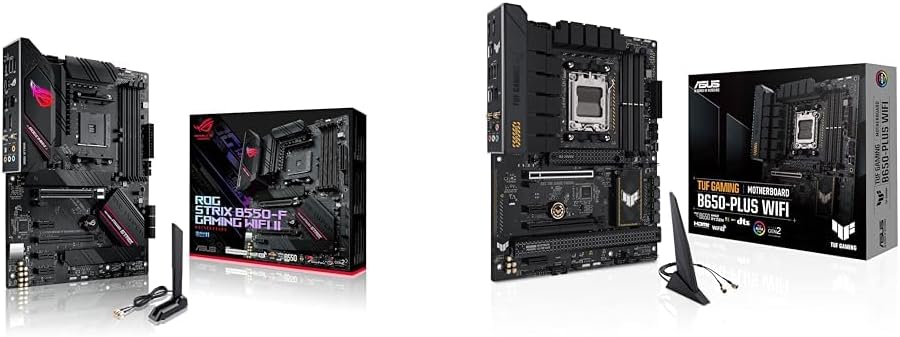
Asus ROG Strix B550-F Gaming WiFi II AMD AM4 (3rd Gen Ryzen) ATX Motherboard & TUF Gaming B650-PLUS WiFi Socket AM5 (LGA 1718) Ryzen 7000 ATX Gaming Motherboard
$150-$299This bundle offers two ATX motherboards: the ROG Strix B550-F Gaming WiFi II for AM4 Ryzen 3000/5000 CPUs with DDR4 RAM, and the TUF Gaming B650-PLUS WiFi for AM5 Ryzen 7000 CPUs with DDR5 RAM.

Game Motherboard Fit for ASROCK B650E PG-ITX WiFi B650 AM5 Motherboard Support Ryzen 7800X3D 7600/X 7950X 7700/X CPU 2xDDR5 128GB Hyper M.2 Mini-ITX
Price range unavailableThis KUETFBVC motherboard listing presents highly contradictory specifications, including a BGA 1023 socket and AMD 480 chipset, making it unsuitable for any modern Ryzen AM5 CPU.

Asus ROG Strix B550-F Gaming WiFi II AMD AM4 (3rd Gen Ryzen) ATX Gaming Motherboard (PCIe 4.0,WiFi 6E, 2.5Gb LAN, BIOS Flashback, HDMI 2.1, Addressable Gen 2 RGB Header and Aura Sync)
This is a premium-feeling AM4 board with beefy VRMs and WiFi 6E, perfect for squeezing the last drop of performance out of a Ryzen 5000 series CPU.