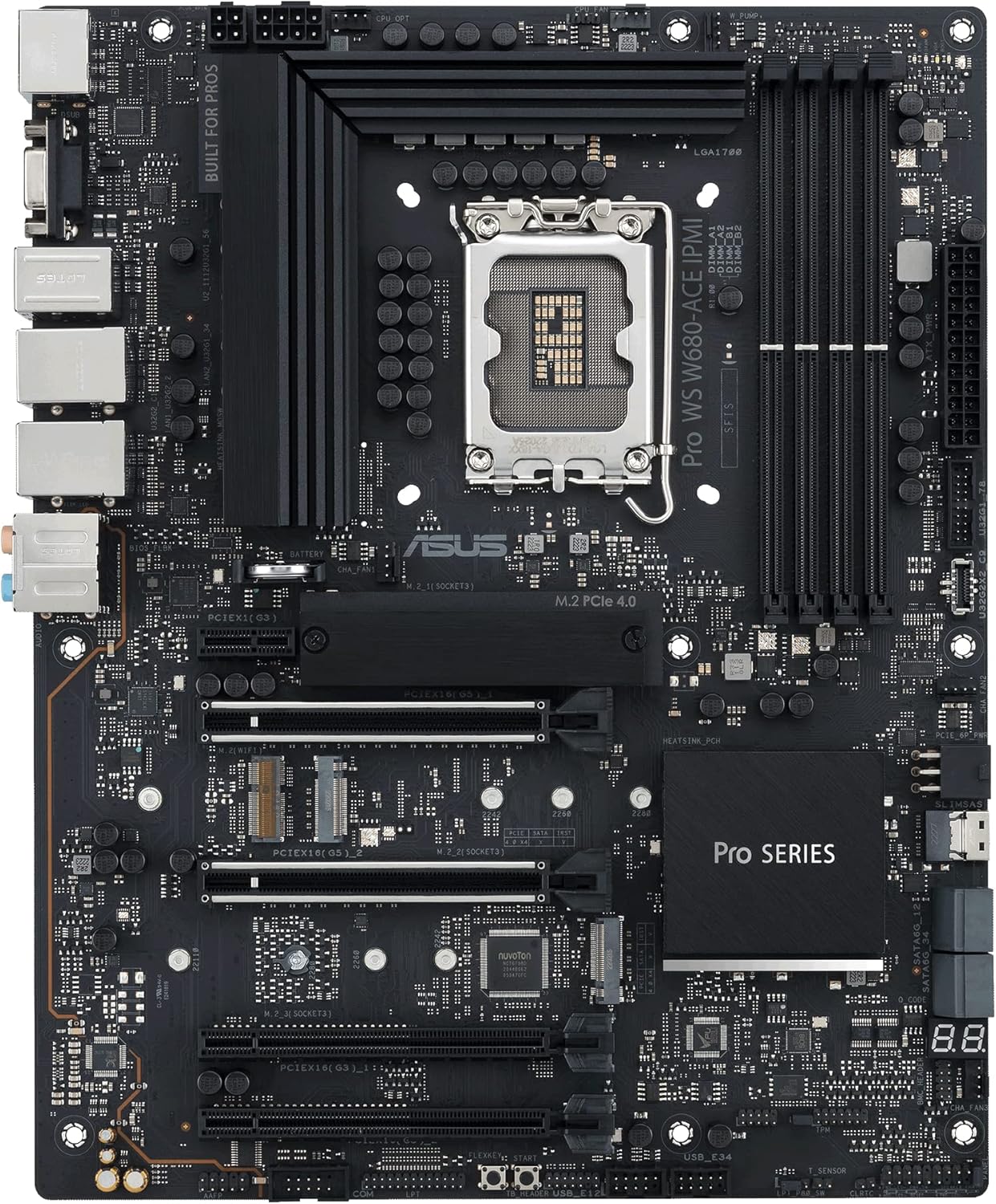
ASUS Pro WS W680-ACE IPMI Intel LGA1700 ATX workstation motherboard,2x PCIe 5.0x16 slot,DDR5,ECC memory,2x2.5 Gb Lan,3xM.2 slots,SlimSAS,BMC header,THUNDERBOLT4 Header,IPMI Expansion card bundled,ACCE
Want the best price and purchase timing?
Our AI advisor analyzes real-time pricing across all channels to find you the best deal.
AI Verdict
This is a niche, expensive W680 workstation board built specifically for homelabbers and VFIO enthusiasts who desperately need ECC memory support and remote IPMI management on Intel consumer CPUs.
This board is a godsend if you specifically need Intel QuickSync, ECC RAM, and remote management in one system. If you don't need all three of those exact features, you are drastically overpaying for enterprise tools you'll never touch.
If you just need lots of PCIe lanes and don't care about Intel QuickSync, look at a used AMD Threadripper or EPYC platform instead.
Regret Score™
Low RiskLower is better — measures purchase-regret risk from real buyer complaints, review credibility, and product maturity
Issues discovered after purchase
Critically weak dimension
Amazon rating vs actual quality
Chance this product isn't for you
Pros
- Flawless IOMMU grouping isolates every single PCIe device and onboard NIC for easy VM passthrough
- Bundled IPMI expansion card provides full remote KVM and power cycling capabilities
- Supports ECC DDR5 memory to prevent data corruption in TrueNAS or ZFS builds
- Includes a SlimSAS port that can break out into four additional SATA connections
- Dual Intel 2.5GbE LAN ports provide solid baseline networking for home servers
Cons
- The bundled IPMI card eats up a valuable PCIe 3.0 x1 slot
- Onboard SATA bandwidth is hard-capped by the DMI link to roughly 2GB/s total
- Populating all four RAM slots severely drops the maximum stable DDR5 memory speed
- Users report widespread stability issues when pairing this board with i9-13900K or 14900K CPUs
Dimension Scores
DrMOS and ProCool connectors easily handle sustained 24/7 loads on i9 processors.
Bundling IPMI, SlimSAS, and ECC support on an LGA 1700 socket is incredibly rare.
Great IOMMU grouping, but the DMI bottleneck on SATA and the IPMI card eating a slot hurts.
ASUS Control Center is decent, but the IPMI firmware is clunky and prone to 'No Signal' lockups.
Best For
- Proxmox or Unraid servers utilizing heavy VFIO PCIe passthrough
- TrueNAS Core/Scale builds requiring ECC memory on an Intel platform
- Remote headless workstations managed entirely via IPMI
Not Recommended For
- Standard gaming rigs where IPMI and ECC are useless expenses
- Massive SATA SSD RAID arrays relying solely on motherboard ports
Watch Out For
- The PCH SATA controller bottlenecks at 2GB/s — if you run an 8-drive SSD RAID array, you'll only get half the expected throughput without a dedicated HBA card.
- The IPMI remote KVM can randomly get stuck on a 'No Signal' or 'Configuring firmware' screen, requiring a hard power cycle.
- If you forget the IPMI password, clearing the CMOS won't fix it — you have to use a specific hex command via ipmitool to reset the BMC.
- Using the IPMI card has been reported by some users to increase memory latency and drop performance in highly tuned setups.
Full Specifications
| RAM | DIMM |
| ASIN | B0BZGKKCWC |
| Brand | ASUS |
| Color | BLACK |
| Series | PRO WS W680-ACE IPMI |
| Platform | Windows 10 |
| CPU Model | Pentium |
| Processor | pentium |
| CPU Socket | LGA 1700 |
| Model Name | PRO WS W680-ACE IPMI |
| Item Weight | 4.19 pounds |
| Chipset Type | Intel |
| Manufacturer | ASUS |
| Memory Speed | 4400 MHz |
| Item model number | PRO WS W680-ACE IPMI |
| Compatible Devices | Personal Computer |
| Memory Clock Speed | 4400 MHz |
| Product Dimensions | 8.9 x 2.36 x 7.17 inches |
| Compatible Processors | Intel Celeron, Intel Pentium Gold |
| RAM Memory Technology | DIMM |
| Item Dimensions LxWxH | 8.9 x 2.36 x 7.17 inches |
| Number of USB 2.0 Ports | 6 |
What Buyers Say
The standout feature everyone praises is the flawless IOMMU grouping, which isolates every single PCIe device and NIC for painless VM passthrough. The IPMI implementation feels like a bolted-on afterthought since it requires a separate expansion card that eats up a PCIe 3.0 slot. Storage enthusiasts were disappointed to discover the onboard SATA ports share a DMI link that hard-caps throughput at 2GB/s. It's a highly capable board for a very specific type of home server, but it requires manual BIOS tweaking to get perfectly stable.
“Great board for VFIO and TrueNAS, but the IPMI card feels like a hacky afterthought and the SATA bottleneck drove me insane until I bought an HBA card.”
Common Praise
- Every PCIe slot and onboard NIC gets its own dedicated IOMMU group
- SlimSAS port allows for clean cable management to four SATA drives
- ECC memory support works flawlessly with compatible Intel CPUs
- Dual 2.5GbE ports provide great out-of-the-box networking for hypervisors
Common Complaints
- IPMI remote KVM frequently drops signal or gets stuck on firmware configuration screens
- SATA bandwidth is severely bottlenecked by the Intel PCH DMI link
- DDR5 memory speeds tank when populating all four DIMM slots
- The IPMI expansion card blocks airflow and takes up a useful PCIe slot
Ownership Tips
- You will likely need to buy a dedicated LSI HBA card if you plan on running more than four SATA SSDs at full speed.
- Updating the BMC firmware is a completely separate and much clunkier process than updating the standard motherboard BIOS.
- If you plan to use 128GB of RAM, expect to manually tune the speeds down to 4000MHz or lower for 24/7 stability.
Frequently Asked Questions
Does the IPMI card come built into the motherboard?
No. It's a separate PCIe expansion card included in the box that you must install into a PCIe slot and connect to the BMC header.
Will this board run an i9-14900K out of the box?
It supports 14th Gen CPUs with a BIOS update. Homelabbers report severe stability and crashing issues with the 13900K and 14900K, so stick to a 12900K or i5/i7 for server stability.
Can I use regular non-ECC DDR5 memory?
Yes. The board will boot and run perfectly fine with standard non-ECC DDR5. You just won't get the error-correction features.
Why is my SATA SSD RAID array maxing out at 2GB/s?
The Intel W680 chipset routes all onboard SATA ports through a DMI link that physically bottlenecks around 2GB/s. You need a dedicated PCIe HBA card to get full speed.
How do I reset the IPMI password if I get locked out?
A standard BIOS reset won't work. You have to boot into an OS and run the command `ipmitool raw 0x32 0x66` to reset the BMC credentials.
Buying Guide
You are paying a massive premium for three specific things: ECC memory support, IPMI remote management, and Intel QuickSync compatibility. If you are building a gaming PC, walk away right now. This board is strictly for people building headless servers, NAS boxes, or virtualization rigs who want to run enterprise-grade software on consumer Intel processors. Be prepared to deal with some quirky firmware and strict memory limitations if you populate all four RAM slots.
IPMI (Intelligent Platform Management Interface)
It's a tiny computer inside your computer. It lets you turn the system on, access the BIOS, and install an OS remotely from another room, even if the main motherboard is turned off.
ECC Memory Support
It acts like a spellchecker for your RAM. If a random cosmic ray flips a bit of data, ECC catches and fixes it before it permanently corrupts your files.
IOMMU Grouping
Think of it like giving each component its own private VIP room. It allows you to pass a specific graphics card or network port directly to a virtual machine without the host OS interfering.
Alternatives
If you don't need remote IPMI management, look for standard W680 motherboards to save money. If you need massive PCIe lanes and don't care about Intel QuickSync, look into a used AMD EPYC or Threadripper Pro platform.
You Might Also Like

JetKVM KVM Over IP ATX Extension Board, ATX Power Control Board- Only for Jet KVM Accessories Boot from Shutdown, Crash Recovery
$0-$49This is an ATX form factor power control board designed for JetKVM accessories, enabling remote PC power state management and simultaneous front panel button use.

Asus ROG Strix B550-F Gaming WiFi II AMD AM4 (3rd Gen Ryzen) ATX Motherboard & TUF Gaming B650-PLUS WiFi Socket AM5 (LGA 1718) Ryzen 7000 ATX Gaming Motherboard
$150-$299This bundle offers two ATX motherboards: the ROG Strix B550-F Gaming WiFi II for AM4 Ryzen 3000/5000 CPUs with DDR4 RAM, and the TUF Gaming B650-PLUS WiFi for AM5 Ryzen 7000 CPUs with DDR5 RAM.

Game Motherboard Fit for ASROCK B650E PG-ITX WiFi B650 AM5 Motherboard Support Ryzen 7800X3D 7600/X 7950X 7700/X CPU 2xDDR5 128GB Hyper M.2 Mini-ITX
Price range unavailableThis KUETFBVC motherboard listing presents highly contradictory specifications, including a BGA 1023 socket and AMD 480 chipset, making it unsuitable for any modern Ryzen AM5 CPU.

Asus ROG Strix B550-F Gaming WiFi II AMD AM4 (3rd Gen Ryzen) ATX Gaming Motherboard (PCIe 4.0,WiFi 6E, 2.5Gb LAN, BIOS Flashback, HDMI 2.1, Addressable Gen 2 RGB Header and Aura Sync)
This is a premium-feeling AM4 board with beefy VRMs and WiFi 6E, perfect for squeezing the last drop of performance out of a Ryzen 5000 series CPU.