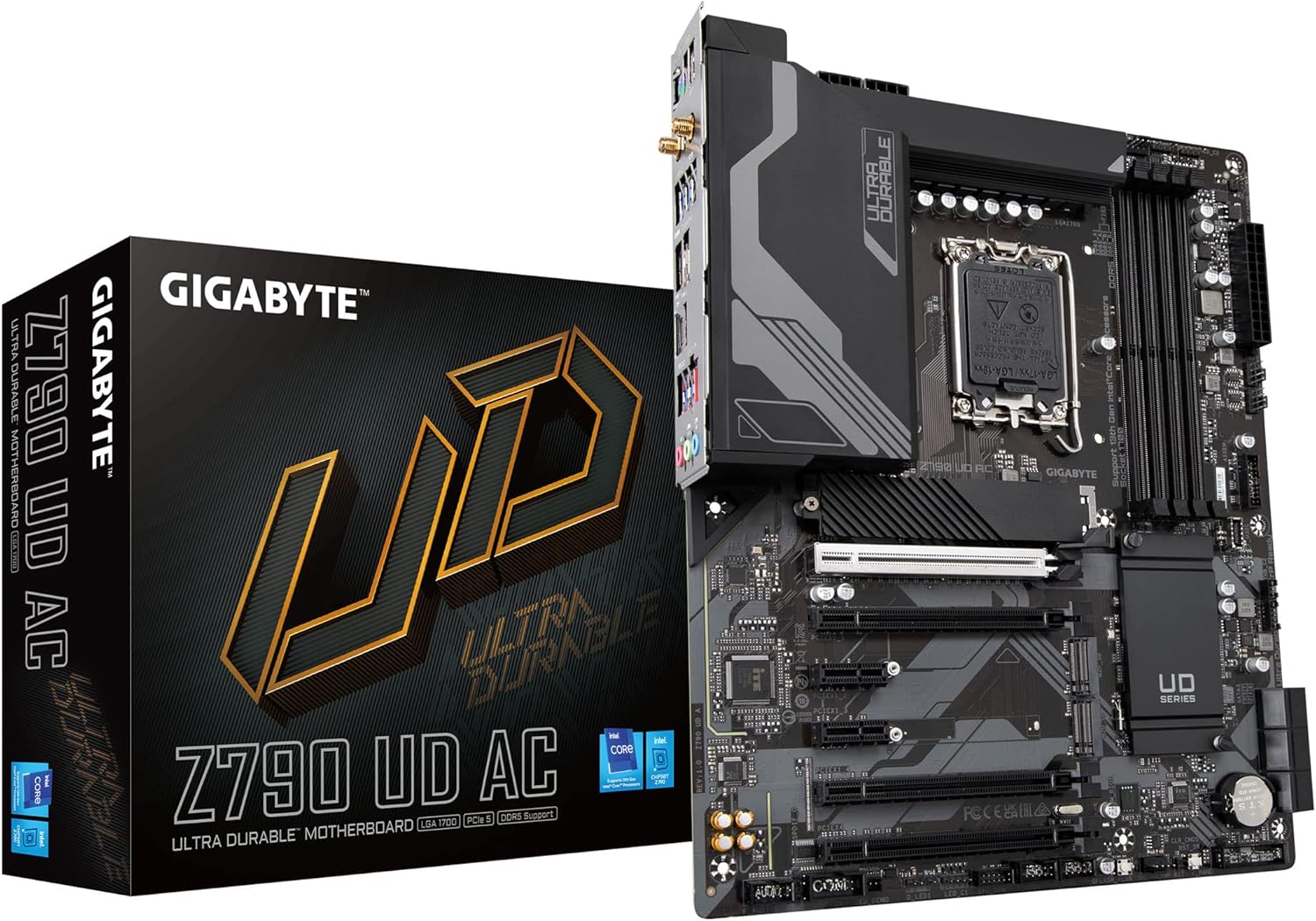
GIGABYTE Z790 UD AC LGA 1700 ATX Motherboard, Support Intel Core 14th/13th/12th Gen, DDR5, 16+1+1 Power Phase, 3X M.2, PCIe 5.0, USB-C 3.2, Dual Band WiFi, 2.5GbE, EZ-Latch, Q-Flash, RGB Fusion
Want the best price and purchase timing?
Our AI advisor analyzes real-time pricing across all channels to find you the best deal.
AI Verdict
This barebones Z790 board delivers excellent 16-phase power for high-end Intel CPUs, making it perfect for budget overclockers who can tolerate older Wi-Fi 5 and potential VRM coil whine.
This board makes sense if you want to pair a power-hungry 13700K or 14700K with DDR5 memory while keeping your motherboard budget under $150. The reliance on an outdated Wi-Fi 5 module and the high probability of VRM coil whine make it a risky choice for quiet rooms or wireless setups.
If you need modern wireless speeds, spend the extra $20-$30 for the Gigabyte Z790 UD AX version to get Wi-Fi 6E.
Regret Score™
Low RiskLower is better — measures purchase-regret risk from real buyer complaints, review credibility, and product maturity
Issues discovered after purchase
Critically weak dimension
Amazon rating vs actual quality
Chance this product isn't for you
Pros
- 16+1+1 phase 60A DrMOS VRM easily handles a 14700K without thermal throttling.
- Includes a PCIe 5.0 x16 slot for future GPU upgrades.
- Q-Flash Plus button lets you update the BIOS via USB without a CPU or RAM installed.
- Features three PCIe 4.0 x4 M.2 slots for NVMe storage expansion.
- 2.5GbE Realtek LAN provides up to 2500 Mbps wired networking speeds.
Cons
- Uses an older Realtek Wi-Fi 5 (802.11ac) module instead of modern Wi-Fi 6/6E.
- Widespread user reports of severe VRM coil whine during low-load tasks or mouse movement.
- Lacks a PCIe 5.0 M.2 slot, capping all storage drives at PCIe 4.0 speeds.
- Bluetooth functionality drops frequently and requires the Wi-Fi adapter to remain enabled in Windows.
Dimension Scores
The 16+1+1 60A DrMOS setup easily handles a 13700K, though it relies on a twin-phase design rather than true direct phases.
Includes Q-Flash Plus and 2.5GbE LAN, but loses points for utilizing an outdated Wi-Fi 5 module.
Three PCIe 4.0 M.2 slots and a PCIe 5.0 GPU slot provide adequate, standard expansion for the price.
The Gigabyte BIOS is easy to navigate, but users frequently have to hunt for obscure acoustic noise settings to fix hardware whine.
Best For
- Budget-conscious 13th or 14th Gen Intel builders prioritizing 16-phase CPU power delivery over premium connectivity.
- Wired network users who plan to plug directly into the 2.5GbE LAN port and disable the Wi-Fi.
- First-time builders who need the Q-Flash Plus feature to ensure out-of-the-box 14th Gen CPU compatibility.
Not Recommended For
- Silent PC enthusiasts building open-air or mesh cases, due to the high risk of VRM coil whine.
- Users with gigabit wireless routers who need Wi-Fi 6E speeds for large file transfers.
Watch Out For
- VRM coil whine is a massive lottery. If you hear a high-pitched squeal when moving your mouse, you must dig into the BIOS and enable 'Acoustic Noise Mitigation' or disable CPU C-states to fix it.
- The Wi-Fi is only 802.11ac (Wi-Fi 5). You are capped at older wireless speeds, and the Bluetooth connection occasionally drops unless the Wi-Fi radio is actively turned on in Windows.
- No PCIe 5.0 M.2 support exists here. Despite having a PCIe 5.0 x16 slot for the GPU, all three of your M.2 slots are hard-capped at PCIe 4.0 speeds.
- The 16-phase power design uses a twin-phase architecture rather than true direct phases, meaning voltage regulation isn't tight enough for extreme i9 overclocking records.
Full Specifications
| RAM | DDR5 |
| ASIN | B0BHTMXMRQ |
| Brand | GIGABYTE |
| Series | Z790 UD AC |
| Platform | Windows 11 |
| CPU Model | Core i7 |
| Processor | core_i7 |
| CPU Socket | LGA 1700 |
| Model Name | Z790 UD AC |
| Item Weight | 2.2 pounds |
| Chipset Type | Intel Z790 |
| Manufacturer | GIGABYTE |
| Memory Speed | 4400 MHz |
| Item model number | Z790 UD AC |
| Compatible Devices | 13th Gen Intel Core, 12th Core |
| Memory Clock Speed | 4400 MHz |
| Product Dimensions | 13.18 x 10.62 x 3.14 inches |
| Compatible Processors | 12th Generation Intel Core, 13th Generation Intel Core, 14th Generation Intel Core |
| RAM Memory Technology | DDR5 |
| Item Dimensions LxWxH | 13.18 x 10.62 x 3.14 inches |
| Number of USB 2.0 Ports | 2 |
What Buyers Say
The most glaring takeaway from owner forums is the sheer volume of complaints regarding VRM coil whine. Buyers frequently report a high-pitched squeal that triggers during low-load tasks or simply when moving the mouse on the desktop. While the 16+1+1 power delivery is widely praised for easily handling hot chips like the 13700K, the acoustic issues force many users to dig into the BIOS to disable C-states or tweak slew rates. Buyers are also caught off guard by the 'AC' in the name, realizing too late that it means older Wi-Fi 5 rather than modern Wi-Fi 6. Despite these quirks, budget builders love the inclusion of Q-Flash Plus and the rock-solid DDR5 memory stability.
“Great price for a Z790 and it runs my 13700k fine, but the coil whine is driving me absolutely insane every time I move my mouse.”
Common Praise
- Easily handles 13700K and 14700K power draws without VRM thermal throttling.
- DDR5 memory profiles (XMP) remain highly stable up to 6400MHz.
- Q-Flash Plus makes updating the BIOS for 14th Gen CPUs completely painless.
- The 2.5GbE LAN port delivers consistent, drop-free wired network performance.
Common Complaints
- Severe VRM coil whine syncs up with mouse movements or idle desktop states.
- The Wi-Fi 5 (802.11ac) speeds are noticeably slower than modern AX boards.
- Bluetooth frequently disconnects or requires Wi-Fi to be left on in Windows.
- Gigabyte Control Center software is bloated and triggers false antivirus flags.
Ownership Tips
- The coil whine often disappears during heavy gaming, becoming painfully obvious only when browsing the web or idling.
- Disabling CPU C-states in the BIOS fixes the noise but increases your idle power draw and CPU temperatures.
- The Realtek Wi-Fi module is physically located in an M.2 E-key slot, meaning you can manually swap it for an Intel AX210 Wi-Fi 6E card for about $20.
- The Acoustic Noise Mitigation setting in the BIOS (under Misc) is the best first step to fix the squealing without sacrificing power efficiency.
Frequently Asked Questions
Does this motherboard support 14th Gen Intel CPUs out of the box?
It depends on the manufacturing date. You will likely need to use the Q-Flash Plus button on the rear I/O to update the BIOS via a USB drive before a 14th Gen CPU will post.
How do I fix the high-pitched squealing noise coming from the CPU area?
That is VRM coil whine, a heavily reported issue with this specific board. You can reduce or eliminate it by navigating the BIOS to 'Misc Settings' and enabling 'Acoustic Noise Mitigation', or by disabling CPU C-states.
Does the Z790 UD AC have a PCIe 5.0 M.2 slot for storage?
No. It features a PCIe 5.0 x16 slot for your graphics card, but all three M.2 storage slots max out at PCIe 4.0 x4 speeds.
Why is my Bluetooth connection dropping or not showing up?
The Realtek Wi-Fi/Bluetooth module on this board is notoriously buggy. Many users report that you must keep the Wi-Fi adapter enabled in Windows for the Bluetooth to function properly.
Can this board handle an Intel Core i9-14900K?
The 16+1+1 60A power stages can physically run an i9, but it is not recommended for heavy overclocking. For an i9, you are better off with a higher-tier board featuring better VRM cooling and true direct power phases.
Buying Guide
When buying an entry-level Z790 motherboard, you are paying for the chipset's ability to overclock the CPU and memory, but sacrificing premium connectivity. The 'AC' in this board's name is the biggest catch—it means you are getting older Wi-Fi 5 technology instead of the current Wi-Fi 6 or 6E standards. You also need to be prepared for the silicon lottery of coil whine, which is a known quirk of this specific power delivery design. If you plan to use a wired ethernet connection and wear headphones while gaming, these compromises are well worth the money you save.
16+1+1 Power Phases (60A)
Think of power phases like lanes on a highway delivering electricity to your CPU. More lanes mean the power is delivered smoother and cooler, which is critical if you are running a hot, high-end chip like a Core i7 or i9.
Wi-Fi 5 (802.11ac)
This is the wireless standard from 2013. It is perfectly fine for basic web browsing and 1080p streaming, but it will bottleneck your download speeds if you have a modern gigabit internet plan.
Q-Flash Plus
This is a physical button on the back of the board that lets you update the motherboard's software using just a USB stick and a power supply. It is a lifesaver if you buy a newer 14th Gen CPU that the board does not recognize out of the box.
Alternatives
If you want faster wireless speeds, look for a Z790 board with 'AX' or 'Wi-Fi 6E' in the name. If you want to avoid coil whine entirely, look toward entry-level Z790 options from competing brands with different VRM component suppliers.
You Might Also Like

JetKVM KVM Over IP ATX Extension Board, ATX Power Control Board- Only for Jet KVM Accessories Boot from Shutdown, Crash Recovery
$0-$49This is an ATX form factor power control board designed for JetKVM accessories, enabling remote PC power state management and simultaneous front panel button use.

Asus ROG Strix B550-F Gaming WiFi II AMD AM4 (3rd Gen Ryzen) ATX Motherboard & TUF Gaming B650-PLUS WiFi Socket AM5 (LGA 1718) Ryzen 7000 ATX Gaming Motherboard
$150-$299This bundle offers two ATX motherboards: the ROG Strix B550-F Gaming WiFi II for AM4 Ryzen 3000/5000 CPUs with DDR4 RAM, and the TUF Gaming B650-PLUS WiFi for AM5 Ryzen 7000 CPUs with DDR5 RAM.

Game Motherboard Fit for ASROCK B650E PG-ITX WiFi B650 AM5 Motherboard Support Ryzen 7800X3D 7600/X 7950X 7700/X CPU 2xDDR5 128GB Hyper M.2 Mini-ITX
Price range unavailableThis KUETFBVC motherboard listing presents highly contradictory specifications, including a BGA 1023 socket and AMD 480 chipset, making it unsuitable for any modern Ryzen AM5 CPU.

Asus ROG Strix B550-F Gaming WiFi II AMD AM4 (3rd Gen Ryzen) ATX Gaming Motherboard (PCIe 4.0,WiFi 6E, 2.5Gb LAN, BIOS Flashback, HDMI 2.1, Addressable Gen 2 RGB Header and Aura Sync)
This is a premium-feeling AM4 board with beefy VRMs and WiFi 6E, perfect for squeezing the last drop of performance out of a Ryzen 5000 series CPU.