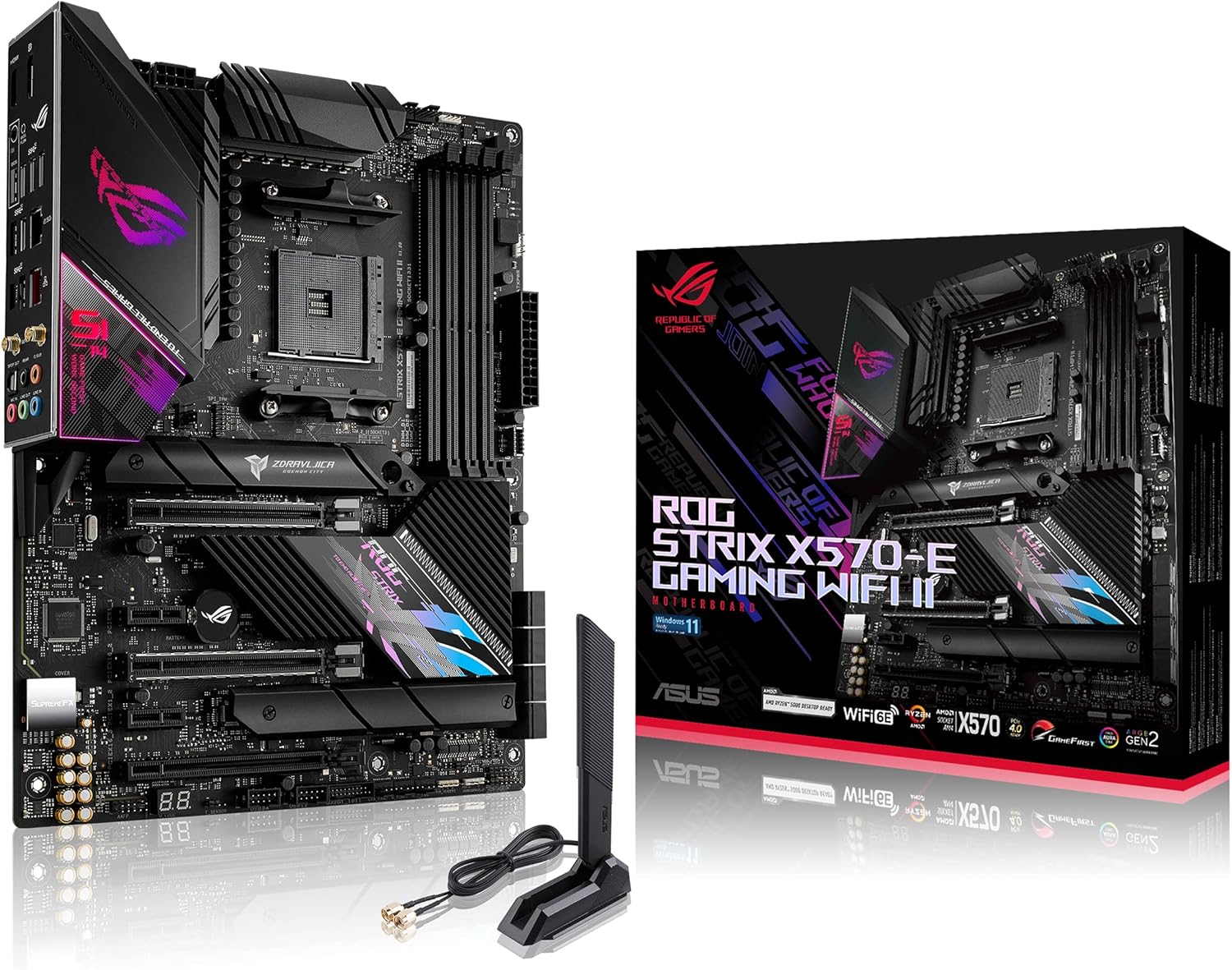
ASUS ROG Strix X570-E Gaming WiFi II AMD AM4 X570S ATX Gaming Motherboard (PCIe 4.0, Passive PCH Heatsink, 12+4 Power Stages, WiFi 6E, 2.5 Gb LAN,USB 3.2 Gen 2 Type C and Aura Sync RGB
Want the best price and purchase timing?
Our AI advisor analyzes real-time pricing across all channels to find you the best deal.
AI Verdict
This is a high-end AM4 board built for maxing out a Ryzen 5000 CPU with silent passive cooling and 12+4 power stages, but the Mediatek Wi-Fi chip is notoriously buggy.
This board delivers top-tier 12+4 power delivery and silent passive cooling for high-end AM4 processors. The Mediatek Wi-Fi issues and limitation of only two M.2 slots make it frustrating if you need flawless wireless networking or massive NVMe storage.
Look for a board with an Intel AX200 or AX210 Wi-Fi module if you need rock-solid wireless connectivity, or one with three M.2 slots if you plan to expand storage.
Regret Score™
Low RiskLower is better — measures purchase-regret risk from real buyer complaints, review credibility, and product maturity
Issues discovered after purchase
Critically weak dimension
Amazon rating vs actual quality
Chance this product isn't for you
Pros
- Passive X570S chipset heatsink eliminates the tiny fan whine found on the original V1 board.
- 12+4 power stages easily handle overclocked Ryzen 9 5900X and 5950X processors without VRM thermal throttling.
- Built-in Q-Code LED display makes troubleshooting boot failures infinitely easier than deciphering beep codes.
- Includes a front panel USB 3.2 Gen 2 Type-C header for modern case connectivity.
Cons
- Uses a Mediatek MT7921K Wi-Fi module instead of an Intel chip, which frequently drops connections or disappears from Windows.
- Only features two M.2 slots, while many competing boards in this tier offer three.
- The Asus Armoury Crate software prompts to auto-install on first boot and acts like system-hogging bloatware.
Dimension Scores
12+4 power stages easily push a Ryzen 9 5950X to its limits without overheating.
Includes a Q-Code LED and 2.5Gb LAN, but the Mediatek Wi-Fi module is a massive downgrade from Intel chips.
Only provides two M.2 slots, and using the second one throttles the secondary PCIe slot to x4 speeds.
The BIOS is intuitive and easy to navigate, but Armoury Crate is intrusive bloatware that auto-installs by default.
Best For
- Pushing a Ryzen 9 5900X or 5950X to its limits in a custom loop or high-airflow case.
- First-time builders who need the Q-Code LED display to diagnose POST errors.
- Silent PC builds that benefit from the fanless passive chipset heatsink.
Not Recommended For
- Users who rely heavily on flawless out-of-the-box Wi-Fi without wanting to troubleshoot drivers.
- Storage hoarders who need more than two NVMe M.2 drives without using PCIe adapter cards.
Watch Out For
- The Mediatek Wi-Fi module randomly vanishes from Windows Device Manager — you have to physically unplug the power supply for 10 minutes to reset it.
- The 'RGB' lighting near the chipset is a lie — it's just a holographic sticker that reflects ambient light, not actual LEDs.
- Leaving Asus 'PBO Fmax Enhancer' enabled in the BIOS causes random system crashes and freezes with Ryzen 5000 series CPUs.
- Populating the second M.2 slot drops the second PCIe x16 slot to x4 mode, which ruins dual-GPU or heavy expansion card setups.
Full Specifications
| RAM | DDR4 |
| ASIN | B09GP7V2W5 |
| Brand | ASUS |
| Series | ROG STRIX X570-E GAMING WIFI II |
| Voltage | 12 Volts |
| Platform | Windows 10 |
| CPU Socket | Socket AM4 |
| Model Name | ROG STRIX X570-E GAMING WIFI II |
| Item Weight | 1.27 pounds |
| Chipset Type | X570 |
| Manufacturer | ASUS |
| Memory Speed | 4600 MHz |
| Wireless Type | 802.11a/b/g/n/ac, 802.11ax |
| Item model number | ROG STRIX X570-E GAMING WIFI II |
| Compatible Devices | Personal Computer |
| Memory Clock Speed | 4600 MHz |
| Product Dimensions | 12 x 9.6 x 2.2 inches |
| Compatible Processors | amd athlon |
| RAM Memory Technology | DDR4 |
| Item Dimensions LxWxH | 12 x 9.6 x 2.2 inches |
| Memory Storage Capacity | 64 GB |
| Number of USB 2.0 Ports | 4 |
What Buyers Say
The passive chipset cooling is the biggest upgrade here, eliminating the annoying fan whine from the original X570-E. The Q-Code LED display saves hours of troubleshooting during initial builds. The Mediatek Wi-Fi module is a constant source of frustration, frequently dropping connections or disappearing entirely from Device Manager. Armoury Crate software causes enough system lag that most builders recommend disabling its auto-install feature in the BIOS immediately.
“The passive cooling is awesome but the Mediatek wifi chip randomly disappears from Windows until I physically unplug the power supply for 10 minutes.”
Common Praise
- Passive chipset heatsink runs completely silent.
- Q-Code LED display pinpoints exact POST errors.
- VRMs stay cool even when stress-testing a Ryzen 9 5950X.
- BIOS layout makes setting DOCP memory profiles and fan curves simple.
Common Complaints
- Mediatek MT7921K Wi-Fi module vanishes from Windows and requires a hard power cycle to fix.
- Armoury Crate software installs unwanted background processes.
- Chipset 'RGB' is just a cheap holographic sticker.
- Only two M.2 slots limits future storage expansion.
Ownership Tips
- You must go into the BIOS on first boot to disable the Armoury Crate auto-install prompt.
- If your Wi-Fi drops, do not reinstall Windows — just unplug the PSU for 10 minutes to drain the capacitors and reset the module.
- Leaving Asus 'PBO Fmax Enhancer' on auto can cause random hard freezes with Ryzen 5000 CPUs.
Frequently Asked Questions
Does this board have a tiny chipset fan like the older X570 models?
No. The 'WiFi II' version uses a passive chipset heatsink, so it is completely silent.
Why did my Wi-Fi suddenly disappear from Windows?
The Mediatek MT7921K chip is prone to crashing. Unplug your PC's power cord from the wall for 10 minutes to hard-reset the motherboard, and it should reappear.
Is the RAM speed actually capped at 2666 MHz?
No. That is just the default JEDEC speed. You can run memory up to 4600 MHz by enabling DOCP in the BIOS.
Why isn't the RGB lighting working on the bottom right over the chipset?
There are no LEDs there. Asus used a holographic reflective sticker that looks like RGB in marketing photos, but it only reflects ambient case lighting.
Will this work with a Ryzen 5000 CPU out of the box without a BIOS update?
Yes. Since this 'II' revision launched in late 2021, the factory BIOS natively supports Ryzen 5000 processors.
Buying Guide
You are buying a premium board for an older, dead-end socket (AM4). The main reason to get this specific 'WiFi II' version over the original is the silent passive chipset cooling. You need to be prepared to deal with buggy Mediatek Wi-Fi drivers or just use an Ethernet cable. Make sure your case has good airflow, as the passive heatsinks rely on case fans to dissipate heat.
12+4 Power Stages
Think of this as the engine's fuel pump. More stages mean cleaner, more stable electricity delivery to high-core CPUs like the Ryzen 9, preventing crashes under heavy load.
Passive Chipset Heatsink
Older X570 boards used a tiny, whiny fan to cool the motherboard chip. This board uses a large metal block instead, meaning zero noise and one less moving part to break.
Q-Code LED
A tiny digital screen on the board that spits out a two-digit number if your PC won't boot. You look up the number in the manual to instantly know if your RAM, CPU, or GPU is the problem.
Alternatives
Look for a B550 motherboard if you only need one Gen 4 M.2 slot and want to save money, or an X570S board with an Intel Wi-Fi chip and three M.2 slots if you need better wireless stability and more storage.
You Might Also Like

JetKVM KVM Over IP ATX Extension Board, ATX Power Control Board- Only for Jet KVM Accessories Boot from Shutdown, Crash Recovery
$0-$49This is an ATX form factor power control board designed for JetKVM accessories, enabling remote PC power state management and simultaneous front panel button use.

Asus ROG Strix B550-F Gaming WiFi II AMD AM4 (3rd Gen Ryzen) ATX Motherboard & TUF Gaming B650-PLUS WiFi Socket AM5 (LGA 1718) Ryzen 7000 ATX Gaming Motherboard
$150-$299This bundle offers two ATX motherboards: the ROG Strix B550-F Gaming WiFi II for AM4 Ryzen 3000/5000 CPUs with DDR4 RAM, and the TUF Gaming B650-PLUS WiFi for AM5 Ryzen 7000 CPUs with DDR5 RAM.

Game Motherboard Fit for ASROCK B650E PG-ITX WiFi B650 AM5 Motherboard Support Ryzen 7800X3D 7600/X 7950X 7700/X CPU 2xDDR5 128GB Hyper M.2 Mini-ITX
Price range unavailableThis KUETFBVC motherboard listing presents highly contradictory specifications, including a BGA 1023 socket and AMD 480 chipset, making it unsuitable for any modern Ryzen AM5 CPU.

Asus ROG Strix B550-F Gaming WiFi II AMD AM4 (3rd Gen Ryzen) ATX Gaming Motherboard (PCIe 4.0,WiFi 6E, 2.5Gb LAN, BIOS Flashback, HDMI 2.1, Addressable Gen 2 RGB Header and Aura Sync)
This is a premium-feeling AM4 board with beefy VRMs and WiFi 6E, perfect for squeezing the last drop of performance out of a Ryzen 5000 series CPU.