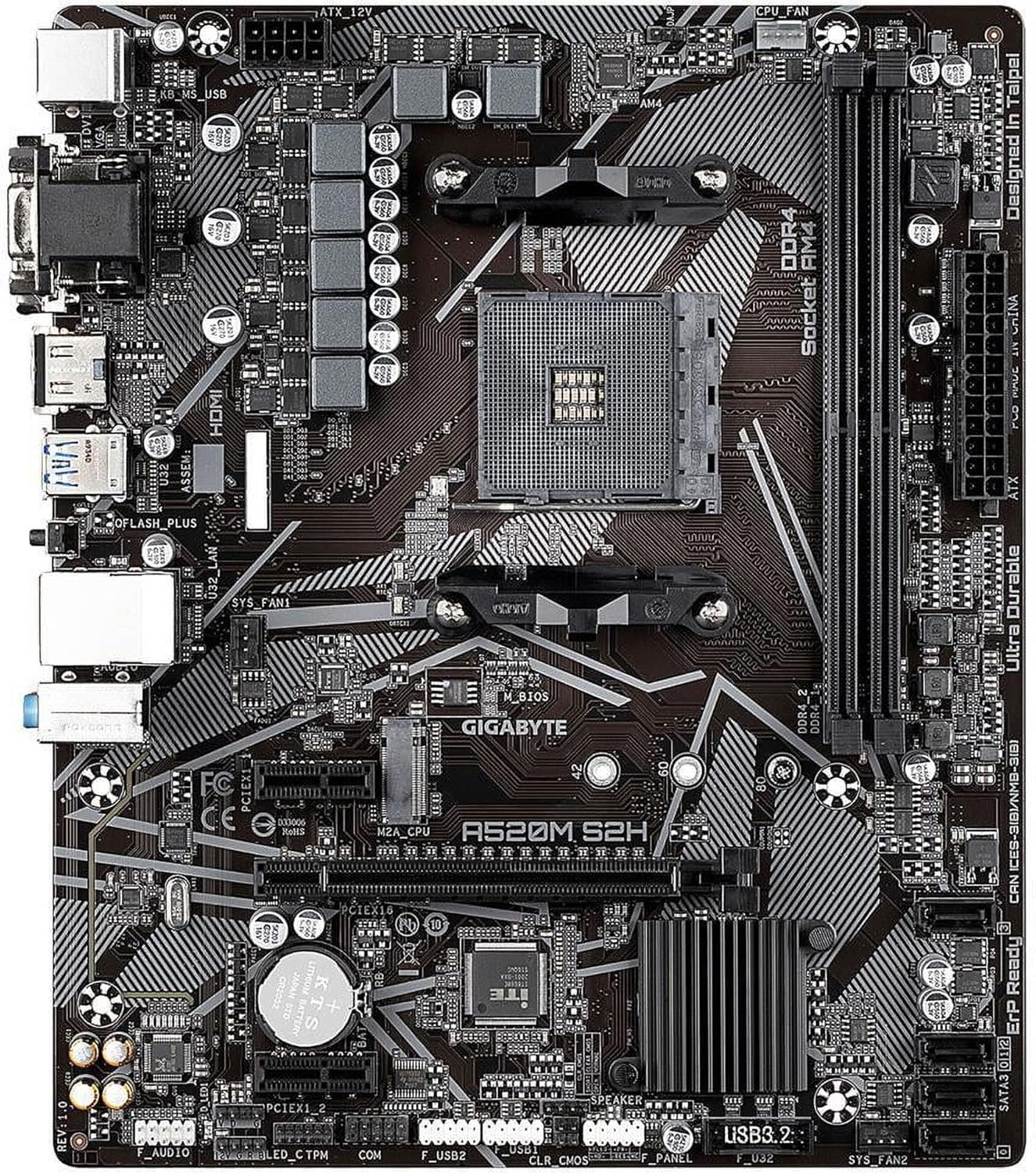
Gigabyte A520M S2H (AMD Ryzen AM4/MicroATX/4+3 Phases Digital PWM/Gigabyte Gaming GbE LAN/NVMe PCIe 3.0 x4 M.2/3 Display Interfaces/Q-Flash Plus/RGB Fusion 2.0/Motherboard)
Want the best price and purchase timing?
Our AI advisor analyzes real-time pricing across all channels to find you the best deal.
AI Verdict
The Gigabyte A520M S2H is a barebones micro-ATX board built strictly for budget 1080p gaming rigs and office PCs using 65W Ryzen 3000 or 5000 series processors.
This board makes sense if you are building a sub-$80 PC with a 65W CPU like the Ryzen 5 5600 and do not care about PCIe Gen 4 speeds. The 4+3 phase VRM without heatsinks will struggle with higher-end chips, and the two RAM slots limit future upgrades.
If you plan to upgrade to a higher-tier CPU or need PCIe 4.0 for a faster SSD, step up to a B550 motherboard with VRM heatsinks.
Regret Score™
High RiskLower is better — measures purchase-regret risk from real buyer complaints, review credibility, and product maturity
Issues discovered after purchase
Critically weak dimension
Amazon rating vs actual quality
Chance this product isn't for you
Pros
- Q-Flash Plus button enables BIOS updates for Ryzen 5000 CPUs using just a USB drive and power supply
- Includes both 12V RGB and 5V ARGB headers for case lighting control via Gigabyte RGB Fusion 2.0
- Three display outputs (HDMI, DVI-D, VGA) provide flexible monitor connections for APUs like the Ryzen 5 5600G
- Supports up to 64GB of DDR4 memory at speeds up to 5100MHz via XMP
Cons
- Bare VRMs with no heatsinks cause thermal throttling under the sustained load of 105W processors like the Ryzen 9 5900X
- PCIe 3.0 limitation bottlenecks Gen4 NVMe SSDs and x4 graphics cards like the Radeon RX 6500 XT
- Two DDR4 DIMM slots force you to discard existing memory sticks to upgrade capacity
- Lacks integrated Wi-Fi and Bluetooth, requiring a separate adapter for wireless connections
Dimension Scores
The 4+3 phase digital PWM lacks heatsinks, restricting safe usage to 65W CPUs.
Includes Q-Flash Plus and both 5V ARGB/12V RGB headers, which is rare for a sub-$80 board.
Two RAM slots, a single M.2 slot, and PCIe 3.0 speeds severely limit future hardware upgrades.
The BIOS easily enables XMP profiles, but the A520 chipset completely removes CPU overclocking menus.
Best For
- Ultra-budget 1080p gaming builds pairing a 65W Ryzen 5 5600 with a mid-range GPU like an RTX 3060
- Home office PCs utilizing a Ryzen 5000G series APU for multi-monitor setups without a dedicated graphics card
- Media center PCs requiring a cheap, reliable AM4 board that fits inside a micro-ATX case
Not Recommended For
- Overclockers or anyone planning to install a high-wattage CPU like the Ryzen 9 5900X
- Builds utilizing PCIe 4.0 storage drives or bandwidth-sensitive GPUs like the RX 6400
Watch Out For
- No official support for older CPUs — dropping a Ryzen 1000, 2000, or 3000G-series chip into the AM4 socket usually results in a failure to post.
- No USB-C ports exist on the rear I/O or internal headers, leaving your case's front-panel Type-C port dead.
- The primary M.2 slot sits directly under the PCIe x16 slot, forcing your NVMe drive to absorb direct exhaust heat from the graphics card.
- Only two system fan headers populate the board, requiring a fan splitter if your case uses three or more fans.
Full Specifications
| RAM | 16 GB DDR4 |
| ASIN | B08F7HPJ4F |
| Brand | GIGABYTE |
| Color | Multicolor |
| Series | A520M |
| Language | English |
| Platform | PlayStation 5 |
| CPU Model | Ryzen 3 |
| Processor | ryzen_3 |
| CPU Socket | Socket AM4 |
| Model Name | A520M |
| Item Weight | 15.5 ounces |
| Chipset Type | AMD A520 |
| Manufacturer | GIGABYTE |
| Memory Speed | 2133 MHz |
| Wireless Type | 2.4 GHz Radio Frequency, 801.11ac, 802.11a/b/g/n/ac, Bluetooth |
| Flash Memory Size | 3 |
| Item model number | A520M S2H |
| Compatible Devices | Personal Computer, Desktop, Server |
| Memory Clock Speed | 2133 MHz |
| Product Dimensions | 10.43 x 9.25 x 2.04 inches |
| Computer Memory Type | DDR4 SDRAM |
| Compatible Processors | AMD 3rd Generation Ryzen |
| RAM Memory Technology | DDR4 |
| Item Dimensions LxWxH | 10.43 x 9.25 x 2.04 inches |
| Number of USB 2.0 Ports | 1 |
| Is Discontinued By Manufacturer | No |
What Buyers Say
Q-Flash Plus dominates the positive feedback for this board, as it saves budget builders from needing an older CPU just to update the BIOS for Ryzen 5000 chips. Reviews confirm the 4+3 phase power delivery handles 65W processors like the Ryzen 5 5600X without issue, but the bare VRMs hit thermal limits quickly with 8-core chips. Layout complaints focus heavily on the single M.2 slot, which sits directly under the PCIe x16 slot and forces the NVMe drive to absorb GPU exhaust heat. The rear I/O draws mixed reactions; the legacy VGA and DVI ports easily connect to older office monitors, but the complete absence of USB-C frustrates modern case owners.
“Bought this for a cheap 5600G build and it works fine, but I had to use a fan splitter because there's only two sys fan headers and the M.2 drive gets pretty toasty sitting right under my graphics card.”
Common Praise
- Q-Flash Plus allows BIOS updates via USB without a CPU or RAM installed
- Includes a 5V ARGB header for controlling modern case fans via RGB Fusion
- Legacy VGA and DVI ports are highly useful for cheap multi-monitor office setups
- Runs 65W Ryzen 3000 and 5000 series CPUs with perfect stability
Common Complaints
- No VRM heatsinks causes thermal throttling with 8-core or 12-core processors
- Only two RAM slots means you have to discard your old sticks to upgrade capacity
- The M.2 slot is positioned directly underneath the graphics card cooler
- Lacks a front-panel USB-C header for modern PC cases
Ownership Tips
- The Realtek 8118 Gaming LAN software can sometimes cause network stuttering; uninstalling the utility and using bare drivers fixes it
- RGB Fusion 2.0 software is clunky and sometimes fails to detect 5V ARGB fans on the first boot
- Enabling XMP for 3600MHz RAM works flawlessly, but manually tuning timings is tedious in the Gigabyte BIOS
Frequently Asked Questions
Does this motherboard support Ryzen 5000 series out of the box?
It depends on the manufacturing date. The included Q-Flash Plus button lets you update the BIOS using a USB stick and power supply without needing an older CPU installed.
Can I use a Ryzen 5 3400G or Ryzen 3 3200G with this board?
Officially, no. The A520 chipset drops support for Ryzen 1000, 2000, and 3000G-series processors. Some specific BIOS versions unofficially boot them, but it remains a gamble.
Does the Gigabyte A520M S2H have built-in Wi-Fi?
No, it only features a Realtek Gigabit LAN port for wired internet. You must buy a separate PCIe Wi-Fi card or USB dongle for wireless connectivity.
How many fans can I connect to this motherboard?
The board provides one CPU fan header and two system fan headers. Cases with more than two intake or exhaust fans require a PWM fan splitter cable.
Will a PCIe 4.0 NVMe SSD work in this board?
Yes, but the A520 chipset bottlenecks it to PCIe 3.0 x4 speeds, capping transfers around 3500 MB/s. Buying a premium Gen4 drive for this board wastes money.
Can I overclock my CPU on the A520 chipset?
No, AMD locks CPU overclocking on all A520 motherboards. You can only enable XMP profiles to run your RAM at its advertised speed.
Buying Guide
When buying an ultra-budget motherboard like this, you are sacrificing future upgrade paths to save cash today. The A520 chipset locks you out of CPU overclocking and PCIe 4.0 speeds, meaning your storage and graphics card will run at older Gen 3 limits. You also need to pay close attention to the power delivery; without metal heatsinks on the VRMs, this board is strictly meant for lower-power 65W processors. If you just want to plug in a Ryzen 5 5600, enable your RAM's XMP profile, and play games, this board does exactly that without wasting money on features you will not use.
A520 Chipset
This is the brain of the motherboard. Unlike B550 boards, A520 does not allow you to manually overclock your processor and limits data speeds to older PCIe 3.0 standards.
4+3 Phase VRM
This is the power delivery system for your CPU. Think of it like a water pipe; a 4+3 setup is a narrow pipe that perfectly handles a 6-core chip, but will choke and overheat if you try to push a 12-core chip through it.
Q-Flash Plus
A lifesaver feature that lets you update the motherboard's software using just a USB thumb drive and a power supply, ensuring it can recognize newer processors before you even install them.
Micro-ATX (mATX)
This refers to the physical size of the board. It is shorter than a standard ATX board, meaning it fits in smaller, cheaper PC cases, but gives you fewer slots for extra add-in cards.
Alternatives
If you want to overclock your CPU, need PCIe 4.0 for a high-speed SSD, or plan to upgrade to a 12-core processor later, search for a B550 micro-ATX motherboard with VRM heatsinks.
You Might Also Like

JetKVM KVM Over IP ATX Extension Board, ATX Power Control Board- Only for Jet KVM Accessories Boot from Shutdown, Crash Recovery
$0-$49This is an ATX form factor power control board designed for JetKVM accessories, enabling remote PC power state management and simultaneous front panel button use.

Asus ROG Strix B550-F Gaming WiFi II AMD AM4 (3rd Gen Ryzen) ATX Motherboard & TUF Gaming B650-PLUS WiFi Socket AM5 (LGA 1718) Ryzen 7000 ATX Gaming Motherboard
$150-$299This bundle offers two ATX motherboards: the ROG Strix B550-F Gaming WiFi II for AM4 Ryzen 3000/5000 CPUs with DDR4 RAM, and the TUF Gaming B650-PLUS WiFi for AM5 Ryzen 7000 CPUs with DDR5 RAM.

Game Motherboard Fit for ASROCK B650E PG-ITX WiFi B650 AM5 Motherboard Support Ryzen 7800X3D 7600/X 7950X 7700/X CPU 2xDDR5 128GB Hyper M.2 Mini-ITX
Price range unavailableThis KUETFBVC motherboard listing presents highly contradictory specifications, including a BGA 1023 socket and AMD 480 chipset, making it unsuitable for any modern Ryzen AM5 CPU.

Asus ROG Strix B550-F Gaming WiFi II AMD AM4 (3rd Gen Ryzen) ATX Gaming Motherboard (PCIe 4.0,WiFi 6E, 2.5Gb LAN, BIOS Flashback, HDMI 2.1, Addressable Gen 2 RGB Header and Aura Sync)
This is a premium-feeling AM4 board with beefy VRMs and WiFi 6E, perfect for squeezing the last drop of performance out of a Ryzen 5000 series CPU.