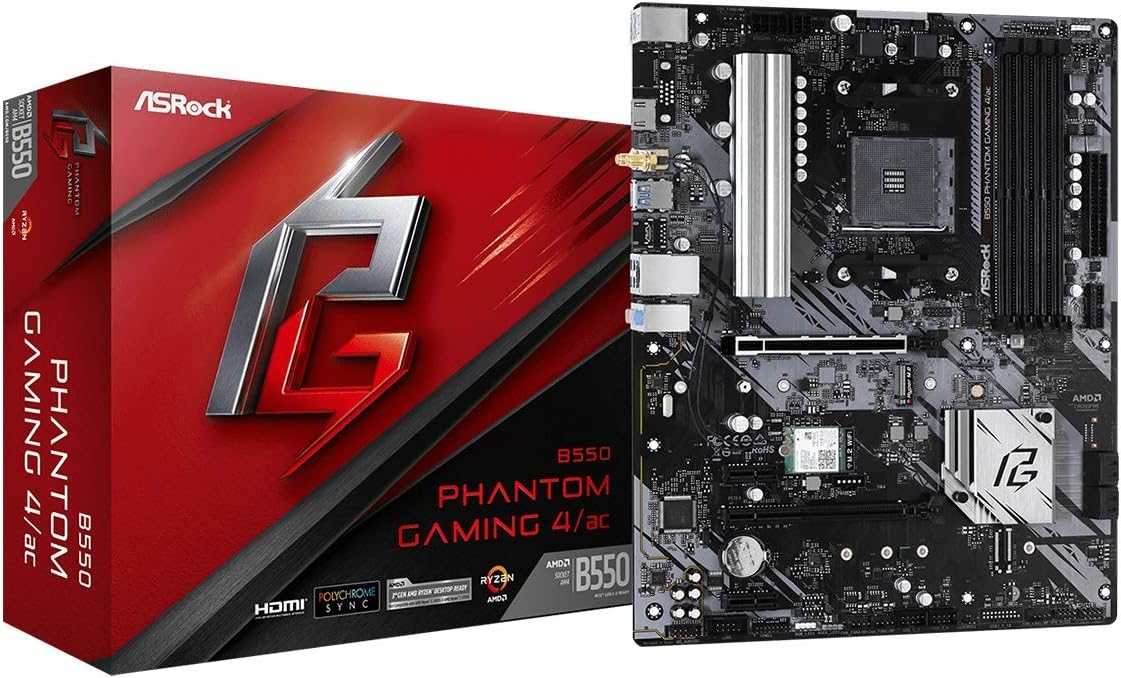
ASRock B550 Phantom Gaming 4 AC Supports 3rd Gen AMD AM4 Ryzen™ / Future AMD Ryzen™ Processors Motherboard
Want the best price and purchase timing?
Our AI advisor analyzes real-time pricing across all channels to find you the best deal.
AI Verdict
A barebones AM4 motherboard that sacrifices storage slots and modern USB headers to squeeze Wi-Fi 5 into an entry-level package.
The 8-phase power delivery and PCIe 4.0 support easily handle standard Ryzen 5000 gaming builds. The single M.2 slot and lack of a front USB-C header make it a poor match for modern cases and users who hoard massive game libraries.
Look for a board with dual M.2 slots and an internal USB 3.2 Gen 2 Type-E header if you want to use a modern case and add more storage later.
Regret Score™
Medium RiskLower is better — measures purchase-regret risk from real buyer complaints, review credibility, and product maturity
Issues discovered after purchase
Critically weak dimension
Amazon rating vs actual quality
Chance this product isn't for you
Pros
- Post Status Checker LEDs pinpoint exact CPU or RAM boot failures
- Four 2A/24W chassis fan headers eliminate the need for fan splitters
- Metal-reinforced PCIe 4.0 x16 slot prevents sagging with heavy graphics cards
- Includes two 5V ARGB and two 12V RGB headers for extensive lighting control
Cons
- Only features one M.2 storage slot, severely limiting fast storage upgrades
- Lacks an internal USB Type-E header, leaving front-panel USB-C case ports dead
- Wi-Fi 5 (802.11ac) module caps out at 433 Mbps and uses outdated Bluetooth 4.2
- VRM heatsink only covers the CPU phases, leaving the SOC phases completely bare
Dimension Scores
The 8-phase design handles 105W CPUs adequately, but the heatsink leaves the SOC phases completely exposed.
Debug LEDs and four RGB headers are great, but the outdated Wi-Fi 5 and missing USB-C header drag it down.
Limiting a standard ATX board to a single M.2 storage slot and four SATA ports severely restricts future upgrades.
The UEFI interface makes setting XMP profiles simple, but the lack of a CPU-less BIOS flashback feature is a major oversight.
Best For
- Budget 1080p gaming builds using 65W CPUs like the Ryzen 5 5600X
- First-time builders who rely on debug LEDs to troubleshoot boot issues
- Users with older cases that only feature standard USB Type-A front panels
Not Recommended For
- Content creators who need multiple M.2 NVMe drives for video editing
- Builders using modern cases like the Corsair 4000D that require a front USB-C header
- Anyone planning to heavily overclock a Ryzen 9 processor
Watch Out For
- The second M.2 storage slot is physically missing — you can see the bare solder contacts where it exists on the non-Wi-Fi version.
- There is no BIOS flashback button, meaning you need an older AM4 processor to update the firmware if it ships with an outdated BIOS.
- You only get 4 SATA ports instead of the standard 6 found on the non-AC version of this exact motherboard.
- Using four sticks of RAM with XMP enabled occasionally causes the board to hang on the first boot, requiring a hard reset.
Full Specifications
| RAM | 8 GB DDR4 |
| ASIN | B089VZFWHB |
| Brand | ASRock |
| Series | B550 PHANTOM GAMING 4 AC |
| Language | English, English, English, English |
| Platform | Windows 10 |
| Batteries | 1 Lithium Ion batteries required. |
| CPU Model | Ryzen 3 |
| Processor | ryzen_3 |
| CPU Socket | Socket AM4 |
| Model Name | B550 PHANTOM GAMING 4 AC |
| Item Weight | 2.59 pounds |
| Chipset Type | AMD B550 |
| Manufacturer | ASRock |
| Memory Speed | 4733 MHz |
| Wireless Type | 802.11ac |
| Operating System | - Microsoft Windows 10 64-bit / 11 64-bit |
| Item model number | B550 PHANTOM GAMING 4 AC |
| Compatible Devices | Gaming Console, Personal Computer |
| Memory Clock Speed | 4733 MHz |
| Product Dimensions | 13.5 x 10.5 x 2.5 inches |
| Computer Memory Type | SDRAM |
| Compatible Processors | AMD Ryzen 5000/4000/3000 Series |
| RAM Memory Technology | DDR4 |
| Item Dimensions LxWxH | 13.5 x 10.5 x 2.5 inches |
| Number of USB 2.0 Ports | 2 |
| Is Discontinued By Manufacturer | No |
What Buyers Say
The ASRock B550 Phantom Gaming 4 AC makes bizarre compromises to hit its entry-level tier. Buyers are consistently shocked to discover that adding Wi-Fi meant ASRock physically removed the second M.2 storage slot and two SATA ports found on the non-wireless version. The inclusion of Post Status Checker LEDs saves first-time builders hours of troubleshooting. The lack of a front panel USB-C header forces users with modern cases to buy PCIe adapters. It functions perfectly as a drop-in solution for a Ryzen 5600X, provided you understand its strict expansion limits.
“I bought this for a basic 5600X build and it works fine, but staring at the bare solder pads where the second M.2 slot was supposed to be makes me feel like I got scammed out of storage.”
Common Praise
- Post Status Checker LEDs instantly identify RAM seating issues during the first boot
- Four chassis fan headers provide enough power (2A/24W) to run multiple fans without splitters
- PCIe slot layout leaves plenty of breathing room below a 3-slot graphics card
- Realtek ALC1200 audio implementation delivers clean sound without front-panel static
Common Complaints
- Bare solder pads mock you where the second M.2 storage slot should be
- Wi-Fi 5 speeds struggle to max out gigabit internet connections during large game downloads
- Front panel USB-C cables have nowhere to plug in natively
- Missing BIOS flashback button causes massive headaches with newer APUs like the 5600G
Ownership Tips
- The Wi-Fi card is easily accessible, making an upgrade to a Wi-Fi 6E module a five-minute job
- Using four sticks of RAM with XMP enabled occasionally forces a hard reset on cold boots
- The top PCIe x16 slot's metal reinforcement actually holds up heavy GPUs like the RX 6800 XT without sagging
- You must manually enable IOMMU in the BIOS if you plan to run virtual machines
Frequently Asked Questions
Does this motherboard support Ryzen 5000 CPUs out of the box?
Most current inventory ships with a Ryzen 5000 ready BIOS. If you receive old stock, you will need an older AM4 CPU to update it because there is no BIOS flashback button.
How many M.2 NVMe SSDs can I install?
Only one. The board has a second M.2 slot, but it is a Key-E slot exclusively occupied by the pre-installed Wi-Fi card.
Can I connect the USB-C port on the front of my case?
No. The board lacks an internal USB Type-E header, so you must buy a PCIe x1 riser card adapter to make your front USB-C port functional.
Is the included Wi-Fi module upgradeable?
Yes. The Wi-Fi 5 card sits in a standard M.2 Key-E slot, allowing you to swap it out for a modern Intel AX200 Wi-Fi 6 module.
Can this board handle a Ryzen 7 5800X3D?
The 8-phase VRM handles 105W chips fine at stock settings, but the limited VRM heatsink means you should ensure good case airflow and avoid heavy overclocking.
Buying Guide
When shopping for an entry-level AM4 motherboard, you always trade features for a lower barrier to entry. With the Phantom Gaming 4 AC, you specifically sacrifice storage expansion and modern case compatibility to get built-in Wi-Fi. If you plan to use a single 1TB NVMe drive and a standard 65W processor, this board provides a stable foundation. If you are a digital hoarder who wants to add multiple fast SSDs later, you will hit a wall immediately.
M.2 Slots
Think of these as parking spaces for your fastest hard drives. This board only has one, meaning you can't just plug in a second fast drive later when you run out of space.
Wi-Fi 5 (802.11ac)
This is the wireless standard from 2014. It operates like a two-lane highway—fine for basic multiplayer gaming, but noticeably slower for massive 100GB game downloads compared to modern Wi-Fi 6.
BIOS Flashback
A feature that lets you update the motherboard's brain using just a USB stick, without a processor installed. Without it, you are stuck if the board doesn't recognize your newer CPU out of the box.
Alternatives
If you need more storage space or a front USB-C connection, search for a B550 ATX board with dual M.2 slots and an internal Type-E header, even if it means buying a separate PCIe Wi-Fi card.
You Might Also Like

JetKVM KVM Over IP ATX Extension Board, ATX Power Control Board- Only for Jet KVM Accessories Boot from Shutdown, Crash Recovery
$0-$49This is an ATX form factor power control board designed for JetKVM accessories, enabling remote PC power state management and simultaneous front panel button use.

Asus ROG Strix B550-F Gaming WiFi II AMD AM4 (3rd Gen Ryzen) ATX Motherboard & TUF Gaming B650-PLUS WiFi Socket AM5 (LGA 1718) Ryzen 7000 ATX Gaming Motherboard
$150-$299This bundle offers two ATX motherboards: the ROG Strix B550-F Gaming WiFi II for AM4 Ryzen 3000/5000 CPUs with DDR4 RAM, and the TUF Gaming B650-PLUS WiFi for AM5 Ryzen 7000 CPUs with DDR5 RAM.

Game Motherboard Fit for ASROCK B650E PG-ITX WiFi B650 AM5 Motherboard Support Ryzen 7800X3D 7600/X 7950X 7700/X CPU 2xDDR5 128GB Hyper M.2 Mini-ITX
Price range unavailableThis KUETFBVC motherboard listing presents highly contradictory specifications, including a BGA 1023 socket and AMD 480 chipset, making it unsuitable for any modern Ryzen AM5 CPU.

Asus ROG Strix B550-F Gaming WiFi II AMD AM4 (3rd Gen Ryzen) ATX Gaming Motherboard (PCIe 4.0,WiFi 6E, 2.5Gb LAN, BIOS Flashback, HDMI 2.1, Addressable Gen 2 RGB Header and Aura Sync)
This is a premium-feeling AM4 board with beefy VRMs and WiFi 6E, perfect for squeezing the last drop of performance out of a Ryzen 5000 series CPU.