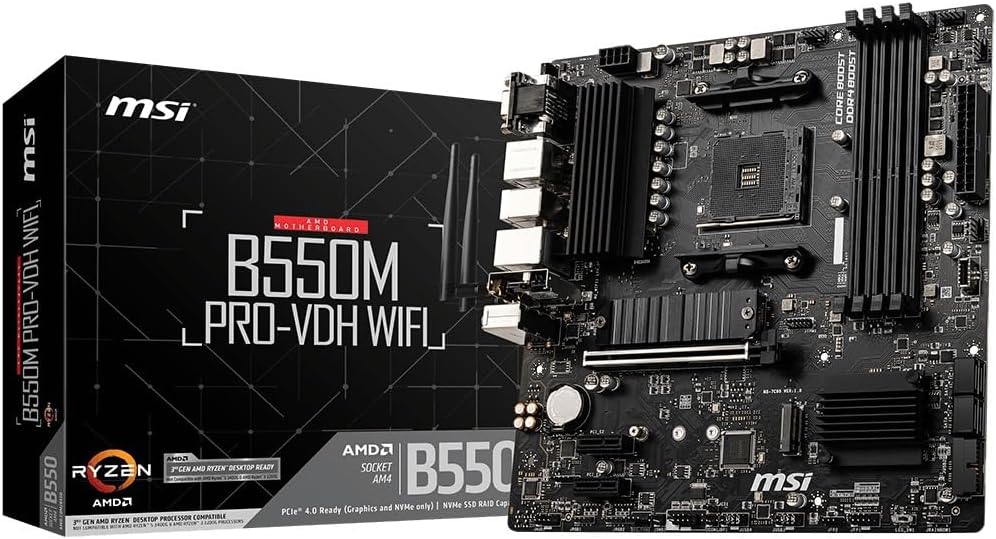
MSI B550M PRO-VDH WiFi ProSeries Motherboard (AMD Ryzen 5000, AM4, DDR4, PCIe 4.0, SATA 6Gb/s, M.2, USB 3.2 Gen 1, Wi-Fi, Bluetooth, D-SUB/HDMI/DP, Micro-ATX)
Want the best price and purchase timing?
Our AI advisor analyzes real-time pricing across all channels to find you the best deal.
AI Verdict
The MSI B550M PRO-VDH WiFi is a budget-friendly Micro-ATX board that gives AM4 builders PCIe 4.0 and decent VRMs, provided you tolerate finicky wireless drivers.
This board is a strong value if you are building a budget AM4 system with a Ryzen 5600X and a wired Ethernet connection. The PCIe 4.0 support and solid VRMs punch above its price class, but the outdated Wi-Fi 5 module and frustrating driver issues make it a headache for wireless users.
If you need reliable wireless connectivity, look for the newer MSI PRO B550M-VC WiFi, which upgrades to Wi-Fi 6E and Bluetooth 5.2 for roughly the same price.
Regret Score™
Medium RiskLower is better — measures purchase-regret risk from real buyer complaints, review credibility, and product maturity
Issues discovered after purchase
Critically weak dimension
Amazon rating vs actual quality
Chance this product isn't for you
Pros
- VRM heatsink and power delivery comfortably handle a 65W Ryzen 5 5600X or 105W Ryzen 7 5700X without thermal throttling
- Includes a BIOS Flashback button on the rear I/O to update for Ryzen 5000 CPUs without an older chip installed
- Features a PCIe 4.0 x16 slot and a Gen4 M.2 slot with an included Shield Frozr heatsink
- Offers four DDR4 RAM slots supporting up to 128GB at 4400 MHz
- Dedicated water pump PIN header supports up to 3 amps for AIO liquid coolers
Cons
- Included Wi-Fi 5 (AC) card is notoriously unreliable, with users frequently reporting dropped connections and missing Windows drivers
- BIOS Flashback is extremely picky about USB drives, requiring older low-capacity FAT32 sticks to function
- Boot times are noticeably longer than competing boards, with a consistent 5-10 second delay before the MSI logo appears
- Rear I/O features legacy VGA and USB 2.0 ports instead of modern USB 3.2 Gen 2 or Type-C options
Dimension Scores
Handles 65W and 105W AM4 chips like the 5600X and 5700X without overheating thanks to the extended heatsink.
Includes BIOS flashback and four RAM slots, but the Wi-Fi 5 and Bluetooth 4.2 modules are severely outdated.
Offers a PCIe 4.0 x16 slot, a Gen4 M.2 slot, and a secondary Gen3 M.2 slot, which is excellent for a Micro-ATX board.
The Click BIOS is easy to navigate, but the BIOS Flashback feature is notoriously picky about USB drive formats.
Best For
- Budget 1080p or 1440p gaming builds using a Ryzen 5 5600X or Ryzen 7 5700X
- Compact Micro-ATX cases where you still need four RAM slots for future memory upgrades
- Builders upgrading older AM4 systems who want PCIe 4.0 storage speeds without paying X570 prices
Not Recommended For
- Users who rely heavily on fast, stable Wi-Fi or Bluetooth for competitive gaming or wireless peripherals
- First-time builders who might panic if they have to manually flash a BIOS using a USB stick to get the system to post
Watch Out For
- Wi-Fi drivers missing on Windows install — you will likely need to use the included CD or download the drivers on another PC to get the wireless card working.
- CPU debug light boot loops — if you mix RAM kits with different speeds or timings, the board's memory controller often fails to train and gets stuck on the white CPU LED.
- Picky BIOS flashback — if your Ryzen 5000 CPU doesn't post, you must use a low-capacity (under 32GB) FAT32 USB drive formatted as MBR, or the flash button will just blink endlessly.
- Bluetooth dropouts — the onboard Bluetooth 4.2 module frequently disconnects wireless mice and controllers, prompting many owners to buy a separate USB dongle.
Full Specifications
| RAM | DDR4 |
| ASIN | B089D1YG11 |
| Brand | msi |
| Series | B550M PRO-VDH WIFI |
| Voltage | 28 Volts |
| Language | Italian |
| Platform | Windows 10 |
| Batteries | 1 AAAA batteries required. |
| CPU Model | AMD Athlon MP |
| Processor | athlon_mp |
| CPU Socket | Socket AM4 |
| Model Name | B550M PRO-VDH WIFI |
| Item Weight | 2.42 pounds |
| Chipset Type | AMD B550 |
| Manufacturer | MSI |
| Memory Speed | 4400 MHz |
| Wireless Type | Bluetooth |
| Item model number | B550M PRO-VDH WIFI |
| Compatible Devices | Personal Computer |
| Memory Clock Speed | 4400 MHz |
| Product Dimensions | 9.6 x 9.6 x 1.5 inches |
| Number of Processors | 1 |
| RAM Memory Technology | DDR4 |
| Item Dimensions LxWxH | 9.6 x 9.6 x 1.5 inches |
| Number of USB 2.0 Ports | 12 |
What Buyers Say
The most consistent theme across hundreds of builds is that the onboard Wi-Fi and Bluetooth are more trouble than they are worth. Buyers frequently report having to dig out an old optical drive to install network drivers from the included CD just to get online. Once past the initial setup hurdles, the board is praised as an absolute tank for budget Ryzen builds. The VRMs stay remarkably cool even when paired with 8-core chips like the Ryzen 7 5700X. The inclusion of a BIOS flashback button saves many builds, though users warn it demands very specific, older USB drives to function properly.
“Great board for the price but the wifi drivers are a nightmare, I literally had to use the CD it came with because windows couldn't find the network card, and the bluetooth drops my xbox controller constantly.”
Common Praise
- VRM temperatures remain stable even under heavy multi-core loads with Ryzen 7 processors
- The BIOS Flashback button allows CPU upgrades without needing a legacy AM4 processor
- Four DIMM slots provide easy memory upgrade paths, unlike many budget Micro-ATX boards
- The included M.2 Shield Frozr heatsink effectively prevents Gen4 NVMe drives from thermal throttling
- Fan control in the MSI BIOS is intuitive and allows for custom temperature curves
Common Complaints
- Wi-Fi 5 card frequently drops connection or limits speeds to 30Mbps on 2.4GHz bands
- Bluetooth 4.2 module randomly disconnects peripherals and often requires a system restart to fix
- Boot times are unusually long, with the system hanging for several seconds before the MSI logo appears
- BIOS Flashback button fails silently if the USB drive isn't formatted to FAT32 with an MBR partition
- The Realtek ALC892 audio codec is dated and occasionally dies completely after a few months of use
Ownership Tips
- If your Wi-Fi speeds are terrible, check the device manager to ensure the card is preferring the 5GHz band, as it defaults to 2.4GHz.
- The long boot delay never goes away, even with fast boot enabled and a Gen4 NVMe drive installed.
- Mixing RAM brands or speeds will almost certainly trigger a CPU debug light boot loop; stick to identical kits.
Frequently Asked Questions
Does this motherboard support Ryzen 5000 series out of the box?
It depends on when the board was manufactured. Most new stock supports Ryzen 5000, but you may need to use the BIOS Flashback button with a USB drive to update it before it will post.
Why is my Wi-Fi so slow or not showing up at all?
Windows often doesn't recognize the older Intel Wi-Fi 5 card automatically. You need to install the drivers from the included CD or download them from MSI's website using another computer.
Can I use an NVMe SSD and a graphics card at PCIe 4.0 speeds?
Yes, the top PCIe x16 slot and the top M.2 slot both support PCIe 4.0, provided you are using a Ryzen 3000 or 5000 series CPU (excluding 'G' series APUs).
Why is the white CPU debug light stuck on?
This usually means the board doesn't recognize the CPU due to an outdated BIOS, or the memory failed to train. Try flashing the latest BIOS and booting with only one stick of RAM in the DIMMA2 slot.
Does this board have an ARGB header for RGB fans?
Yes, it includes two 3-pin 5V ARGB headers (JRAINBOW) and two 4-pin 12V RGB headers, controllable via MSI Mystic Light.
Buying Guide
When buying a budget AM4 motherboard today, you are looking for a stable foundation that won't bottleneck your CPU or storage. This board gives you the PCIe 4.0 speeds necessary for modern graphics cards and fast SSDs, which is the main reason to choose B550 over older B450 boards. You also get a BIOS flashback button, which is mandatory if you're buying a newer Ryzen 5000 CPU that the factory BIOS might not recognize. Just be prepared to use a wired Ethernet connection or buy a cheap USB Wi-Fi dongle, as the built-in wireless card is an older, frustrating model.
B550 Chipset & PCIe 4.0
Think of PCIe 4.0 as a wider highway for your data. It allows modern graphics cards and NVMe SSDs to run at their maximum speeds without getting stuck in traffic, which older B450 boards can't do.
BIOS Flashback Button
Motherboards need software updates to recognize newer processors. This button lets you update the board using just a USB stick and a power supply, saving you from needing to borrow an older, compatible CPU just to turn the PC on.
Micro-ATX Form Factor
This is a shorter, more compact board than a standard ATX motherboard. It fits into smaller, cheaper PC cases but still gives you enough slots for a graphics card and extra storage.
Alternatives
If you want this exact layout but with modern, reliable wireless, search for a B550M board that explicitly advertises Wi-Fi 6E and Bluetooth 5.2.
You Might Also Like

JetKVM KVM Over IP ATX Extension Board, ATX Power Control Board- Only for Jet KVM Accessories Boot from Shutdown, Crash Recovery
$0-$49This is an ATX form factor power control board designed for JetKVM accessories, enabling remote PC power state management and simultaneous front panel button use.

Asus ROG Strix B550-F Gaming WiFi II AMD AM4 (3rd Gen Ryzen) ATX Motherboard & TUF Gaming B650-PLUS WiFi Socket AM5 (LGA 1718) Ryzen 7000 ATX Gaming Motherboard
$150-$299This bundle offers two ATX motherboards: the ROG Strix B550-F Gaming WiFi II for AM4 Ryzen 3000/5000 CPUs with DDR4 RAM, and the TUF Gaming B650-PLUS WiFi for AM5 Ryzen 7000 CPUs with DDR5 RAM.

Game Motherboard Fit for ASROCK B650E PG-ITX WiFi B650 AM5 Motherboard Support Ryzen 7800X3D 7600/X 7950X 7700/X CPU 2xDDR5 128GB Hyper M.2 Mini-ITX
Price range unavailableThis KUETFBVC motherboard listing presents highly contradictory specifications, including a BGA 1023 socket and AMD 480 chipset, making it unsuitable for any modern Ryzen AM5 CPU.

Asus ROG Strix B550-F Gaming WiFi II AMD AM4 (3rd Gen Ryzen) ATX Gaming Motherboard (PCIe 4.0,WiFi 6E, 2.5Gb LAN, BIOS Flashback, HDMI 2.1, Addressable Gen 2 RGB Header and Aura Sync)
This is a premium-feeling AM4 board with beefy VRMs and WiFi 6E, perfect for squeezing the last drop of performance out of a Ryzen 5000 series CPU.