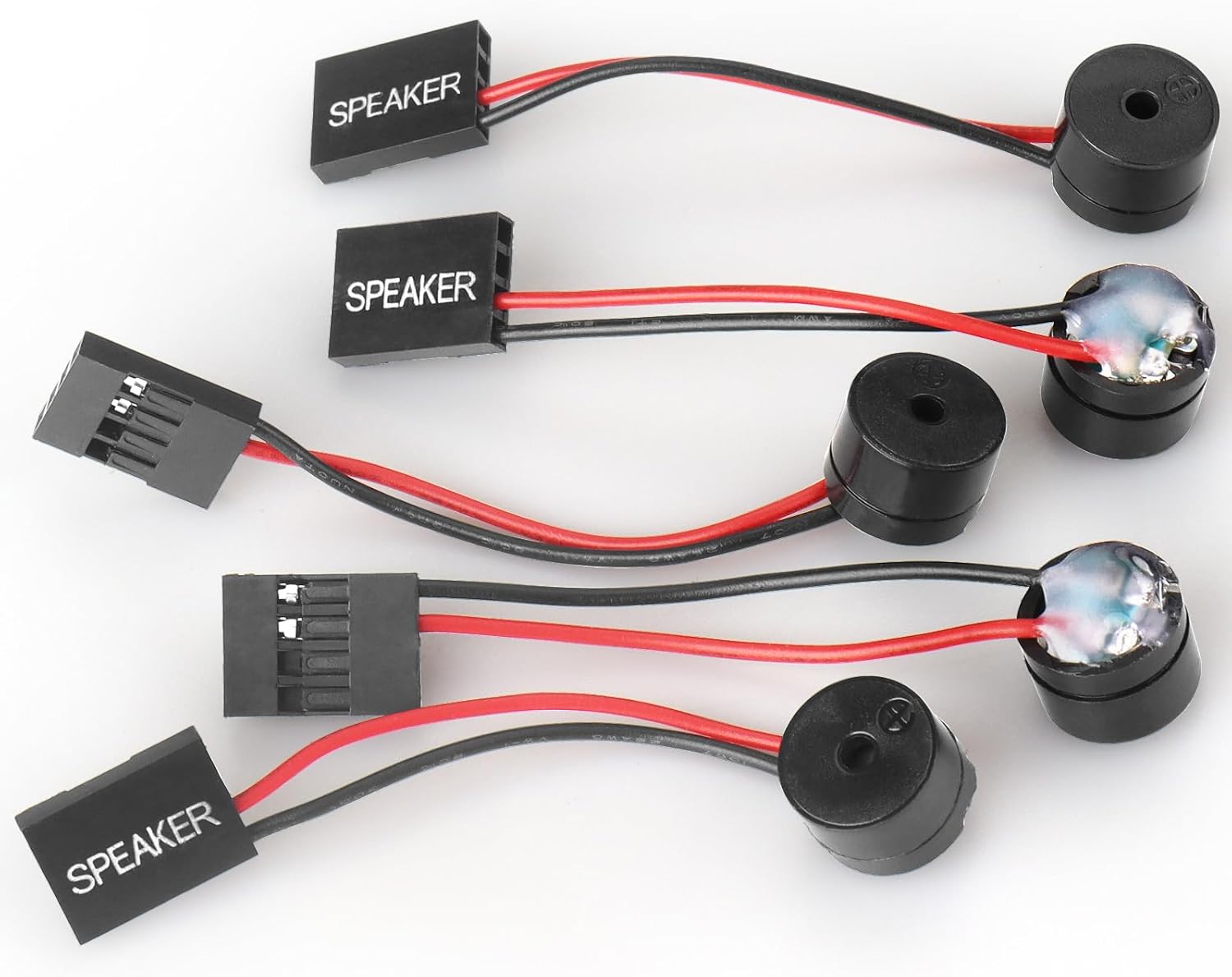
5 PCS Motherboard Speaker, Computer Casemini Speakers, PC Internal Bios Mini Plug Buzzer Computer Motherboard Buzzer Alarm
Want the best price and purchase timing?
Our AI advisor analyzes real-time pricing across all channels to find you the best deal.
AI Verdict
This is a dirt-cheap five-pack of piezo buzzers that plug into your motherboard's 4-pin header to spit out BIOS error codes when your PC refuses to boot.
If your motherboard lacks debug LEDs, this 4-pin piezo buzzer is the only way to hear the BIOS beep codes needed to diagnose a dead system. The 2.3-inch wire is short but sufficient for temporary troubleshooting. The exposed solder joints mean they won't survive rough handling.
If your motherboard has a 2-digit digital POST code display, you don't need this buzzer at all.
Regret Score™
Very High RiskLower is better — measures purchase-regret risk from real buyer complaints, review credibility, and product maturity
Issues discovered after purchase
Critically weak dimension
Amazon rating vs actual quality
Chance this product isn't for you
Pros
- Plugs directly into any standard 4-pin motherboard speaker header
- 2.3-inch pigtail wire gives just enough slack to route around front panel connectors
- Five-pack provides plenty of backups in case one arrives dead or wires snap
- Loud enough to clearly hear POST beep codes over noisy case fans
Cons
- Extremely thin wires are prone to snapping off the buzzer if bent too sharply
- Solder joints at the buzzer base are exposed and poorly reinforced
- Amazon listing incorrectly claims it has an Intel H61 chipset and DDR3 RAM compatibility
Dimension Scores
It is a passive buzzer that draws negligible power from the 5V speaker header, making VRM irrelevant.
It does exactly one thing—emit a loud beep for BIOS codes—and nothing else.
There is zero expandability on a basic 2-wire piezo buzzer.
It perfectly translates your motherboard's native BIOS error codes into audible diagnostic beeps.
Best For
- Troubleshooting a new PC build that powers on but shows a black screen
- Diagnosing older motherboards that lack built-in debug LEDs or digital code readouts
- IT technicians who need a handful of cheap diagnostic buzzers in their toolkit
Not Recommended For
- Modern high-end motherboards that already feature a digital POST code display
- Users looking for a speaker to play actual PC audio or music
Watch Out For
- Fragile solder joints — you need to handle the 2.3-inch wires gently or they will detach from the buzzer head.
- Polarity confusion — the red wire is positive and black is negative, but plugging it in backward won't damage it, it just might not beep.
- DOA units — buyers frequently report one or two buzzers in the five-pack arriving dead, which is why buying a multi-pack is necessary.
Full Specifications
| ASIN | B088KN6B9Q |
| Brand | WEICHUANG |
| CPU Model | Pentium |
| CPU Socket | DIP |
| Model Name | [WC-string] |
| Item Weight | 0.317 ounces |
| Chipset Type | Intel H61 Express, Intel H81 |
| Manufacturer | WEICHUANGJING |
| Item model number | [WC-string] |
| Compatible Devices | Personal Computer |
| Package Dimensions | 4.61 x 2.99 x 0.43 inches |
| Compatible Processors | Pentium |
| RAM Memory Technology | DDR3 |
| Memory Storage Capacity | 8 GB |
| Main Power Connector Type | 4-pin |
What Buyers Say
The most surprising thing about these buzzers is that modern motherboard manufacturers stopped including them in the box, making this cheap 5-pack a mandatory purchase for old-school troubleshooting. Buyers consistently praise how loud and clear the beeps are, easily cutting through the noise of case fans. The 2.3-inch pigtail wires are just long enough to clear front-panel headers. The exposed solder joints are a major weak point. Many users report snapping a wire just by pulling it out of the motherboard header. Because quality control is virtually nonexistent, buying a 5-pack is actually a necessity rather than a luxury, as getting one or two dead units is common.
“Saved my butt when my new Ryzen build wouldn't post and just gave me a black screen, but be careful because the wires on two of them snapped off when I tried to unplug them.”
Common Praise
- Loud enough to hear clearly from across the room
- Standard 4-pin female connector fits perfectly on both modern and vintage motherboards
- Instantly solves the mystery of a black screen on a new PC build
- Cheap enough to leave one permanently installed in every PC you build
Common Complaints
- Wires easily break off the buzzer base if you pull them by the cord
- At least one buzzer in the 5-pack is frequently dead on arrival
- The 2.3-inch wire is too short if you want to route it cleanly behind the motherboard tray
- Amazon listing is filled with completely irrelevant CPU and RAM specs
Ownership Tips
- The single short beep on a successful boot becomes a reassuring daily ritual.
- If you leave it plugged in permanently, make sure the exposed solder joints aren't touching any metal case components.
- You will likely throw three of these in a drawer and forget they exist until your next PC build.
Frequently Asked Questions
Do I need this if my motherboard has debug LEDs?
Not strictly, but the beep codes can sometimes provide more specific error details than a generic CPU or RAM LED. Many builders still use them to hear the single all-clear POST beep.
Will this play music or game audio?
No. This is strictly a piezo buzzer designed to emit basic BIOS beep codes, not a dynamic speaker for media.
Does it matter which way I plug it into the 4-pin header?
The red wire is positive and black is negative. If you plug it in backward, it usually just won't make a sound, but it won't fry your board.
Why does the listing mention Intel H61 and DDR3?
That is an error in the Amazon catalog data. This is a universal 4-pin buzzer that works with any motherboard brand or chipset that has a speaker header.
Why do I need a 5-pack?
These are mass-produced with cheap solder joints, so having backups is helpful if one arrives dead or a wire snaps during installation.
Buying Guide
You only need this if your PC turns on but won't show a picture, and your motherboard lacks a digital error code display. It plugs into a specific 4-pin header labeled 'SPK' or 'SPEAKER' near your front panel connectors. Don't be fooled by the Amazon listing mentioning Intel chipsets or DDR3 RAM — this is a universal analog part that works on literally any motherboard from the last 25 years. Treat the wires delicately, as they are barely soldered on.
4-pin female connector
This is the standard layout for motherboard speaker headers, though it only actually uses the two outer pins for the positive and negative wires.
2.3-inch wire length
It is just long enough to let the buzzer dangle away from other cables, but too short to route through your case's cable management holes.
Piezoelectric buzzer
It uses a crystal that changes shape when electricity is applied to create a harsh, loud beep, rather than a magnet and cone like a normal speaker.
Alternatives
If your motherboard already has a 2-digit LED display for POST codes, or if you want a dedicated POST diagnostic card that plugs into a PCIe slot, you can skip this entirely.
You Might Also Like

JetKVM KVM Over IP ATX Extension Board, ATX Power Control Board- Only for Jet KVM Accessories Boot from Shutdown, Crash Recovery
$0-$49This is an ATX form factor power control board designed for JetKVM accessories, enabling remote PC power state management and simultaneous front panel button use.

Asus ROG Strix B550-F Gaming WiFi II AMD AM4 (3rd Gen Ryzen) ATX Motherboard & TUF Gaming B650-PLUS WiFi Socket AM5 (LGA 1718) Ryzen 7000 ATX Gaming Motherboard
$150-$299This bundle offers two ATX motherboards: the ROG Strix B550-F Gaming WiFi II for AM4 Ryzen 3000/5000 CPUs with DDR4 RAM, and the TUF Gaming B650-PLUS WiFi for AM5 Ryzen 7000 CPUs with DDR5 RAM.

Game Motherboard Fit for ASROCK B650E PG-ITX WiFi B650 AM5 Motherboard Support Ryzen 7800X3D 7600/X 7950X 7700/X CPU 2xDDR5 128GB Hyper M.2 Mini-ITX
Price range unavailableThis KUETFBVC motherboard listing presents highly contradictory specifications, including a BGA 1023 socket and AMD 480 chipset, making it unsuitable for any modern Ryzen AM5 CPU.

Asus ROG Strix B550-F Gaming WiFi II AMD AM4 (3rd Gen Ryzen) ATX Gaming Motherboard (PCIe 4.0,WiFi 6E, 2.5Gb LAN, BIOS Flashback, HDMI 2.1, Addressable Gen 2 RGB Header and Aura Sync)
This is a premium-feeling AM4 board with beefy VRMs and WiFi 6E, perfect for squeezing the last drop of performance out of a Ryzen 5000 series CPU.