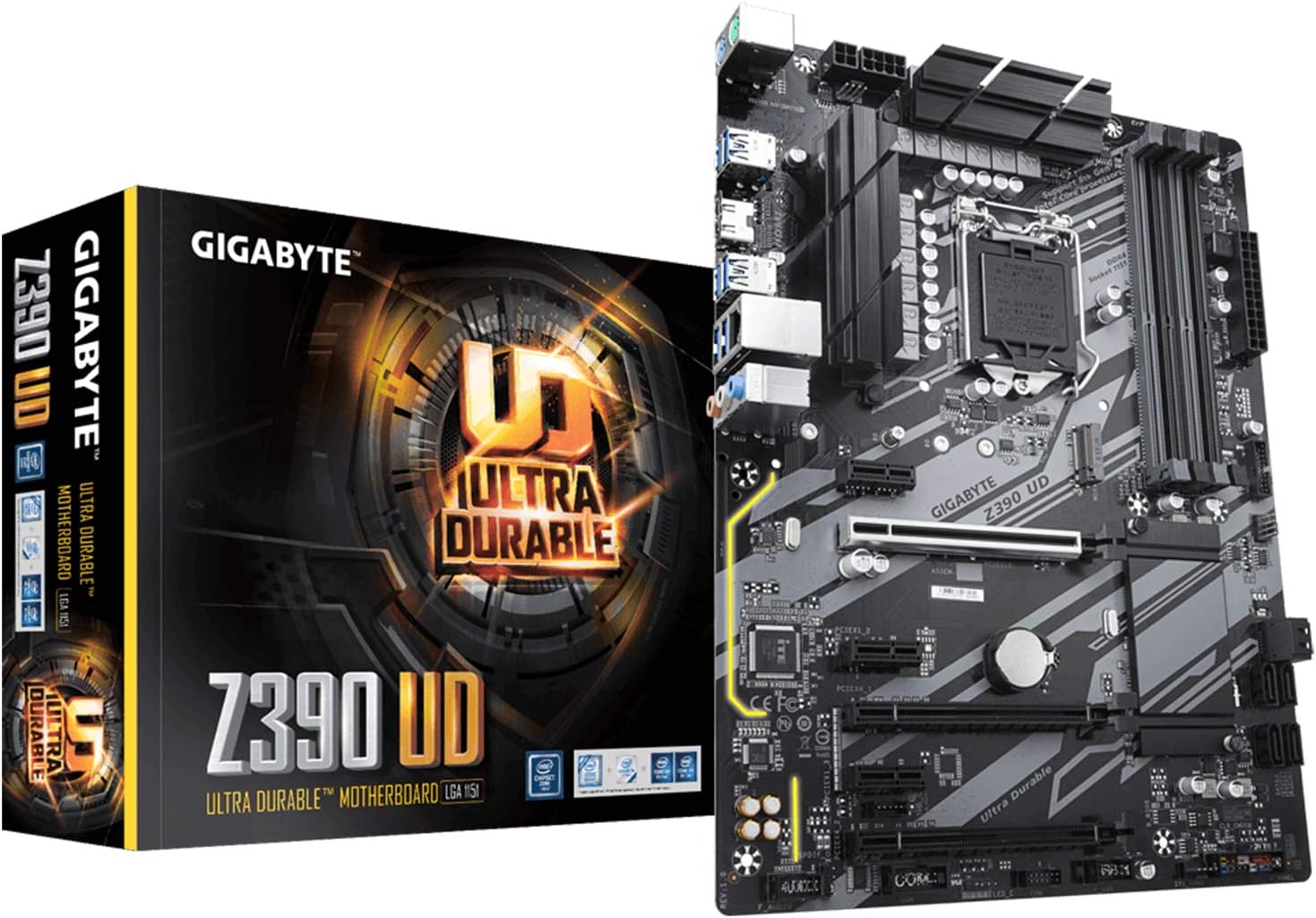
GIGABYTE Z390 UD (LGA 1151 (300 Series) Intel Z390 SATA 6Gb/s ATX Intel Motherboard for Cryptocurrency Mining with Above 4G Decoding, 6 x PCIe Slots)
Want the best price and purchase timing?
Our AI advisor analyzes real-time pricing across all channels to find you the best deal.
AI Verdict
This is a barebones, budget-friendly Z390 board built specifically for crypto miners needing six PCIe slots or builders trying to squeeze a 9900K into a tight budget.
This board is a highly specific tool for crypto miners needing six PCIe slots or budget builders trying to run an 8th/9th Gen Intel chip. The 10+2 phase VRM is surprisingly capable for the price, but the single M.2 slot and lack of Wi-Fi severely limit its appeal for standard gaming rigs.
If you need multiple M.2 slots and built-in wireless, step up to the Gigabyte Z390 AORUS Elite.
Regret Score™
Medium RiskLower is better — measures purchase-regret risk from real buyer complaints, review credibility, and product maturity
Issues discovered after purchase
Critically weak dimension
Amazon rating vs actual quality
Chance this product isn't for you
Pros
- 10+2 phase VRM handles an i9-9900K at stock speeds without thermal throttling.
- Six PCIe slots and 'Above 4G Decoding' support make it a plug-and-play dream for 6-GPU mining rigs.
- Includes a Thunderbolt 3 add-in card header, making it surprisingly popular for budget Hackintosh builds.
- Reinforced main PCIe x16 slot prevents GPU sag from heavy cards like the RTX 3080.
Cons
- Only features a single M.2 NVMe slot, severely limiting your fast storage expansion.
- The PCB is an ugly brownish-black with extremely dim LED lighting that looks terrible in showcase builds.
- No integrated Wi-Fi or Bluetooth, so you'll need to eat up a PCIe slot or USB port for wireless.
- VRM heatsinks run dangerously hot if you push the CPU vcore past 1.35V during manual overclocking.
Dimension Scores
10+2 phase digital PWM handles a stock 9900K easily, though heatsinks run hot over 1.35V.
Missing built-in Wi-Fi, uses a basic ALC887 audio codec, and features an ugly brown PCB.
Six PCIe slots are great for mining, but having only a single M.2 slot is a massive bottleneck for gamers.
The BIOS is functional and easy to configure for mining, but the physical manual is vague.
Best For
- Crypto miners building 6-to-10 GPU rigs using PCIe splitters.
- Budget builders pairing an older i5-9600K or i7-9700K with a modern GPU.
- Hackintosh enthusiasts needing Thunderbolt 3 support on a strict budget.
Not Recommended For
- Showcase RGB builds inside glass cases due to the ugly brown PCB.
- Heavy overclockers trying to push a 9900K past 5.0GHz on all cores.
Watch Out For
- Only one M.2 slot — if you want a second NVMe drive, you have to buy a PCIe adapter card.
- Mining past 6 GPUs requires BIOS tweaking — you must enable 'Above 4G Decoding', disable CSM, and set PCIe link speed to Gen1.
- Vague instruction manual — the front panel header pinouts are poorly labeled, forcing you to look up diagrams online.
- Basic ALC887 audio codec — the onboard sound is noticeably flat compared to the ALC1220 found on slightly pricier boards.
Full Specifications
| RAM | DDR4 |
| ASIN | B07HS59X7P |
| Brand | GIGABYTE |
| Series | Z390 UD |
| Platform | Windows 10, Windows 7, Windows 8 Pro, Windows 8.1 |
| CPU Model | Core i9 |
| Processor | core_i9 |
| CPU Socket | LGA 1151 |
| Model Name | Z390 UD |
| Item Weight | 1 pounds |
| Chipset Type | Intel Z390 |
| Manufacturer | Gigabyte |
| Memory Speed | 4400 MHz |
| Wireless Type | 802.11a/b/g/n/ac |
| Item model number | Z390 UD |
| Compatible Devices | Supports 9th and 8th Gen Intel Core Processors |
| Memory Clock Speed | 4400 MHz |
| Product Dimensions | 12.79 x 10.23 x 2.75 inches |
| Computer Memory Type | DDR4 SDRAM |
| Compatible Processors | 8th Generation Intel Core |
| RAM Memory Technology | DDR4 |
| Item Dimensions LxWxH | 12.79 x 10.23 x 2.75 inches |
| Number of USB 2.0 Ports | 2 |
| Is Discontinued By Manufacturer | No |
What Buyers Say
The biggest surprise with the Z390 UD is its massive popularity in the crypto mining and Hackintosh communities, rather than with standard gamers. Miners constantly praise how easily it boots with six GPUs once 'Above 4G Decoding' is enabled. Gamers are frustrated by the single M.2 slot and the surprisingly ugly brown-tinted PCB that looks cheap in a glass case. The 10+2 phase VRM punches above its weight class, handling an i9-9900K at stock speeds without breaking a sweat. Just keep your overclocking ambitions in check, as the VRM heatsinks get dangerously hot if you push the voltage past 1.35V.
“Bought this for a 6 GPU mining rig and it fired right up after enabling 4G decoding, but I'd never use this ugly brown board for my main gaming PC.”
Common Praise
- Boots 6 GPUs out of the box for mining with minimal BIOS tweaking.
- 10+2 phase VRM easily handles an i7-9700K or i9-9900K at stock speeds.
- Thunderbolt 3 add-in card header makes it a cheap base for macOS builds.
- Reinforced PCIe x16 slot prevents heavy graphics cards from sagging.
Common Complaints
- Only one M.2 slot means you can't easily add a second NVMe drive.
- The PCB is actually a dark brown, not black, which ruins the look of showcase builds.
- VRM heatsinks overheat during Prime95 stress tests if vcore exceeds 1.35V.
- Vague instruction manual requires Googling for basic front-panel installation.
Ownership Tips
- If you use 1-to-4 PCIe splitters, you can actually push this board to run 10 GPUs for mining.
- Disabling CSM in the BIOS is required if you want to enable Resizable BAR for modern GPUs.
- The single M.2 slot is located directly under the primary GPU slot, causing the drive to absorb exhaust heat.
Frequently Asked Questions
Can I run 6 GPUs for mining on this board?
Yes, it handles 6 GPUs easily. You just need to enable 'Above 4G Decoding' and set PCIe speeds to Gen2 in the BIOS.
Does this motherboard have built-in Wi-Fi?
No, it lacks onboard Wi-Fi and Bluetooth. You will need to buy a separate PCIe Wi-Fi card or a USB dongle.
Can this board handle an i9-9900K?
Yes, the 10+2 phase VRM can handle a 9900K at stock speeds. Just don't push the vcore past 1.35V for manual overclocking, or the VRM heatsinks will overheat.
How many M.2 NVMe slots does it have?
Only one. If you plan to run multiple NVMe SSDs, you'll need to use a PCIe-to-M.2 adapter in one of the lower slots.
Will this work with a 10th Gen Intel processor?
No, the LGA 1151 socket on this Z390 board only supports 8th and 9th Gen Intel CPUs.
Does it support RGB lighting?
It has a basic RGB pin header for external strips, but the onboard lighting is just a single, dim LED trace path that you can barely see.
Buying Guide
When buying a Z390 motherboard today, you are locking yourself into older 8th and 9th Gen Intel processors. This specific board strips away luxury features like Wi-Fi, premium audio, and extra M.2 storage slots to keep the price rock-bottom. It's built for utility, giving you a ton of PCIe slots for expansion cards or mining GPUs. If you just need a cheap replacement board to keep an old i7-9700K alive, it does the job perfectly.
LGA 1151 Socket
This is the physical slot for the CPU. It's like a puzzle piece that only fits Intel's 8th and 9th generation chips, so a newer 12th or 13th Gen processor physically will not fit.
10+2 Phase VRM
This is the power delivery system that feeds electricity to your processor. Think of it like a highway—more phases mean smoother, more stable power, which is crucial for power-hungry chips like the i9-9900K.
Above 4G Decoding
A BIOS setting that allows the processor to talk to multiple graphics cards at once. It's the magic switch you have to flip if you want to build a crypto mining rig with 6 GPUs.
Alternatives
If you need more storage space, look for a Z390 board with 'Dual M.2 slots'. If you want a cleaner look and wireless internet, search for 'Z390 ATX Wi-Fi black PCB'.
You Might Also Like

JetKVM KVM Over IP ATX Extension Board, ATX Power Control Board- Only for Jet KVM Accessories Boot from Shutdown, Crash Recovery
$0-$49This is an ATX form factor power control board designed for JetKVM accessories, enabling remote PC power state management and simultaneous front panel button use.

Asus ROG Strix B550-F Gaming WiFi II AMD AM4 (3rd Gen Ryzen) ATX Motherboard & TUF Gaming B650-PLUS WiFi Socket AM5 (LGA 1718) Ryzen 7000 ATX Gaming Motherboard
$150-$299This bundle offers two ATX motherboards: the ROG Strix B550-F Gaming WiFi II for AM4 Ryzen 3000/5000 CPUs with DDR4 RAM, and the TUF Gaming B650-PLUS WiFi for AM5 Ryzen 7000 CPUs with DDR5 RAM.

Game Motherboard Fit for ASROCK B650E PG-ITX WiFi B650 AM5 Motherboard Support Ryzen 7800X3D 7600/X 7950X 7700/X CPU 2xDDR5 128GB Hyper M.2 Mini-ITX
Price range unavailableThis KUETFBVC motherboard listing presents highly contradictory specifications, including a BGA 1023 socket and AMD 480 chipset, making it unsuitable for any modern Ryzen AM5 CPU.

Asus ROG Strix B550-F Gaming WiFi II AMD AM4 (3rd Gen Ryzen) ATX Gaming Motherboard (PCIe 4.0,WiFi 6E, 2.5Gb LAN, BIOS Flashback, HDMI 2.1, Addressable Gen 2 RGB Header and Aura Sync)
This is a premium-feeling AM4 board with beefy VRMs and WiFi 6E, perfect for squeezing the last drop of performance out of a Ryzen 5000 series CPU.