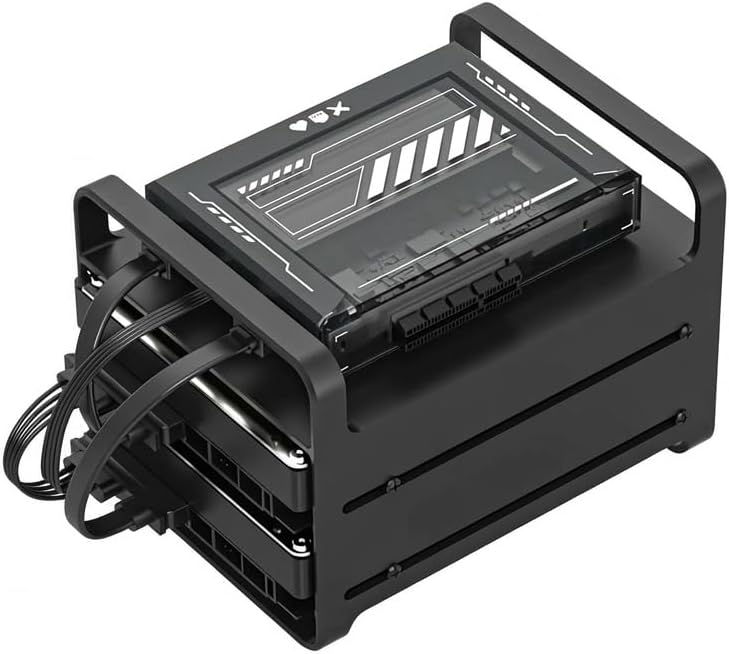
ZimaBlade 7700 x86 Personal NAS - 2 Bay Network Attached Storage for Home, Intel Quad-Core, Up to 16GB RAM, PCIe Slot for 10GbE/SSD, Pre-Installed CasaOS, Supports Plex, Docker, Unraid
Want the best price and purchase timing?
Our AI advisor analyzes real-time pricing across all channels to find you the best deal.
AI Verdict
A compact x86 mini-PC with an Intel Quad-Core Celeron N3450 CPU, up to 16GB DDR3L RAM, and a PCIe 2.0 x4 slot, designed for DIY 2-bay home NAS and server projects.
This ZimaBlade 7700 is a solid choice if you're specifically looking for an affordable, compact x86 mini-PC to build a 2-bay NAS or home server. Its PCIe slot and open OS support offer flexibility for those who enjoy tinkering, but the limited drive bays and older CPU mean it's not a one-size-fits-all solution.
If you need more storage capacity or a more powerful CPU for demanding applications, look for NAS solutions with more drive bays or newer generation Intel Core i3/i5 processors.
Regret Score™
High RiskLower is better — measures purchase-regret risk from real buyer complaints, review credibility, and product maturity
Issues discovered after purchase
Critically weak dimension
Amazon rating vs actual quality
Chance this product isn't for you
Pros
- Features a true desktop-class x86 Intel Celeron N3450 Quad-Core CPU, ensuring native compatibility with professional software and Docker images.
- Supports up to 16GB swappable DDR3L RAM, allowing simultaneous operation of Plex, 50+ Docker apps, and Home Assistant without stuttering.
- Includes an external PCIe 2.0 x4 slot, providing expansion for 10GbE networking or NVMe SSD caches.
- Comes with CasaOS pre-installed, offering an intuitive, smartphone-like UI for quick setup of photo syncing, file sharing, and one-click app installs.
- Offers open system freedom, fully supporting Unraid, TrueNAS, and Proxmox for high-speed private cloud configurations.
- Operates with low power consumption, drawing around 36 watts for the kit including drives.
Cons
- Limited to two SATA ports, restricting the number of directly attached hard drives for storage expansion.
- Lacks integrated Wi-Fi and Bluetooth, requiring external dongles for wireless connectivity.
- The Intel Celeron N3450 CPU is an older generation processor, which might limit performance for demanding tasks like multiple 4K transcodes.
- Some users have reported potential overheating issues, with one suggesting checking thermal paste application.
Dimension Scores
Equipped with Gigabit Ethernet and a PCIe 2.0 x4 slot, it offers faster network and potential NVMe SSD speeds than basic NAS units.
Users report it working 'solidly' for extended periods, but one instance of potential overheating due to thermal paste suggests a minor concern.
With only two SATA ports, its capacity is limited for a NAS, especially compared to units offering four or more drive bays.
Its x86 architecture and open system support for multiple operating systems like Unraid, TrueNAS, and Proxmox provide exceptional software compatibility.
Best For
- Homelab enthusiasts wanting an affordable x86 platform for experimenting with various server operating systems like Unraid or Proxmox.
- Users needing a dedicated storage solution for a separate Plex server, capable of handling 1 4K remux stream and a couple of 1080p streams.
- DIY NAS builders who prefer assembling their own system and customizing software rather than using a proprietary solution.
- Beginners looking for an easy-to-set-up home server with CasaOS for basic file sharing and app management.
Not Recommended For
- Users requiring a multi-bay NAS solution with more than two hard drive slots for extensive storage arrays.
- Individuals seeking a high-performance CPU for intensive tasks like simultaneous 4K video transcoding for multiple users.
- Those who prefer a fully integrated, plug-and-play NAS appliance without the need for assembly or software customization.
Watch Out For
- The system only offers two SATA ports, which means you're capped at two internal drives for your NAS setup.
- You'll need to buy separate USB dongles if you want Wi-Fi or Bluetooth, as they aren't built into the unit.
- One user reported needing to reapply thermal paste due to overheating, indicating a potential quality control issue with the CPU cooling.
- The Intel Celeron N3450 processor, while x86, is an older chip, so don't expect it to keep up with current-gen CPUs for heavy workloads.
Full Specifications
| ASIN | B0GL6QYDRD |
| Brand | zimablade |
| Color | Black |
| Material | Metal, Tempered Glass |
| Item Weight | 2.64 pounds |
| Manufacturer | zimablade |
| Mounting Type | Floor Mount, Tabletop |
| Compatible Devices | mini pc Hard Drive SSD Network Router Home Assistant Hub |
| Package Dimensions | 9.37 x 7.91 x 6.81 inches |
What Buyers Say
This ZimaBlade 7700 is often seen as a surprisingly capable mini-PC that you can turn into a home server or NAS, especially considering its price. Many users are drawn to its x86 processor and the flexibility to run various operating systems beyond the pre-installed CasaOS. The PCIe slot is a big deal for adding faster networking or NVMe storage, which isn't common in this price range. However, the limited two drive bays and the need for external dongles for wireless connectivity are consistent points of discussion.
“Okay, so I got this ZimaBlade and the NAS kit, and honestly, it's pretty cool for the price, but seriously, only two drives? And no Wi-Fi? I had to dig out an old dongle, but at least I can run whatever OS I want on it, which is kinda awesome.”
Common Praise
- Easy setup process, especially with CasaOS, making it accessible for beginners.
- x86 architecture offers broad software compatibility for Docker, Plex, and Home Assistant.
- The PCIe 2.0 x4 expansion slot allows for significant upgrades like 10GbE or NVMe SSDs.
- Low power consumption makes it suitable for always-on home server applications.
- Compact size and ability to use it as a mini-PC or server.
Common Complaints
- Only two SATA ports, which restricts the total internal storage capacity.
- No built-in Wi-Fi or Bluetooth, requiring users to purchase and connect USB dongles.
- The Intel Celeron N3450 CPU is an older model, which can be a bottleneck for heavy processing tasks.
- Some users have reported issues with thermal paste application leading to overheating.
Ownership Tips
- The system runs quietly and with low power, often forgotten once set up and running in a corner.
- You'll likely want to swap out CasaOS for something like Unraid or TrueNAS for more advanced features and control.
- Adding a 10GbE card via the PCIe slot significantly boosts network transfer speeds, making it feel much faster.
- Be prepared to manage cables, especially if you're using the NAS kit with external drives.
Frequently Asked Questions
Can the ZimaBlade 7700 run Plex?
Yes, it can function as storage for a separate Plex server or run the Plex server itself for light loads, handling 1 4K remux stream and a couple of 1080p streams.
What operating systems are supported?
It comes with CasaOS pre-installed, but also fully supports open systems like Unraid, TrueNAS, Proxmox, Linux, Windows, and ChromeOS.
Does it have Wi-Fi or Bluetooth?
No, the ZimaBlade 7700 does not have integrated Wi-Fi or Bluetooth. You will need to use external USB dongles for these functionalities.
What kind of processor does it have?
It features an Intel Celeron N3450 Quad-Core x86 processor, boosting up to 2.4 GHz.
How many hard drives can I connect?
The ZimaBlade 7700 has two SATA ports, allowing you to connect up to two SATA hard drives or SSDs.
Is the RAM upgradeable?
Yes, the RAM is swappable and supports up to 16GB of DDR3L memory.
Buying Guide
When looking at something like the ZimaBlade 7700, you're not just buying a storage box; you're getting a mini-computer that you can adapt into a home server. Think about what you actually want to *do* with it. Do you just need to store files, or do you want to run apps, stream media, or host smart home services? The flexibility here means you'll be doing some setup yourself, which is different from a pre-built NAS appliance.
x86 CPU
This means it's like a tiny desktop computer, not a smartphone chip. It can run full versions of Linux, Windows, or server operating systems, giving you access to a huge library of software and Docker containers without compatibility headaches.
16GB RAM
More RAM lets your server juggle more tasks at once without slowing down. If you plan to run Plex, Home Assistant, and a bunch of other apps simultaneously, having 16GB means everything stays snappy, like having more workspace on your desk.
PCIe Slot
This is a big deal for future-proofing. It's like an expansion slot in a desktop PC. You can plug in a faster network card (like 10 Gigabit Ethernet) or an NVMe SSD for super-fast caching, which can dramatically speed up file access.
2-Bay Capacity
This tells you how many hard drives you can put inside. Two bays are enough for a basic mirrored setup (for data redundancy) or two separate drives, but it limits your total storage and future expansion compared to larger NAS units. Think of it as a small two-drawer filing cabinet.
Alternatives
If this doesn't quite fit, look for devices with more than two drive bays if you need extensive storage, or a newer generation Intel Core i3/i5 processor if you anticipate heavy transcoding or virtual machine workloads.
You Might Also Like

Seagate IronWolf Pro SATA III 3.5" Internal NAS Hard Drive, 2-Pack - 8TB
$300-$599A 2-pack of 8TB 7200 RPM CMR internal hard drives with 256MB cache, built for 24/7 multi-bay NAS environments.

QNAP TS-453E-8G-US 4 Bay High-Performance Desktop NAS with Intel Celeron Quad-core Processor, 8 GB DDR4 RAM and Dual 2.5GbE (2.5G/1G/100M) Network Connectivity (Diskless)
$600+A 4-bay diskless NAS with an Intel Celeron J6412, 8GB DDR4 RAM, dual 2.5GbE, and M.2 NVMe slots for businesses needing long-term support.

Seagate Exos 28TB Internal Hard Drive HDD - 3.5 in CMR SATA 6Gb/s, 7200 RPM, 512MB Cache, 2.5M MTBF - ST28000NM000C (Renewed)
$300-$599This 28TB, 7200 RPM, 3.5-inch CMR SATA 6Gb/s renewed hard drive is for serious data hoarders needing massive capacity at a lower price point.

1TB G-Drive ArmorATD Rugged, Durable Portable External HDD, Up to 130MB/s, USB-C (5Gbps), USB 3.2 Gen 1 – SDPHE1G-001T
$50-$99A 1TB mechanical hard drive with a 130MB/s read speed and USB-C (5Gbps) connectivity, built for users needing rugged, portable storage for school or creative projects.