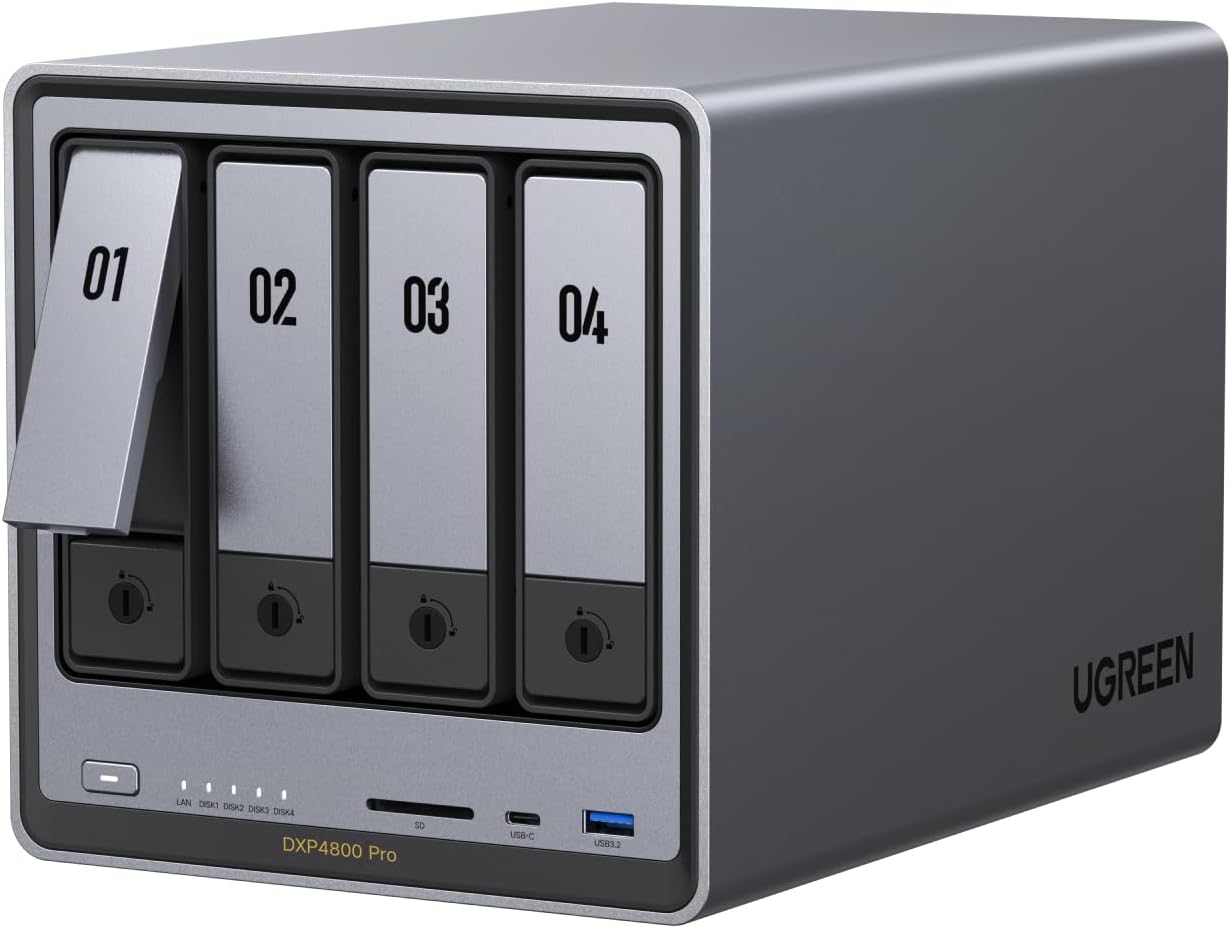
UGREEN NAS DXP4800 Pro 4-Bay Desktop NAS, Intel® Core™ i3-1315U 6-Core CPU, 8GB DDR5 RAM, 128G SSD, 1x 10GbE, 1x 2.5GbE, 2X M.2 NVMe Slots, 4K HDMI, Network Attached Storage (Diskless)
Want the best price and purchase timing?
Our AI advisor analyzes real-time pricing across all channels to find you the best deal.
AI Verdict
This is a 4-bay diskless NAS with an Intel i3-1315U CPU, 8GB DDR5 RAM, and dual 10GbE and 2.5GbE ports, built for demanding workflows like VMs and Docker.
This NAS is a strong fit for power users and small businesses due to its Intel Core i3-1315U CPU, 8GB DDR5 RAM (expandable to 96GB), and dual 10GbE and 2.5GbE networking. These specifications directly support demanding applications like virtualization and Docker containers.
If you need even more processing power for extreme virtualization or multiple concurrent 4K transcodes, look for a NAS with an Intel Core i5 or i7 processor and more base RAM.
Regret Score™
Medium RiskLower is better — measures purchase-regret risk from real buyer complaints, review credibility, and product maturity
Issues discovered after purchase
Critically weak dimension
Amazon rating vs actual quality
Chance this product isn't for you
Pros
- Features an Intel Core i3-1315U 6-core CPU with up to 4.5GHz Turbo, providing processing power for demanding tasks like virtual machines and Docker containers.
- Includes 8GB of DDR5 RAM, expandable to 96GB, allowing for significant memory upgrades for future needs.
- Equipped with dual high-speed network ports (1x 10GbE and 1x 2.5GbE) for transfer speeds up to 1.25GB/s.
- Offers two M.2 PCIe 4.0 SSD slots for high-speed caching or additional storage, eliminating HDD bottlenecks.
- Supports a maximum storage capacity of 136TB (4x HDD + 2x M.2 SSD), accommodating large media libraries or extensive file archives.
- Provides multiple RAID configuration options (0, 1, 5, 10) for data protection and performance flexibility.
Cons
- The 128GB SSD for the system disk might feel restrictive if you plan on installing many applications or larger operating systems within VMs.
- As a diskless unit, you'll need to factor in the additional cost of hard drives and M.2 SSDs to reach its full capacity.
- While it has 4K HDMI output, its utility for direct media consumption might be limited by the UGOS Pro interface compared to dedicated media players.
- The inclusion of only one 10Gbps USB-A port and two USB 2.0 ports on the rear panel limits high-speed peripheral connectivity.
Dimension Scores
The dual 10GbE and 2.5GbE network ports allow for blazing-fast transfers up to 1.25GB/s, significantly above average for consumer NAS units.
Built with a unibody aluminum chassis and a multi-zone cooling system, it's engineered for 24/7 operation and hardware longevity.
Supporting up to 136TB with four HDD bays and two M.2 SSD slots, this NAS offers massive storage potential for demanding users.
It supports a wide range of 3.5-inch/2.5-inch SATA drives and M.2 SSDs, with no vendor lock-in, and is compatible with various operating systems for access.
Best For
- Video editors and developers needing a private workstation for virtual machines and Docker environments.
- Small offices or growing teams requiring a centralized IT hub with advanced workflows and high-speed data transfers.
- Users managing massive photo libraries who want on-device AI-powered facial and scene recognition for privacy.
- Home users looking to consolidate a large media collection (up to 136TB) with 4K HDMI playback capabilities.
Not Recommended For
- Budget-conscious users who are not prepared to purchase additional storage drives.
- Individuals seeking a plug-and-play solution without any technical setup or configuration.
- Users who primarily need a simple file share and won't utilize the advanced CPU, RAM, or virtualization features.
Watch Out For
- The 128GB system SSD is not user-upgradable for the operating system, meaning you're stuck with that capacity for UGOS Pro and its core applications.
- While it supports 136TB capacity, achieving this requires purchasing four 32TB HDDs and two 8TB M.2 SSDs, which significantly increases the total cost beyond the $600+ base price.
- The 4K HDMI output is for direct display, but the UGOS Pro operating system's media player capabilities might not match dedicated streaming boxes or HTPCs for all users.
- Despite the powerful CPU, the absence of specific user reports on transcoding performance for multiple 4K streams means this remains an untested area for heavy media server use.
Full Specifications
| ASIN | B0G1C1YNN8 |
| Size | DXP4800 Pro 4-Bay |
| Brand | UGREEN |
| Color | Grey |
| Series | DXP4800 Pro |
| Material | Aluminum |
| Item Weight | 14.17 pounds |
| Manufacturer | UGREEN |
| Mounting Type | Floor Mount, Tabletop |
| Item model number | DXP4800 Pro 4-Bay |
| Package Dimensions | 14.88 x 11.93 x 10.24 inches |
What Buyers Say
The UGREEN NAS DXP4800 Pro is a new entrant, and specific, detailed user feedback on Amazon and Reddit is still emerging. Early discussions on Reddit indicate it's seen as a viable pre-built option for those who don't want to DIY a NAS, especially for tasks like running Jellyfin or Docker. The focus is often on its powerful Intel i3-1315U processor and the inclusion of 10GbE networking, which are key differentiators for performance-oriented users. Users are generally looking for a system that can handle virtualization and media transcoding without issues. The expandable DDR5 RAM is also a frequently mentioned advantage for future-proofing.
“Man, I needed something that could actually run my Plex server AND a couple of Docker containers without choking, and this UGREEN thing with the i3 and 10GbE actually delivers. My old NAS was always buffering, but this one just flies. Worth the money if you're serious about your home lab.”
Common Praise
- The Intel Core i3-1315U CPU provides ample power for running multiple virtual machines and Docker containers concurrently.
- The 10GbE port delivers extremely fast file transfers, making large data backups and access quick.
- The ability to expand DDR5 RAM up to 96GB offers significant headroom for future performance needs.
- The inclusion of dual M.2 NVMe slots for caching or storage pools helps accelerate frequently accessed data.
- The UGOS Pro operating system is considered intuitive for managing media and photos, with on-device AI for privacy.
Common Complaints
- The 128GB system SSD is fixed and cannot be upgraded, which might limit the number of applications or OS images for VMs.
- Some users might find the initial cost high, especially when factoring in the required hard drives and M.2 SSDs.
- The limited number of high-speed USB-A ports on the rear (one 10Gbps, two USB 2.0) could be a bottleneck for external storage or peripherals.
- As a newer product, long-term software support and community resources for UGOS Pro are not as established as with older NAS brands.
Ownership Tips
- The tool-free drive trays make adding or swapping hard drives surprisingly easy, saving time during setup and maintenance.
- The multi-zone cooling system keeps the drives and CPU temperatures stable, even under continuous heavy load.
- The UGOS Pro AI photo album actually works for face and scene recognition, and it's all local, which is a big privacy win.
- Setting up Docker containers was straightforward, and the performance for virtual machines is noticeably snappier than my previous setup.
Frequently Asked Questions
What kind of drives does this NAS support?
It supports four 3.5-inch or 2.5-inch SATA hard drives and two M.2 PCIe 4.0 NVMe SSDs. You can mix and match drive sizes and types.
Can I upgrade the RAM?
Yes, the 8GB DDR5 RAM is expandable up to 96GB, allowing you to boost performance for more demanding applications or virtual machines.
Does it support Docker and virtual machines?
Yes, the UGOS Pro operating system offers comprehensive support for Docker containers and virtual machines, making it suitable for custom development environments or smart home hubs.
What are the network speeds?
It features one 10 Gigabit Ethernet (10GbE) port and one 2.5 Gigabit Ethernet (2.5GbE) port, enabling transfer speeds up to 1.25GB/s.
Does it have HDMI output?
Yes, it includes a 4K HDMI output, allowing you to connect it directly to a display for media playback or system monitoring.
What RAID levels are supported?
It supports RAID 0, 1, 5, and 10, as well as JBOD and Basic configurations, providing flexibility for data redundancy and performance.
Buying Guide
When you're looking at a NAS like this, you're not just buying storage; you're buying a mini-server for your home or small office. You need to think about what you'll actually run on it. Do you just need to store files, or do you want to host websites, run media servers, or even virtual machines? The more complex your needs, the more powerful the CPU and RAM you'll require. Also, consider your network setup – 10GbE is amazing, but only if your network can handle it.
Intel Core i3-1315U CPU
This isn't just a basic file server CPU; it's a modern processor with 6 cores and 8 threads, meaning it can handle multiple demanding tasks simultaneously, like running a media server, a virtual machine, and backing up files all at once, without slowing down. Think of it like the engine in a car – a bigger, more efficient engine means it can do more work without struggling.
8GB DDR5 RAM (expandable to 96GB)
RAM is like the workspace for your NAS. 8GB is a good starting point for many tasks, but if you plan on running several virtual machines or complex applications, having the option to expand to 96GB means your NAS won't run out of memory and slow down. It's like having a bigger desk for more projects.
1x 10GbE, 1x 2.5GbE network ports
These are your data highways. A 10GbE port is incredibly fast, letting you transfer huge files (like 4K video projects) at speeds up to 1.25GB per second, assuming your network infrastructure supports it. The 2.5GbE port is still faster than standard Gigabit Ethernet and is a good fallback. It's the difference between a single-lane road and a multi-lane highway for your data.
Alternatives
If this doesn't fit, look for NAS units with fewer drive bays and a less powerful CPU (like a Pentium or Celeron) if you only need basic file storage, or consider models with PCIe expansion slots if you need to add specialized cards like more 10GbE ports or Fibre Channel.
You Might Also Like

Seagate IronWolf Pro SATA III 3.5" Internal NAS Hard Drive, 2-Pack - 8TB
$300-$599A 2-pack of 8TB 7200 RPM CMR internal hard drives with 256MB cache, built for 24/7 multi-bay NAS environments.

QNAP TS-453E-8G-US 4 Bay High-Performance Desktop NAS with Intel Celeron Quad-core Processor, 8 GB DDR4 RAM and Dual 2.5GbE (2.5G/1G/100M) Network Connectivity (Diskless)
$600+A 4-bay diskless NAS with an Intel Celeron J6412, 8GB DDR4 RAM, dual 2.5GbE, and M.2 NVMe slots for businesses needing long-term support.

Seagate Exos 28TB Internal Hard Drive HDD - 3.5 in CMR SATA 6Gb/s, 7200 RPM, 512MB Cache, 2.5M MTBF - ST28000NM000C (Renewed)
$300-$599This 28TB, 7200 RPM, 3.5-inch CMR SATA 6Gb/s renewed hard drive is for serious data hoarders needing massive capacity at a lower price point.

1TB G-Drive ArmorATD Rugged, Durable Portable External HDD, Up to 130MB/s, USB-C (5Gbps), USB 3.2 Gen 1 – SDPHE1G-001T
$50-$99A 1TB mechanical hard drive with a 130MB/s read speed and USB-C (5Gbps) connectivity, built for users needing rugged, portable storage for school or creative projects.