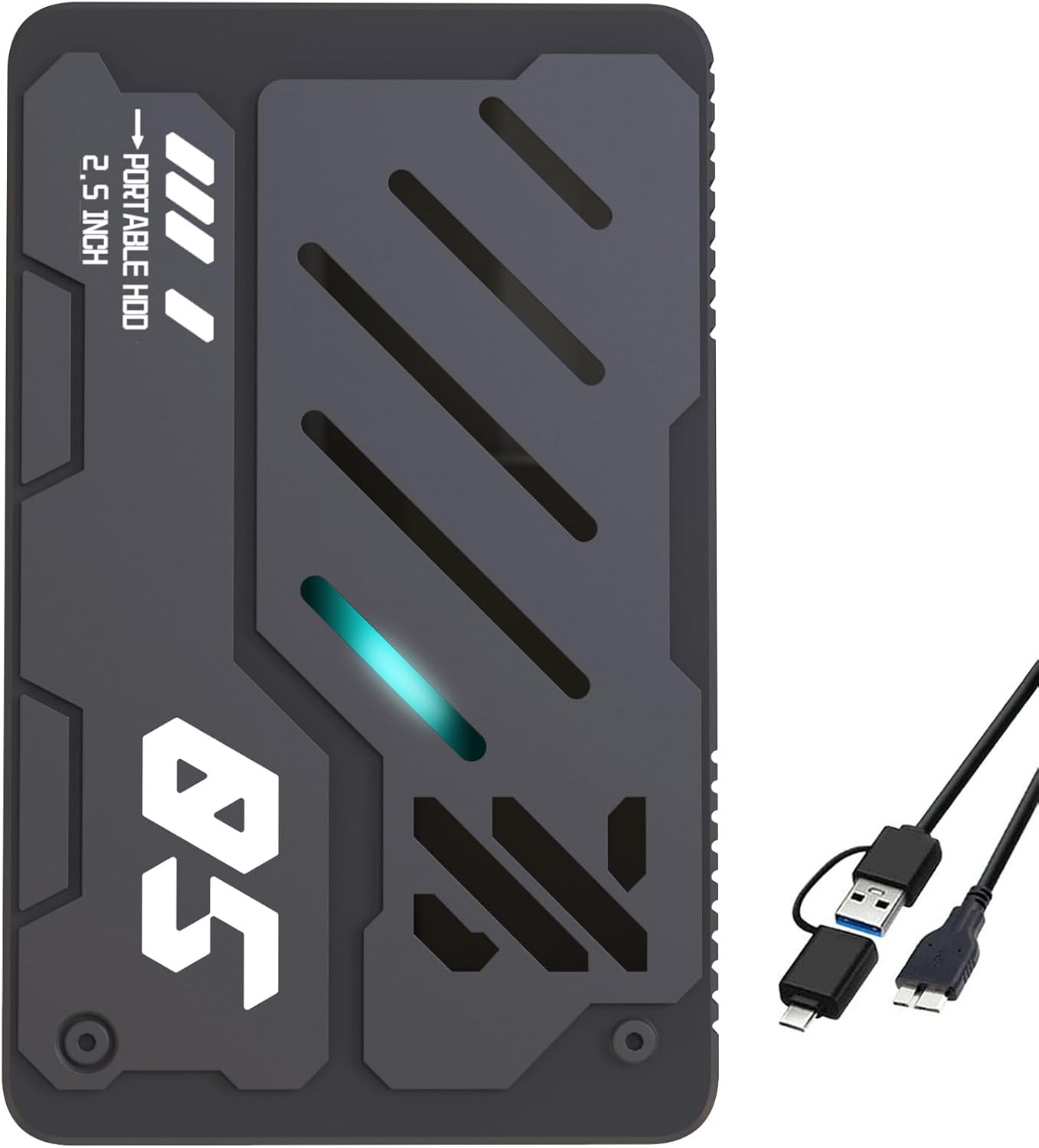
Ultra Slim Portable External Hard Drive USB 3.0 HDD Storage for PC, Laptop, Mac, Xbox one, PS4, PS5 (1TB)
Want the best price and purchase timing?
Our AI advisor analyzes real-time pricing across all channels to find you the best deal.
AI Verdict
This 1TB mechanical hard drive with USB 3.0 is for basic file storage across multiple devices, not for speed-critical tasks or robust data protection.
This 1TB mechanical external hard drive is a situational fit, primarily for users needing basic, affordable storage expansion. Its USB 3.0 interface offers decent speed for casual use, but the mechanical nature means it won't match the performance or durability of SSDs. It's best suited for archiving or expanding storage on devices where speed isn't the top priority.
If you need faster data access or more physical durability, look for an external SSD with a USB 3.2 Gen 2 interface.
Regret Score™
Very High RiskLower is better — measures purchase-regret risk from real buyer complaints, review credibility, and product maturity
Issues discovered after purchase
Critically weak dimension
Amazon rating vs actual quality
Chance this product isn't for you
Pros
- Provides 1 TB of storage capacity for files, movies, music, photos, and games.
- Connects via USB 3.0, offering theoretical transfer speeds up to 5 Gbps, which is faster than USB 2.0.
- Measures 0.6 inches thick, making it easy to carry.
- Formatted and ready to use out of the box with Windows, Mac OS (10.6.5+), Linux, Android, Chromebook, PC, Laptop, Xbox One, PS4, PS5, and TV.
- Includes a 2-in-1 Micro-USB 3.0 cable for varied connection ports and stable transmission.
Cons
- Uses a mechanical hard disk drive, which is inherently slower and more fragile than solid-state drives.
- Actual usable storage capacity is typically less than 1 TB after formatting, often around 931 GB.
- The plastic casing, while described as sturdy, may be prone to scratches.
- Some budget external HDDs can experience inconsistent performance or slow transfer rates over time.
- The included USB cable length is not specified, but similar budget drives have been reported to include short cables, around 19 inches.
Dimension Scores
As a mechanical hard drive, its real-world transfer speeds will be significantly slower than external SSDs, despite the USB 3.0 interface's theoretical 5 Gbps maximum.
Mechanical hard drives are more susceptible to damage from drops or impacts than SSDs, and some budget drives have reported issues with sporadic disconnections or early failure.
1 TB is a common and practical capacity for general file storage and console game archiving, offering a balance between cost and space.
The drive is broadly compatible with Desktop, Gaming Console, Laptop, and Television, supporting multiple operating systems including Windows, Mac OS, Linux, and Android.
Best For
- Storing large archives of photos, videos, or documents.
- Expanding storage for older gaming consoles like PS4 or Xbox One.
- Backup storage for non-critical files from PCs or laptops.
- Transporting media files between compatible devices.
Not Recommended For
- Running demanding applications or games directly from the drive, especially PS5 titles.
- Users requiring high-speed data transfer for frequent large file edits or professional work.
- Environments where the drive might experience frequent drops or impacts.
- Primary backup for mission-critical data without additional redundancy.
Watch Out For
- Some budget external hard drives are reported to make noticeable noise during operation, which can be distracting in quiet environments.
- Users of similar products have experienced the USB cable becoming loose over time, leading to connection issues.
- Compatibility issues, particularly with Mac devices, have been reported for comparable drives, sometimes requiring reformatting or additional hubs.
- Transfer speeds, despite USB 3.0 claims, can be underwhelming, with some users reporting significantly slower rates than expected.
- Overheating concerns have been noted with extended usage on similar slim external hard drives.
Full Specifications
| ASIN | B0F5WC5FH9 |
| Brand | Tianken |
| Color | Black |
| Series | EHDBJJ30 |
| Hard Drive | 1024 GB Mechanical Hard Disk |
| Item Weight | 7.2 ounces |
| Manufacturer | Tianken |
| Special Feature | Portable |
| Installation Type | External Hard Drive |
| Item model number | EHDBJJ30 |
| Compatible Devices | Desktop, Gaming Console, Laptop, Television |
| Product Dimensions | 5.06 x 3.15 x 0.62 inches |
| Hard Disk Interface | USB 3.0 |
| Hard Drive Interface | USB 3.0 |
| Hard Disk Description | Mechanical Hard Disk |
| Hard Disk Form Factor | 2.5 Inches |
| Item Dimensions LxWxH | 5.06 x 3.15 x 0.62 inches |
| Connectivity Technology | USB |
| Digital Storage Capacity | 1 TB |
| Hard Drive Rotational Speed | 5400 RPM |
What Buyers Say
While direct reviews for this specific Tianken drive are scarce, user feedback for similar budget 1TB external mechanical hard drives often highlights a trade-off between low cost and performance. Many users find these drives suitable for basic file storage and console game archiving, but frequently encounter issues with slower-than-advertised transfer speeds and potential reliability concerns. The 'plug and play' promise sometimes falls short, requiring users to reformat the drive for specific devices like Macs or Xboxes.
“Look, it's cheap storage, and it works for my old PS4 games, but don't expect it to be fast or last forever. My last one started making weird noises after a few months, so I'm just hoping this one holds up.”
Common Praise
- Provides a cost-effective way to add 1 TB of storage.
- Compact size at 0.6 inches thick makes it easy to carry.
- Works with a wide range of devices including PCs, laptops, and gaming consoles.
- Pre-formatted for immediate use without software installation.
Common Complaints
- Transfer speeds are often much slower than the theoretical USB 3.0 maximum, especially for large files.
- The drive can be noisy during operation, producing unsettling sounds.
- The included USB cable has been reported to be short (around 19 inches) and prone to becoming loose.
- Some users experience compatibility issues, particularly with Mac devices, requiring extra steps to get it working.
- Concerns about durability and shock resistance, with reports of drives failing after a few months.
- Actual usable storage is less than the advertised 1 TB, typically around 931 GB.
Ownership Tips
- The plastic casing might show scratches quickly with regular handling.
- You might need to reformat the drive if you switch between different operating systems or consoles.
- Transferring many small files can be noticeably slower than moving one large file.
- The drive can get warm during extended use, especially during large transfers.
- The included USB cable might be too short for some setups, requiring a separate purchase.
Frequently Asked Questions
Can I use this drive with my PS5?
Yes, you can use this drive to store PS4 games and media on your PS5. However, PS5 games cannot be played directly from an external HDD; they must be transferred to the console's internal storage to play.
Is this drive truly 'plug and play'?
The product claims to be pre-formatted and ready to use. However, some users of similar drives have reported needing to reformat for specific devices like Xbox or Mac, which can be a hassle if you're not tech-savvy.
What is the actual usable storage capacity?
While advertised as 1 TB, the actual usable storage space after formatting is typically around 931 GB. This is standard for hard drives due to how manufacturers calculate capacity versus how operating systems report it.
How fast are the data transfers?
It uses USB 3.0, which has a theoretical maximum speed of 5 Gbps. However, real-world transfer speeds for mechanical hard drives are much lower, often around 80-120 MB/s for sequential reads/writes, and can be slower for small files or inconsistent due to drive performance.
Is this drive durable for travel?
The drive is 0.6 inches thick and has a plastic anti-scratch model. However, as a mechanical hard drive, it is inherently more fragile than SSDs and less shock-resistant. Frequent travel with potential for bumps could lead to data loss.
Buying Guide
When you're looking at external hard drives, you need to think about what you're actually going to do with it. Don't just grab the cheapest one. Consider if you need it for quick access to files, or just for archiving stuff you don't touch often. Also, think about where you'll use it – if it's going to travel, durability matters a lot more.
Capacity (1 TB)
This is how much data the drive can hold, like a digital closet. 1 TB is enough for hundreds of movies or thousands of photos, but if you're storing lots of large game files, it can fill up faster than you think.
Interface (USB 3.0)
This is the connection speed, like how many lanes are on a highway. USB 3.0 is faster than older USB 2.0, so files move quicker, but it's not as fast as newer USB-C or Thunderbolt connections you find on more premium drives.
Drive Type (Mechanical Hard Disk)
This tells you what's inside. Mechanical drives have spinning platters, like a tiny record player. They're cheaper per gigabyte but slower and more prone to damage from drops compared to solid-state drives (SSDs), which have no moving parts.
Alternatives
If this drive doesn't fit your needs, look for external SSDs for significantly faster speeds and better durability, or higher capacity mechanical drives if you need more than 1TB for archival storage.
You Might Also Like

Seagate IronWolf Pro SATA III 3.5" Internal NAS Hard Drive, 2-Pack - 8TB
$300-$599A 2-pack of 8TB 7200 RPM CMR internal hard drives with 256MB cache, built for 24/7 multi-bay NAS environments.

QNAP TS-453E-8G-US 4 Bay High-Performance Desktop NAS with Intel Celeron Quad-core Processor, 8 GB DDR4 RAM and Dual 2.5GbE (2.5G/1G/100M) Network Connectivity (Diskless)
$600+A 4-bay diskless NAS with an Intel Celeron J6412, 8GB DDR4 RAM, dual 2.5GbE, and M.2 NVMe slots for businesses needing long-term support.

Seagate Exos 28TB Internal Hard Drive HDD - 3.5 in CMR SATA 6Gb/s, 7200 RPM, 512MB Cache, 2.5M MTBF - ST28000NM000C (Renewed)
$300-$599This 28TB, 7200 RPM, 3.5-inch CMR SATA 6Gb/s renewed hard drive is for serious data hoarders needing massive capacity at a lower price point.

1TB G-Drive ArmorATD Rugged, Durable Portable External HDD, Up to 130MB/s, USB-C (5Gbps), USB 3.2 Gen 1 – SDPHE1G-001T
$50-$99A 1TB mechanical hard drive with a 130MB/s read speed and USB-C (5Gbps) connectivity, built for users needing rugged, portable storage for school or creative projects.