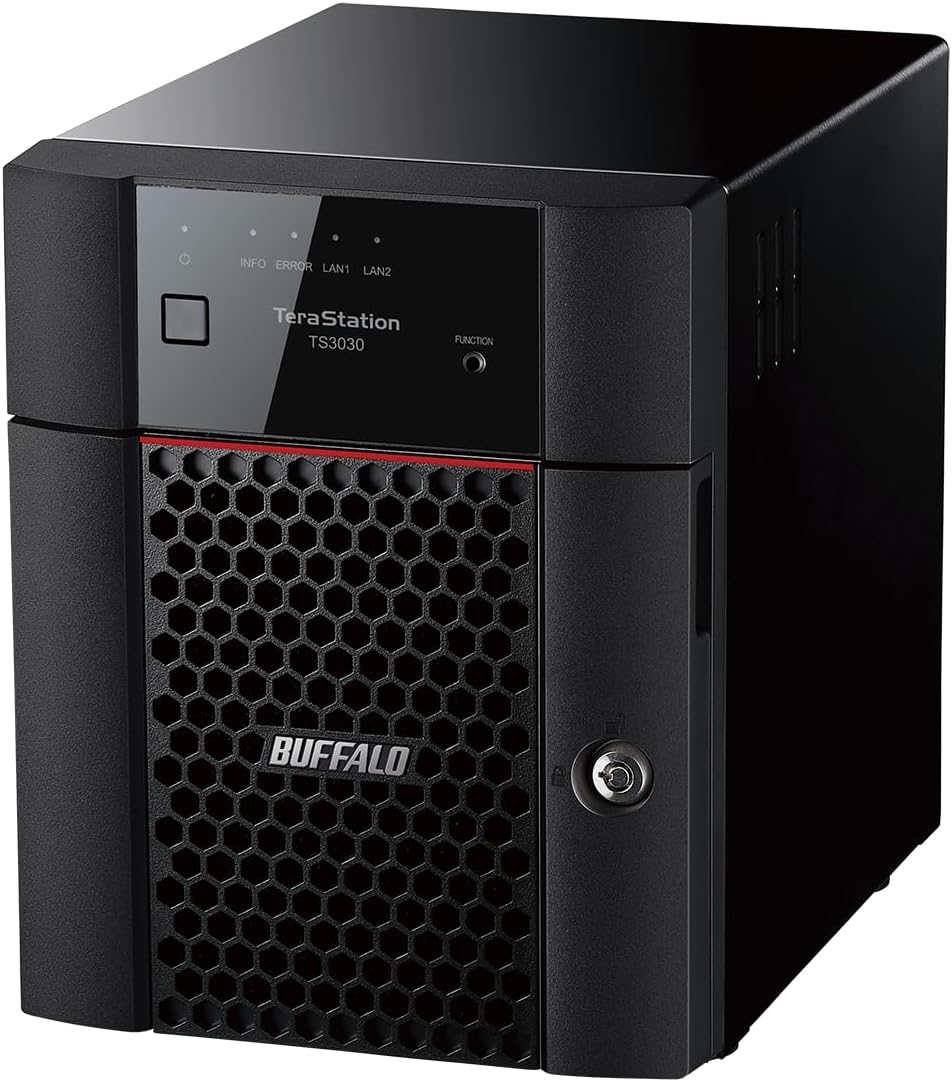
BUFFALO TeraStation Essentials 2025 4-Bay Value Desktop NAS 16TB (4x4TB) with Hard Drives Included
Want the best price and purchase timing?
Our AI advisor analyzes real-time pricing across all channels to find you the best deal.
AI Verdict
This 16TB (4x4TB) 4-bay NAS with a 2.5GbE port and 256-bit encryption is for small offices needing pre-configured, secure file storage and backup, but not advanced features or consistent network stabi
This NAS is a situational fit because it offers a compelling package of included drives, 2.5GbE, and strong security features like 256-bit encryption and 2FA for its target small office audience. However, widespread user complaints about a slow UI, network drops, and permission issues indicate it might not deliver the consistent, hassle-free experience expected from a 'professional grade' device.
If network stability and UI responsiveness are critical, look for models with a more powerful processor and a reputation for stable firmware updates.
Regret Score™
High RiskLower is better — measures purchase-regret risk from real buyer complaints, review credibility, and product maturity
Issues discovered after purchase
Critically weak dimension
Amazon rating vs actual quality
Chance this product isn't for you
Pros
- Includes four 4TB hard drives and arrives pre-configured in RAID 5 for 12TB usable capacity, simplifying initial setup.
- Features a native 2.5GbE port for faster file transfers than standard 1GbE connections.
- Offers robust data protection with 256-bit drive encryption, a closed system, and two-factor authentication (2FA).
- Integrates with cloud services like Amazon S3, Dropbox, Azure, and OneDrive for hybrid cloud setups.
- Backed by a 3-year warranty that includes hard drive coverage and 24/7 US-based support.
Cons
- The user interface is reportedly slow and glitchy, causing delays in accessing files and managing settings.
- Users have experienced the device dropping off the network regularly, hindering file access and reliability.
- Constantly changes permissions, especially when using NFS, leading to management frustration.
- Setup process for adding users and configuring settings can be confusing and difficult.
- Lacks iSCSI support, limiting its utility for certain professional virtualization or database applications.
Dimension Scores
The native 2.5GbE port provides speeds above standard 1GbE, but user reports of slowness with VMware and a glitchy UI suggest real-world performance might not always meet expectations.
While built in Japan with 5-step drive testing and a 3-year warranty, user complaints about regular network drops, changing permissions, and general unresponsiveness significantly undermine its reliability claims.
The 16TB raw capacity (12TB usable in RAID 5) with included 4x4TB drives is a specific and appropriate offering for its target small office user base.
It's compatible with Desktop and Laptop systems and integrates with major cloud services, but specific issues with VMware and lack of iSCSI limit its broader compatibility for advanced use cases.
Best For
- Small offices with 10-30 concurrent users needing centralized file storage and backup.
- Businesses prioritizing out-of-the-box data security with 256-bit encryption and a closed system.
- Users who want pre-installed and pre-configured hard drives to avoid manual setup.
- Environments looking to create a hybrid cloud solution with existing services like Amazon S3 or Dropbox.
Not Recommended For
- Users requiring consistent network uptime and a highly responsive management interface.
- Environments heavily relying on VMware or NFS shares where performance is critical.
- IT professionals needing advanced customization options or iSCSI support.
Watch Out For
- The user interface is 'painfully slow and glitchy,' making basic tasks frustratingly delayed.
- The device 'constantly changes permissions,' particularly with NFS, which can disrupt access and data integrity.
- Many users have reported the device 'dropping off the network regularly,' leading to intermittent access issues.
- The setup process for adding users and configuring settings is described as a 'headache,' requiring significant effort.
- Performance is 'extremely slow when used with VMware' as an NFS share unless sync is manually turned off.
Full Specifications
| ASIN | B0F411DWLH |
| Brand | BUFFALO |
| Hard Drive | 16 TB Mechanical Hard Disk |
| Item Weight | 15.62 pounds |
| Manufacturer | BUFFALO |
| Hard Disk Size | 16 TB |
| Installation Type | Ethernet NAS Device |
| Item model number | TS3430D1604S |
| Compatible Devices | Desktop, Laptop |
| Package Dimensions | 14.4 x 14.4 x 12.6 inches |
| Hard Disk Interface | Serial ATA-600 |
| Hard Drive Interface | Serial ATA-600 |
| Hard Disk Description | Mechanical Hard Disk |
| Hard Disk Form Factor | 3.5 Inches |
| Connectivity Technology | Ethernet |
| Digital Storage Capacity | 16 TB |
| Hard Drive Rotational Speed | 5400 RPM |
What Buyers Say
This TeraStation is a bit of a mixed bag; it's pitched as 'professional grade' with 2.5GbE and included drives, which sounds great for a small office. However, a lot of people are getting frustrated with how slow the user interface is and how often it just drops off the network. The security features like 256-bit encryption are there, but if you can't reliably access your files, that's a problem. Plus, if you're trying to use it with VMware, prepare for a slow experience unless you mess with settings.
“Seriously, I bought this for my small business thinking 'easy, secure storage,' but the UI is so slow it makes me want to throw it out the window, and it keeps disconnecting from the network! What's the point of security if I can't even reliably get to my files?!”
Common Praise
- The included 4x4TB hard drives and pre-configured RAID 5 make setup straightforward.
- The 2.5GbE port offers a noticeable speed bump over older 1GbE NAS units.
- The 256-bit drive encryption and closed system provide a strong sense of data security.
- Cloud integration with services like Dropbox and Amazon S3 is handy for hybrid backups.
- The 3-year warranty, including hard drives, and 24/7 US-based support are reassuring.
Common Complaints
- The user interface is 'painfully slow and glitchy,' making management a chore.
- The device 'drops off the network regularly,' causing frustrating interruptions to file access.
- Permissions 'constantly change,' especially with NFS, which is a nightmare for shared access.
- Setting up new users and configuring settings is 'a bit of a headache'.
- It's 'extremely slow when used with VMware' as an NFS share unless sync is disabled.
Ownership Tips
- Expect to spend more time than you'd like troubleshooting network connectivity if you experience drops.
- The slow UI means even simple configuration changes or status checks will take longer than anticipated.
- Be prepared to constantly re-verify file permissions, especially in multi-user environments or with NFS shares.
- If you plan on using it for virtualization, be aware of the potential performance hit and look into disabling NFS sync.
- The 'hassle-free' setup might only apply to the initial RAID configuration; advanced settings can be a struggle.
Frequently Asked Questions
What is the usable storage capacity out of the box?
The NAS includes four 4TB hard drives and ships pre-configured in RAID 5, providing 12TB of usable capacity. You can reconfigure it to RAID 0 for the full 16TB or RAID 6 for more redundancy.
Does it come with hard drives included?
Yes, it comes with four 4TB mechanical hard drives pre-installed and pre-tested.
What kind of network connection does it have?
It features a native 2.5GbE port for faster network transfers, which is an upgrade from standard 1GbE.
Can I use it with cloud services?
Yes, it supports integration with popular cloud services like Amazon S3, Dropbox, Azure, and OneDrive to create a hybrid cloud environment.
Is the data on the NAS encrypted?
Yes, it offers 256-bit drive encryption to help secure your data.
Buying Guide
When you're looking at a NAS like this, you're essentially buying a mini-server for your files. You need to think about how much space you actually need, not just now, but in a few years. Also, how fast do you need to access those files? A 2.5GbE port is faster than the old standard, but it's not the fastest out there. And critically, how important is it that your data is always available and secure?
Capacity (16TB, 4x4TB)
This tells you the total raw storage. With 4x4TB drives, you'll get less usable space if you use RAID for data protection (like 12TB in RAID 5), which is smart for keeping your files safe if one drive fails. Think of it like a bookshelf: 16TB is the total shelf space, but you need to leave room for the books themselves (data) and maybe some dividers (RAID overhead).
RAID (Redundant Array of Independent Disks)
RAID isn't just a techy term; it's how your data is protected. RAID 5, for example, lets one drive fail without losing your data, like having a backup copy of each page spread across different books. RAID 0 gives you maximum speed and capacity but zero protection, like having only one copy of each page.
2.5GbE Port
This is your NAS's highway to your network. 2.5 Gigabit Ethernet means it can transfer data up to 2.5 times faster than a common 1 Gigabit connection. If you're moving big files or multiple people are accessing it, this speed boost is like upgrading from a two-lane road to a five-lane highway.
Alternatives
If this model's performance and stability issues are a concern, look for NAS units with more powerful processors, 10GbE ports for significantly faster transfers, and more advanced software features like iSCSI support for virtualization.
You Might Also Like

Seagate IronWolf Pro SATA III 3.5" Internal NAS Hard Drive, 2-Pack - 8TB
$300-$599A 2-pack of 8TB 7200 RPM CMR internal hard drives with 256MB cache, built for 24/7 multi-bay NAS environments.

QNAP TS-453E-8G-US 4 Bay High-Performance Desktop NAS with Intel Celeron Quad-core Processor, 8 GB DDR4 RAM and Dual 2.5GbE (2.5G/1G/100M) Network Connectivity (Diskless)
$600+A 4-bay diskless NAS with an Intel Celeron J6412, 8GB DDR4 RAM, dual 2.5GbE, and M.2 NVMe slots for businesses needing long-term support.

Seagate Exos 28TB Internal Hard Drive HDD - 3.5 in CMR SATA 6Gb/s, 7200 RPM, 512MB Cache, 2.5M MTBF - ST28000NM000C (Renewed)
$300-$599This 28TB, 7200 RPM, 3.5-inch CMR SATA 6Gb/s renewed hard drive is for serious data hoarders needing massive capacity at a lower price point.

1TB G-Drive ArmorATD Rugged, Durable Portable External HDD, Up to 130MB/s, USB-C (5Gbps), USB 3.2 Gen 1 – SDPHE1G-001T
$50-$99A 1TB mechanical hard drive with a 130MB/s read speed and USB-C (5Gbps) connectivity, built for users needing rugged, portable storage for school or creative projects.