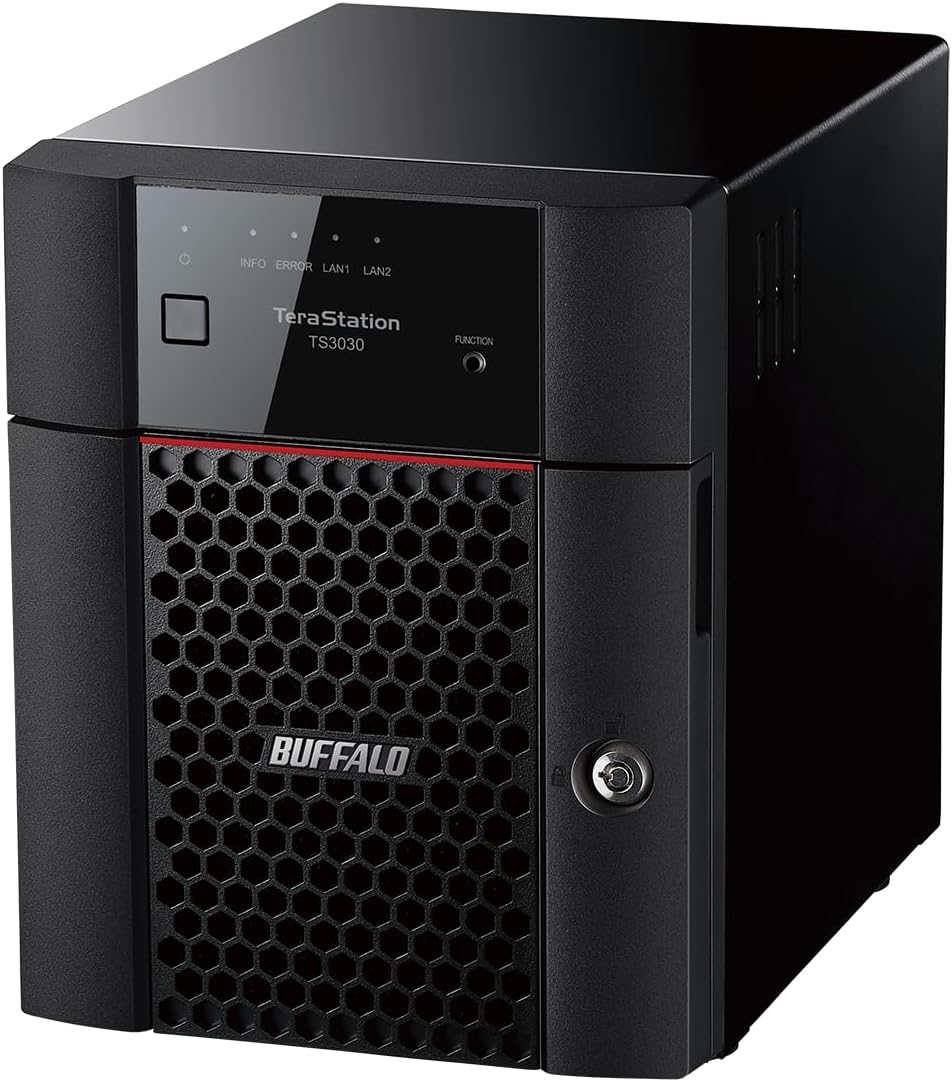
BUFFALO TeraStation 3430DN 4-Bay 16TB (2x8TB) Desktop Small-Med Business NAS w/Hard Drives Included
Want the best price and purchase timing?
Our AI advisor analyzes real-time pricing across all channels to find you the best deal.
AI Verdict
A 4-bay NAS with 16TB (2x8TB) Serial ATA-600 storage, pre-configured for 8TB usable capacity in RAID 1, designed for small businesses up to 40 users with 2.5GbE connectivity.
This NAS is a situational fit for small businesses needing a secure, pre-configured storage solution with 256-bit encryption and cloud sync. However, the reported confusing setup and clunky interface mean it's not for those expecting a seamless, easy-to-manage device.
If ease of use and a broad app ecosystem are critical, look for NAS systems with highly-rated, intuitive operating systems and extensive third-party application stores.
Regret Score™
Very High RiskLower is better — measures purchase-regret risk from real buyer complaints, review credibility, and product maturity
Issues discovered after purchase
Critically weak dimension
Amazon rating vs actual quality
Chance this product isn't for you
Pros
- Includes two pre-tested, NAS-grade 8TB hard drives, eliminating compatibility guesswork.
- Ships with RAID 1 pre-configured for immediate 8TB usable data protection out of the box.
- Features 256-bit drive encryption, two-factor authentication, and Abnormal Login and File Activity Detection for data security.
- Offers cloud synchronization with Dropbox, Microsoft OneDrive, and Amazon S3 for hybrid backup options.
- Provides two empty bays for future storage expansion beyond the initial 16TB (2x8TB) setup.
- Designed for 24/7 uptime, supporting continuous operation for business environments.
Cons
- The setup process can be confusing, requiring more effort than some users expect.
- Support for third-party applications is limited, restricting customization options.
- Can be noisy during heavy usage, which might be disruptive in quiet office settings.
- The user interface is reported as clunky and not intuitive, making management less straightforward.
- Comes with a 3-year warranty, which is shorter than some competing NAS solutions.
- Reported slower-than-expected data transfer speeds despite having 2.5GbE connectivity.
Dimension Scores
While it features 2.5GbE connectivity, users have reported slower-than-expected speeds during data transfers, placing it at an average performance for its class.
Designed for 24/7 uptime and includes pre-tested NAS-grade hard drives, but some general Buffalo reliability concerns have been noted by users of other TeraStation models.
The 16TB (2x8TB) capacity with 8TB usable in RAID 1, plus two empty bays for expansion, provides a flexible starting point for small to medium business needs.
Offers broad compatibility with cloud services like Dropbox, OneDrive, and Amazon S3, and supports standard network protocols for small business environments.
Best For
- Small offices up to 40 users needing secure, pre-configured network storage.
- Businesses prioritizing robust data security with 256-bit encryption and two-factor authentication.
- Users who need hybrid cloud backup solutions with Dropbox, OneDrive, or Amazon S3.
- Environments requiring 24/7 data availability and pre-tested hardware.
Not Recommended For
- Users expecting extensive third-party application support or deep customization.
- Noise-sensitive environments where consistent fan noise would be an issue.
- Individuals seeking a plug-and-play setup experience without any configuration challenges.
Watch Out For
- The setup process can be a headache, with users reporting confusing configurations.
- Limited support for third-party applications means you're somewhat closed off from expanding capabilities with additional apps.
- The device can be quite noisy, especially during heavy usage, which might be distracting in an office.
- The user interface is often described as clunky and not intuitive, making navigation and management frustrating.
- Performance can be underwhelming, with some users reporting slower than expected speeds during data transfers despite 2.5GbE.
Full Specifications
| ASIN | B0D98WB419 |
| Brand | BUFFALO |
| Series | TeraStation 3430DN |
| Hard Drive | 16 TB Mechanical Hard Disk |
| Item Weight | 14.45 pounds |
| Manufacturer | BUFFALO |
| Hardware Platform | Buffalo |
| Item model number | TS3430DN1602 |
| Product Dimensions | 14 x 12 x 15 inches |
| Hard Drive Interface | Serial ATA-600 |
| Item Dimensions LxWxH | 14 x 12 x 15 inches |
| Hard Drive Rotational Speed | 5400 RPM |
What Buyers Say
The biggest surprise is how much users struggle with the setup and the clunky interface, despite the promise of a business-class solution. Many expected a smoother experience, but instead found themselves navigating confusing configurations and a less-than-intuitive management system. The limited support for third-party applications also comes up as a recurring point of frustration, making it less flexible than some alternatives. Even with 2.5GbE, some users felt the performance wasn't living up to expectations, which is a bummer when you're moving large files.
“Man, I thought 'business-class' meant easy, but setting this thing up was a nightmare, and the interface feels like it's from 2005. My data's safe, I guess, but getting to it is a chore.”
Common Praise
- Comes with pre-tested NAS-grade drives already installed, saving time and hassle.
- Includes robust security features like 256-bit drive encryption and two-factor authentication.
- Offers integration with major cloud services like Dropbox and OneDrive for backup.
- Provides two empty drive bays for future storage expansion.
Common Complaints
- The initial setup process is reported as confusing and difficult to navigate.
- The user interface is clunky and lacks intuitiveness, making daily management frustrating.
- Limited support for third-party applications restricts the device's functionality and customization.
- Can generate noticeable noise during periods of heavy operation.
- Performance, despite 2.5GbE, has been described as underwhelming by some users.
Ownership Tips
- The fan noise becomes quite noticeable when the drives are actively working or under load.
- Navigating the administrative interface takes a significant learning curve due to its dated design.
- Actual file transfer speeds, even over a 2.5GbE network, don't always match the theoretical maximums.
- The lack of a modern app ecosystem means you're stuck with Buffalo's built-in features, which can feel restrictive.
- Regularly checking for firmware updates is crucial, as some users report stability issues with older versions.
Frequently Asked Questions
What is the usable storage capacity out of the box?
The NAS ships with two 8TB drives configured in RAID 1, providing 8 TB of usable storage capacity initially.
Can I expand the storage capacity?
Yes, the unit has two empty bays, allowing for future expansion beyond the included 16TB (2x8TB) drives.
What RAID levels are supported?
It ships in RAID 1, but you can reconfigure it to RAID 0 for the full 16 TB capacity.
What security features are included?
It offers 256-bit drive encryption, two-factor authentication (2FA), and Abnormal Login and File Activity Detection for robust data protection.
Does it integrate with cloud services?
Yes, it supports cloud synchronization with popular services like Dropbox, Microsoft OneDrive, and Amazon S3.
Buying Guide
When you're looking at a NAS like this, you're essentially buying a mini-server for your data. You need to think about how much storage you actually need right now, and how much you might need in a few years. Don't just look at the total capacity; consider the usable capacity after RAID, which protects your data if a drive fails. Also, think about who will be using it and how tech-savvy they are, because setup and daily management can vary wildly between brands.
Capacity (16TB, 2x8TB)
This tells you the total raw storage. But with two 8TB drives, if you use RAID 1 for data protection (which is how it ships), you only get 8TB of usable space. It's like having two copies of the same book; you only get to read one story, but if one book gets damaged, you have a backup.
4-Bay
This means it has four slots for hard drives. Since it comes with two 8TB drives, you have two empty slots. This is important for future expansion; you can add more drives later to increase capacity or change RAID configurations.
Serial ATA-600 Interface
This is the connection standard for the hard drives inside. SATA-600 (or SATA III) is a common, fast interface for mechanical hard drives, ensuring the drives can communicate quickly with the NAS's internal system.
2.5GbE (2.5 Gigabit Ethernet)
This is how fast the NAS can talk to your network. Standard gigabit Ethernet is 1GbE. 2.5GbE is 2.5 times faster, which is a big deal for moving large files around, but your network switch and other devices also need to support 2.5GbE to get the full benefit. It's like having a wider highway for your data.
Alternatives
If this doesn't fit, look for NAS systems with a more modern, intuitive user interface and a wider selection of third-party applications, or consider models with a longer standard warranty period.
You Might Also Like

Seagate IronWolf Pro SATA III 3.5" Internal NAS Hard Drive, 2-Pack - 8TB
$300-$599A 2-pack of 8TB 7200 RPM CMR internal hard drives with 256MB cache, built for 24/7 multi-bay NAS environments.

QNAP TS-453E-8G-US 4 Bay High-Performance Desktop NAS with Intel Celeron Quad-core Processor, 8 GB DDR4 RAM and Dual 2.5GbE (2.5G/1G/100M) Network Connectivity (Diskless)
$600+A 4-bay diskless NAS with an Intel Celeron J6412, 8GB DDR4 RAM, dual 2.5GbE, and M.2 NVMe slots for businesses needing long-term support.

Seagate Exos 28TB Internal Hard Drive HDD - 3.5 in CMR SATA 6Gb/s, 7200 RPM, 512MB Cache, 2.5M MTBF - ST28000NM000C (Renewed)
$300-$599This 28TB, 7200 RPM, 3.5-inch CMR SATA 6Gb/s renewed hard drive is for serious data hoarders needing massive capacity at a lower price point.

1TB G-Drive ArmorATD Rugged, Durable Portable External HDD, Up to 130MB/s, USB-C (5Gbps), USB 3.2 Gen 1 – SDPHE1G-001T
$50-$99A 1TB mechanical hard drive with a 130MB/s read speed and USB-C (5Gbps) connectivity, built for users needing rugged, portable storage for school or creative projects.