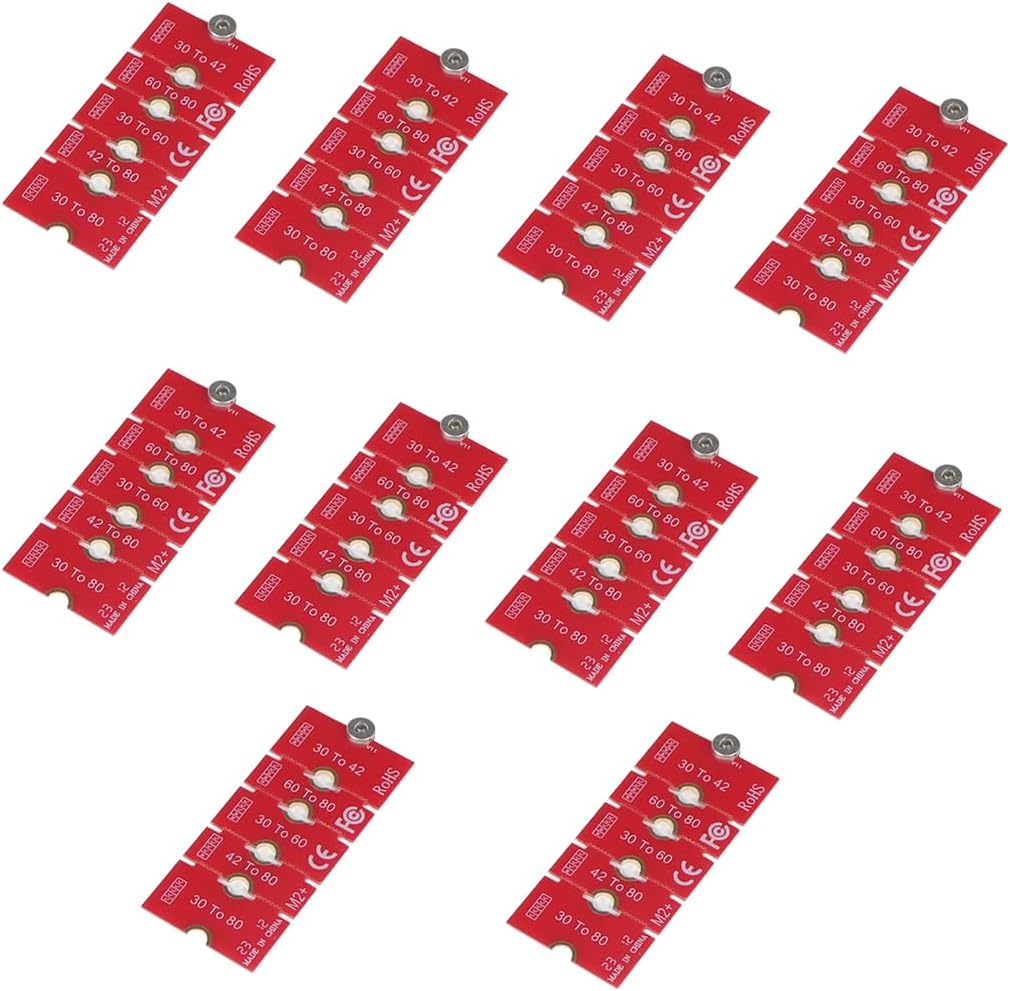
JMT NGFF NVME M2 M2PLUS 2230 to 2280 Adapter Card 2230, 2242, 2260, 2280 Extended Transfer Long Size Change for M.2 U.2 M3 M.3 SSD (10Pcs)
Want the best price and purchase timing?
Our AI advisor analyzes real-time pricing across all channels to find you the best deal.
AI Verdict
This JMT M.2 adapter converts 2230, 2242, or 2260 NVME SSDs to a 2280 form factor, allowing fitment in compatible laptops like the ROG Ally or ThinkPad X270.
This adapter is a situational fit for users who specifically need to adapt a shorter NVME M.2 SSD (2230, 2242, 2260) to a 2280 slot in a compatible laptop, as it offers adjustable lengths and a metal construction. Its utility is tied directly to this specific conversion need and the user's willingness to perform minor physical adjustments.
If you need a simpler solution, look for SSDs that natively match your M.2 slot's required length (e.g., a 2280 SSD for a 2280 slot) to avoid adapters and potential installation complexities.
Regret Score™
High RiskLower is better — measures purchase-regret risk from real buyer complaints, review credibility, and product maturity
Issues discovered after purchase
Critically weak dimension
Amazon rating vs actual quality
Chance this product isn't for you
Pros
- Supports multiple M.2 SSD lengths (2230, 2242, 2260) for conversion to 2280, increasing compatibility options for shorter SSDs.
- Features a lead-free SMT fixing screw column for straightforward installation and removal.
- Constructed from metal material, contributing to its durability.
- Offers five adjustable lengths, allowing for precise fitment after cutting.
- Compatible with specific laptop models such as ROG Ally, Legion Go, and various ThinkPad X/T/L series.
Cons
- Does not support 2242 to 2260 length conversion, limiting some specific upgrade paths.
- Requires physical modification (cutting) to adjust lengths, which is irreversible.
- Installation may require additional insulation like electrical tape if the SSD's underside contacts other components.
- Physical modifications to the laptop's internal plastic stands might be necessary for a flush fit in some cases.
Dimension Scores
As a passive adapter, it does not inherently affect the read/write speed of the NVME SSD, which is determined by the SSD and the M.2 slot's interface.
Made of metal with stable fixing columns, the adapter itself is physically robust, but overall reliability depends on correct installation and avoiding shorts.
The adapter's primary function is to enable fitting a wider range of M.2 SSD capacities by extending shorter drives to the 2280 standard.
It offers broad compatibility for converting 2230, 2242, and 2260 NVME SSDs to 2280, and lists specific laptop models, though it has one stated limitation (2242 to 2260).
Best For
- Laptop owners with 2230, 2242, or 2260 NVME SSDs needing to fit them into a 2280 slot.
- Users upgrading storage in specific compatible devices like the ROG Ally or ThinkPad X270.
- DIY enthusiasts comfortable with minor physical modifications to achieve specific component fitment.
Not Recommended For
- Users seeking a plug-and-play solution without any potential for physical modification or careful installation.
- Individuals needing to convert a 2242 SSD to a 2260 length, as this specific conversion is not supported.
- Those unfamiliar with working inside laptops or handling delicate internal components.
Watch Out For
- Some users report needing to use electrical tape to insulate the SSD from underlying battery connectors after adapter installation.
- Physical modification of internal laptop plastic stands might be required to ensure the SSD sits flush with the adapter.
- Incorrect installation or compatibility issues with the M.2 slot can lead to the system failing to boot.
- The adapter itself needs to be cut to the desired length, which is a permanent alteration.
Full Specifications
| ASIN | B0CVVJFKMH |
| Brand | JMT |
| Item Weight | 1.13 ounces |
| Manufacturer | JMT |
| Connector Type | NVMe |
| Item model number | F35066 |
| Compatible Devices | Laptop |
| Package Dimensions | 3.27 x 2.52 x 1.26 inches |
| Item Package Quantity | 1 |
What Buyers Say
This JMT M.2 adapter is a practical solution for fitting shorter NVME SSDs into 2280 slots, particularly in laptops like the ROG Ally or ThinkPads. Users appreciate its metal construction and the ability to adjust its length by cutting. However, some installations might require careful attention to detail, like insulating components with electrical tape or modifying internal laptop structures for a flush fit. The main purpose is to enable upgrades that wouldn't otherwise be possible due to physical size constraints.
“Man, this thing saved my butt, finally got that cheap 2230 SSD to fit my laptop's 2280 slot, just had to snip it a bit and add some tape, but totally worth it!”
Common Praise
- Allows for the use of readily available 2280 M.2 slots with shorter, often cheaper, 2230/2242/2260 NVME SSDs.
- The metal construction feels sturdy and durable.
- The lead-free SMT fixing screw column simplifies the mounting process.
- The ability to cut the adapter to five different lengths provides flexibility for various setups.
- Specifically noted compatibility with popular devices like the ROG Ally and Legion Go.
Common Complaints
- The need for users to physically cut the adapter to size, which is a permanent modification.
- Potential for the SSD to contact other internal components, requiring user-supplied insulation like electrical tape.
- Some laptop designs may necessitate modifying internal plastic supports for the SSD to sit correctly.
- The adapter does not facilitate 2242 to 2260 conversions, which can be a specific limitation for some users.
Ownership Tips
- You might need to apply electrical tape to the underside of the SSD or adapter to prevent shorting if it sits over battery connectors.
- Be prepared to potentially trim or modify existing plastic standoffs in your laptop's chassis for the SSD to sit perfectly flush.
- Double-check your laptop's M.2 slot specifications to ensure it supports NVME, as some older slots might be SATA-only, which could lead to boot issues.
- The cutting process requires a steady hand and appropriate tools to ensure a clean, accurate cut for proper fitment.
Frequently Asked Questions
What SSD lengths can this adapter convert?
This adapter can convert 2230, 2242, and 2260 length M.2 NVME SSDs to fit into a 2280 slot.
Is this adapter compatible with SATA M.2 SSDs?
No, the product specifications state it is for NVME interface SSDs only.
Do I need to cut the adapter?
Yes, the adapter is designed to be cut to one of five adjustable lengths to match your specific needs.
Will this adapter work with my specific laptop model?
It is compatible with specific models like ROG Ally, Legion Go, and ThinkPad X270, X280, t470, t480, L480, T580 serials, but checking your laptop's M.2 slot specifications is always recommended.
What material is the adapter made from?
The adapter is made from a high-quality metal material.
Buying Guide
When you're looking at M.2 SSDs, the numbers like 2230 or 2280 refer to their physical dimensions: 22mm wide by 30mm or 80mm long. Your laptop or motherboard will have a specific slot size. If you have a shorter SSD but a longer slot, an adapter like this lets you bridge that gap. It's about physical fit, not performance, so don't expect speed boosts.
Compatible SSD Lengths (e.g., 2230, 2242, 2260)
This tells you which shorter SSDs can be extended. If you have a 2230 SSD, you need an adapter that supports that specific length to make it fit a longer slot. It's like having a small picture and needing a larger frame with a mat to make it fit.
Target SSD Length (e.g., 2280)
This is the size of the M.2 slot you're trying to fill. Most modern laptops and motherboards use 2280 slots, so an adapter that extends to this length is common. Think of it as the final size of the picture frame you're aiming for.
Interface (NVME)
M.2 slots can be either NVME (faster) or SATA (slower). This adapter is specifically for NVME SSDs. Using an NVME SSD in a SATA-only slot, or vice-versa, won't work, just like trying to plug a USB-C cable into a USB-A port.
Alternatives
If this adapter doesn't fit your needs, search for an M.2 SSD that natively matches your slot's length and interface (e.g., a 2280 NVME SSD for a 2280 NVME slot) to avoid any adapter-related installation steps.
You Might Also Like

Seagate IronWolf Pro SATA III 3.5" Internal NAS Hard Drive, 2-Pack - 8TB
$300-$599A 2-pack of 8TB 7200 RPM CMR internal hard drives with 256MB cache, built for 24/7 multi-bay NAS environments.

QNAP TS-453E-8G-US 4 Bay High-Performance Desktop NAS with Intel Celeron Quad-core Processor, 8 GB DDR4 RAM and Dual 2.5GbE (2.5G/1G/100M) Network Connectivity (Diskless)
$600+A 4-bay diskless NAS with an Intel Celeron J6412, 8GB DDR4 RAM, dual 2.5GbE, and M.2 NVMe slots for businesses needing long-term support.

Seagate Exos 28TB Internal Hard Drive HDD - 3.5 in CMR SATA 6Gb/s, 7200 RPM, 512MB Cache, 2.5M MTBF - ST28000NM000C (Renewed)
$300-$599This 28TB, 7200 RPM, 3.5-inch CMR SATA 6Gb/s renewed hard drive is for serious data hoarders needing massive capacity at a lower price point.

1TB G-Drive ArmorATD Rugged, Durable Portable External HDD, Up to 130MB/s, USB-C (5Gbps), USB 3.2 Gen 1 – SDPHE1G-001T
$50-$99A 1TB mechanical hard drive with a 130MB/s read speed and USB-C (5Gbps) connectivity, built for users needing rugged, portable storage for school or creative projects.