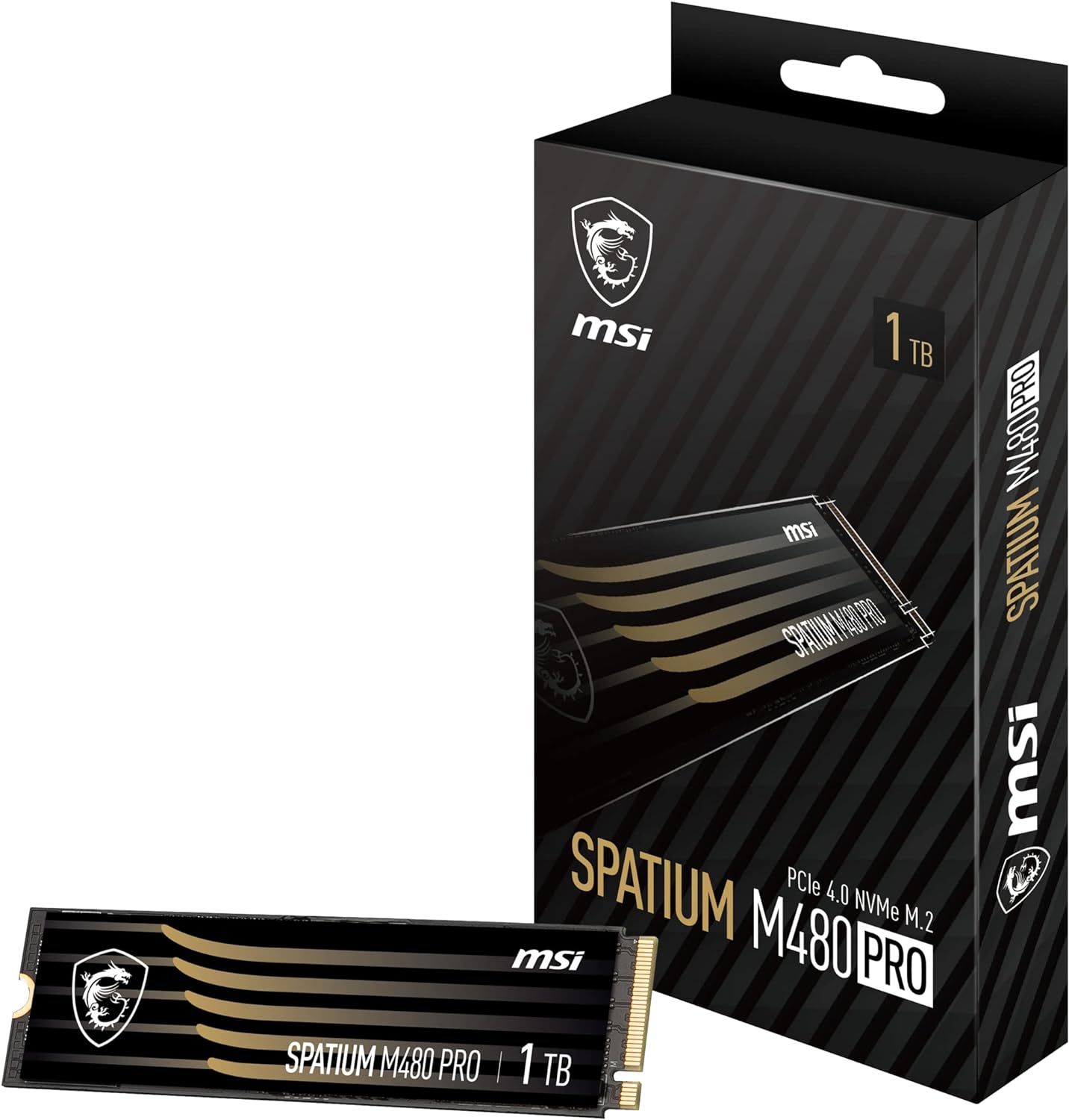
msi Gaming SPATIUM M480 PRO PCIe 4.0 NVMe M.2 1TB Internal SSD (PCIe Gen4, NVMe 1.4, M.2 2280, Read 7400 MB/S, Write 6000 MB/S, 1TB)
Want the best price and purchase timing?
Our AI advisor analyzes real-time pricing across all channels to find you the best deal.
AI Verdict
This 1TB PCIe 4.0 NVMe M.2 SSD delivers 7400 MB/s sequential reads and 6000 MB/s sequential writes, making it a fast option for desktop and notebook users with compatible slots.
This SSD is a strong contender for its 7400 MB/s read speeds, which are excellent for loading applications and games quickly. However, the 1TB model's 6000 MB/s write speed is not the fastest in its series, and the reported significant drop in sustained write performance after the SLC cache fills means it's not ideal for continuous, massive data transfers. It fits best where read performance is prioritized over sustained writes.
If you need consistent, high sustained write performance for very large files, consider the 2TB or 4TB versions of this drive, which offer 7000 MB/s write speeds, or look for drives with larger, more resilient SLC caches.
Regret Score™
Medium RiskLower is better — measures purchase-regret risk from real buyer complaints, review credibility, and product maturity
Issues discovered after purchase
Critically weak dimension
Amazon rating vs actual quality
Chance this product isn't for you
Pros
- Sequential read speeds reach 7400 MB/s, allowing for rapid data access.
- The drive features a Phison PS5018-E18-41 controller and 1024 MB of DRAM cache for consistent performance.
- It offers a 5-year warranty, providing extended coverage.
- The 1TB model has an endurance rating of 700 TBW, indicating a long lifespan for typical use.
- Built-in data security and error-correction capabilities help protect your information.
Cons
- The 1TB model's sequential write speed is 6000 MB/s, which is lower than the 7000 MB/s advertised for higher capacity versions.
- Write speeds can drop significantly to around 1.6 GB/s after the SLC cache is exhausted, especially with large file transfers.
- The drive does not include an integrated heatsink, requiring motherboard cooling or an aftermarket solution for optimal thermal management.
- The dual-sided design might cause compatibility issues or require extra clearance in some compact notebook or desktop setups.
Dimension Scores
The 7400 MB/s sequential read speed is near the top of PCIe Gen4 performance, though the 1TB model's 6000 MB/s write speed is not the absolute fastest in its class.
With a 700 TBW endurance rating for the 1TB model and a 5-year warranty, it offers good longevity, but some users report speed degradation issues with the Phison E18 controller.
1TB is a widely used capacity, offering enough space for an operating system, several large games, and applications for most users.
The M.2 2280 form factor, NVMe 1.4, and PCIe Gen4x4 interface ensure broad compatibility with modern desktops and many notebooks, plus backward compatibility with PCIe 3.0.
Best For
- Gamers looking for fast game load times on a PCIe 4.0 system.
- Content creators working with large files that benefit from high read speeds.
- Users upgrading a desktop or notebook with a PCIe 4.0 M.2 slot.
- Anyone needing a high-capacity, high-speed boot drive for demanding applications.
Not Recommended For
- Users with only PCIe 3.0 slots, as the drive's full speed capabilities will be limited.
- Professionals who frequently transfer massive files (hundreds of GBs) and require consistent, sustained write performance without speed drops.
- Laptops with extremely tight M.2 slot clearances that cannot accommodate a dual-sided drive or an added heatsink.
Watch Out For
- Write speeds can plummet to approximately 1.6 GB/s after transferring about 225GB of data, due to SLC cache exhaustion.
- The SLC cache does not recover quickly, with one user reporting no recovery even after 30 minutes of idle time.
- The absence of an included heatsink means you'll need to rely on your motherboard's cooling solution or purchase a separate one to prevent thermal throttling.
Full Specifications
| ASIN | B0CDW66CG7 |
| Brand | msi |
| Color | Black |
| Series | SPATIUM M480 PRO |
| Hard Drive | 1 TB Solid State Drive |
| Item Weight | 0.035 ounces |
| Manufacturer | MSI |
| Special Feature | Portable |
| Flash Memory Size | 1 TB |
| Installation Type | Internal Hard Drive |
| Item model number | S78-440L1G0-P83 |
| Compatible Devices | Desktop |
| Product Dimensions | 3.15 x 0.87 x 0.08 inches |
| Hard Disk Interface | NVMe |
| Hard Drive Interface | NVMe |
| Hard Disk Description | Solid State Drive |
| Hard Disk Form Factor | 2280 Inches |
| Item Dimensions LxWxH | 3.15 x 0.87 x 0.08 inches |
| Connectivity Technology | PCIe 4.0 |
| Digital Storage Capacity | 1000 GB |
What Buyers Say
Users frequently highlight the drive's blazing fast read speeds, noting how quickly games and applications launch. Many appreciate the straightforward installation process in compatible systems. However, a recurring point of concern is the significant drop in write performance once the SLC cache is full, with some users observing speeds as low as 1.6 GB/s during large file transfers. The lack of an included heatsink is also a common observation, meaning you'll need to ensure adequate cooling. Despite these points, the drive generally performs well for everyday tasks and gaming.
“Man, this thing loads my games so fast it's almost unfair, but trying to copy my whole Steam library at once? Yeah, it chokes a bit after a while, gotta let it breathe. Still, for gaming, it's a beast!”
Common Praise
- Games and applications load extremely fast, reducing wait times significantly.
- Installation is quick and easy in motherboards with M.2 2280 slots.
- The 7400 MB/s sequential read speed is consistently achieved in benchmarks.
- It runs cool when paired with a motherboard heatsink, even under heavy load.
- The 5-year warranty provides peace of mind for long-term use.
Common Complaints
- Write speeds drop dramatically to around 1.6 GB/s after transferring large amounts of data, like 225GB.
- The SLC cache doesn't seem to recover quickly, even after the drive is idle for extended periods.
- No heatsink is included, which means you have to rely on your motherboard's solution or buy one separately.
- The 1TB model's write speed is 6000 MB/s, not the 7000 MB/s advertised for larger capacities.
Ownership Tips
- You'll definitely want to use your motherboard's M.2 heatsink or get an aftermarket one; it can get warm without it during sustained activity.
- For everyday use and gaming, you probably won't even notice the write speed drop unless you're moving huge files constantly.
- Make sure your motherboard actually supports PCIe Gen4 to get the advertised speeds, otherwise you're leaving performance on the table.
- The drive's performance is heavily influenced by how much data you're writing in a single session; short bursts are fine, long ones will slow down.
Frequently Asked Questions
What are the actual write speeds for the 1TB model?
The 1TB MSI Spatium M480 PRO offers sequential write speeds up to 6000 MB/s, not the 7000 MB/s found on the larger 2TB and 4TB capacities.
Does this SSD come with a heatsink?
No, this specific 1TB model typically does not include an integrated heatsink. You will need to use your motherboard's M.2 heatsink or purchase an aftermarket one for optimal thermal performance.
Is this drive compatible with PCIe 3.0 slots?
Yes, the MSI Spatium M480 PRO is backward compatible with PCIe 3.0 slots. However, its performance will be limited to the maximum speeds supported by the PCIe 3.0 interface, which is around 3500 MB/s for both read and write.
What is the endurance (TBW) rating for the 1TB model?
The 1TB model of the MSI Spatium M480 PRO has an endurance rating of 700 TBW (Terabytes Written), which is a solid figure for its capacity.
Can I use this SSD in a laptop?
Yes, it is suitable for both desktop and notebook use, provided your laptop has a compatible M.2 2280 slot that supports PCIe Gen4.
Buying Guide
When you're looking at an NVMe SSD like this, you're basically buying speed for your computer. It's not just about how much space you get, but how fast you can access that space. If you're tired of waiting for games to load or applications to open, a fast NVMe drive can make a huge difference. You need to make sure your computer has a compatible M.2 slot that supports PCIe Gen4 to get the full performance out of it.
PCIe Gen4x4 interface
This is like the highway your data travels on. PCIe Gen4 is a super-fast, multi-lane highway, allowing for much higher speeds than older Gen3 drives. The 'x4' means it uses four lanes, maximizing that bandwidth.
NVMe 1.4 standard
NVMe is the language your SSD speaks to your computer. It's designed specifically for SSDs, making them much faster and more efficient than older SATA SSDs. Version 1.4 is the latest iteration, bringing further optimizations.
Sequential Read/Write Speeds
These numbers (like 7400 MB/s read, 6000 MB/s write) tell you how fast the drive can move large, continuous blocks of data. Think of it as how quickly you can copy a huge movie file or load a massive game world. Higher numbers mean less waiting.
TBW (Terabytes Written)
This is an endurance rating, telling you how much data can be written to the drive over its lifetime before it might start having issues. A higher TBW means the drive is expected to last longer under heavy write workloads, like installing many games or editing large video files.
Alternatives
If this drive doesn't quite fit, look for other PCIe Gen4 NVMe M.2 SSDs with higher sustained write speeds for their 1TB capacities, or consider models that include an integrated heatsink if your motherboard lacks one.
You Might Also Like

Seagate IronWolf Pro SATA III 3.5" Internal NAS Hard Drive, 2-Pack - 8TB
$300-$599A 2-pack of 8TB 7200 RPM CMR internal hard drives with 256MB cache, built for 24/7 multi-bay NAS environments.

QNAP TS-453E-8G-US 4 Bay High-Performance Desktop NAS with Intel Celeron Quad-core Processor, 8 GB DDR4 RAM and Dual 2.5GbE (2.5G/1G/100M) Network Connectivity (Diskless)
$600+A 4-bay diskless NAS with an Intel Celeron J6412, 8GB DDR4 RAM, dual 2.5GbE, and M.2 NVMe slots for businesses needing long-term support.

Seagate Exos 28TB Internal Hard Drive HDD - 3.5 in CMR SATA 6Gb/s, 7200 RPM, 512MB Cache, 2.5M MTBF - ST28000NM000C (Renewed)
$300-$599This 28TB, 7200 RPM, 3.5-inch CMR SATA 6Gb/s renewed hard drive is for serious data hoarders needing massive capacity at a lower price point.

1TB G-Drive ArmorATD Rugged, Durable Portable External HDD, Up to 130MB/s, USB-C (5Gbps), USB 3.2 Gen 1 – SDPHE1G-001T
$50-$99A 1TB mechanical hard drive with a 130MB/s read speed and USB-C (5Gbps) connectivity, built for users needing rugged, portable storage for school or creative projects.