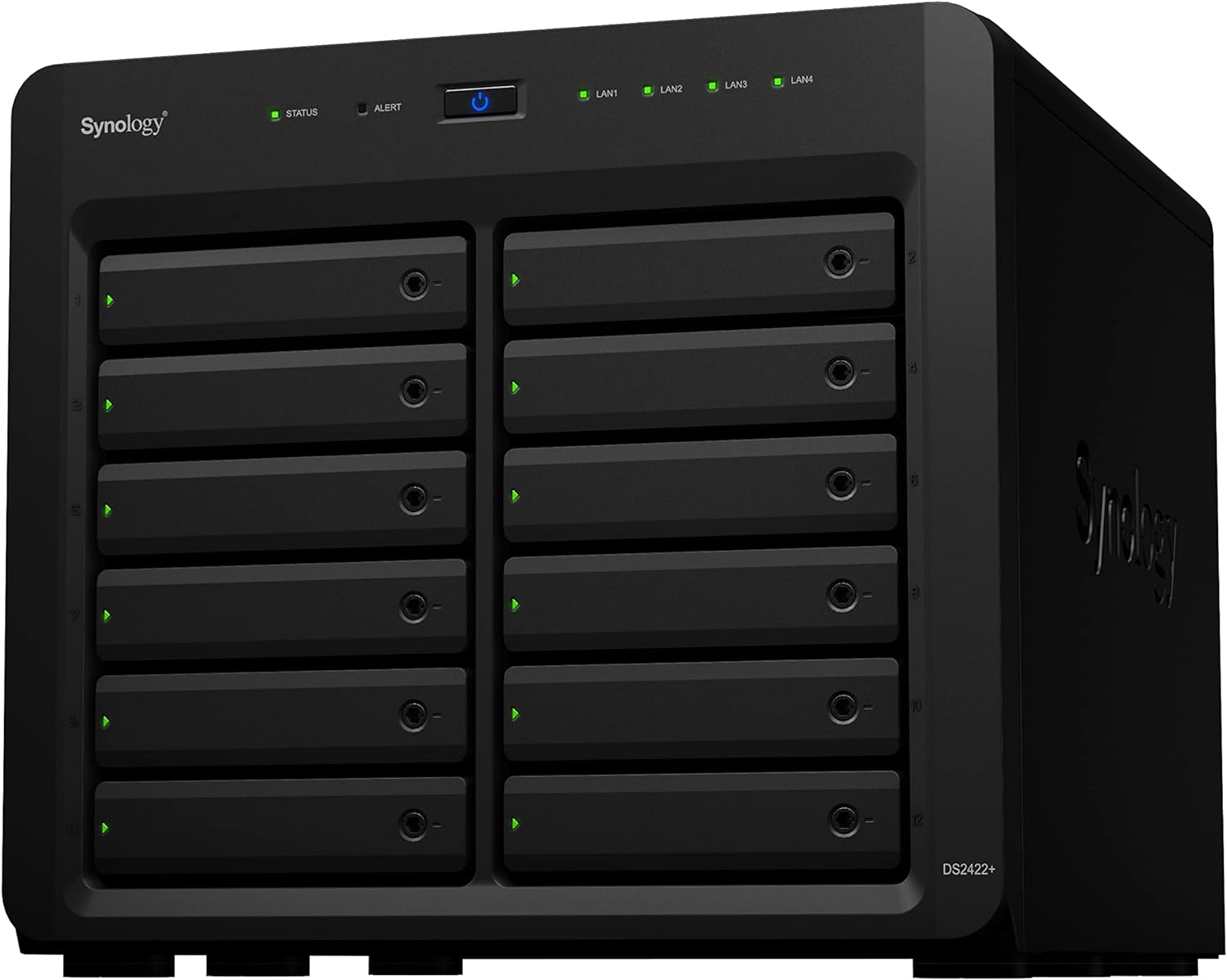
Synology DiskStation 12 Bay DS2422+ Quad Core CPU with 4GB Memory (Diskless), Black
Want the best price and purchase timing?
Our AI advisor analyzes real-time pricing across all channels to find you the best deal.
AI Verdict
This 12-bay diskless NAS with an AMD Ryzen V1500B quad-core 2.2 GHz CPU and 4GB ECC RAM is for businesses needing scalable, high-performance storage, especially with 25GbE and NVMe cache upgrades.
This DiskStation is a strong fit for businesses needing serious storage capacity and performance. Its 12 bays, expandable to 24, and support for up to 32GB ECC memory make it suitable for large data sets and multi-user environments. The PCIe slot allows for critical 10/25GbE and NVMe cache upgrades to hit its advertised 2,201 MB/s read speeds.
If you need even higher I/O or more dedicated NVMe slots without sacrificing network speed, look for models with multiple PCIe slots or integrated M.2 slots.
Regret Score™
Medium RiskLower is better — measures purchase-regret risk from real buyer complaints, review credibility, and product maturity
Issues discovered after purchase
Critically weak dimension
Amazon rating vs actual quality
Chance this product isn't for you
Pros
- Scales to 24 drive bays with a DX1222 expansion unit, offering massive storage potential.
- Achieves up to 2,201 MB/s read and 1,383 MB/s sequential write performance with 25GbE and NVMe SSD cache upgrades.
- Comes with 4GB DDR4 ECC SODIMM RAM, expandable up to 32GB for demanding applications.
- Features a PCIe Gen3 x8 slot (x4 link) for 10/25GbE networking or NVMe SSD cache cards.
- Powered by an AMD Ryzen V1500B 4-core 2.2 GHz CPU, providing a performance boost over older Atom processors.
- Includes a 3-year hardware warranty.
Cons
- Lacks built-in M.2 NVMe SSD slots, requiring a PCIe expansion card to add NVMe cache.
- Does not include built-in 10GbE networking, necessitating a PCIe card for faster than 1GbE speeds.
- Synology strongly recommends and may restrict support for non-Synology branded hard drives, which can be significantly more expensive.
- The single PCIe slot means you have to choose between adding dual 10GbE, or a combination card for 10GbE and NVMe, limiting simultaneous high-end upgrades.
Dimension Scores
Achieves up to 2,201 MB/s read and 1,383 MB/s sequential write performance with 25GbE and NVMe SSD cache, which is top-tier for a desktop NAS.
Features ECC SODIMM RAM and a 3-year warranty, indicating a focus on data integrity and hardware longevity.
With 12 bays expandable to 24 bays via a DX1222 unit, it offers best-in-class raw storage capacity for a desktop form factor.
Synology's restrictive drive compatibility policy and lack of built-in M.2 slots or 10GbE significantly limit hardware flexibility without additional purchases.
Best For
- Small to medium businesses managing large data sets in multi-user environments.
- Video production studios needing high-quality video storage and VM storage.
- Organizations requiring scalable backup solutions and robust file sharing.
- Users with existing 1GbE infrastructure planning future 10/25GbE upgrades.
Not Recommended For
- Home users or small offices with minimal storage needs (under 8 bays).
- Budget-conscious buyers unwilling to invest in Synology-branded drives or expansion cards.
- Users expecting out-of-the-box 10GbE or M.2 NVMe SSD slots without additional purchases.
Watch Out For
- Synology's policy on drive compatibility means using non-Synology drives will show as 'unverified' and may void technical support.
- Adding NVMe SSD cache requires using the single PCIe slot with an adapter card like the E10M20-T1, which also provides 10GbE, preventing a separate 25GbE card.
- The diskless unit's $1800-$2100 price tag can significantly increase with the cost of 12 drives and necessary expansion cards.
- The base 4GB RAM might be insufficient for heavy VM or multi-user loads, requiring an upgrade to the 32GB maximum.
Full Specifications
| RAM | 4 GB |
| ASIN | B09JNRPK2Z |
| Size | 12-bay; 4GB DDR4 |
| Brand | Synology |
| Color | Black |
| Series | DS2422+ |
| Material | Metal |
| Hard Drive | 4 GB |
| Item Weight | 20.9 pounds |
| Manufacturer | Synology |
| Flash Memory Size | 32 GB |
| Item model number | DS2422+ |
| Product Dimensions | 18.5 x 17 x 16.5 inches |
| Item Dimensions LxWxH | 18.5 x 17 x 16.5 inches |
What Buyers Say
The biggest head-scratcher with the DS2422+ is Synology's insistence on using their own drives, or at least heavily discouraging third-party ones, which can really inflate costs. Users are also consistently pointing out the lack of built-in M.2 NVMe slots and 10GbE, meaning you'll definitely need to budget for expansion cards to get the advertised speeds. Despite these annoyances, the AMD Ryzen CPU is a welcome upgrade, and the DSM operating system is still praised for being user-friendly. It's a powerful unit, but you're paying a premium for the Synology ecosystem and any performance upgrades.
“Man, this thing is fast once you dump another grand into it for the 10GbE card and some NVMe drives, but seriously, the drive compatibility warnings are a pain and I wish it just had M.2 slots built in already.”
Common Praise
- The AMD Ryzen V1500B CPU provides a noticeable performance improvement over previous generations.
- The DiskStation Manager (DSM) operating system is intuitive and feature-rich for managing storage and services.
- The 12-bay capacity, expandable to 24 bays, offers significant room for future data growth.
- The unit runs quietly, even under load.
- Easy setup and maintenance for those familiar with Synology systems.
Common Complaints
- The requirement or strong recommendation for Synology-branded hard drives is a major cost and compatibility concern.
- Absence of integrated M.2 NVMe SSD slots for caching, forcing use of the single PCIe slot for an adapter card.
- No built-in 10GbE networking, requiring an additional PCIe card to achieve faster network speeds.
- The high base price of the diskless unit, compounded by the cost of drives and necessary expansion cards.
- The single PCIe slot limits upgrade options, as a combo 10GbE/NVMe card prevents other PCIe cards.
Ownership Tips
- The 'unverified' status for non-Synology drives is a constant notification in the DSM interface, even if the drives function perfectly.
- Upgrading the RAM from 4GB to 32GB is a simple process, requiring only two screws and sliding off a side panel.
- Dust accumulation near the motherboard can be an issue, requiring periodic cleaning with an air pump or compressed air.
- The migration process from older Synology models to this unit is generally smooth.
Frequently Asked Questions
Does the DS2422+ come with hard drives?
No, the Synology DS2422+ is a diskless unit, meaning you need to purchase and install hard drives separately.
Can I use any brand of hard drive with the DS2422+?
While you can physically install third-party drives, Synology strongly encourages using their branded drives and may display 'unverified' warnings or limit technical support for non-Synology drives.
Does this model have 10 Gigabit Ethernet (10GbE) built-in?
No, the DS2422+ comes with four 1GbE ports. To achieve 10GbE or 25GbE speeds, you need to install a compatible PCIe network interface card in its single expansion slot.
Are there M.2 NVMe SSD slots for caching?
The DS2422+ does not have integrated M.2 NVMe SSD slots. You'll need to use the PCIe expansion slot with an adapter card, such as the E10M20-T1, to add NVMe SSD cache.
What kind of CPU does the DS2422+ have?
It's equipped with an AMD Ryzen V1500B quad-core 2.2 GHz CPU.
How much memory does it come with and can it be upgraded?
The unit comes with 4GB of DDR4 ECC SODIMM RAM and can be upgraded to a maximum of 32GB.
Buying Guide
When looking at a NAS like this, you're essentially buying a mini-server for your data. You need to think about how much storage you need right now and how much you'll need in a few years. Don't forget that 'diskless' means you'll be buying all the hard drives separately, which is a significant additional cost. Also, consider your network speed; if you're moving huge files, 1 Gigabit Ethernet might feel slow, so plan for 10GbE or 25GbE upgrades.
Capacity (12-bay, expandable to 24)
This tells you how many hard drives you can put in the unit, and thus your maximum raw storage. More bays mean you can store more data or create more robust RAID configurations for data protection, like having multiple copies of your files.
Read/Write Speed (up to 2,201 MB/s read)
This is how fast the NAS can send and receive data. Think of it like the speed limit on a highway. If you're editing 4K video directly from the NAS or many people are accessing files simultaneously, higher speeds are crucial to avoid bottlenecks and frustration.
PCIe Gen3 x8 slot (x4 link)
This is an expansion slot, like adding a new card to your desktop computer. For this NAS, it's where you'd install a faster network card (10GbE/25GbE) or an NVMe SSD card to speed up frequently accessed data (caching). Without it, you're limited to slower speeds and no NVMe cache.
4GB DDR4 ECC SODIMM RAM (expandable to 32GB)
RAM is the NAS's short-term memory. More RAM helps the system run smoother, especially if you're running multiple applications, virtual machines, or have many users accessing it at once. ECC (Error-Correcting Code) RAM is important for data integrity, as it helps prevent memory errors that could corrupt your files.
Alternatives
If this model doesn't fit, look for NAS units with integrated M.2 NVMe slots for caching, multiple PCIe slots for diverse expansion, or built-in 10GbE ports to reduce upgrade costs.
You Might Also Like

Seagate IronWolf Pro SATA III 3.5" Internal NAS Hard Drive, 2-Pack - 8TB
$300-$599A 2-pack of 8TB 7200 RPM CMR internal hard drives with 256MB cache, built for 24/7 multi-bay NAS environments.

QNAP TS-453E-8G-US 4 Bay High-Performance Desktop NAS with Intel Celeron Quad-core Processor, 8 GB DDR4 RAM and Dual 2.5GbE (2.5G/1G/100M) Network Connectivity (Diskless)
$600+A 4-bay diskless NAS with an Intel Celeron J6412, 8GB DDR4 RAM, dual 2.5GbE, and M.2 NVMe slots for businesses needing long-term support.

Seagate Exos 28TB Internal Hard Drive HDD - 3.5 in CMR SATA 6Gb/s, 7200 RPM, 512MB Cache, 2.5M MTBF - ST28000NM000C (Renewed)
$300-$599This 28TB, 7200 RPM, 3.5-inch CMR SATA 6Gb/s renewed hard drive is for serious data hoarders needing massive capacity at a lower price point.

1TB G-Drive ArmorATD Rugged, Durable Portable External HDD, Up to 130MB/s, USB-C (5Gbps), USB 3.2 Gen 1 – SDPHE1G-001T
$50-$99A 1TB mechanical hard drive with a 130MB/s read speed and USB-C (5Gbps) connectivity, built for users needing rugged, portable storage for school or creative projects.