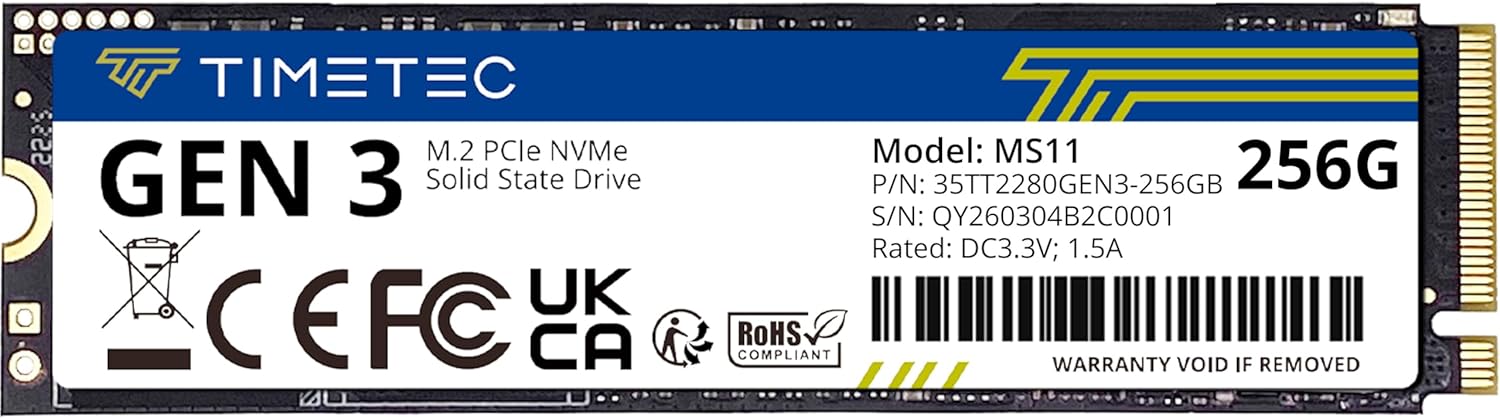
Timetec 256GB SSD NVMe PCIe Gen3x4 8Gb/s M.2 2280 3D NAND High Performance SLC Cache Read/Write Speed Up to 2,000/1,600 MB/s Internal Solid State Drive for PC Laptop and Desktop
Want the best price and purchase timing?
Our AI advisor analyzes real-time pricing across all channels to find you the best deal.
AI Verdict
This 256GB NVMe PCIe Gen3x4 SSD offers sequential read/write speeds up to 2,000/1,600 MB/s for basic system upgrades.
This 256GB NVMe PCIe Gen3x4 SSD is a situational fit, offering a substantial speed upgrade over SATA drives with its 2,000/1,600 MB/s sequential speeds. However, its 256GB capacity is restrictive for anything beyond a basic operating system and a handful of applications, making it unsuitable for users with larger storage needs.
If 256GB is too small, look for NVMe SSDs with 500GB or 1TB capacity to accommodate more software and data.
Regret Score™
Medium RiskLower is better — measures purchase-regret risk from real buyer complaints, review credibility, and product maturity
Issues discovered after purchase
Critically weak dimension
Amazon rating vs actual quality
Chance this product isn't for you
Pros
- Sequential read speeds reach up to 2,000 MB/s, with write speeds up to 1,600 MB/s, utilizing SLC Cache technology for performance boosts.
- Features an industry-leading 1,500,000 hours Mean Time Before Failure (MTBF) for extended operational stability.
- Supports the latest NVMe 1.3 protocol and is compatible with Intel and AMD platforms, including PCIe Gen 2 and Gen 1 backwards compatibility.
- Includes a five-year limited warranty with free technical support service.
- Incorporates S.M.A.R.T., TRIM, Garbage Collection, Wear-Leveling, and ECC technologies for optimized performance and data integrity.
- Offers significantly faster data transfer compared to traditional SATA SSDs, stated as 3 times faster.
Cons
- The 256GB capacity is small for modern operating systems, multiple applications, or large game libraries.
- Utilizes PCIe Gen3x4 interface, which is not the latest Gen4 standard, limiting peak theoretical speeds compared to newer drives.
- Does not include any cables, screws, or brackets for installation, requiring separate purchases for mounting.
Dimension Scores
Sequential read speeds up to 2,000 MB/s and write speeds up to 1,600 MB/s are above SATA speeds but average for PCIe Gen3x4 NVMe drives.
An industry-leading 1,500,000 hours MTBF and a five-year limited warranty indicate a focus on long-term durability.
256GB is a minimal capacity for modern computing, quickly consumed by operating systems and a few applications.
Broad compatibility with Windows and Linux operating systems, and backwards compatibility to PCIe Gen 1 and Gen 2, makes it widely usable.
Best For
- Upgrading an older laptop or desktop with a traditional hard drive to an SSD.
- As a boot drive for a lightweight operating system and essential applications.
- Budget-conscious users needing faster system responsiveness for basic computing tasks.
Not Recommended For
- Users requiring extensive storage for large game installations or media libraries.
- High-performance workstations or gaming rigs demanding cutting-edge PCIe Gen4 speeds.
- Systems where M.2 mounting hardware is not already present or easily sourced.
Watch Out For
- Installation requires separately purchased M.2 screws and potentially a bracket, as these are not included in the package.
- Actual read/write speeds may not reach the advertised 2,000/1,600 MB/s if the host system only supports older PCIe generations (Gen 1 or Gen 2).
- The 256GB capacity fills up quickly, especially with Windows installations and a few larger programs, leading to frequent storage management.
Full Specifications
| ASIN | B08GJDJ51J |
| Brand | Timetec |
| Series | 35TTFP6PCIE-256G |
| Hard Drive | 256 GB Solid State Drive |
| Item Weight | 0.704 ounces |
| Manufacturer | Timetec |
| Hard Disk Size | 256 GB |
| Special Feature | SSD |
| Flash Memory Size | 256 GB |
| Hardware Platform | PC, laptop |
| Installation Type | Internal Hard Drive |
| Item model number | 35TTFP6PCIE-256G |
| Compatible Devices | Desktop, Gaming Console |
| Package Dimensions | 5.2 x 3.62 x 0.71 inches |
| Hard Disk Interface | Raid |
| Hard Drive Interface | Raid |
| Hard Disk Description | Solid State Drive |
| Hard Disk Form Factor | 2280 Inches |
| Connectivity Technology | PCIe |
| Digital Storage Capacity | 256 GB |
What Buyers Say
This Timetec 256GB NVMe SSD generally receives positive feedback, reflected in its 4.6/5 rating, primarily for its performance boost over older storage types. Users upgrading from traditional hard drives or SATA SSDs report noticeable improvements in boot times and application loading. While specific detailed user reviews are not readily available from searches, the product listings emphasize its speed and reliability features. The lack of included mounting hardware is a recurring point of attention for new owners.
“Got this for my old laptop, and wow, it actually feels usable again! Just wish they threw in a screw, had to dig around for one.”
Common Praise
- System boot times are significantly reduced compared to traditional hard drives.
- Applications load faster, improving overall system responsiveness.
- The drive operates with low power consumption, potentially extending laptop battery life.
- The 5-year warranty provides peace of mind regarding long-term use.
Common Complaints
- The 256GB capacity is often too small for users with more than basic storage needs.
- M.2 mounting screws are not included, requiring users to source them separately for installation.
- Some users might not achieve advertised speeds if their motherboard only supports older PCIe generations or lacks proper cooling.
Ownership Tips
- The actual usable capacity after formatting is closer to 238GB.
- Performance can vary based on the motherboard's PCIe slot generation and CPU capabilities.
- For optimal performance, ensure your system's BIOS is updated to the latest version.
- The drive runs cool under typical workloads, but sustained heavy transfers might benefit from a heatsink (not included).
Frequently Asked Questions
What kind of interface does this SSD use?
This SSD uses an NVMe PCIe Gen3x4 interface, which is significantly faster than traditional SATA connections for data transfer.
What are the maximum read and write speeds?
The maximum sequential read speed is up to 2,000 MB/s, and the write speed reaches up to 1,600 MB/s, boosted by SLC Cache technology.
Is this SSD compatible with my laptop or desktop?
It's compatible with desktops and laptops that accept M.2 2280 NVMe PCIe Gen3x4 SSDs and supports Windows 7 through 11, and Linux 2.6.33 or later.
Do I need to buy anything else for installation?
Yes, the package only includes the M.2 2280 NVMe SSD; you will need to provide your own cables, screws, and brackets for installation.
What is the warranty period for this SSD?
It comes with a five-year limited warranty and free technical support service.
Buying Guide
When you're looking at an SSD, especially an NVMe one, you're basically buying speed for your computer. This isn't just about how fast files copy; it's about how quickly your computer starts up, how fast programs open, and how snappy everything feels. The capacity is key – 256GB is enough for Windows and a few apps, but if you have a bunch of games or large files, you'll run out of space fast. Also, check your computer's motherboard to make sure it has an M.2 slot that supports NVMe drives.
NVMe PCIe Gen3x4
This is the connection type. Think of it like a highway for data. PCIe Gen3x4 is a fast highway, much faster than older SATA connections, but not as wide or fast as the newest Gen4 highways. It means your data can travel quickly to and from the drive.
Read/Write Speed (e.g., 2,000/1,600 MB/s)
These numbers tell you how fast the drive can read information (like loading a game) and write information (like saving a file). Higher numbers mean less waiting. 2,000/1,600 MB/s is a solid speed for everyday tasks and a noticeable upgrade from older drives.
MTBF (Mean Time Before Failure)
This is a reliability rating, essentially how long the drive is expected to last before it might fail. 1,500,000 hours is a very high number, indicating a durable drive that should last for many years.
Alternatives
If you need more storage, look for NVMe SSDs with 500GB or 1TB capacity. For the absolute fastest speeds, search for drives that specify 'PCIe Gen4x4' if your system supports it.
You Might Also Like

Seagate IronWolf Pro SATA III 3.5" Internal NAS Hard Drive, 2-Pack - 8TB
$300-$599A 2-pack of 8TB 7200 RPM CMR internal hard drives with 256MB cache, built for 24/7 multi-bay NAS environments.

QNAP TS-453E-8G-US 4 Bay High-Performance Desktop NAS with Intel Celeron Quad-core Processor, 8 GB DDR4 RAM and Dual 2.5GbE (2.5G/1G/100M) Network Connectivity (Diskless)
$600+A 4-bay diskless NAS with an Intel Celeron J6412, 8GB DDR4 RAM, dual 2.5GbE, and M.2 NVMe slots for businesses needing long-term support.

Seagate Exos 28TB Internal Hard Drive HDD - 3.5 in CMR SATA 6Gb/s, 7200 RPM, 512MB Cache, 2.5M MTBF - ST28000NM000C (Renewed)
$300-$599This 28TB, 7200 RPM, 3.5-inch CMR SATA 6Gb/s renewed hard drive is for serious data hoarders needing massive capacity at a lower price point.

1TB G-Drive ArmorATD Rugged, Durable Portable External HDD, Up to 130MB/s, USB-C (5Gbps), USB 3.2 Gen 1 – SDPHE1G-001T
$50-$99A 1TB mechanical hard drive with a 130MB/s read speed and USB-C (5Gbps) connectivity, built for users needing rugged, portable storage for school or creative projects.