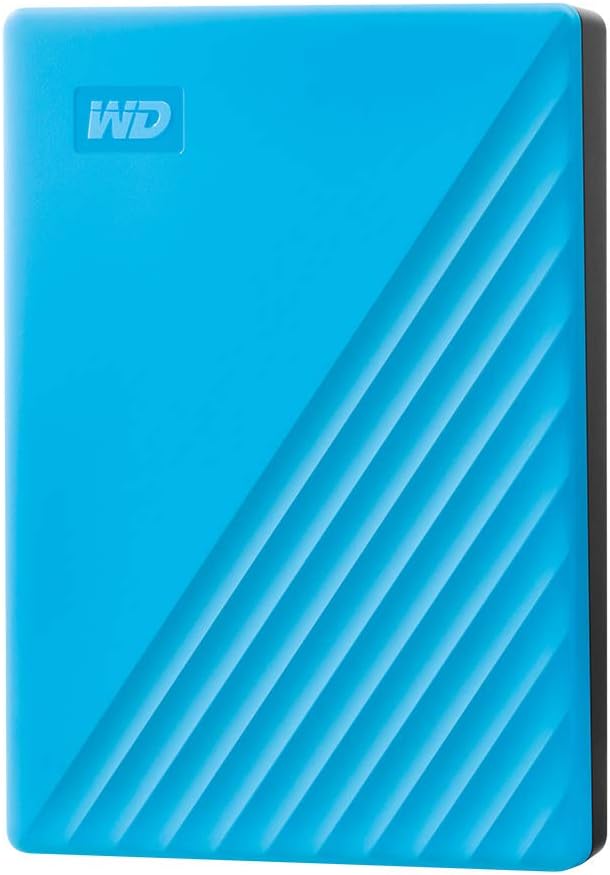
WD 4TB My Passport, Portable External Hard Drive, Blue, backup software with defense against ransomware, and password protection, USB 3.1/USB 3.0 compatible - WDBPKJ0040BBL-WESN
Want the best price and purchase timing?
Our AI advisor analyzes real-time pricing across all channels to find you the best deal.
AI Verdict
This 4TB mechanical hard drive with USB 3.0 and hardware encryption is for anyone needing portable, budget-friendly bulk storage.
This 4TB My Passport is a situational fit because its 2.5-inch mechanical drive offers substantial storage capacity and basic security features for its price. However, its mechanical nature means slower speeds compared to SSDs, and some users report issues with idle delays and software, making it less ideal for performance-critical tasks or seamless Mac integration.
If you need faster performance for frequent file access or editing, look for an external SSD with USB 3.2 Gen 2 or Thunderbolt connectivity.
Regret Score™
Medium RiskLower is better — measures purchase-regret risk from real buyer complaints, review credibility, and product maturity
Issues discovered after purchase
Critically weak dimension
Amazon rating vs actual quality
Chance this product isn't for you
Pros
- Offers 4TB of storage in a compact 2.5-inch form factor, fitting easily into a bag or pocket.
- Includes 256-bit AES hardware encryption and password protection to secure important files.
- Comes with WD Backup software for automatic data backups.
- Features USB 3.0 connectivity, providing sequential transfer speeds around 100 MB/s.
- Backed by a 3-year limited warranty.
Cons
- Some 4TB units have been reported to operate at 4800 RPM instead of the expected 5400 RPM, leading to slower performance.
- Users report a delay when the drive idles, and disabling the sleep timer can cause constant LED blinking.
- Mac users must reformat the drive, and some experience delays of 5-10 minutes for it to appear in Finder.
- The included WD software for Windows has been described as lacking advanced features and having a poor user experience.
- As a mechanical hard drive, its read/write speeds are significantly slower than SSD alternatives, typically around 100 MB/s.
Dimension Scores
Sequential transfer speeds are around 100 MB/s, which is typical for a 2.5-inch mechanical hard drive but significantly slower than modern SSDs.
While some users report long-term reliability, others have experienced drive failures and issues with idle delays or uninitialized drives.
4TB provides ample storage for most users' photo, video, and document collections, making it a strong option for bulk storage.
It's compatible with Desktop, Laptop, and Tablet via USB 3.0, but Mac users must reformat and may experience recognition delays.
Best For
- Storing large archives of photos, videos, or documents that don't require frequent, high-speed access.
- Budget-conscious users needing a portable backup solution for their laptop or desktop.
- Students or professionals who need to transport large files between different Windows computers.
- Anyone looking for an affordable way to expand storage for a desktop or laptop.
Not Recommended For
- Users who need fast data transfer speeds for editing large video files or running applications directly from the drive.
- Mac users who want a plug-and-play experience without reformatting or potential delays in drive recognition.
- Individuals prioritizing maximum durability and shock resistance for frequent, rough travel.
Watch Out For
- The drive may be 4800 RPM instead of 5400 RPM, resulting in slower-than-expected data access and transfer speeds.
- An idle delay occurs after about a minute of inactivity, which can only be 'fixed' by disabling the sleep timer, potentially causing constant LED activity.
- Mac users might face a 5-10 minute wait for the drive to appear in Finder after plugging it in, and may need to repair it on a Windows machine after Mac shutdowns.
- The Windows WD software is reported to be clunky, with updates not easily accessible and advanced features missing from the current application.
- Some users have experienced drive failures after several years of use, with reports of clicking sounds and uninitialized drives.
Full Specifications
| ASIN | B07VP5WG78 |
| Brand | WD |
| Color | Blue |
| Series | My Passport External Hard Drive |
| Voltage | 1 Volts |
| Language | English |
| Hard Drive | 4 TB Mechanical Hard Disk |
| Item Weight | 7.4 ounces |
| Manufacturer | Western Digital Technologies, Inc. |
| Special Feature | Hardware Encryption, Portable |
| Flash Memory Size | 4 |
| Hardware Platform | PC |
| Installation Type | External Hard Drive |
| Item model number | WDBPKJ0040BBL-WESN |
| Compatible Devices | Desktop, Laptop, Tablet |
| Product Dimensions | 4.22 x 2.95 x 0.75 inches |
| Hard Disk Interface | USB 2.0/3.0 |
| Hard Drive Interface | USB 2.0/3.0 |
| Hard Disk Description | Mechanical Hard Disk |
| Hard Disk Form Factor | 2.5 Inches |
| Item Dimensions LxWxH | 4.22 x 2.95 x 0.75 inches |
| Connectivity Technology | USB |
| Digital Storage Capacity | 4 TB |
| Hard Drive Rotational Speed | 1 |
| Is Discontinued By Manufacturer | No |
What Buyers Say
The biggest head-scratcher with this drive is the reported 4800 RPM speed on some 4TB units, which is a step down from the expected 5400 RPM and directly impacts performance. Users also frequently mention an annoying idle delay, where the drive takes a moment to 'wake up' after a minute of inactivity, and the workaround of disabling the sleep timer can lead to constant LED blinking. Mac users, brace yourself for reformatting and potential 5-10 minute delays before the drive shows up. On the upside, people consistently point out its compact size and the peace of mind from the included hardware encryption and backup software.
“Man, I just needed a place to dump my photos, and this thing does it, but seriously, the wait when it wakes up is annoying, and I swear it's slower than my old one. At least my stuff's encrypted, I guess.”
Common Praise
- The drive's compact 2.5-inch form factor makes it easy to carry around.
- The 4TB capacity provides plenty of space for large media libraries and documents.
- Hardware encryption and password protection offer a layer of security for stored data.
- The included backup software simplifies setting up automatic backups.
- It's an affordable option for expanding storage without spending a lot.
Common Complaints
- Some 4TB drives are 4800 RPM, not 5400 RPM, making them slower than anticipated.
- There's a noticeable delay when the drive comes out of idle, which is frustrating for quick access.
- Mac users have to reformat the drive and sometimes wait several minutes for it to mount.
- The WD software on Windows is clunky and lacks advanced features, making it a pain to use.
- Concerns about long-term reliability and sudden drive failures have been raised by some users.
Ownership Tips
- The actual rotational speed might be 4800 RPM, not 5400 RPM, which impacts real-world performance.
- You'll likely notice a brief delay (around a second or two) when accessing the drive after it's been idle for a short period.
- If you use a Mac, prepare to reformat the drive and potentially deal with slow recognition times.
- The pre-installed WD software might not be as user-friendly or feature-rich as you'd hope, especially on Windows.
- Keep an eye on its performance over time; some users report issues like clicking sounds or uninitialized drives after extended use.
Frequently Asked Questions
Does this drive work with Mac computers?
Yes, it works with Mac, but you'll need to reformat it first. Some Mac users have also reported delays of 5-10 minutes for the drive to appear after plugging it in.
What kind of transfer speeds can I expect?
As a mechanical hard drive with USB 3.0, you can expect sequential transfer speeds around 100 MB/s. This is typical for this type of drive but slower than SSDs.
Does it require external power?
No, the WD My Passport is bus-powered, meaning it draws power directly from the USB connection to your computer. It does not need a separate power adapter.
Is the included backup software useful?
The drive comes with WD Backup software for automatic backups and security features like password protection and hardware encryption. Some users find it useful for basic backups, though the overall Windows software experience has received criticism.
What is the warranty period?
The WD My Passport 4TB comes with a 3-year limited warranty.
Can I use this drive for gaming?
You can store games on it, but loading times will be significantly slower compared to an internal drive or an external SSD due to its mechanical nature and 100 MB/s transfer speeds.
Buying Guide
When you're looking at external hard drives, you're mostly balancing capacity, speed, and portability. This WD My Passport gives you a lot of space in a small package, which is awesome for backups or carrying around big files. But because it's a mechanical drive, it won't be as fast as the tiny SSDs out there. Think about what you'll actually use it for: quick access to files, or just dumping stuff you don't need every day?
Capacity (4TB)
This is how much data the drive can hold, like how many books fit on a bookshelf. 4TB is a massive amount, enough for thousands of movies or hundreds of thousands of photos, making it perfect for archiving large collections.
Interface (USB 3.0)
This is the connection type, like the size of a highway. USB 3.0 is much faster than older USB 2.0, allowing you to transfer large files in minutes instead of hours, but it's not as fast as newer USB-C or Thunderbolt connections.
Drive Type (Mechanical Hard Disk)
This refers to how the data is stored. Mechanical drives use spinning platters, like a record player, which makes them cheaper for large capacities but slower and more fragile than solid-state drives (SSDs) that use flash memory.
Alternatives
If you need faster file transfers for editing or running programs, look for an external solid-state drive (SSD) with USB 3.2 Gen 2 or Thunderbolt 3/4. If you need even more capacity and don't mind a larger, less portable device, consider a desktop external hard drive with its own power supply.
You Might Also Like

Seagate IronWolf Pro SATA III 3.5" Internal NAS Hard Drive, 2-Pack - 8TB
$300-$599A 2-pack of 8TB 7200 RPM CMR internal hard drives with 256MB cache, built for 24/7 multi-bay NAS environments.

QNAP TS-453E-8G-US 4 Bay High-Performance Desktop NAS with Intel Celeron Quad-core Processor, 8 GB DDR4 RAM and Dual 2.5GbE (2.5G/1G/100M) Network Connectivity (Diskless)
$600+A 4-bay diskless NAS with an Intel Celeron J6412, 8GB DDR4 RAM, dual 2.5GbE, and M.2 NVMe slots for businesses needing long-term support.

Seagate Exos 28TB Internal Hard Drive HDD - 3.5 in CMR SATA 6Gb/s, 7200 RPM, 512MB Cache, 2.5M MTBF - ST28000NM000C (Renewed)
$300-$599This 28TB, 7200 RPM, 3.5-inch CMR SATA 6Gb/s renewed hard drive is for serious data hoarders needing massive capacity at a lower price point.

1TB G-Drive ArmorATD Rugged, Durable Portable External HDD, Up to 130MB/s, USB-C (5Gbps), USB 3.2 Gen 1 – SDPHE1G-001T
$50-$99A 1TB mechanical hard drive with a 130MB/s read speed and USB-C (5Gbps) connectivity, built for users needing rugged, portable storage for school or creative projects.