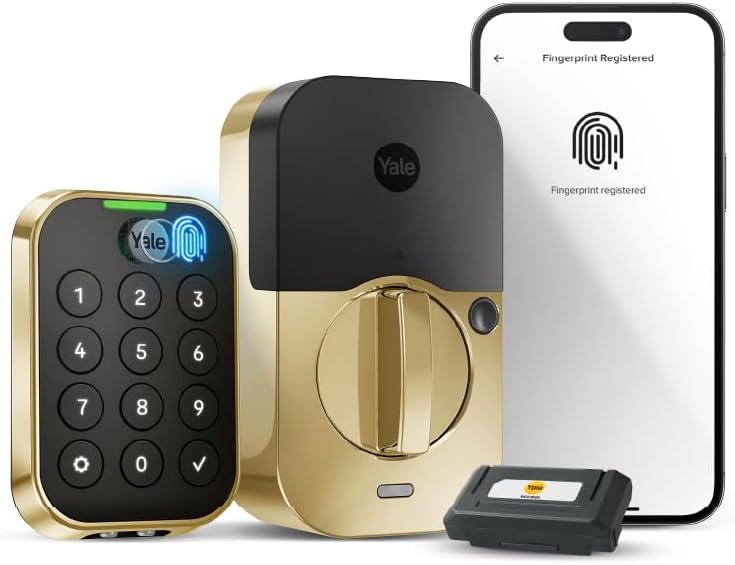
Yale Assure Lock 2 Touch Deadbolt, Lifetime Brass Key-Free Smart Lock with Wi-Fi Connected Keypad and Fingerprint Scanner for Code Entry and Remote Access, YRD430-F-WF1-P05
Want the best price and purchase timing?
Our AI advisor analyzes real-time pricing across all channels to find you the best deal.
AI Verdict
A Wi-Fi and Bluetooth biometric deadbolt with a fingerprint scanner and keypad for keyless entry, best for those prioritizing multiple access methods and remote control.
This lock offers extensive keyless access options with fingerprint, keypad, and app control, plus built-in Wi-Fi for remote management. However, the reported 3-4 month battery life with Wi-Fi active is a significant consideration for daily use.
If frequent battery changes are a deal-breaker, look for smart locks with longer battery life ratings, often achieved by using Bluetooth-only connectivity or larger battery packs.
Regret Score™
Medium RiskLower is better — measures purchase-regret risk from real buyer complaints, review credibility, and product maturity
Issues discovered after purchase
Critically weak dimension
Amazon rating vs actual quality
Chance this product isn't for you
Pros
- Fingerprint scanner offers <0.5 recognition time and 99% accuracy for quick entry.
- Built-in Wi-Fi and Bluetooth enable remote lock/unlock and activity tracking via the Yale Access App.
- Multiple entry options including fingerprint, keypad codes, and app control.
- Auto-Lock feature with DoorSense ensures the door locks after a set time.
- Backlit, matte keypad resists fingerprint smudges and is visible in low light.
- Weather-resistant design handles temperatures from -22 to 140°F.
Cons
- Battery life can be as short as 3-4 months, especially with Wi-Fi actively used.
- Fingerprint scanner requires precise finger placement for consistent 99% accuracy.
- The illuminated keypad numbers might disappear too quickly for some users.
- No physical key override, relying solely on electronic access methods.
Dimension Scores
Fingerprint scanner boasts 99% accuracy and <0.5 recognition time, but some users report needing precise placement for consistent results.
Built-in Wi-Fi and Bluetooth provide remote access from anywhere and local control, integrating well with smart home ecosystems.
The Yale Access App allows remote lock/unlock, code management, activity tracking, and integrates with major voice assistants like Alexa, Google Assistant, and Apple HomeKit.
Constructed from metal and rated to withstand temperatures from -22 to 140°F, indicating a durable and weather-resistant design.
Best For
- Homeowners wanting multiple keyless entry options, including biometric.
- Users who need to grant temporary access to dog walkers or house sitters remotely.
- Individuals who frequently forget to lock their door and benefit from Auto-Lock.
- Smart home enthusiasts integrating with Alexa, Google Assistant, or Apple HomeKit.
Not Recommended For
- Users who prefer a physical key backup for their primary door lock.
- Those unwilling to manage battery replacements every few months.
- Anyone with inconsistent finger placement for biometric scanners.
Watch Out For
- Battery life can be as low as 3-4 months with continuous Wi-Fi usage, requiring frequent battery changes.
- Fingerprint scanner accuracy is 99% but requires consistent finger positioning; registering only one specific angle might lead to failed unlocks.
- The 'Key-Free' design means there's no physical key override if batteries die or electronics fail.
- Some users reported the illuminated keypad numbers disappear too quickly, making entry in the dark less convenient.
Full Specifications
| UPC | 081023133708 |
| ASIN | B0FJS7RLMW |
| Size | Wi-Fi |
| Brand | Yale |
| Color | Lifetime Brass |
| Shape | Rectangular |
| Style | Modern |
| Pattern | Key-Free |
| Material | Metal |
| Batteries | 4 AA batteries required. (included) |
| Lock Type | Biometric, Deadbolt, Keypad |
| Model Name | Assure Lock 2 |
| Item Weight | 3.67 pounds |
| Part Number | YRD430-F-WF1-P05 |
| Manufacturer | Yale |
| Control Method | App, Touch |
| Controller Type | Amazon Alexa, Android, Apple HomeKit, Google Assistant, iOS |
| Special Feature | Auto-Lock, Back-Lit Keypad, Fingerprint, Passcode Unlock, Weather Resistant |
| Number of Pieces | 1 |
| Special Features | Auto-Lock, Back-Lit Keypad, Fingerprint, Passcode Unlock, Weather Resistant |
| Battery Cell Type | Alkaline |
| Item model number | YRD430-F-WF1-P05 |
| Product Dimensions | 0.6 x 2.6 x 3.75 inches |
| Batteries Included? | Yes |
| Batteries Required? | Yes |
| Included Components | Deadbolt, Strike Plate, Mounting Hardware, Installation Manual, Yale Assure Lock 2, Yale DoorSense, Yale Wi-Fi Smart Module |
| Connectivity Protocol | Bluetooth, Wi-Fi |
| Item Package Quantity | 1 |
| Smart Home Compatibility | Smart Home Compatible |
| Item dimensions L x W x H | 0.6 x 2.6 x 3.75 inches |
| Recommended Uses For Product | Exterior Door |
What Buyers Say
Many users are surprised by the convenience of the fingerprint scanner, noting its speed and accuracy once they get the hang of finger placement. The biggest recurring concern is the battery life, which some found to be as short as 3-4 months when Wi-Fi features are heavily utilized. Installation is frequently described as easy, often completed in under 30 minutes, and the app's guidance is appreciated. The ability to manage access codes remotely and track activity through the Yale Access App is a standout feature for many.
“This lock is cool when it works, but I'm tired of changing batteries every few months, and sometimes that fingerprint reader just doesn't want to cooperate, making me type in the code anyway.”
Common Praise
- Fingerprint scanner unlocks the door in under 0.5 seconds.
- Easy installation process, often completed in under 30 minutes.
- Remote lock and unlock functionality via the Yale Access App from any location.
- Ability to create and manage multiple access codes for different users.
- Auto-Lock feature provides peace of mind, ensuring the door is secured after closing.
- Integration with smart home platforms like Alexa, Google Assistant, and Apple HomeKit.
Common Complaints
- Battery life can be as short as 3-4 months, especially with Wi-Fi enabled.
- Fingerprint scanner requires precise finger positioning to consistently register.
- No physical key backup, which is a concern for some users if electronics fail.
- Illuminated keypad numbers turn off too quickly for some users.
Ownership Tips
- Expect to replace batteries more frequently than advertised if you use the Wi-Fi features constantly.
- Take your time registering fingerprints from multiple angles to improve recognition consistency.
- The Auto-Lock feature is a game-changer for peace of mind, but double-check its settings.
- The activity log in the app is surprisingly useful for knowing who came and went.
Frequently Asked Questions
Does this lock have a physical key?
No, this is a key-free deadbolt, meaning it relies entirely on electronic access methods like fingerprint, keypad codes, or the Yale Access App.
How long do the batteries last?
Battery life can be around 3-4 months, especially when the built-in Wi-Fi is actively used for remote functions.
Can I unlock the door remotely?
Yes, with built-in Wi-Fi, you can lock and unlock the door from anywhere using the Yale Access App.
Is the fingerprint scanner accurate?
The fingerprint scanner is rated for 99% accuracy and <0.5 recognition time, though consistent finger placement is important for reliable unlocking.
Does it work with smart home systems?
Yes, it integrates with Amazon Alexa, Google Assistant, and Apple HomeKit for voice control and smart home routines.
Is it easy to install?
Installation is generally straightforward, often taking less than 30 minutes to replace an existing deadbolt, with step-by-step guidance from the Yale app.
Buying Guide
When you're looking at smart locks, you're basically trading a physical key for convenience and control. This Yale lock gives you a fingerprint scanner, keypad, and app access. Think about how often you'd use the remote features, because that Wi-Fi connection is a battery hog. Also, since it's key-free, you're fully relying on the electronics, so battery life and backup plans are crucial.
Biometric (Fingerprint)
This means you can unlock your door just by touching a sensor with your finger, like unlocking your phone. It's super fast (<0.5 seconds) and means you don't need to carry keys or remember codes.
Wi-Fi Connectivity
Built-in Wi-Fi lets your lock talk directly to your home network and the internet, so you can control it from anywhere using your phone, even when you're not home. Without it, you'd only be able to control it via Bluetooth when you're close by.
Key-Free Deadbolt
This means there's no traditional keyhole. Your only ways in are the electronic methods (fingerprint, code, app). It's more secure against lock picking, but also means no physical backup if the batteries die or the system glitches.
Auto-Lock with DoorSense
DoorSense is a sensor that tells the lock if your door is open or closed. Auto-Lock then automatically locks the door after a set time once it detects the door is closed, so you never have to worry if you remembered to lock up.
Alternatives
If you need a physical key backup or significantly longer battery life, look for smart deadbolts that offer a traditional keyway or use a separate Wi-Fi bridge instead of built-in Wi-Fi.
You Might Also Like

Ring Wired Doorbell Elite (newest model), Native Power over Ethernet, Retinal 4K video, Remote Gate Access, 10x Enhanced Zoom, and Low-Light Sight
$300-$599A 4K PoE doorbell with 10x zoom and remote gate control, built for properties needing robust, wired security and advanced motion detection.

Blink Doorbell Mount, 2nd Gen Anti-Theft Blink Doorbell Camera Mount No Drilling with Rain Cover, Fit for Blink Video Doorbell 1st & 2nd Gen, No Block Sensor & Night Vision
$0-$49This is a no-drilling, anti-theft mount with a rain cover designed for Blink Video Doorbells (1st and 2nd Gen) on inward-opening doors 0.8-1.9 inches thick.

Ring Chime Pro
A plug-in chime and Wi-Fi extender for Ring devices, it provides audible alerts and a limited 2000 sq. ft. signal boost for Ring cameras and doorbells.

Ring Video Wired Doorbell (newest model), Home or business security, Two-Way Talk, advanced motion detection, HD camera and real-time alerts to monitor your front door (wiring required)
This 1080p wired doorbell delivers real-time alerts and two-way talk for front door monitoring, requiring existing wiring.