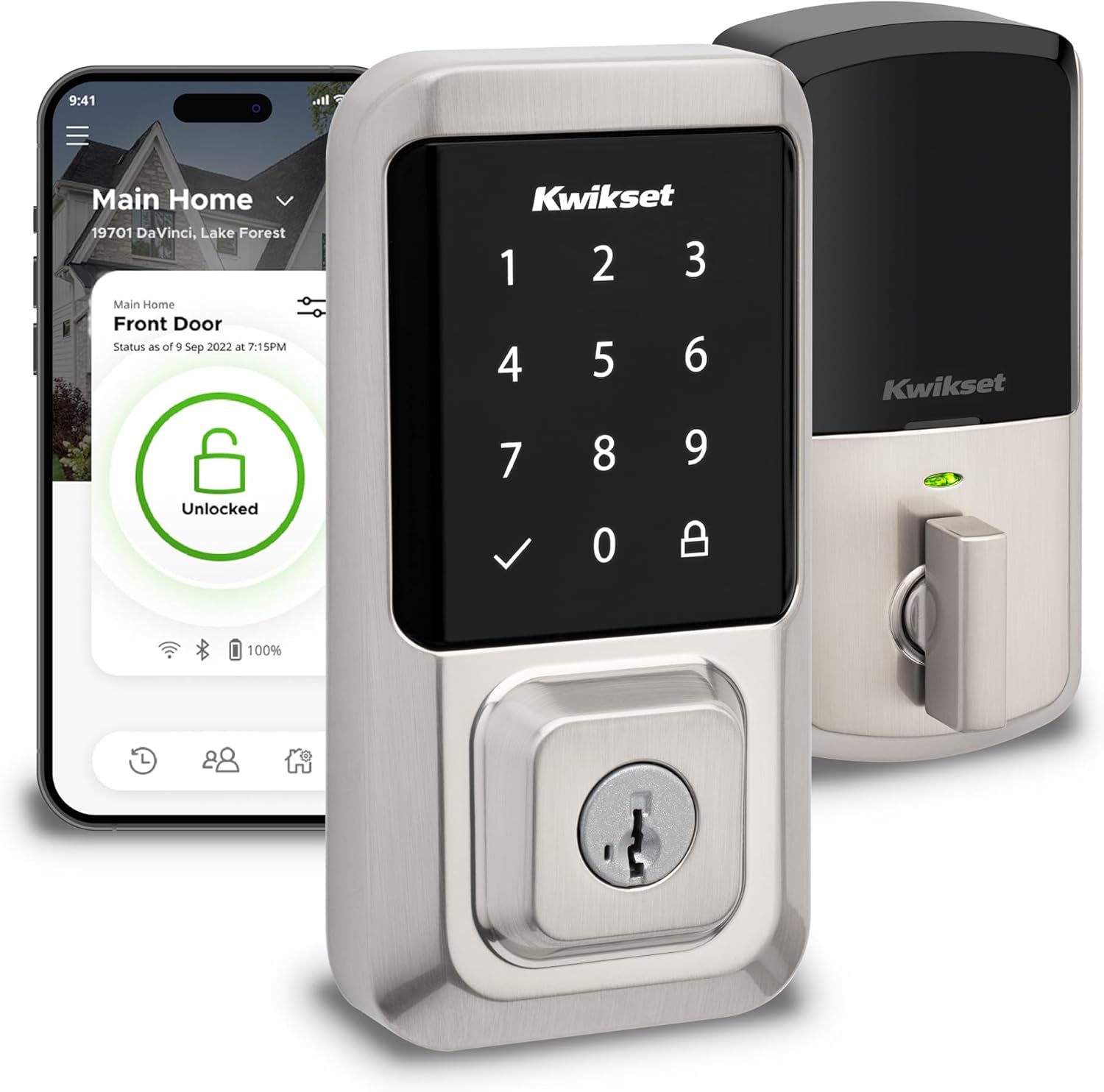
Kwikset Halo Wi-Fi Smart Lock, Keyless Entry Door Deadbolt, Geofence Auto-Unlock, Grade AAA Certified, No Hub Required Easy Install, Satin Nickel Lifetime Finish Warranty, Touchscreen
Want the best price and purchase timing?
Our AI advisor analyzes real-time pricing across all channels to find you the best deal.
AI Verdict
A Wi-Fi enabled deadbolt that offers remote control and 250 access codes, but struggles with consistent battery life and broad smart home integration.
This lock is a situational fit because its direct Wi-Fi connectivity and extensive code management are appealing for hub-free remote access. However, reported issues with battery longevity and inconsistent remote connectivity mean it's not a universally seamless experience for all users.
If you need more robust smart home integration or guaranteed remote reliability, look for locks with Z-Wave, Zigbee, or Matter support.
Regret Score™
Medium RiskLower is better — measures purchase-regret risk from real buyer complaints, review credibility, and product maturity
Issues discovered after purchase
Critically weak dimension
Amazon rating vs actual quality
Chance this product isn't for you
Pros
- Connects directly to home Wi-Fi, eliminating the need for a separate hub for remote access.
- Manages up to 250 unique access codes, with options for temporary, scheduled, or permanent access.
- Integrates with Amazon Alexa and Google Home for voice control and automations.
- Features SecureScreen technology, requiring random digits before code entry to prevent fingerprint detection.
- Includes geofencing for automatic unlocking as you approach your home.
- Rated BHMA Grade AAA for security, durability, and finish, and UL certified with a 20-minute fire rating.
Cons
- Reported battery life can be as short as 3-4 weeks for some users, significantly less than the 6-month estimate.
- Some users experience connectivity issues, including the app not providing remote updates unless on the same Wi-Fi network.
- Touchscreen can be unresponsive in temperatures below freezing or very hot conditions, requiring precise presses.
- Lacks direct integration with Apple HomeKit, IFTTT, or Samsung SmartThings.
- The plastic cover for internal buttons is difficult to remove, potentially scratching the lock's finish.
Dimension Scores
The lock features SecureScreen technology to prevent fingerprint residue detection and includes a tamper alarm for invalid code attempts.
It offers direct Wi-Fi and Bluetooth connectivity for remote control and geofencing, but some users report inconsistent remote access and initial syncing issues.
The Kwikset app provides comprehensive control and activity history, and it integrates with Alexa and Google Home, but lacks support for HomeKit, IFTTT, and SmartThings.
Constructed from metal and BHMA Grade AAA certified, it also has a UL 20-minute fire rating, though the touchscreen can be sensitive to extreme temperatures.
Best For
- Households needing remote lock/unlock functionality without purchasing an additional smart home hub.
- Property owners managing access for numerous guests, dog walkers, or service providers with up to 250 unique codes.
- Users already invested in Amazon Alexa or Google Home ecosystems for voice control and basic automations.
- Individuals prioritizing a deadbolt with BHMA Grade AAA certification and SmartKey Security against picking and bumping.
Not Recommended For
- Users in climates with frequent extreme cold or heat, due to reported touchscreen unresponsiveness.
- Anyone requiring native Apple HomeKit, IFTTT, or Samsung SmartThings integration.
- Those who need consistent, long battery life without frequent replacement (some users report 3-4 weeks).
Watch Out For
- Battery drain is a frequent complaint, with some users reporting needing to replace the four AA batteries every 3-4 weeks, despite a 6-month manufacturer estimate.
- Remote access via the Kwikset app sometimes fails, with users stating they could only control the lock when connected to the same Wi-Fi network.
- The touchscreen can become unreliable in extreme temperatures, requiring more deliberate presses when below freezing or in direct hot sunlight.
- Initial setup can be tricky, requiring a Bluetooth connection before Wi-Fi setup, and some users find the internal wiring difficult to manage during installation.
- The small plastic cover protecting the Bluetooth and reset buttons is hard to pry off, often requiring a flathead screwdriver and risking damage to the lock's finish.
Full Specifications
| UPC | 883351681957 |
| ASIN | B081FYNZ7B |
| Brand | Kwikset |
| Color | Satin Nickel |
| Shape | Rectangular |
| Style | Smart Lock |
| Finish | Brushed |
| Pattern | Lock |
| Material | Metal |
| Batteries | 4 AA batteries required. (included) |
| Lock Type | Keypad |
| Model Name | Halo Wi-Fi Smart Lock Keyless Entry Electronic Touchscreen Deadbolt Featuring SmartKey Security |
| Finish Type | Brushed |
| Item Weight | 1 pounds |
| Part Number | 99390-001 |
| Manufacturer | Kwikset |
| Control Method | Voice |
| Controller Type | Amazon Alexa, Google Assistant, Vera |
| Special Feature | Auto-Lock, One-Touch Lock, Passcode Unlock, Touchscreen, Weather Resistant |
| Number of Pieces | 1 |
| Special Features | Auto-Lock, One-Touch Lock, Passcode Unlock, Touchscreen, Weather Resistant |
| Battery Cell Type | Alkaline |
| Item model number | 99390-001 |
| Product Dimensions | 3.99 x 4.24 x 9.74 inches |
| Batteries Included? | Yes |
| Batteries Required? | Yes |
| Included Components | interior Assembly, Exterior Assembly, Latch, Strike, Installation hardware, 4 AA Batteries, Battery Pack, SmartKey Tool, 2 Keys, Mounting Plate, Adapter Ring, Installation Instructions |
| Warranty Description | Lifetime Mechanical-Finish, 1 Year Electronics |
| Connectivity Protocol | Wi-Fi |
| Item Package Quantity | 1 |
| Smart Home Compatibility | Smart Home Compatible |
| Item dimensions L x W x H | 3.99 x 4.24 x 9.74 inches |
| Recommended Uses For Product | Security |
| Global Trade Identification Number | 00883351681957 |
What Buyers Say
Many users are surprised by the inconsistent battery life, with some reporting the four AA batteries needing replacement every few weeks instead of the advertised 6-12 months. While the direct Wi-Fi connection is a major draw, some find the remote access unreliable, occasionally requiring them to be on the same Wi-Fi network to control the lock. The ability to manage up to 250 unique access codes is a frequently praised feature, making it convenient for guest access. However, the touchscreen's sensitivity to extreme cold or heat is a recurring complaint, impacting usability in certain climates.
“Man, this thing eats batteries like crazy, I'm swapping out AAs every month, but when it actually connects remotely, it's super handy for letting the dog sitter in.”
Common Praise
- The Kwikset app allows remote locking and unlocking from anywhere with an internet connection.
- Creating and managing up to 250 temporary or permanent access codes is straightforward and useful.
- Voice control through Amazon Alexa and Google Home works as expected for locking and checking status.
- Installation is often described as easy, similar to a standard deadbolt, with helpful app guidance.
- The SecureScreen feature adds a layer of security by preventing code detection from fingerprint smudges.
- The lock's metal construction and BHMA Grade AAA certification provide a sense of security.
Common Complaints
- Battery life is a significant concern, with reports of batteries draining in 3-4 weeks for some users.
- Remote control via the app sometimes fails, requiring the user to be on the local Wi-Fi network.
- The touchscreen becomes unresponsive or requires very precise presses in very cold or hot weather.
- Lack of integration with Apple HomeKit, IFTTT, and Samsung SmartThings limits smart home ecosystem options.
- The plastic cover for the internal Bluetooth and reset buttons is difficult to remove without scratching the lock.
- Notifications are an all-or-nothing setting, meaning you get alerts for every lock/unlock event or none at all.
Ownership Tips
- Expect to replace the four AA batteries more frequently than the advertised 6 months, possibly every 3-4 weeks depending on usage and Wi-Fi activity.
- The 'all or nothing' notification setting means you'll either get spammed with alerts for every lock event or miss important ones if you turn them off.
- The SecureScreen feature, while a good security measure, adds an extra step to code entry by requiring two random taps first.
- Re-keying the lock to match existing Kwikset keys is a quick process thanks to SmartKey Security.
- Be careful when trying to access the internal buttons; the plastic cover is stiff and can scratch the finish if forced.
Frequently Asked Questions
Does the Kwikset Halo require a smart home hub?
No, the Kwikset Halo connects directly to your home's Wi-Fi network, allowing remote control via the Kwikset app without an additional hub.
What smart home platforms does it integrate with?
It works with Amazon Alexa and Google Home for voice commands and basic automations. It does not support Apple HomeKit, IFTTT, or Samsung SmartThings.
How many access codes can I create?
You can create and manage up to 250 unique access codes, which can be set for permanent, scheduled, or one-time use.
What is the expected battery life?
Kwikset estimates 6 to 12 months, but many users report significantly shorter battery life, sometimes as little as 3-4 weeks, especially with frequent Wi-Fi use.
Is installation difficult?
Installation is generally straightforward, similar to a standard deadbolt, with an app-guided process. However, some users find connecting the internal wiring to be a bit challenging.
Does it have a physical key override?
Yes, the Kwikset Halo includes a traditional keyway, allowing you to unlock the door with a physical key.
Buying Guide
When looking at smart locks, you need to think about how you'll actually use it. If you want to unlock your door from your phone when you're not home, you'll need Wi-Fi connectivity, either built-in or through a hub. Consider how many people will need access and if you need to set time limits for their entry. Also, battery life is a big deal; a lock that constantly needs new batteries becomes a chore, not a convenience.
Wi-Fi Connectivity (No Hub Required)
Access Codes (Up to 250)
Auto-Lock
Alternatives
If this lock's integration limitations are a deal-breaker, look for models that specify Z-Wave or Zigbee for broader compatibility with existing smart home hubs, or those with Matter support for future-proofing across ecosystems.
You Might Also Like

Ring Wired Doorbell Elite (newest model), Native Power over Ethernet, Retinal 4K video, Remote Gate Access, 10x Enhanced Zoom, and Low-Light Sight
$300-$599A 4K PoE doorbell with 10x zoom and remote gate control, built for properties needing robust, wired security and advanced motion detection.

Blink Doorbell Mount, 2nd Gen Anti-Theft Blink Doorbell Camera Mount No Drilling with Rain Cover, Fit for Blink Video Doorbell 1st & 2nd Gen, No Block Sensor & Night Vision
$0-$49This is a no-drilling, anti-theft mount with a rain cover designed for Blink Video Doorbells (1st and 2nd Gen) on inward-opening doors 0.8-1.9 inches thick.

Ring Chime Pro
A plug-in chime and Wi-Fi extender for Ring devices, it provides audible alerts and a limited 2000 sq. ft. signal boost for Ring cameras and doorbells.

Ring Video Wired Doorbell (newest model), Home or business security, Two-Way Talk, advanced motion detection, HD camera and real-time alerts to monitor your front door (wiring required)
This 1080p wired doorbell delivers real-time alerts and two-way talk for front door monitoring, requiring existing wiring.