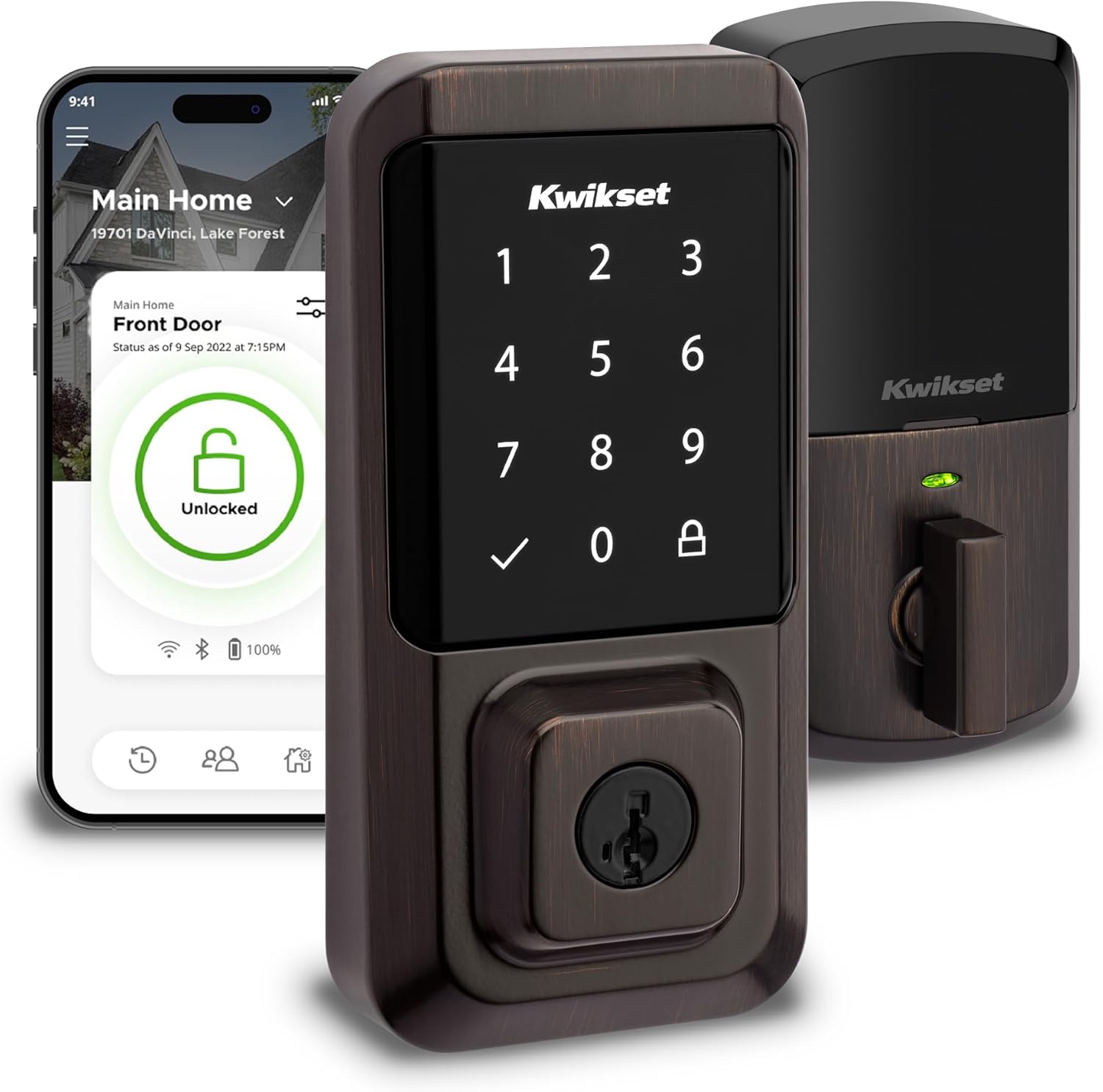
Kwikset Halo Wi-Fi Smart Lock, Keyless Entry Front Door Touchscreen Deadbolt, App Control, Grade AAA Certified, Easy Install No Hub, Venetian Bronze Finish
Want the best price and purchase timing?
Our AI advisor analyzes real-time pricing across all channels to find you the best deal.
AI Verdict
This is a Wi-Fi enabled touchscreen deadbolt with app control and voice integration, for those needing remote access and keyless entry without a hub.
The Kwikset Halo Wi-Fi Smart Lock offers convenient keyless entry and remote control via its built-in Wi-Fi, making it a strong contender for users prioritizing hub-free smart lock functionality. However, its reported short battery life and app limitations for multi-lock management or phone transfers create significant friction for daily use.
If battery life is a primary concern, look for smart locks that utilize Z-Wave or Zigbee protocols, which typically consume less power than direct Wi-Fi connections.
Regret Score™
Medium RiskLower is better — measures purchase-regret risk from real buyer complaints, review credibility, and product maturity
Issues discovered after purchase
Critically weak dimension
Amazon rating vs actual quality
Chance this product isn't for you
Pros
- Built-in Wi-Fi connectivity means no separate hub is required for remote access and control via the Kwikset app.
- The Kwikset app allows remote locking/unlocking, sharing guest access, and viewing activity history from anywhere.
- Supports up to 250 unique access codes, which can be scheduled for temporary, permanent, or one-time use.
- Integrates with Amazon Alexa and Google Home for voice control and smart home automations.
- Features an auto-lock function with adjustable duration for added security after entry or exit.
- BHMA Grade AAA certified for security, durability, and finish, and UL certified with a 20-minute fire rating.
Cons
- Battery life is frequently reported as short, with some users experiencing 3-4 weeks instead of the estimated 6 months, influenced by usage and features.
- Users report occasional Wi-Fi connection drops, sometimes preventing remote control unless within Bluetooth range.
- The touchscreen can be less responsive in extreme temperatures, either below freezing or in direct hot sunlight.
- The Kwikset app has limitations, including difficulty transferring lock access to a new phone and inability to transfer codes between multiple locks.
- Does not support Apple HomeKit, Samsung SmartThings, or IFTTT, limiting broader smart home integration.
Dimension Scores
The lock is BHMA Grade AAA certified for security and includes features like SecureScreen technology to prevent code residue tracking.
It features built-in Wi-Fi for remote access and Bluetooth for local control, but some users report inconsistent Wi-Fi connectivity and drops.
The Kwikset app offers remote control and activity history, but users report issues with phone transfers, code management, and limited third-party smart home integrations beyond Alexa/Google Home.
The lock is BHMA Grade AAA certified for durability and UL certified with a 20-minute fire rating, but the touchscreen can be affected by extreme temperatures.
Best For
- Homeowners who want remote access and monitoring of their front door without needing a separate smart home hub.
- Families or individuals needing to share temporary or scheduled access codes with guests, cleaners, or dog walkers.
- Users already invested in Amazon Alexa or Google Home ecosystems for voice control of smart devices.
Not Recommended For
- Users prioritizing maximum battery longevity, as frequent Wi-Fi use can significantly reduce battery life.
- Those who require integration with Apple HomeKit, Samsung SmartThings, or IFTTT for their smart home setup.
- Individuals living in areas with frequent extreme temperatures, which can affect touchscreen responsiveness.
Watch Out For
- Battery life can be as short as 3-4 weeks for some users, significantly less than the advertised 6 months, requiring frequent battery changes.
- Transferring lock access to a new mobile phone is problematic; if not done within Bluetooth range, it can globally wipe the lock from the app, requiring re-setup.
- The app's auto-lock feature only offers preset times up to 30 minutes, lacking more granular or user-defined options.
- Codes created for one lock cannot be saved or transferred to another Kwikset smart lock, forcing manual re-entry of up to 250 codes if you replace or add a lock.
- The lock does not log unsuccessful entry attempts in the activity history, which some users find to be a security oversight.
Full Specifications
| UPC | 883351681964 |
| ASIN | B081FYDWL1 |
| Brand | Kwikset |
| Color | Venetian Bronze |
| Shape | Rectangular |
| Style | Smart Lock |
| Finish | Polished |
| Pattern | Lock |
| Material | Bronze |
| Batteries | 4 AA batteries required. (included) |
| Lock Type | Keypad |
| Model Name | Halo Wi-Fi Smart Lock, Keyless Entry Front Door Touchscreen Deadbolt, App Control, |
| Finish Type | Polished |
| Item Weight | 1 pounds |
| Part Number | 99390-002 |
| Manufacturer | Kwikset |
| Control Method | Voice |
| Controller Type | Amazon Alexa, Google Assistant, Vera |
| Special Feature | Auto-Lock, One-Touch Lock, Passcode Unlock, Touchscreen, Weather Resistant |
| Number of Pieces | 1 |
| Special Features | Auto-Lock, One-Touch Lock, Passcode Unlock, Touchscreen, Weather Resistant |
| Battery Cell Type | Alkaline |
| Item model number | 99390-002 |
| Product Dimensions | 3.99 x 4.24 x 9.74 inches |
| Batteries Included? | Yes |
| Batteries Required? | Yes |
| Included Components | Exterior Deadbolt, Interior Deadbolt, Latch, Strike, Mounting Plate, 2 Kwikset Keys, SmartKey Learn Tool, Installation Hardware, Installation Guide, Batteries |
| Warranty Description | Lifetime Mechanical-Finish, 1 Year Electronics |
| Connectivity Protocol | Wi-Fi |
| Item Package Quantity | 1 |
| Smart Home Compatibility | Smart Home Compatible |
| Item dimensions L x W x H | 3.99 x 4.24 x 9.74 inches |
| Recommended Uses For Product | Security |
| Global Trade Identification Number | 00883351681964 |
What Buyers Say
The biggest surprise with this lock is how often you'll be changing batteries; many users report needing new AA batteries every 3-4 weeks, far short of the 6 months Kwikset suggests. While the built-in Wi-Fi is a major draw for avoiding a hub, some people struggle with consistent remote connectivity, occasionally needing to be within Bluetooth range for control. The app itself, while functional for basic remote locking and unlocking, has frustrating limitations like not being able to transfer user codes between locks or easily move lock access to a new phone. The touchscreen can also be finicky in very cold or hot weather, requiring more deliberate presses.
“Man, this thing eats batteries like crazy, every month I'm swapping AAs, and sometimes the app just won't connect when I'm out, so what's the point of Wi-Fi then? Still, it's nice not fumbling for keys.”
Common Praise
- Installation is straightforward, often completed with just a screwdriver.
- The ability to remotely lock and unlock the door from anywhere using the Kwikset app is highly valued.
- Setting up and managing up to 250 unique access codes with scheduled access is a convenient feature.
- Voice control via Amazon Alexa and Google Home works well for many users.
- The auto-lock feature provides peace of mind, automatically securing the door after a set time.
- The SmartKey rekeying feature allows matching the lock to existing Kwikset keys.
Common Complaints
- Battery life is a recurring issue, with many users reporting 3-4 weeks of use before needing replacement.
- Wi-Fi connectivity can be unreliable, sometimes dropping connection or requiring Bluetooth proximity for app control.
- The touchscreen's responsiveness decreases in extreme cold or direct hot sunlight.
- The Kwikset app makes it difficult to transfer lock ownership or access to a new phone, often requiring a full re-setup.
- User codes cannot be transferred between different Kwikset Halo locks, forcing manual re-entry for multiple devices.
- Lack of integration with popular smart home platforms like Apple HomeKit, SmartThings, or IFTTT.
Ownership Tips
- Expect to purchase rechargeable AA batteries or a bulk pack of disposables, as battery changes will be frequent.
- Ensure your home Wi-Fi signal is strong at the door, as a weak signal exacerbates connectivity issues.
- Be prepared for a potentially frustrating process if you upgrade your phone or need to transfer lock access, as it often requires being physically present and within Bluetooth range.
- If you have multiple Kwikset smart locks, you'll need to manually re-enter all user codes for each new device.
- The lack of a door open/closed sensor means the app won't tell you if the door is ajar, only if the deadbolt is locked or unlocked.
Frequently Asked Questions
Does the Kwikset Halo require a separate hub to connect to Wi-Fi?
No, the Kwikset Halo has built-in Wi-Fi, so it connects directly to your home network without needing an additional hub.
How long do the batteries typically last in the Kwikset Halo?
Kwikset estimates 6 months, but many users report significantly shorter battery life, often around 3-4 weeks, depending on usage frequency and enabled features.
Can I use my voice to control the Kwikset Halo?
Yes, the Kwikset Halo integrates with Amazon Alexa and Google Home, allowing you to lock and unlock your door using voice commands.
Is the Kwikset Halo compatible with Apple HomeKit?
No, the Kwikset Halo Wi-Fi Smart Lock does not support Apple HomeKit, Samsung SmartThings, or IFTTT.
How many access codes can I program into the lock?
The Kwikset Halo supports up to 250 unique access codes, which can be managed and scheduled through the Kwikset app.
Buying Guide
When looking at smart locks, you're balancing convenience with security and battery life. This Kwikset Halo offers keyless entry and remote control without a separate hub, which sounds great, but that direct Wi-Fi connection can drain batteries fast. Think about how often you're willing to change batteries and if you need integration beyond Alexa or Google Home.
Connectivity: Wi-Fi (no hub required)
This means the lock connects directly to your home Wi-Fi network, letting you control it from your phone anywhere you have internet, without needing an extra device (a 'hub') plugged into your router. It's like your phone connecting directly to your home Wi-Fi, rather than needing another gadget in between.
Lock Type: Keypad (Touchscreen)
Instead of a physical key, you enter a code on a digital screen to unlock your door. This is handy for sharing access without cutting keys, but consider if you prefer physical buttons or if a touchscreen is easy for everyone in your household to use, especially in different weather conditions.
Special Feature: Auto-Lock
This feature automatically locks your door after a set amount of time (e.g., 30 seconds) once it's been unlocked. It's like having a forgetful friend who always double-checks the door for you, ensuring your home is secure even if you rush out.
Alternatives
If frequent battery changes are a deal-breaker, look for smart locks that use Z-Wave or Zigbee protocols, which are more energy-efficient but typically require a compatible smart home hub. If broader smart home integration is crucial, seek locks explicitly stating compatibility with Apple HomeKit, SmartThings, or IFTTT.
You Might Also Like

Ring Wired Doorbell Elite (newest model), Native Power over Ethernet, Retinal 4K video, Remote Gate Access, 10x Enhanced Zoom, and Low-Light Sight
$300-$599A 4K PoE doorbell with 10x zoom and remote gate control, built for properties needing robust, wired security and advanced motion detection.

Blink Doorbell Mount, 2nd Gen Anti-Theft Blink Doorbell Camera Mount No Drilling with Rain Cover, Fit for Blink Video Doorbell 1st & 2nd Gen, No Block Sensor & Night Vision
$0-$49This is a no-drilling, anti-theft mount with a rain cover designed for Blink Video Doorbells (1st and 2nd Gen) on inward-opening doors 0.8-1.9 inches thick.

Ring Chime Pro
A plug-in chime and Wi-Fi extender for Ring devices, it provides audible alerts and a limited 2000 sq. ft. signal boost for Ring cameras and doorbells.

Ring Video Wired Doorbell (newest model), Home or business security, Two-Way Talk, advanced motion detection, HD camera and real-time alerts to monitor your front door (wiring required)
This 1080p wired doorbell delivers real-time alerts and two-way talk for front door monitoring, requiring existing wiring.