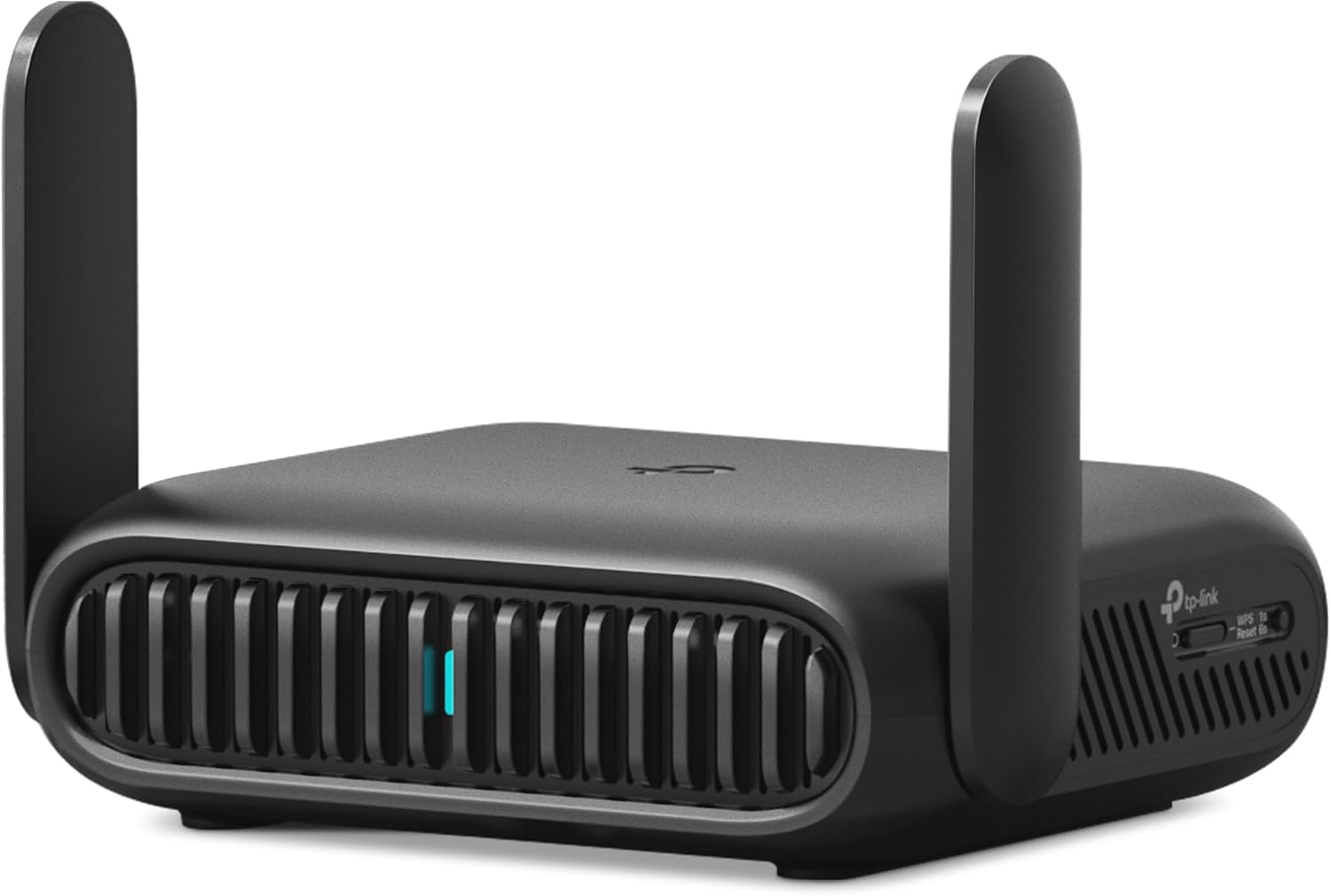
TP-Link BE3600 Wi-Fi 7 Portable Travel Router TL-WR3602BE | Dual-Band, 2.5 Gig Port, USB 3.0 | Multi-Modes in One | OpenVPN, WireGuard® | Public WiFi Sharing for Hotel/Cruise/RV/Plane | No 6 GHz
Want the best price and purchase timing?
Our AI advisor analyzes real-time pricing across all channels to find you the best deal.
AI Verdict
A dual-band Wi-Fi 7 travel router with a 2.5 Gbps WAN port and robust VPN support, ideal for securing multiple devices on public networks.
This router is a strong fit for travelers needing to secure multiple devices on public Wi-Fi, offering Wi-Fi 7 speeds on dual bands and extensive VPN support. Its USB-C power and multiple operating modes make it highly adaptable to various travel scenarios.
If you need the absolute fastest Wi-Fi 7 performance with a 6 GHz band, look for routers explicitly stating tri-band support including 6 GHz.
Regret Score™
Low RiskLower is better — measures purchase-regret risk from real buyer complaints, review credibility, and product maturity
Issues discovered after purchase
Critically weak dimension
Amazon rating vs actual quality
Chance this product isn't for you
Pros
- Provides Wi-Fi 7 connectivity on 2.4 GHz (up to 688 Mbps) and 5 GHz (up to 2882 Mbps) bands for up to 90 devices.
- Features a 2.5 Gbps WAN port and a 1 Gbps LAN port for multi-gigabit wired connections.
- Supports OpenVPN and WireGuard for both client and server configurations, with speeds up to 450 Mbps for WireGuard and 350 Mbps for OpenVPN.
- Offers multiple operating modes including Router, Hotspot, AP/RE/Client, USB Tethering, and 3G/4G/5G USB Modem for flexible connectivity.
- Includes a USB 3.0 port for connecting external storage for file sharing or a USB modem.
- Powered via USB-C, allowing use with power banks, laptops, or wall adapters.
Cons
- Does not support the 6 GHz band, limiting its full Wi-Fi 7 potential.
- The default LAN IP address (192.168.0.1) can conflict with public Wi-Fi networks, requiring manual adjustment.
- The desktop interface is reported to feel dated compared to the mobile app.
- TP-Link's software frequently prompts for opt-in data sharing.
- Upload speeds can significantly drop at distances beyond 15 feet.
Dimension Scores
Delivers up to 2882 Mbps on 5 GHz and 688 Mbps on 2.4 GHz, supporting up to 90 devices, but lacks 6 GHz for peak Wi-Fi 7 speeds.
Users report stable connections for multiple devices, though USB tethering speeds can be inconsistent and upload speeds drop over distance.
Setup is easy via the Tether app, but the default LAN IP can cause conflicts, and the desktop interface feels dated.
Offers robust OpenVPN and WireGuard support, WPA3 encryption, and a physical toggle button for VPN, enhancing privacy on public networks.
Best For
- Securing multiple devices on hotel, cruise, or RV public Wi-Fi networks.
- Creating a private Wi-Fi network from a wired Ethernet connection in temporary locations.
- Remote workers needing secure VPN access and file sharing on the go.
- Gamers requiring a stable, private connection for consoles and devices while traveling.
Not Recommended For
- Users prioritizing the full 6 GHz Wi-Fi 7 band for maximum speed.
- Individuals who prefer not to engage with frequent data sharing prompts in router software.
- Those needing symmetrical 2.5 Gbps WAN and LAN ports for high-speed wired network testing.
Watch Out For
- The default LAN IP address of 192.168.0.1 can cause network conflicts with many public Wi-Fi setups, necessitating a manual change.
- USB tethering performance with an iPhone Air resulted in a reported 11.75 Mbps down and 8.86 Mbps up, which was significantly lower than direct phone speeds.
- The device requires external USB power and does not have an internal battery.
- TP-Link's software has been noted to frequently ask for opt-in data sharing, which some users may find intrusive.
- Upload speeds experienced a notable drop, from 754 Mbps at 5 feet to 86 Mbps at 25 feet, impacting performance for heavy upload tasks over distance.
Full Specifications
| ASIN | B0FHZGXZH7 |
| Brand | TP-Link |
| Color | Black |
| Series | TP-Link BE3600 Wi-Fi 7 Travel Router |
| Model Name | TP-Link BE3600 Wi-Fi 7 Travel Router |
| Item Weight | 8.8 ounces |
| Manufacturer | TP-Link |
| Wireless Type | 802.11.be, 802.11ac, 802.11ax, 802.11g, 802.11n |
| Special Feature | Access Point Mode, Beamforming, Guest Mode, Internet Security, LED Indicator, Parental Control, QoS |
| Operating System | Linux |
| Item model number | TL-WR3602BE |
| Compatible Devices | Gaming Console, Laptop, Smartphone, Tablet |
| Product Dimensions | 4.96 x 3.68 x 1.5 inches |
| Included Components | Power Adapters, QIG, RJ45 Ethernet Cable, TL-WR3602BE, USB Cable |
| Frequency Band Class | Dual-Band |
| Item Dimensions LxWxH | 4.96 x 3.68 x 1.5 inches |
| Connectivity Technology | Wi-Fi |
| Recommended Uses For Product | Business, Travel |
| Wireless Communication Standard | 802.11.be, 802.11ac, 802.11ax, 802.11g, 802.11n |
What Buyers Say
This little router is a game-changer for anyone tired of sketchy public Wi-Fi, letting you create your own secure network with VPN support. It's tiny, fits in a pocket, and powers up easily with USB-C, which is super handy for travel. While it doesn't hit the full Wi-Fi 7 potential without the 6 GHz band, it still pushes out fast enough speeds for streaming and gaming on the go. Just be ready to tweak the default IP address and deal with TP-Link's data sharing prompts.
“Man, this thing saved my sanity on my last trip! Hotel Wi-Fi was trash, but I plugged this in, set up my VPN, and suddenly all my devices were flying. Only bummer is no 6 GHz, but honestly, for travel, who cares? Just wish it didn't keep asking me to share data.”
Common Praise
- Creates a private, secure network from public Wi-Fi, eliminating repeated logins.
- Supports OpenVPN and WireGuard, making secure browsing on public networks straightforward.
- USB-C power input allows for flexible powering options, including power banks.
- Multiple operating modes (Router, Hotspot, AP/RE/Client) provide adaptability for various connection scenarios.
- Compact size (126×93.5x36mm) and foldable antennas make it easy to pack.
- Handles multiple connected devices (up to 90) without significant slowdowns for typical travel use.
Common Complaints
- No 6 GHz band means it doesn't fully leverage Wi-Fi 7's capabilities.
- The default LAN IP address (192.168.0.1) often clashes with hotel networks, requiring manual configuration.
- TP-Link's software frequently asks for data sharing consent, which some users find bothersome.
- Upload speeds can drop significantly at longer distances from the router.
- USB tethering performance can be inconsistent and slower than expected.
- The desktop web interface feels less modern than the mobile app.
Ownership Tips
- You'll probably need to change the default LAN IP address in the settings to avoid conflicts with hotel networks.
- The physical toggle button can be customized beyond just VPN, like for a guest network, which is a neat trick.
- It doesn't have an internal battery, so always have a USB-C power source or power bank ready.
- The flip-up antennas are actually pretty sturdy and articulate well, not flimsy at all.
- While it supports Wi-Fi 7, don't expect mind-blowing speeds if your devices aren't also Wi-Fi 7 compatible and you're not using the 6 GHz band.
Frequently Asked Questions
Does this router support the 6 GHz Wi-Fi band?
No, this model does not support the 6 GHz band. It operates on dual bands: 2.4 GHz and 5 GHz.
Can I use this router with a VPN?
Yes, it supports OpenVPN and WireGuard protocols for both client and server configurations, allowing for secure browsing on public Wi-Fi.
How is the router powered?
The router is powered via a USB-C port, meaning you can use a power bank, laptop, or a standard wall adapter.
Can I connect a USB modem for internet access?
Yes, it supports 3G/4G/5G USB modem connections, as well as USB tethering from a phone.
What kind of wired ports does it have?
It features one 2.5 Gbps WAN port and one 1 Gbps LAN port for high-speed wired connections.
Is it easy to set up?
Setup is generally straightforward, either through direct connection and logging into the router or using the TP-Link Tether app.
Buying Guide
When looking at travel routers, you're essentially buying convenience and security for when you're away from your home network. You want something that can take whatever internet connection is available (Ethernet, public Wi-Fi, phone tethering) and turn it into your own private, secure Wi-Fi bubble for all your gadgets. Think about how many devices you travel with and if you need VPN protection for privacy on public networks.
Wi-Fi Standard (e.g., Wi-Fi 7, Wi-Fi 6)
This tells you the generation of Wi-Fi technology. Higher numbers generally mean faster speeds and better efficiency, especially in crowded environments. Wi-Fi 7 (802.11be) is the newest, but make sure your devices can actually use it to get the full benefit.
Dual-Band vs. Tri-Band
Dual-band means it uses 2.4 GHz and 5 GHz frequencies. Tri-band adds a third band, usually 6 GHz, which offers even more bandwidth and less interference, but few travel routers have it. For most travel, dual-band is plenty, especially if the 6 GHz band isn't supported.
WAN/LAN Ports
These are your wired connections. A WAN (Wide Area Network) port connects to the internet source (like a hotel Ethernet). LAN (Local Area Network) ports are for wired devices. Faster speeds (like 2.5 Gbps) mean quicker data transfer for devices that can use it.
VPN Support (Client/Server)
VPN client support means the router can connect to a VPN service, encrypting all traffic from devices connected to it. VPN server means you can access your home network securely from anywhere. This is crucial for privacy on public Wi-Fi.
Alternatives
If this router doesn't fit, look for models with symmetrical 2.5 Gbps WAN/LAN ports for higher wired throughput, or tri-band Wi-Fi 7 routers if the 6 GHz band is a must-have for your specific devices.
You Might Also Like

Amazon eero Pro 7 with 1 month free eero Business (auto-renews annually) - Supports internet plans up to 5 Gbps, Coverage up to 6,000 sq. ft., Connect 600+ devices, 3-pack
$600+This 3-pack Wi-Fi 7 tri-band mesh system delivers up to 3.9 Gbps wireless speeds and 5 Gbps wired speeds, covering 6,000 sq. ft. for businesses needing high-capacity networking.

TP-Link Deco S4 Mesh AC1900 WiFi System - Up to 5,500 Sq.ft. Coverage, Replaces WiFi Router and Extender, Gigabit Ports, Works with Alexa, Deco S4(3-Pack)
A 3-pack AC1900 dual-band mesh system covering 5,500 sq ft with Gigabit Ethernet, for homes needing broad Wi-Fi 5 coverage on a budget.

Amazon eero 6 mesh wifi add-on extender - Add up to 1,500 sq. ft. of Wi-Fi 6 coverage. Required eero mesh wifi system not included
A Wi-Fi 6 mesh extender that adds up to 1,500 sq. ft. of coverage, exclusively for existing eero network users.

TP-Link Deco X55 Pro AX3000 Whole Home Wi-Fi 6 Mesh System - Coverage up to 6500 Sq.Ft & up to 150 Devices, 2x2.5G WAN/LAN Ports, 4 Streams, Wired Ethernet Backhaul, Ideal for 1Gig+ Internet, 3-Pack
A Wi-Fi 6 mesh system with AX3000 speed and 2x 2.5G ports per unit, covering 6500 sq. ft. for homes with 1Gig+ internet.