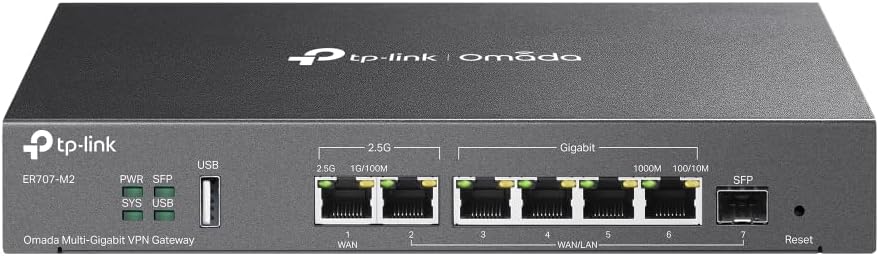
TP-Link ER707-M2 | Omada Multi-Gigabit VPN Router | Dual 2.5Gig WAN Ports | High Network Capacity | SPI Firewall | Omada SDN Integrated | Load Balance | Lightning Protection
Want the best price and purchase timing?
Our AI advisor analyzes real-time pricing across all channels to find you the best deal.
AI Verdict
This is a multi-gigabit VPN router with dual 2.5Gig WAN ports and Omada SDN, built for small businesses or advanced home users needing high-bandwidth aggregation and centralized management.
This router is a strong contender if you're already invested in the Omada ecosystem or plan to be, especially for its dual 2.5Gig WAN ports and extensive VPN options. However, its performance limitations with IDS/IPS enabled and reported firmware quirks mean it's not a set-it-and-forget-it device for everyone. It demands a user comfortable with advanced networking and troubleshooting.
If you need full multi-gigabit speeds with active IDS/IPS, look for routers with more powerful processors and higher IDS/IPS throughput ratings, often found in higher-tier business gateways.
Regret Score™
High RiskLower is better — measures purchase-regret risk from real buyer complaints, review credibility, and product maturity
Issues discovered after purchase
Critically weak dimension
Amazon rating vs actual quality
Chance this product isn't for you
Pros
- Features one 2.5Gigabit WAN port and one 2.5Gigabit WAN/LAN port for high-bandwidth aggregation connectivity.
- Supports up to 6 WAN ports, including a Gigabit SFP WAN/LAN port and four Gigabit WAN/LAN ports, for load balancing and increased utilization of multi-line broadband.
- Integrates with Omada SDN for centralized cloud management of the entire network from a single interface.
- Offers robust VPN capabilities, supporting up to 100 LAN-to-LAN IPsec, 66 OpenVPN, 60 L2TP, and 60 PPTP VPN connections.
- Designed for high network capacity, handling a maximum of 500,000 concurrent sessions and over 1000 clients.
- Includes a USB 2.0 port for USB storage and LTE backup with a compatible dongle.
Cons
- IDS/IPS performance is limited to approximately 160Mbps, which can become a bottleneck for high-speed connections when enabled.
- Some users reported issues with firmware updates causing VPN connection failures or requiring specific character removal in VPN names.
- VLAN configuration for WAN1 was initially problematic for some users, with the option being greyed out or missing in the Omada Controller.
- Omada software controller has been reported to crash and require reboots/reinstalls for some users.
- Intermittent connection drops or freezes, especially with Wi-Fi connections managed through Omada APs, have been reported by some users.
Dimension Scores
Offers dual 2.5Gig WAN ports for high-speed internet aggregation and supports 500,000 concurrent sessions, but IDS/IPS limits throughput to 160Mbps.
Some users reported intermittent connection drops, firmware update issues causing VPN problems, and occasional Omada Controller crashes, impacting consistent operation.
Omada SDN integration provides centralized cloud management via web or app, but initial adoption and firmware updates can be challenging for some users.
Includes SPI Firewall, DoS/DDoS protection, IP/MAC/URL filtering, and robust VPN options, but IDS/IPS performance is significantly reduced at higher speeds.
Best For
- Small businesses requiring multi-gigabit WAN connectivity and extensive VPN support.
- Advanced home users or prosumers building an Omada SDN ecosystem with multiple access points and switches.
- Environments needing load balancing across multiple internet service providers.
- Users who need centralized management of their network devices via the Omada platform.
Not Recommended For
- Users who require full multi-gigabit speeds with IDS/IPS enabled, as performance drops to ~160Mbps.
- Beginners expecting a simple plug-and-play router without any advanced configuration.
- Users who rely heavily on UPnP, as some reported it not working correctly when adopted into the Omada controller.
Watch Out For
- Enabling IDS/IPS significantly reduces throughput to around 160Mbps, making it unsuitable for multi-gigabit connections if security features are a priority.
- Firmware updates have caused issues like VPN connection failures when special characters are used in VPN names, requiring manual adjustment.
- Some users experienced intermittent internet drops or freezes lasting 5-10 seconds, particularly when integrated with Omada APs.
- Initial setup and adoption into the Omada Controller can be problematic, with some users reporting the router not being recognized or firmware update failures.
- VLAN configuration for WAN1 has been reported as problematic in earlier firmware versions, requiring specific updates to function correctly.
Full Specifications
| ASIN | B0C238XMVV |
| Brand | TP-Link |
| Color | Black |
| Model Name | ER707-M2 |
| Item Weight | 2.42 pounds |
| Manufacturer | TP-Link |
| Special Feature | Access Point Mode |
| Item model number | ER707-M2 |
| Compatible Devices | Windows |
| Product Dimensions | 12.9 x 9.5 x 3.1 inches |
| Included Components | ER707-M2, Power Adapter, Quick Installation Guide |
| Frequency Band Class | Single-Band |
| Connectivity Technology | Ethernet |
| Recommended Uses For Product | Business |
| Wireless Communication Standard | 802.11ac |
What Buyers Say
This router is a bit of a mixed bag, with many users loving the raw speed and Omada integration, but hitting snags with firmware and advanced features. The dual 2.5Gig WAN ports are a big win for those with fast internet, and the Omada ecosystem makes managing multiple devices straightforward once configured. However, if you plan on using IDS/IPS, be ready for a significant speed hit, dropping your multi-gig connection down to 160Mbps. Firmware updates have also been a source of frustration for some, breaking VPNs or causing connection instability, which means you might need to be hands-on with troubleshooting.
“Look, I got this thing for the 2.5G ports and Omada, and it delivers on speed, but man, those firmware updates are a headache, and if you turn on IDS, your speed just tanks. It's not for the faint of heart, but it works if you're willing to tinker.”
Common Praise
- Provides noticeable speed boost, especially when upgrading from older gigabit routers.
- Dual 2.5Gbps WAN ports effectively handle high-speed internet connections.
- Omada SDN integration allows for centralized management of the entire network.
- Flexible port configuration with multiple WAN/LAN options is useful for various setups.
- VPN server functions well once the initial setup complexities are overcome.
Common Complaints
- IDS/IPS feature severely limits network throughput to around 160Mbps when active.
- Firmware updates have introduced bugs, such as breaking VPN connections or causing general instability.
- VLAN configuration, particularly for WAN1, can be difficult and inconsistent across firmware versions.
- The Omada software controller can be unstable, requiring frequent reboots or reinstallation.
- Some users experienced intermittent connection drops or freezes, especially with Wi-Fi devices.
Ownership Tips
- The second 2.5G WAN/LAN port can be reconfigured as a LAN port, but you'll need an additional 2.5G switch for multiple multi-gigabit LAN devices.
- Managing the router via a web browser is often a more stable experience than using the Omada phone app.
- Be prepared to manually check for and apply firmware updates, as the controller might not always show the latest available versions.
- If you use VPNs, be careful with special characters in names, as firmware updates can break connections due to new validation rules.
Frequently Asked Questions
Does the ER707-M2 have Wi-Fi?
No, the TP-Link ER707-M2 is a wired VPN router and does not include Wi-Fi capabilities. You'll need separate Omada access points for wireless connectivity.
Can I use all 2.5Gigabit ports as LAN ports?
The ER707-M2 has one dedicated 2.5Gigabit WAN port and one 2.5Gigabit WAN/LAN port. The WAN/LAN port can be configured as a LAN port, but if you need more than one 2.5Gigabit LAN connection, you will need an additional 2.5GbE switch.
Is the Omada Controller required to use this router?
While the ER707-M2 can operate in standalone mode, it's designed to be integrated into the Omada SDN for centralized management. Many advanced features and seamless operation with other Omada devices benefit from a controller, either hardware or software-based.
What kind of VPNs does it support?
The router supports a wide range of VPN protocols, including SSL VPN, OpenVPN, IPsec, PPTP, and L2TP, with high capacities for concurrent connections.
Does it support 4G LTE backup?
Yes, it has a USB 2.0 port that supports LTE backup when connected to a compatible LTE dongle.
Buying Guide
When you're looking at a router like the ER707-M2, you're stepping into the world of serious networking, not just basic home Wi-Fi. This isn't a simple plug-and-play box; it's a gateway that manages your entire network's traffic, especially if you have multiple internet connections or need secure remote access. You need to understand that a router like this is the brain, but it doesn't usually provide Wi-Fi itself; you'll need separate access points for that. The big deal here is the multi-gigabit ports and the Omada ecosystem, which lets you control everything from one place.
Dual 2.5Gig WAN Ports
This means you can connect two very fast internet lines, like two 1Gbps fiber connections, and the router can combine their speeds (load balancing) or use one as a backup. This is crucial for businesses or power users who can't afford downtime or need more bandwidth than a single connection offers.
Omada SDN Integrated
SDN (Software-Defined Networking) means you can manage all your compatible TP-Link network devices (routers, switches, access points) from a single interface, either locally or through the cloud. Think of it like a central command center for your entire network, making configuration and monitoring much simpler than managing each device individually.
VPN Router
A VPN (Virtual Private Network) router creates secure, encrypted connections over the internet. This is essential for remote workers to access company resources securely, or for connecting multiple office locations as if they were one network. The ER707-M2 supports various VPN types, giving you flexibility for different security needs.
High Network Capacity (500,000 concurrent sessions, 1000+ clients)
This spec tells you how much traffic and how many devices the router can handle simultaneously without slowing down. For a small office, a school, or a large smart home, having a high capacity ensures your network stays responsive even when many users and devices are active at once.
Alternatives
If this router doesn't fit, look for other business-grade gateways with higher IDS/IPS throughput if security at full speed is paramount, or simpler consumer-grade routers if you don't need multi-WAN or advanced Omada SDN integration.
You Might Also Like

Amazon eero Pro 7 with 1 month free eero Business (auto-renews annually) - Supports internet plans up to 5 Gbps, Coverage up to 6,000 sq. ft., Connect 600+ devices, 3-pack
$600+This 3-pack Wi-Fi 7 tri-band mesh system delivers up to 3.9 Gbps wireless speeds and 5 Gbps wired speeds, covering 6,000 sq. ft. for businesses needing high-capacity networking.

Amazon eero 6 mesh wifi add-on extender - Add up to 1,500 sq. ft. of Wi-Fi 6 coverage. Required eero mesh wifi system not included
A Wi-Fi 6 mesh extender that adds up to 1,500 sq. ft. of coverage, exclusively for existing eero network users.

TP-Link Deco S4 Mesh AC1900 WiFi System - Up to 5,500 Sq.ft. Coverage, Replaces WiFi Router and Extender, Gigabit Ports, Works with Alexa, Deco S4(3-Pack)
A 3-pack AC1900 dual-band mesh system covering 5,500 sq ft with Gigabit Ethernet, for homes needing broad Wi-Fi 5 coverage on a budget.

TP-Link Deco X55 Pro AX3000 Whole Home Wi-Fi 6 Mesh System - Coverage up to 6500 Sq.Ft & up to 150 Devices, 2x2.5G WAN/LAN Ports, 4 Streams, Wired Ethernet Backhaul, Ideal for 1Gig+ Internet, 3-Pack
A Wi-Fi 6 mesh system with AX3000 speed and 2x 2.5G ports per unit, covering 6500 sq. ft. for homes with 1Gig+ internet.